
| ผู้พัฒนา: | Rowena Ricalde (14) | ||
| ราคา: | $1.99 | ||
| การจัดอันดับ: | 0 | ||
| ความเห็น: | 0 เขียนความเห็น | ||
| รายการ: | 0 + 0 | ||
| แต้มแล: | 0 + 0 ¡ | ||
| Mac App Store | |||
คำอธิบาย

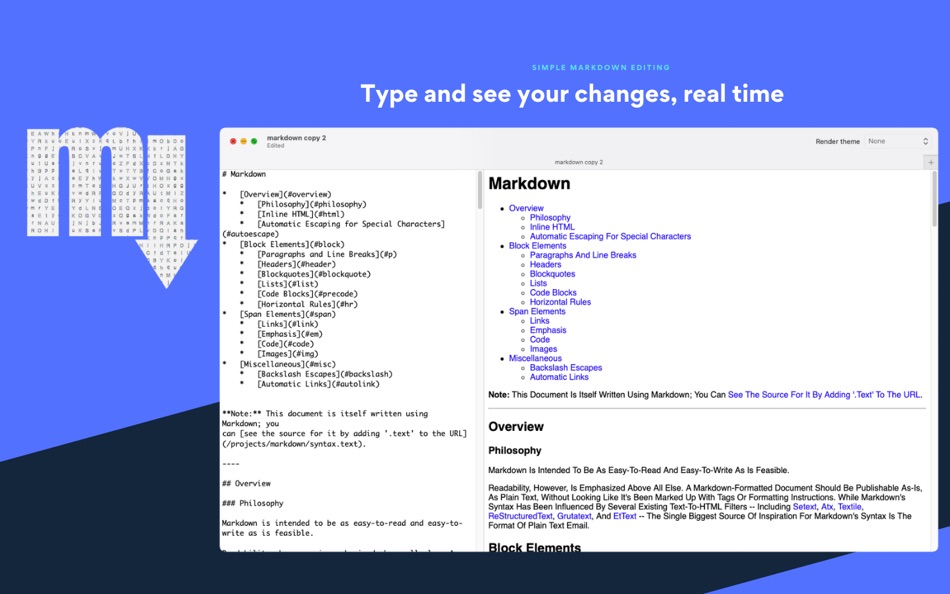
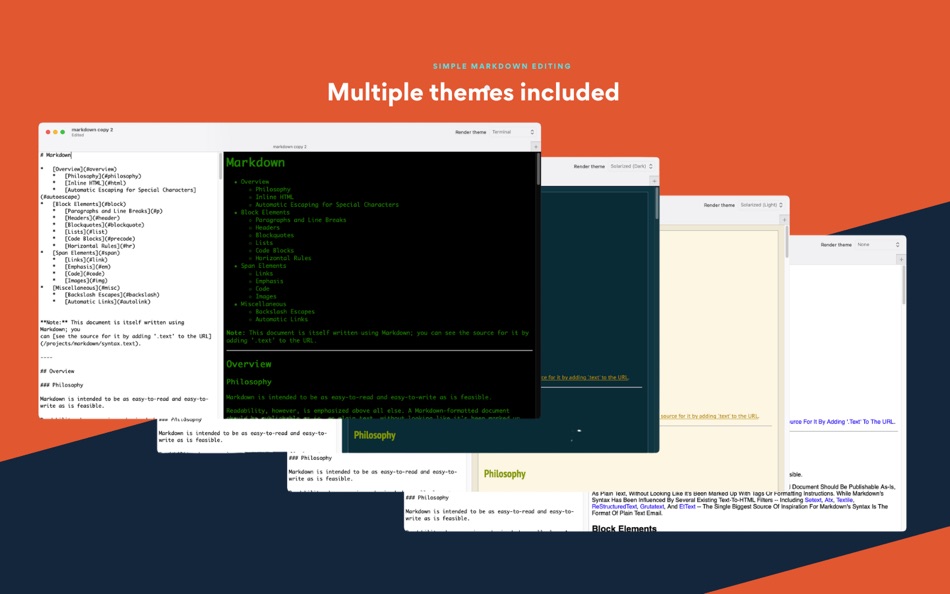
medit is powered by marked.js, a really fast Markdown processor by Christopher Jeffrey.
Copyright (c) 2011-2014, Christopher Jeffrey
ภาพหน้าจอ
มีอะไรใหม่
- เวอร์ชัน: 2.2
- อัปเดต:
- For this version we fixed a few issues with some tags not being handled correctly. But more importantly we have also added Mermaid support! You'll be able to create flowcharts, graphs, etc. using the Mermaid syntax in this version.
ราคา
- วันนี้: $1.99
- ต่ำสุด: $1.99
- มากที่สุด: $1.99
ติดตามราคา
ผู้พัฒนา
- Rowena Ricalde
- แพลตฟอร์ม: iOS แอป (4) macOS แอป (10)
- รายการ: 0 + 1
- แต้มแล: 5 + 14 ¡
- การจัดอันดับ: 0
- ความเห็น: 0
- ลดราคา: 0
- วิดีโอ: 0
- RSS: ติดตาม
แต้มแล
0 ☹️
การจัดอันดับ
0 ☹️
รายการ
0 ☹️
ความเห็น
แสดงรีวิวเป็นคนแรกเลย 🌟
ข้อมูลเพิ่มเติม
- เวอร์ชัน: 2.2
- หมวดหมู่:
macOS แอป›เครื่องมือ - ระบบปฏิบัติการ:
macOS,macOS 12.3 และสูงกว่า - ขนาด:
2 Mb - ภาษาที่สนับสนุน:
English - การจัดประเภทเนื้อหา:
4+ - Mac App Store คะแนนโดย:
0 - อัปเดต:
- วันที่วางจำหน่าย:
รายชื่อติดต่อ
 http://www.ganglionsoftware.com/medit.htmlmedit - Quick Markdown Editor URL แบบสั้น: คัดลอกแล้ว!
- 🌟 แชร์
- Mac App Store
คุณอาจชอบ
-
- Markdown Editor for Safari
- macOS แอป: เครื่องมือ โดย: Coffee & Fun LLC
- $2.99
- รายการ: 0 + 0 การจัดอันดับ: 0 ความเห็น: 0
- แต้มแล: 5 + 1 (5.0) เวอร์ชัน: 1.3 Create and view markdown files easily from anywhere with our simple and easy, GitHub-flavored markdown editor. Say hello to your new favorite Markdown editor, designed to make your ... ⥯
-
- Markdown EditPad
- macOS แอป: เครื่องมือ โดย: Damian Pieszczynski
- $4.99
- รายการ: 0 + 0 การจัดอันดับ: 0 ความเห็น: 0
- แต้มแล: 0 + 0 เวอร์ชัน: 1.0 Markdown editor with support for GitHub flavor. Features: - live preview - outline - bookmarks - markdown docs and interface to add markdown tags - export to HTML and RTF ⥯
-
- Markdown Sticky
- macOS แอป: เครื่องมือ โดย: ReNALNE.inc
- * ฟรี
- รายการ: 0 + 0 การจัดอันดับ: 0 ความเห็น: 0
- แต้มแล: 0 + 0 เวอร์ชัน: 1.0 - Real-time Markdown preview - Lightweight, simple, works ⥯
-
- Quick Sprites
- macOS แอป: เครื่องมือ โดย: Simone Tellini
- $8.99
- รายการ: 0 + 0 การจัดอันดับ: 0 ความเห็น: 0
- แต้มแล: 0 + 0 เวอร์ชัน: 1.16 Quick Sprites simplifies the creation and maintenance of CSS sprite sheets that enable you to optimize your websites. A sprite sheet is a single image that combines many smaller ones. ... ⥯
-
- Quick Icon
- macOS แอป: เครื่องมือ โดย: Tawa Nicolas
- ฟรี
- รายการ: 1 + 0 การจัดอันดับ: 0 ความเห็น: 0
- แต้มแล: 1 + 0 เวอร์ชัน: 2.0 Quick Icon is a productivity tool that helps you resize your app icons from a single file to iOS or macOS the targets in Xcode! ⥯
-
- Quick Localizer
- macOS แอป: เครื่องมือ โดย: Michael Rowe
- $4.99
- รายการ: 0 + 0 การจัดอันดับ: 0 ความเห็น: 0
- แต้มแล: 0 + 0 เวอร์ชัน: 2.0.1 Quick Localizer - Your One-Stop Solution for Multilingual Xcode Apps! Easily create and manage localization strings for your Xcode projects with our user-friendly macOS app. Load ... ⥯
-
- Quick Links and Turkish Chars
- macOS แอป: เครื่องมือ โดย: Eray Alparslan
- $0.99
- รายการ: 0 + 0 การจัดอันดับ: 0 ความเห็น: 0
- แต้มแล: 0 + 0 เวอร์ชัน: 1.0 Quick Links and Turkish Chars app is a macOS app that runs in your menu bar. It does help you to copy turkish characters to clipboard when your current keyboard doesn't have that ... ⥯
- ใหม่
- Markdown Quick Look
- macOS แอป: เครื่องมือ โดย: Bitfield AB
- $4.99
- รายการ: 0 + 0 การจัดอันดับ: 0 ความเห็น: 0
- แต้มแล: 0 + 0 เวอร์ชัน: 1.0 Stop opening files just to peek. Markdown Quick Look adds instant, beautifully rendered Markdown previews to Finder. Press the spacebar on any .md, .markdown, or .mdown file and see ... ⥯
- ใหม่
- Markdown Export
- macOS แอป: เครื่องมือ โดย: Tanvir N Hasan
- ฟรี
- รายการ: 0 + 0 การจัดอันดับ: 0 ความเห็น: 0
- แต้มแล: 0 + 0 เวอร์ชัน: 1.1 A Professional Markdown-to-Document Converter Transform your markdown into beautifully formatted PDFs, Word documents, and PNG images with just a click. Markdown Export combines a ... ⥯
-
- Editor Usage for Cursor AI
- macOS แอป: เครื่องมือ โดย: Inside Internet
- $3.99
- รายการ: 0 + 0 การจัดอันดับ: 0 ความเห็น: 0
- แต้มแล: 0 + 0 เวอร์ชัน: 1.3.2 Effortlessly track your Cursor AI editor usage with our powerful menubar app, designed to keep you informed and in control of your requests. Whether you re a heavy user or just want to ⥯
-
- Quick Icons
- macOS แอป: เครื่องมือ โดย: Max Schlee
- $3.99
- รายการ: 0 + 0 การจัดอันดับ: 0 ความเห็น: 0
- แต้มแล: 0 + 0 เวอร์ชัน: 1.25 Stop wasting time and money on multiple apps! Quick Icons is the #1 all-in-one solution that replaces 6 different tools with one powerful, easy-to-use app. Perfect for app developers, ... ⥯
-
- Cookie-Editor
- macOS แอป: เครื่องมือ โดย: Christophe Gagnier
- ฟรี
- รายการ: 4 + 1 การจัดอันดับ: 0 ความเห็น: 0
- แต้มแล: 6 + 40 (3.2) เวอร์ชัน: 1.13.0 Cookie-Editor is designed to have a simple to use interface that let you do most standard cookie operations. It is ideal for developing and testing web pages or even manual management ... ⥯
-
- Py Editor for Python
- macOS แอป: เครื่องมือ โดย: Andromeda Corp LTD
- ฟรี
- รายการ: 1 + 0 การจัดอันดับ: 0 ความเห็น: 0
- แต้มแล: 2 + 0 เวอร์ชัน: 26.0.0 Python Editor is a native macOS application that lets you write and run Python code instantly, with no installation or configuration required. Python 3.11 is embedded directly in the ... ⥯
-
- WYSIWYG HTML Editor
- macOS แอป: เครื่องมือ โดย: Wicher B Donga
- $17.99
- รายการ: 0 + 0 การจัดอันดับ: 0 ความเห็น: 0
- แต้มแล: 0 + 0 เวอร์ชัน: 26 Unleash your creativity with our intuitive WYSIWYG HTML Editor. Seamlessly create, edit, and preview HTML, CSS, PHP and JavaScript in real-time. Designed for both experienced ... ⥯