
ที่บันทึกไว้
เลือกชื่อที่จะแสดงในเมนูที่บันทึกไว้ของคุณ
เสร็จแล้ว
| ผู้พัฒนา: | Ihor Trach (1) | ||
| ราคา: | ฟรี | ||
| การจัดอันดับ: | 0 | ||
| ความเห็น: | 0 โพสต์ความคิดเห็น | ||
| รายการ: | 0 + 0 | ||
| แต้มแล: | 0 + 0 ¡ | ||
| +1 แต้มแล | |||
คำอธิบาย

Build polished, production-ready interfaces using reusable SwiftUI components along with Professional AI Models to help you move faster and design with confidence.
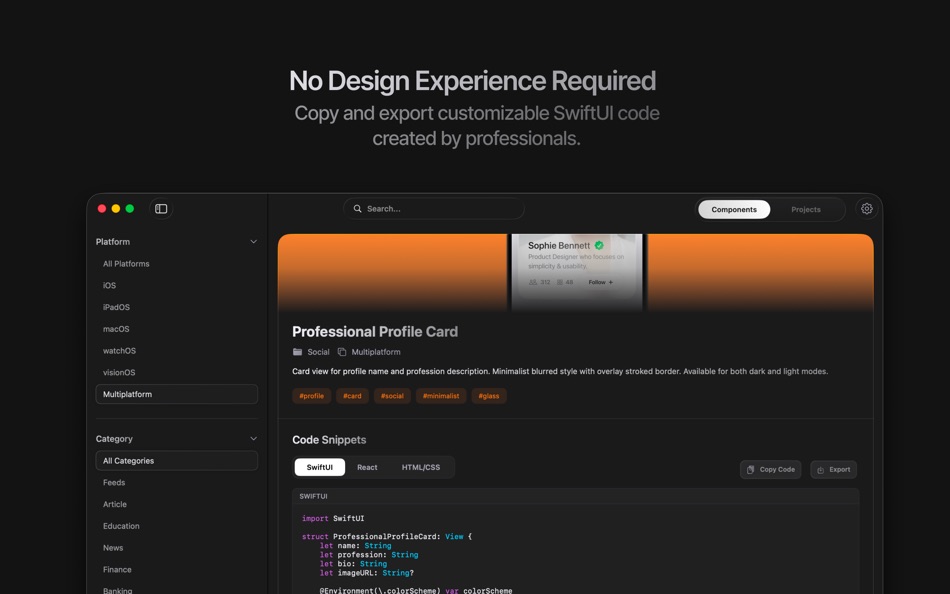
Creating a clean, professional interface is often one of the hardest parts of building an app. Many developers spend significant time recreating common UI patterns or adjusting layouts without design guidance. Movil.dev solves this by offering a curated and rapidly growing library of professionally designed SwiftUI components that follow modern iOS design principles and are ready to use in real production apps.
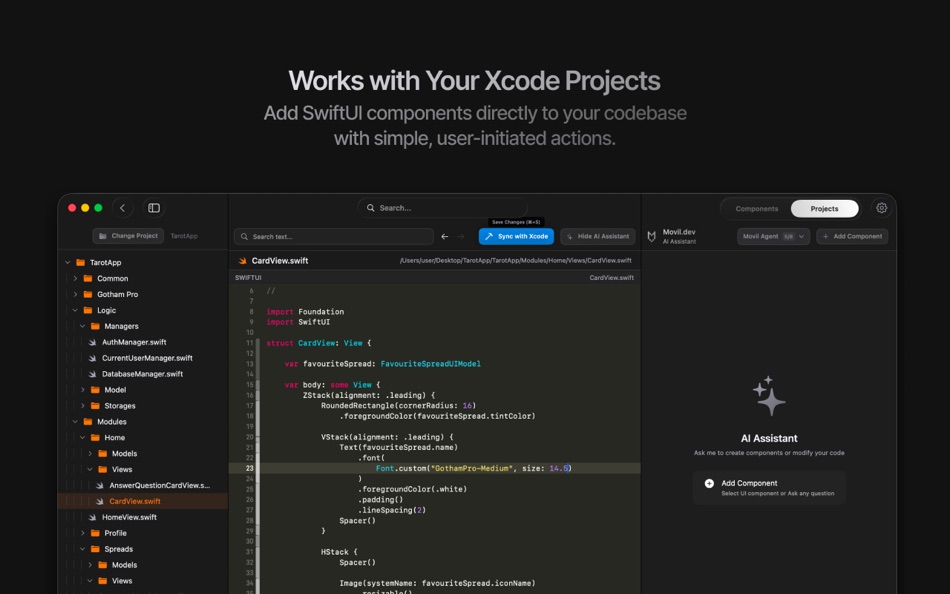
Once you find a component you like, Movil.dev integrates naturally into your existing workflow. You can explicitly select your SwiftUI project and sync components directly as clean, readable Swift files. The app never modifies Xcode itself and only works with folders you choose, so your project structure and ownership remain fully under your control.
Customizing UI should feel intuitive, not overwhelming. Movil.dev provides a developer-friendly workspace where you can adjust your pages and components' code without needing deep UI or design expertise. This makes it easy to adapt professional components to match your app’s identity and avoid interfaces that feel generic or template-based.
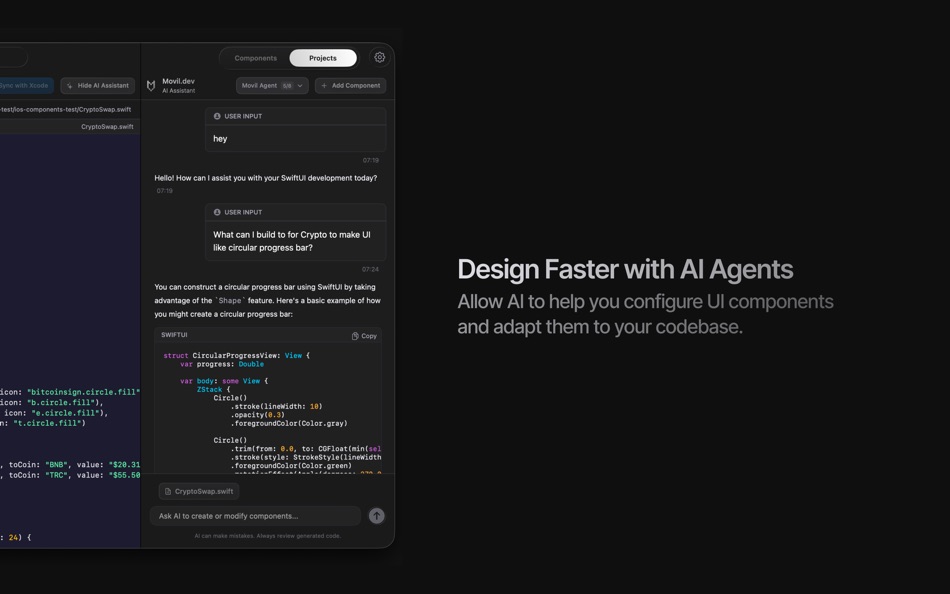
For developers who want to move even faster, Movil.dev allows the use of the most well-known AI coding assistants. AI helps you integrate new components faster, adapt them to your custom app's design and codebase, discover relevant UI components, explore layout ideas, etc. These features are always user-initiated and designed to support your decisions — not replace them.
Movil.dev respects developer workflows and privacy:
- No Sign-up or Account required
- No hidden file changes
- No background scanning
- No automatic project modification
Movil.dev helps creators focus on building great products — without being blocked by UI design complexity and AI models' limitations. Use them as building blocks or inspiration — your code stays yours.
ภาพหน้าจอ


ประวัติราคา
- ราคาปัจจุบัน: ฟรี
- ต่ำสุด: ฟรี
- มากที่สุด: ฟรี
ติดตามราคา
Ad
ข้อมูลเพิ่มเติม
- วันที่วางจำหน่าย:
- หมวดหมู่:
macOS แอป›เครื่องมือ - ระบบปฏิบัติการ:
macOS,macOS 14.6 และสูงกว่า - ขนาด:
16 Mb - ภาษาที่สนับสนุน:
English - การจัดประเภทเนื้อหา:
12+ - Mac App Store คะแนนโดย:
0
มีอะไรใหม่
- เวอร์ชัน: 1.0
- อัปเดต:
ผู้พัฒนา
- Ihor Trach
- แพลตฟอร์ม: macOS แอป (1)
- รายการ: 0 + 0
- แต้มแล: 0 + 0 ¡
- การจัดอันดับ: 0
- ความเห็น: 0
- ลดราคา: 0
- วิดีโอ: 0
- RSS: ติดตาม
รายการ (0)
0 ☹️
- Movil.dev
แต้มแล (0)
0 ☹️
การจัดอันดับ (0)
0 ☹️
ความเห็น (0)
เป็นคนแรกที่แสดงความเห็น 🌟
«Movil.dev». แพลตฟอร์ม: macOS. หมวดหมู่: เครื่องมือ. ผู้พัฒนา: «Ihor Trach». การเปิดตัวครั้งแรก: . อัปเดตล่าสุด: . ราคาปัจจุบัน: ฟรี. ชื่อนี้ยังไม่ได้รับการให้คะแนนหรือบทวิจารณ์บน AppAgg ภาษาที่ใช้ได้: English. AppAgg ติดตามประวัติราคา การให้คะแนน และคำติชมของผู้ใช้ «Movil.dev». ส่วนลดและอัปเดตในอนาคต: RSS. AppAgg ไม่ได้โฮสต์แอปพลิเคชันหรือแจกจ่ายซอฟต์แวร์ เครื่องหมายการค้า โลโก้ และภาพหน้าจอทั้งหมดเป็นของเจ้าของที่เกี่ยวข้อง
Movil.dev URL แบบสั้น: คัดลอกแล้ว!- 🌟 แชร์
- Mac App Store
คล้ายกัน
-
- Dev Utils
- macOS แอป: เครื่องมือ โดย: Shaun Hirst
- $2.99
- รายการ: 0 0 0
- แต้มแล: 1 เวอร์ชัน: 1.3.7 Dev Utils is your Swiss Army knife for macOS development. Whether you're debugging, formatting, encoding, or inspecting data, Dev Utils offers a curated set of powerful, offline-first ... ⥯
-
- Dev Cleanup Utility
- macOS แอป: เครื่องมือ โดย: Sergii Koval
- * ฟรี
- รายการ: 0 0 0
- แต้มแล: 0 เวอร์ชัน: 1.0 Keep Xcode fast. Keep your Mac clean. Dev Cleanup Utility helps Apple developers quickly find and remove stale Xcode data without guesswork. Scan, review, and clean the biggest storage ⥯
-
- Dev Assisant-Collection tools
- macOS แอป: เครื่องมือ โดย: 万象 包
- $6.99
- รายการ: 0 + 1 0 0
- แต้มแล: 4 เวอร์ชัน: 1.4.0 Dev Assistant is a collection of little utilities (4 major features and growing) and converter (3 and growing) that are useful during development. AppIcons It supports every type of ... ⥯
-
- Dev Disk Scanner
- macOS แอป: เครื่องมือ โดย: Yuriy Zhuravel
- * ฟรี
- รายการ: 0 0 0
- แต้มแล: 1 เวอร์ชัน: 3.15 Dev Disk Scanner is a lightweight macOS utility designed specifically for iOS and macOS developers who use Xcode. If Xcode takes dozens of gigabytes on your disk and the Other storage ... ⥯
-
- Dev Connector
- macOS แอป: เครื่องมือ โดย: Alexander Romanov
- * ฟรี
- รายการ: 0 0 0
- แต้มแล: 0 เวอร์ชัน: 1.0.0 AppConnector is a powerful tool for developers and teams managing apps on the App Store. It streamlines everyday tasks like app submissions, versioning, review responses, and metadata ... ⥯
-
- Dev Kit
- macOS แอป: เครื่องมือ โดย: Long Trieu
- $2.99
- รายการ: 0 0 0
- แต้มแล: 1 เวอร์ชัน: 1.1 Introducing the powerful Dev Kit: a comprehensive collection of tools designed to assist developers in their day-to-day tasks. This versatile toolkit includes a range of handy ... ⥯
-
- Dev Hub Swiss-Knife
- macOS แอป: เครื่องมือ โดย: Shimon Benichou
- ฟรี
- รายการ: 0 + 1 0 0
- แต้มแล: 1 เวอร์ชัน: 1.34 DevHub Swiss-Knife is a versatile application that provides a collection of tools to assist developers and users alike, In their daily tasks. With various features and functionalities, ⥯
-
- Dev Tunnel Share
- macOS แอป: เครื่องมือ โดย: Oluwatobiloba Aremu
- ฟรี
- รายการ: 0 0 0
- แต้มแล: 1 เวอร์ชัน: 1.0 DevShare (Local Mesh) transforms how development teams collaborate by creating a secure local network mesh for sharing development services. No more port conflicts, complex ... ⥯
-
- Smart Dev Tools
- macOS แอป: เครื่องมือ โดย: Fabian Reyes
- * ฟรี
- รายการ: 0 0 0
- แต้มแล: 1 เวอร์ชัน: 2.0.0 Smart Dev Tools is the ultimate productivity suite for developers, offering 20 essential utilities in one beautifully designed macOS application. Whether you're debugging APIs, ... ⥯
-
- Hotwire Dev Tools
- macOS แอป: เครื่องมือ โดย: Leon Vogt
- ฟรี
- รายการ: 0 0 0
- แต้มแล: 1 เวอร์ชัน: 0.3.3 This extension has the goal of helping developers inspect their Turbo and Stimulus applications. Turbo features: - Highlight Turbo Frames - Monitor incoming Turbo Streams - Display ... ⥯
- ใหม่
- Janitor - dev cleaner
- macOS แอป: เครื่องมือ โดย: Pincode
- * ฟรี
- รายการ: 0 0 0
- แต้มแล: 0 เวอร์ชัน: 1.0 Janitor is a lightweight cleanup tool for developers who want to keep their Mac tidy without digging through hidden folders. It helps you quickly find and remove unnecessary ... ⥯
- ใหม่
- CodeCleaner – Dev Disk Cleanup
- macOS แอป: เครื่องมือ โดย: Sergey Grigorev
- * ฟรี
- รายการ: 0 0 0
- แต้มแล: 0 เวอร์ชัน: 1.2 Developers often accumulate gigabytes of unnecessary files created by development tools. Build artifacts, caches, logs, simulator data, and temporary files can quickly fill up disk ... ⥯
-
- Try in Dev Spaces
- macOS แอป: เครื่องมือ โดย: Red Hat
- ฟรี
- รายการ: 0 0 0
- แต้มแล: 0 เวอร์ชัน: 1.1.1 The Try in Dev Spaces Safari extension adds a "Dev Spaces" button into GitHub repository pages, allowing you to create a cloud development environment for your Red Hat OpenShift Dev ... ⥯
- ใหม่
- Dark Dev Mode - Dev Tools
- macOS แอป: เครื่องมือ โดย: CASSANDRA ANN MCFADDEN
- ฟรี
- รายการ: 0 0 0
- แต้มแล: 0 เวอร์ชัน: 1.0 Dark Dev Mode is a powerful set of smart tools designed to enhance your browsing experience and boost your productivity. Built for developers and power users, it gives you everything ... ⥯