
| ผู้พัฒนา: | Kyoo Han Bae (2) | ||
| ราคา: | $1.99 | ||
| การจัดอันดับ: | 0 | ||
| ความเห็น: | 0 เขียนความเห็น | ||
| รายการ: | 0 + 0 | ||
| แต้มแล: | 0 + 0 ¡ | ||
| Mac App Store | |||
คำอธิบาย

CONNECT IN SECONDS
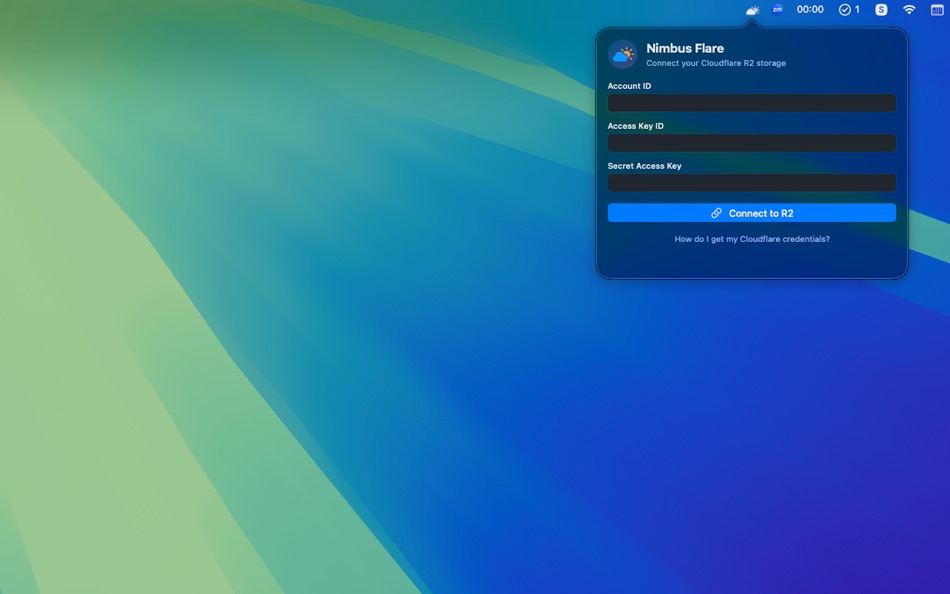
Sign in once with your R2 API credentials: Account ID, Access Key ID, and Secret Access Key. Your credentials are stored securely in macOS Keychain and never leave your Mac. Nimbus Flare talks to Cloudflare's R2 API directly; we don't run any servers, and we never see your data. To get credentials, open the Cloudflare dashboard, go to R2, then Manage R2 API Tokens. Create a token with Admin Read & Write permission and apply it to all buckets. Copy your Account ID from the R2 overview. That's all you need.
BROWSE & MANAGE FILES
View all R2 buckets in your account from a single dropdown. Switch buckets instantly. Navigate folders with clear breadcrumbs, search files by name, and jump to any path. Upload files with drag and drop—no need to open Finder and copy paths. Download files to your Mac with a double-click or right-click. Rename and delete files and folders from the app. Copy files between buckets without downloading first. Create new folders when you need them. Everything you expect from a file manager, tuned for R2 and living in your menu bar.
SHARE WITH PRE-SIGNED URLS
Need to share a private file? Generate a temporary pre-signed URL with one click. Links expire after one hour by default, so you stay in control. Choose whether the link opens in a browser (for viewing) or triggers a download—handy when sharing with clients or teammates. A checkmark confirms when the URL is copied to your clipboard. For public buckets, set up custom domains in Preferences (e.g. files.yoursite.com) and share clean, branded URLs instead of long R2 hostnames.
PREFERENCES & BEHAVIOR
Launch at login so Nimbus Flare is always ready. Turn on upload notifications to get a confirmation when large or background uploads finish. Pick a default bucket so the app opens to the one you use most. Configure custom domains per bucket for public access. View your account info and sign out anytime from Preferences. Your settings and bucket configs are stored locally on your Mac.
WHO IT'S FOR
Built for developers, designers, and teams who use Cloudflare R2 for object storage—backups, assets, media, or app data. If you're already using R2 and tired of switching to the browser to upload a file or grab a link, Nimbus Flare keeps everything a click away. S3-compatible under the hood, so if you know R2, you already know how this works.
PRIVACY & SECURITY
Your credentials are stored only in macOS Keychain. Nimbus Flare connects directly to Cloudflare's R2 API over HTTPS. We don't operate servers, we don't log your activity, and we don't collect or transmit your data. Your files and API keys stay between your Mac and Cloudflare. For full details, see our privacy policy via the link in App Store Connect.
USE IT YOUR WAY
Drag a file from Finder onto the app to upload it to the current bucket and path. Double-click a file to download it. Right-click for a context menu: copy link (view in browser), copy link (download), rename, delete. Use the search box to filter the current folder by filename. Breadcrumbs at the top let you jump back to any parent folder. When you have multiple buckets—staging, production, backups—switch between them from the dropdown without reconnecting. Copy a file from one bucket to another in two clicks. Create a folder, then drag files in. No command line, no browser tabs, no copying paths.
REQUIREMENTS
Requires a Cloudflare account with R2 enabled and an R2 API token with Admin Read & Write permission. Read-only tokens won't allow uploads, renames, or deletes. macOS 14.0 or later. No subscription: one-time purchase, use it as long as you need it. If you run into trouble, check the support page for setup steps and FAQs.
ภาพหน้าจอ

มีอะไรใหม่
- เวอร์ชัน: 1.0
- อัปเดต:
ราคา
- วันนี้: $1.99
- ต่ำสุด: $1.99
- มากที่สุด: $1.99
ติดตามราคา
ผู้พัฒนา
- Kyoo Han Bae
- แพลตฟอร์ม: macOS แอป (2)
- รายการ: 0 + 0
- แต้มแล: 0 + 0 ¡
- การจัดอันดับ: 0
- ความเห็น: 0
- ลดราคา: 0
- วิดีโอ: 0
- RSS: ติดตาม
แต้มแล
0 ☹️
การจัดอันดับ
0 ☹️
รายการ
0 ☹️
- NimbusFlare
ความเห็น
แสดงรีวิวเป็นคนแรกเลย 🌟
ข้อมูลเพิ่มเติม
- เวอร์ชัน: 1.0
- หมวดหมู่:
macOS แอป›เครื่องมือ - ระบบปฏิบัติการ:
macOS,macOS 14.0 และสูงกว่า - ขนาด:
961 Kb - ภาษาที่สนับสนุน:
English - การจัดประเภทเนื้อหา:
4+ - Mac App Store คะแนนโดย:
0 - อัปเดต:
- วันที่วางจำหน่าย:
รายชื่อติดต่อ
 https://www.ideator.co/project/nimbus-flareNimbusFlare URL แบบสั้น: คัดลอกแล้ว!
- 🌟 แชร์
- Mac App Store
คุณอาจชอบ
-
- Nimbus Web Clipper
- macOS แอป: ประสิทธิภาพการผลิต โดย: Nimbus Web Inc
- ฟรี
- รายการ: 2 + 0 การจัดอันดับ: 0 ความเห็น: 0
- แต้มแล: 1 + 0 เวอร์ชัน: 1.0.2 Web Clipper that works! The easiest way to clip text, pics, links, email and pdf from internet pages and save them. Here is a web clipper that works! Nimbus Web Clipper is the easiest ... ⥯
-
- Flare 2
- macOS แอป: การถ่ายภาพ โดย: The Iconfactory
- $9.99
- รายการ: 1 + 2 การจัดอันดับ: 0 ความเห็น: 0
- แต้มแล: 0 + 0 เวอร์ชัน: 2.2.7 Flare 2, awarded Best of 2014 in the Mac App Store, features an improved workflow, a new user interface for Yosemite, curated collections of Effects that are updated monthly, and ... ⥯
-
- Flare - Social Network Client
- macOS แอป: สังคม โดย: SUJITEKU LIMITED LIABILITY CO.
- ฟรี
- รายการ: 0 + 0 การจัดอันดับ: 0 ความเห็น: 0
- แต้มแล: 1 + 0 เวอร์ชัน: 1.2.0 All your Mastodon, Bluesky, Misskey, X, RSS feeds, in one App. Flare masterfully aggregates all your social feeds from Mastodon and Misskey to Bluesky and X into one beautifully ... ⥯
-
- Math Flashcards: Number Nimbus
- macOS แอป: การศึกษา โดย: Patrick Michalina
- ฟรี
- รายการ: 0 + 0 การจัดอันดับ: 0 ความเห็น: 0
- แต้มแล: 0 + 0 เวอร์ชัน: 1.4.0 Transform Math Practice into an Adventure Your Kids Will Love! Number Nimbus makes mastering math as engaging as playing their favorite game. Using scientifically-proven spaced ... ⥯
-
- Lens Flare for Final Cut Pro
- macOS แอป: การถ่ายภาพ โดย: RgbHouse.com
- $3.99
- รายการ: 0 + 0 การจัดอันดับ: 0 ความเห็น: 0
- แต้มแล: 0 + 0 เวอร์ชัน: 1.0 What it is ? This is a Lens Flare Generator. How install it ? click the launch button. Motion 5 will start itself. When Motion is open click save as. Write a generator name - Lens ... ⥯
-
- Trackhunter
- macOS แอป: เพลงและเสียง โดย: Flare Design and Consultancy Ltd
- ฟรี
- รายการ: 0 + 0 การจัดอันดับ: 0 ความเห็น: 0
- แต้มแล: 1 + 0 เวอร์ชัน: 2.1 Trackhunter is an easy to use app that makes finding upfront electronic dance music very quick and easy. It makes it possible to listen to all the new music regardless of genre so you ... ⥯
-
- Dicer - Icon Resizer
- macOS แอป: เครื่องมือ โดย: Flare LLC
- $0.99
- รายการ: 1 + 0 การจัดอันดับ: 0 ความเห็น: 0
- แต้มแล: 0 + 0 เวอร์ชัน: 1.2 Scale your app icons to fit on every device. ⥯
-
- Joystick Monitor
- macOS แอป: ยูทิลิตี้ โดย: Takahide Noro
- ฟรี
- รายการ: 3 + 1 การจัดอันดับ: 0 ความเห็น: 0
- แต้มแล: 10 + 0 เวอร์ชัน: 1.3 Joystick Monitor is a beautiful joystick status monitor application for macOS. This app allows you to check the input value and status information of your Joysticks and Gamepads. ... ⥯
-
- Camera Lens Studio Pro - Best Photo Editor and Stylish Camera Filters Effects
- macOS แอป: การถ่ายภาพ โดย: PSDC Creative Inc.
- $29.99
- รายการ: 0 + 1 การจัดอันดับ: 0 ความเห็น: 0
- แต้มแล: 1 + 0 เวอร์ชัน: 1.0 Amazing 50% discount from the original app price! Eligible Australian, China, New Zealand Mac App Store bestseller list first photography class software, Norway, Mexico, Japan, Hong ... ⥯
-
- Circles - Node Editor
- macOS แอป: เครื่องมือ โดย: Anton Heestand
- ฟรี
- รายการ: 1 + 1 การจัดอันดับ: 0 ความเห็น: 0
- แต้มแล: 2 + 7 (5.0) เวอร์ชัน: 1.6.1 Circles is a node editor for creating live graphics, animations, automations and interfaces. In Circles you can connect nodes that flow in all directions. You can create graphics or ... ⥯
-
- CameraBag Pro
- macOS แอป: การถ่ายภาพ โดย: Nevercenter Ltd. Co.
- * ฟรี
- รายการ: 0 + 0 การจัดอันดับ: 0 ความเห็น: 0
- แต้มแล: 2 + 0 เวอร์ชัน: 2026.0 ** This is the subscription version of CameraBag Pro: always up-to-date with the very latest version of the software available. ** CameraBag Pro includes all the same great features as ⥯
-
- Baby Decks DJ for Mac OS X
- macOS แอป: เพลงและเสียง โดย: Async
- $29.99
- รายการ: 0 + 0 การจัดอันดับ: 0 ความเห็น: 0
- แต้มแล: 0 + 0 เวอร์ชัน: 1.0.3 Baby Decks DJ, which single-handedly started the tablet turntablism revolution on the iPad is now available on the Mac! Baby Decks DJ is a dual turntable Digital Vinyl System (DVS) ... ⥯
-
- Fotogenic : Photo Editor
- macOS แอป: การถ่ายภาพ โดย: Huseyin Ekmekci
- ฟรี
- รายการ: 0 + 0 การจัดอันดับ: 0 ความเห็น: 0
- แต้มแล: 0 + 0 เวอร์ชัน: 1.4 "EVERYONE IS PHOTOGENICS" "Fotogenic" is the best choices for photo editing app to suit every level of photographer. We've created an interactive help for you to understand how to use ... ⥯
-
- StandUp
- macOS แอป: ไลฟ์สไตล์ โดย: Pavel Lobodinsky
- ฟรี
- รายการ: 0 + 0 การจัดอันดับ: 0 ความเห็น: 0
- แต้มแล: 0 + 0 เวอร์ชัน: 2.7 You know that feeling when you finish a complex task at the computer. Thirsty, hungry, brain and muscles are tired. Had to focus hard for several hours. Feel like collapsing on a sofa, ⥯