
Salvate
Alege numele care va fi afișat în meniul Salvate.
Terminat!
| Dezvoltator: | 兰桂 吴 (72) | ||
| Preț: | $1.99 | ||
| Clasificări: | 0 | ||
| Comentarii: | 0 Postează comentariu | ||
| Liste: | 0 + 0 | ||
| Punctele: | 0 + 0 ¡ | ||
| Mac App Store | |||
Descriere

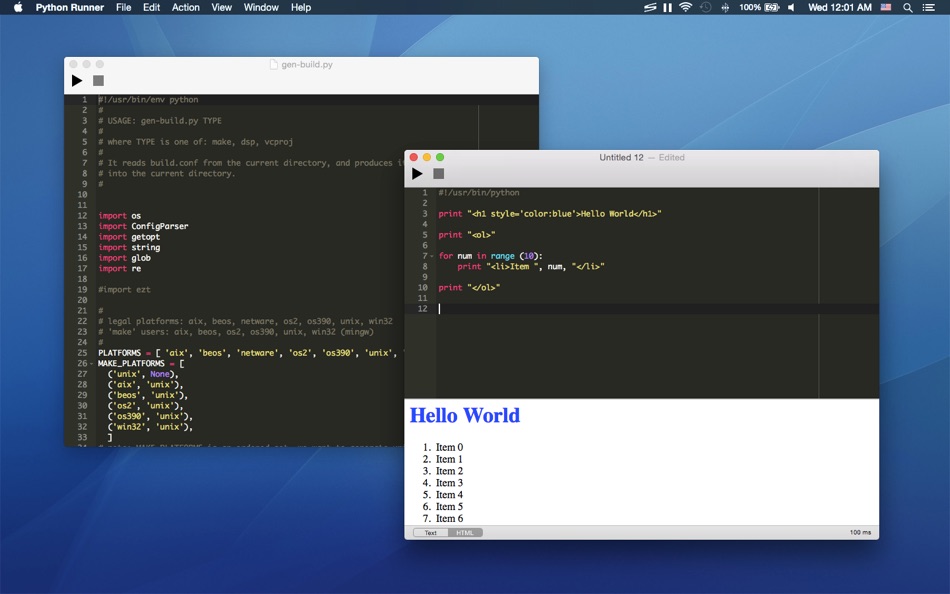
Python Runner is a handy tool for learning Python or running Python script for daily tasks.
Simply type Python code and press "Command-R" to run it, that is all!
You don't event need to save the file first!
* Features
• Type and run Python code instantly
• Display output as plain text or HTML
• Supports Python CLI interaction (text output mode)
• Syntax highlighting
• Auto completion
• Various themes
Python Runner is simple and quick. You can use it for daily tasks such as text processing, code generation or simply type some code to verify your ideas.
Ad
Capturi de ecran
Istoricul prețurilor
- Prețul actual: $1.99
- Minim: $1.99
- Maxim: $1.99
Urmăriți prețurile
Informații suplimentare
- Data lansării:
- Categorie:
macOS Aplicații›Instrumente - SO:
macOS,macOS 10.10 sau o versiune ulterioară - Mărimea:
20 Mb - Limbă acceptată:
Chinese,English - Evaluarea conținutului:
4+ - Mac App Store Evaluare:
0
Dezvoltator
- 兰桂 吴
- Platforme: iOS Aplicații (6) macOS Aplicații (66)
- Liste: 7 + 6
- Punctele: 47 + 151 ¡
- Clasificări: 0
- Comentarii: 0
- Reduceri: 0
- Videoclipuri: 0
- RSS: Abonează-te
Liste (0)
0 ☹️
- Python Runner
Punctele (0)
0 ☹️
Clasificări (0)
0 ☹️
Comentarii (0)
Fii primul care comentează 🌟
«Python Runner». Platforma: macOS. Categorie: Instrumente. Dezvoltator: «兰桂 吴». Prima lansare: . Ultima actualizare: . Prețul actual: $1.99. Cel mai mic preț înregistrat: $1.99. Cel mai mare preț înregistrat: $1.99. Acest titlu nu a primit încă evaluări sau recenzii pe AppAgg. Limbi disponibile: Chinese, English. AppAgg urmărește istoricul prețurilor, evaluările și feedbackul utilizatorilor pentru «Python Runner». Urmăriți reducerile și actualizările viitoare prin RSS. AppAgg nu găzduiește aplicații și nu distribuie software. Toate mărcile comerciale, siglele și capturile de ecran aparțin proprietarilor respectivi.
Python Runner Adresă URL scurtă: Copiate!- 🌟 Trimite
- Mac App Store
Similare
-
- Python Playground: Live Coding
- macOS Aplicații: Instrumente De: Jacob Hauberg Hansen
- $9.99
- Liste: 0 0 0
- Punctele: 1 Versiune: 1.19 Explore and experiment with Python and get instant results as you type. You can use Python Playground to quickly and conveniently try out ideas, learn things about Python or to simply ... ⥯
-
- Py Editor for Python
- macOS Aplicații: Instrumente De: Andromeda Corp LTD
- * Gratuit
- Liste: 1 0 0
- Punctele: 2 Versiune: 26.0.1 Python Editor is a native macOS application that lets you write and run Python code instantly, with no installation or configuration required. Python 3.11 is embedded directly in the ... ⥯
-
- Code Runner for Python
- macOS Aplicații: Instrumente De: Omer UCEL
- $0.99
- Liste: 0 + 1 0 0
- Punctele: 3 Versiune: 4.0 Code Runner for Python is your personal Python sandbox, perfect for learning, experimenting, and quickly testing code snippets wherever you are. Ditch the complex server setup for ... ⥯
-
- Run Python
- macOS Aplicații: Instrumente De: InSili.co
- $2.99
- Liste: 0 0 0
- Punctele: 0 Versiune: 1.0 The easiest and coolest Click'n'Run way to test your Python scripts! == Spinoff of the popular Peppermint editor == - Click'n'Run instantly in the built-in console (user input ... ⥯
-
- DevTools - Smarter coding
- macOS Aplicații: Instrumente De: Anh Nguyen
- * Gratuit
- Liste: 2 + 3 0 0
- Punctele: 22 Versiune: 1.2.3 DevTools is an all-in-one offline application that provides developers with essential tools for daily tasks and ensures data security. The app has been trusted by over 15,000 ... ⥯
-
- CodeRunner 4
- macOS Aplicații: Instrumente De: Nikolai Krill
- $22.99
- Liste: 4 + 3 0 0
- Punctele: 9 Versiune: 4.5 Whether you're new to coding or an experienced developer, CodeRunner is the perfect tool to write, run, and debug code quickly in any programming language. Enjoy essential IDE features ⥯
-
- Textastic
- macOS Aplicații: Instrumente De: Alexander Blach
- $9.99
- Liste: 4 + 4 0 0
- Punctele: 2 Versiune: 7.0 Textastic is a powerful and fast text, code, and markup editor. Syntax highlighting of more than 80 programming and markup languages Supported file types include HTML, JavaScript, CSS, ⥯
-
- Anycode: Code Snippet to Image
- macOS Aplicații: Instrumente De: 宏旭 朱
- Gratuit
- Liste: 0 + 2 0 0
- Punctele: 10 Versiune: 0.7.0 Anycode is a document-based app that helps you manage your code snippets. - Supports syntax highlighting for Bash, C, C++, C#, Clojure, Dart, Go, Java, JavaScript, JSON, Kotlin, ... ⥯
-
- PyPocket AI
- macOS Aplicații: Instrumente De: Dor Pascal
- Gratuit
- Liste: 0 + 1 0 0
- Punctele: 1 Versiune: 1.0 PyPocket AI is a lightweight yet powerful Python development environment that brings the future of coding to your fingertips. With real-time AI-powered code suggestions powered by the ... ⥯
-
- Sourcegraph for Safari
- macOS Aplicații: Instrumente De: Sourcegraph
- Gratuit
- Liste: 2 + 2 0 0
- Punctele: 4 Versiune: 1.24 The open-source Sourcegraph extension adds code navigation and code intelligence to GitHub, GitHub Enterprise, GitLab, Bitbucket Server, Phabricator, and Gerrit. Code intelligence on ... ⥯
-
- ScriptToApp - App Maker
- macOS Aplicații: Instrumente De: 经纬 宛
- $2.99
- Liste: 0 + 1 0 0
- Punctele: 0 Versiune: 1.0 One-click to convert the script file into an app that can be run by double-clicking, and displays the result of the running script in the app window. Support for conversion of more ... ⥯
-
- Aria
- macOS Aplicații: Instrumente De: Benjamin Pisano
- $6.99
- Liste: 2 + 1 0 0
- Punctele: 3 Versiune: 2.0.6 Aria is a powerful native text editor for code and markup. Designed for Mac, it comes with all the macOS user interface that you know and all the classic features like tabs, shortcuts ... ⥯
-
- JSON to Model Class
- macOS Aplicații: Instrumente De: Harshad Jadav
- $0.99
- Liste: 0 + 1 0 5 (1)
- Punctele: 2 Versiune: 1.4 [Introduction] Json To Model is most use to transform JSON to Model generation tool. It s convert in your desired class/struct models. The generated model released on Swift s build in ... ⥯