
Сохранённое
Выберите имя, которое будет отображаться в меню Сохранённое.
Готово!
| Разработчик: | BARTOSZ MACIEJ SROCZYNSKI (1) | ||
| Цена: | * Бесплатно | ||
| Оценка: | 500 Бронза | ||
| Рейтинги: | 0 | ||
| Комментарии: | 0 Оставьте комментарий | ||
| Списки: | 0 + 0 | ||
| Очки: | 0 + 0 ¡ | ||
| +1 Очки | |||
Описание
INSTANT LAUNCH
• Opens in milliseconds — no loading screens
• Native macOS app — no Electron bloat
• Lightweight — respects your disk space
COMPLETE MARKDOWN SUPPORT
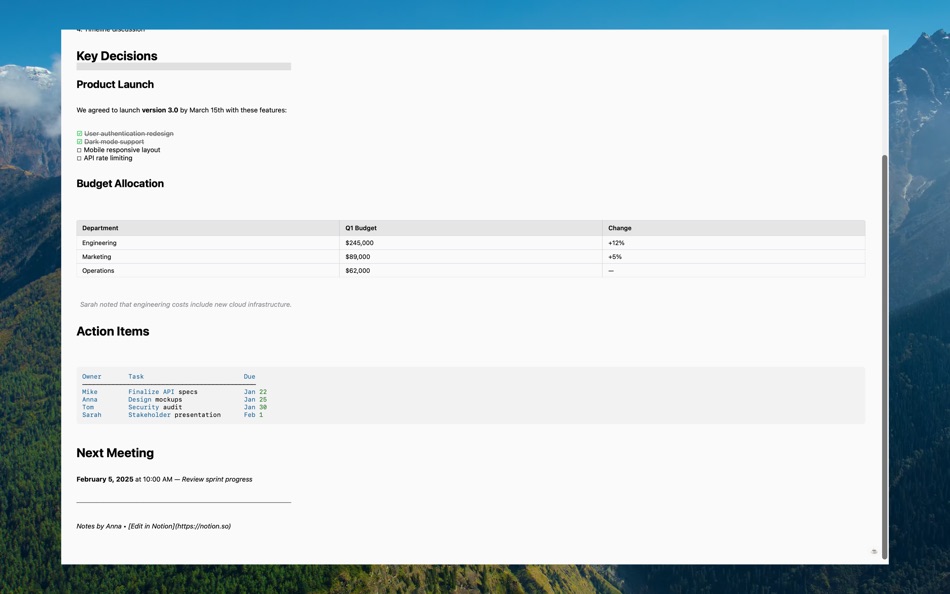
• Headers, bold, italic, strikethrough
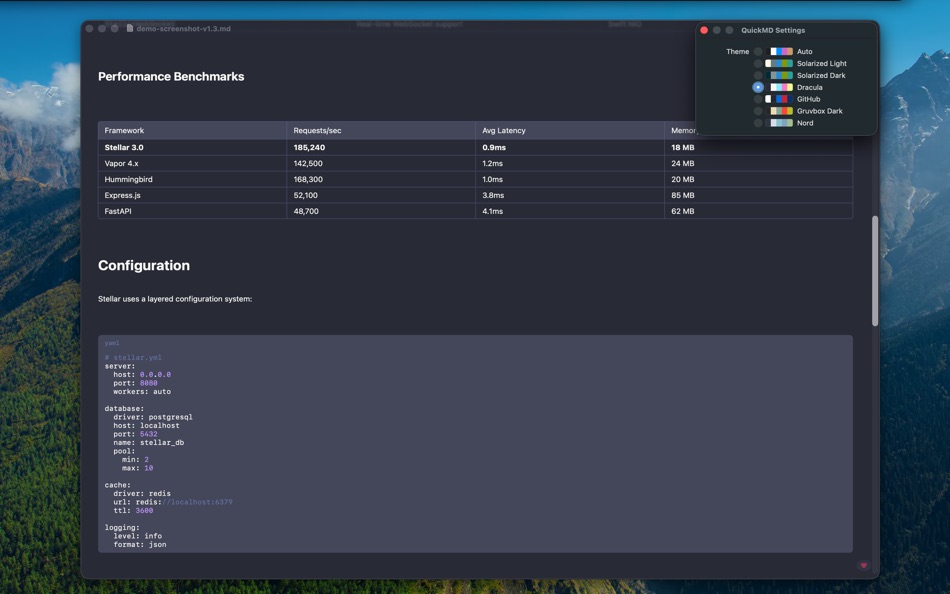
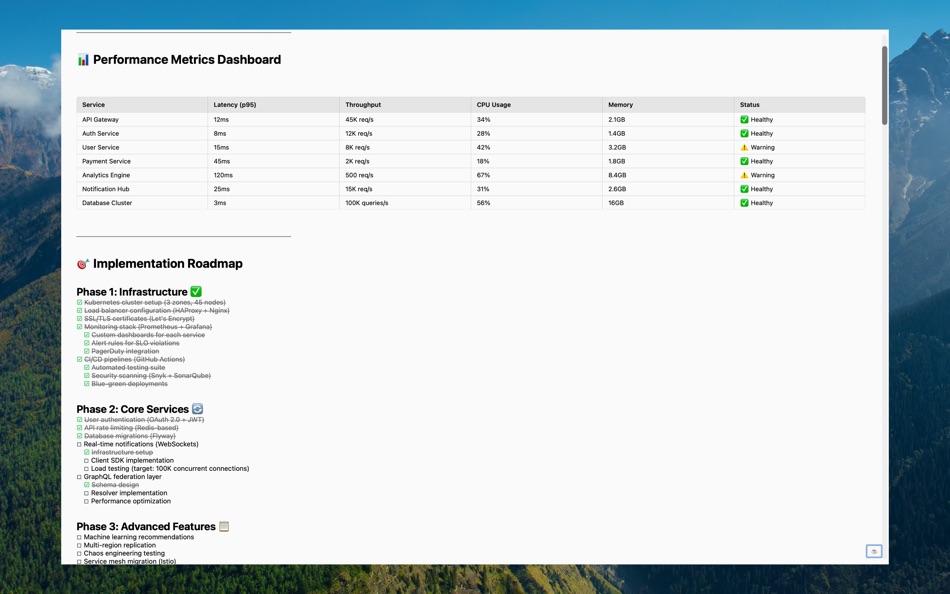
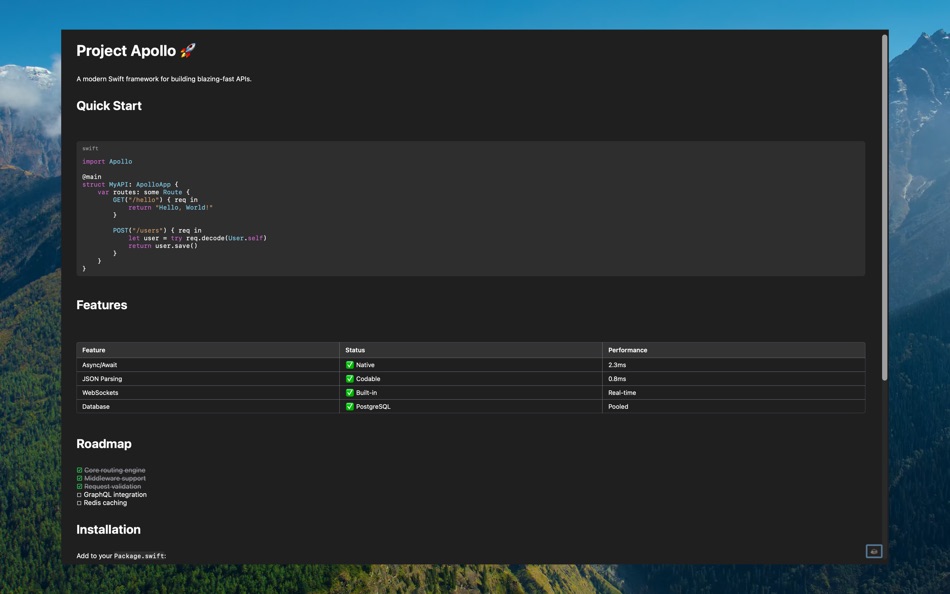
• Tables with proper column alignment
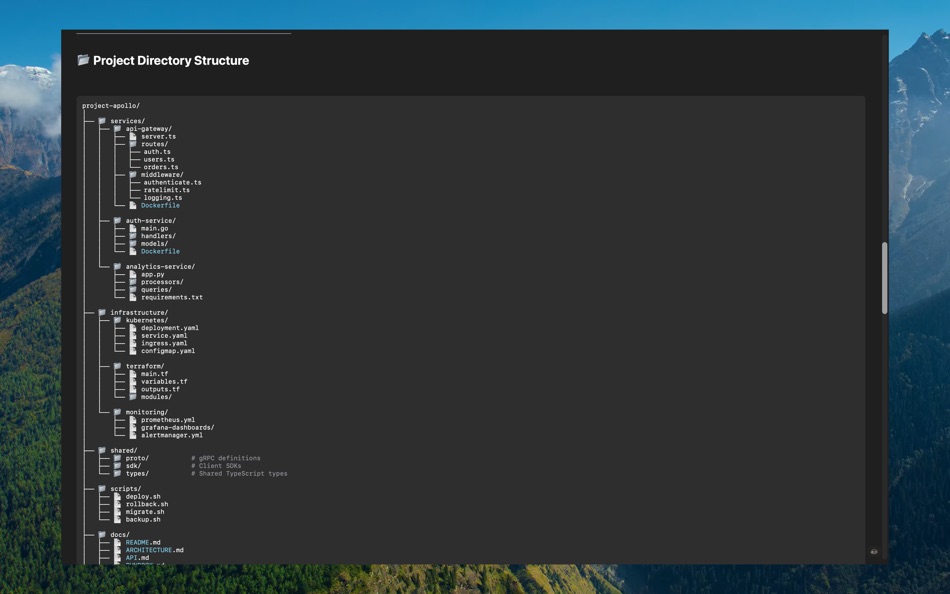
• Code blocks with syntax highlighting
• Task lists with checkboxes
• Nested lists (ordered and unordered)
• Nested blockquotes with level indicators
• Images (local and remote URLs)
• Links (inline, reference-style, autolinks)
• Horizontal rules
LATEX MATH & DIAGRAMS
• Display math ($$...$$) rendered with TeX-quality typography
• Inline math ($...$) embedded in paragraph text
• Mermaid diagrams — flowcharts, sequence, pie, class, and more
• Footnotes ([^id]) with auto-numbered definitions
WORK WITH MULTIPLE DOCUMENTS
• Native macOS tabs — every file opens as a tab in one window
• Recent Documents sidebar (⇧⌘D) — click to re-open, drag to resize, hover to remove
• Switch tabs with ⌘⇧→ / ⌘⇧←
• Remembers your sidebar width and toggle state
NAVIGATION & SEARCH
• Find in document (⌘F) with per-word match count
• Word-level highlighting across all block types (code, tables, blockquotes)
• Table of Contents sidebar (⌘⇧T) — auto-generated from headings
• Copy entire document (⌘⇧C) or individual sections (hover heading → copy icon)
• Export to PDF (⌘⇧E) and Print (⌘P)
CUSTOM COLOR THEMES
• 7 built-in themes: Auto, Solarized Light, Solarized Dark, Dracula, GitHub, Gruvbox Dark, Nord
• Drop your own theme JSON into the QuickMD Themes folder — appears in the picker with live reload
• Import Theme button — pick a JSON file from anywhere on disk
• 14 customizable color slots (background, text, links, code, syntax, and more)
• Theme persists across launches
DEVELOPER-FRIENDLY
• Native NSTextView code blocks — cross-line selection with auto-scroll
• Syntax highlighting for 10+ languages (Swift, Python, JavaScript, Go, Rust, etc.)
• Perfect for README files and project documentation
• Handles AI-generated markdown perfectly
• Dark mode follows system, or pick a fixed theme
PRIVACY FOCUSED
• No analytics, no tracking
• Works completely offline (except remote images)
• Your files stay on your device
Perfect for developers, writers, students, researchers, and anyone who works with Markdown daily. QuickMD is the Preview.app equivalent for Markdown files.
Скриншоты


Ad
История цен
-
* Встроенные покупки - Текущая цена: Бесплатно
- Минимум: Бесплатно
- Максимум: Бесплатно
Отслеживайте цены
Оценка AppAgg
500
Примерная оценка AppAgg для
QuickMD
500 Бронза
Чем выше оценка, тем сильнее показатели на AppAgg.
На основе: популярности · оценок пользователей · актуальности · скидок · данных магазинов · активности сообщества
Пересчитывается ежедневно на основе актуальных данных AppAgg.
Короткий URL: Скопировано!
Что нового
- Версия: 1.5.0
- Последнее обновление:
- Version 1.5.0 — Custom Themes, Recent Documents, Native Tabs
NEW
• Custom Themes from Disk — drop a JSON file into the QuickMD Themes folder and it appears in the picker. Live reload, no app restart. Settings adds Import Theme, Open Themes Folder, and Reload buttons. Schema documented on GitHub with two starter palettes.
• Recent Documents Sidebar (⇧⌘D) — see every document you've opened in this session. Click to re-open, drag the right edge to resize (160-500pt, persisted), hover any row to remove it.
• Native macOS Tabs — every QuickMD document opens as a tab in one window. Switch with ⌘⇧→ / ⌘⇧← or drag tabs to reorder.
IMPROVED
• Code blocks now render through native NSTextView — cross-line text selection with auto-scroll-during-drag, like Xcode or Pages.
• Per-tab keyboard shortcuts — ⌘F, ⌘⇧T, ⌘⇧D, ⌘⇧C now correctly target the active tab instead of every open tab.
• Search input is debounced — no per-keystroke recompute when typing fast.
• Loading indicator while parsing long documents.
• Parser splits long bullet/link lists into smaller chunks for smoother rendering.
Thank you to @cameronsjo for the custom themes feature request and to @COSMAX-JYP for the recent documents sidebar contribution!
Дополнительная информация
- Дата выпуска:
- Категория:
macOS Приложения›Инструменты разработчика - Операционные системы:
macOS,macOS 13.0 и выше - Размер:
7 Mb - Поддерживаемые языки:
English - Возрастные ограничения:
4+ - Mac App Store Рейтинг:
0 - Сайт:
 https://qmd.app/
Разработчик
- BARTOSZ MACIEJ SROCZYNSKI
- Платформы: macOS Приложения (1)
- Списки: 0 + 0
- Очки: 0 + 0 ¡
- Рейтинги: 0
- Комментарии: 0
- Скидки: 0
- Видео: 0
- RSS: Подписаться
Списки (0)
0
- QuickMD
Очки (0)
0
Рейтинги (0)
0
Комментарии (0)
Будьте первым, кто оставит комментарий
Кратко
QuickMD Короткий URL: Скопировано!- Поделиться
- Mac App Store
«QuickMD». Платформа: macOS. Категория: Инструменты разработчика. Разработчик: «BARTOSZ MACIEJ SROCZYNSKI». Первый выпуск: . Последнее обновление: . Текущая цена: бесплатно. Этот материал пока не получил оценок и обзоров на AppAgg. Доступные языки: English. AppAgg отслеживает историю цен, рейтинги и отзывы пользователей для «QuickMD». AppAgg не размещает приложения и не распространяет программное обеспечение. Все товарные знаки, логотипы и снимки экрана принадлежат их владельцам. Следите за будущими скидками и обновлениями через RSS
Похожие
-
- Sitemap Plus
- macOS Приложения: Инструменты разработчика От: OurBigAdventure, LLC
- Бесплатно
- Списки: 1 + 1 0 0
- Очки: 26 + 0 2K Версия: 2.4 Sitemap Plus is designed for web developers, to build a list of pages on websites that they own, the server status at the time of the crawl and the download time for each page. Sitemap ⥯
-
- DevTools - Smarter coding
- macOS Приложения: Инструменты разработчика От: Anh Nguyen
- * Бесплатно
- Списки: 2 + 3 0 0
- Очки: 22 + 0 15K Версия: 1.2.3 DevTools is an all-in-one offline application that provides developers with essential tools for daily tasks and ensures data security. The app has been trusted by over 15,000 ... ⥯
-
- Klipped
- macOS Приложения: Инструменты разработчика От: Andrew Drake
- Бесплатно
- Списки: 0 + 2 0 0
- Очки: 19 + 0 1K Версия: 3.0.2 Beauty in simplicity. Klipped is a minimalist scratch pad that is a buddy for all your other apps. Write ideas down. Paste text and use as a clipboard; delete when you re done. No ... ⥯
-
- 18 Strings
- macOS Приложения: Инструменты разработчика От: Remote Sunrise LTD
- Бесплатно
- Списки: 0 + 1 0 0
- Очки: 17 + 0 1K Версия: 2022.6 Hate doing localization for your project? Now you can hate it a little less: Save tons of money by doing automatic translation using strings from your other projects you have already ... ⥯
- -100%
- Base64 Coder
- macOS Приложения: Инструменты разработчика От: Pavel Kosykh
- ▼ Бесплатно
$1.99-100% - Списки: 0 + 2 0 0
- Очки: 14 + 0 2K Версия: 2.1.0 Base64 Coder is a fast and easy converter files to a Base64 format. Features: Fast work; Automatically string copy; Drag & Drop; MIME prefix support; Save result to file; Result ... ⥯
-
- SnippetsLab
- macOS Приложения: Инструменты разработчика От: Renfei Song
- Бесплатно
- Списки: 6 + 8 5 (1) 0
- Очки: 13 + 0 3K Версия: 2.6.4 Mac App Store Best of 2015 Featured in App Store editorial All Your Code, Brilliantly Organized , Keep Your Code at Your Fingertips and Welcome to the Mac App Store! Featured app in ... ⥯
-
- Xcode
- macOS Приложения: Инструменты разработчика От: Apple
- Бесплатно
- Списки: 22 + 8 5 (1) 0
- Очки: 11 + 0 8K Версия: 26.4.1 Xcode offers the tools you need to develop, test, and distribute apps for Apple platforms, including predictive code completion, generative intelligence powered by the best coding ... ⥯
-
- Eplist - convert data to plist
- macOS Приложения: Инструменты разработчика От: HuMinghua
- * Бесплатно
- Списки: 1 + 2 0 0
- Очки: 10 + 0 5K Версия: 2.0.1 Eplist for Excel is a lightweight conversion tool to help developers to improve development efficiency. You can convert your datas or configuration from excel(.xls and .xlsx) document ... ⥯
-
- Anycode: Code Snippet to Image
- macOS Приложения: Инструменты разработчика От: 宏旭 朱
- Бесплатно
- Списки: 0 + 2 0 0
- Очки: 10 + 0 1K Версия: 0.7.0 Anycode is a document-based app that helps you manage your code snippets. - Supports syntax highlighting for Bash, C, C++, C#, Clojure, Dart, Go, Java, JavaScript, JSON, Kotlin, ... ⥯
-
- Network Debugger
- macOS Приложения: Инструменты разработчика От: 志健 袁
- * Бесплатно
- Списки: 0 + 1 0 0
- Очки: 10 + 0 1K Версия: 1.2.0 Professional network debugging tool for macOS Network Debugger helps developers and testers quickly build TCP and UDP connections, send and inspect messages, and automate repetitive ... ⥯
-
- Application Localizer
- macOS Приложения: Инструменты разработчика От: Serhii Tal
- Бесплатно
- Списки: 0 + 1 0 0
- Очки: 9 + 0 1K Версия: 2.0.1 What this app does? It's a powerful tool for macOS designed to help developers easily localize their apps. So you can translate your SwiftUI app's text strings into any language using ... ⥯
-
- RocketSim for Xcode Simulator
- macOS Приложения: Инструменты разработчика От: SwiftLee
- * Бесплатно
- Списки: 1 + 3 0 0
- Очки: 9 + 0 9K Версия: 16.0.0 RocketSim enhances the Xcode Simulator for iOS and iPadOS development: boost productivity and streamline your workflow with capture, networking, build insights, and quick actions ... ⥯
-
- LocalizApp: Translate your app
- macOS Приложения: Инструменты разработчика От: Dimitri Giani
- * Бесплатно
- Списки: 0 + 3 0 0
- Очки: 9 + 0 9K Версия: 3.2.1 Make app localization effortless with LocalizApp. Harness the power of AI and smart translation tools to transform your development workflow. Key features: AI-Powered Translation with ... ⥯
-
- KeyPad - Keyboard and Remote
- macOS Приложения: Инструменты разработчика От: Toolbunch LLC
- * Бесплатно
- Списки: 0 0 0
- Очки: 9 + 0 1K Версия: 2.20 Use your Mac keyboard to control all your devices. From smartphones and tablets to TVs and even the raspberry pi, KeyPad turns your Mac into a powerful universal Bluetooth keyboard, ... ⥯