
ที่บันทึกไว้
เลือกชื่อที่จะแสดงในเมนูที่บันทึกไว้ของคุณ
เสร็จแล้ว
| ผู้พัฒนา: | Oebele Beetstra (7) | ||
| ราคา: | $1.99 | ||
| การประเมิน: | 2,370 | ||
| การจัดอันดับ: | 0 | ||
| ความเห็น: | 0 โพสต์ความคิดเห็น | ||
| รายการ: | 0 + 0 | ||
| แต้มแล: | 0 + 0 ¡ | ||
| +1 แต้มแล | |||
คำอธิบาย

Visual Studio for Mac does not provide an easy way to edit these files, though; you have to edit the XML by hand.
Enter this RESX Editor app!
Use this app to easily edit your language resources.
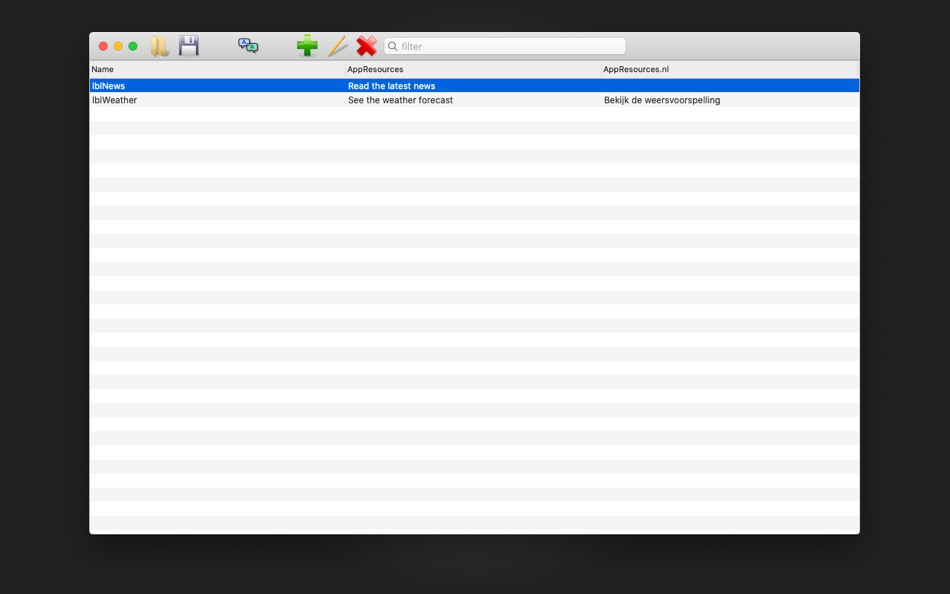
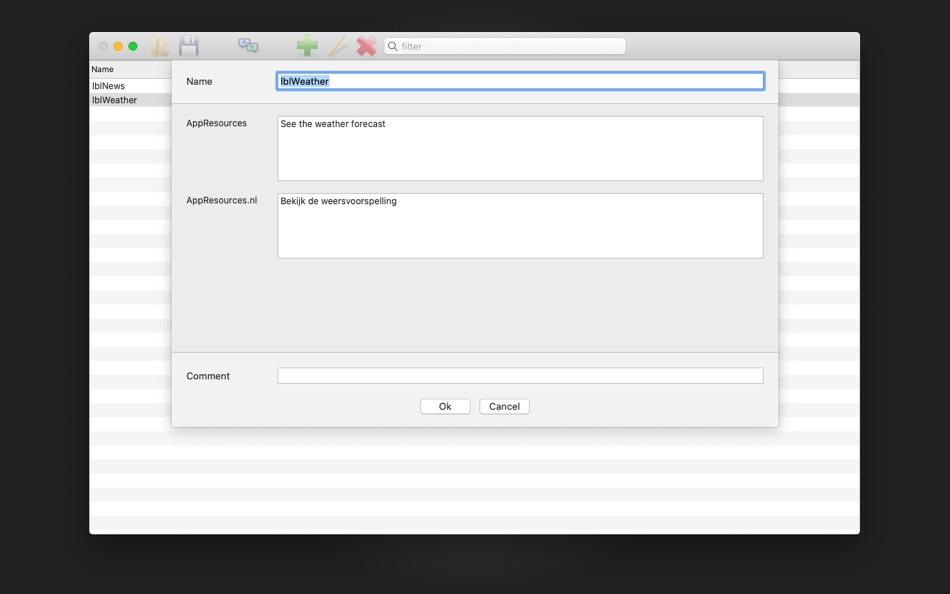
Each line contains one item. Each item has a name and for each language you want to support, it has a value in that language.
Adding a new item just takes one click on the "+" button.
You can easily add a new language by adding a column. All you have to do is provide the two or five character abbreviation for that language.
When you save you language resources, you'll see that for each language a separate RESX file is generated.
Make sure to save the RESX files to the "Resources" folder inside your Xamarin Forms project folder.
ภาพหน้าจอ

Ad
ประวัติราคา
- ราคาปัจจุบัน: $1.99
- ต่ำสุด: $1.99
- มากที่สุด: $1.99
ติดตามราคา
การประเมิน AppAgg
2,370
การประเมิน AppAgg โดยประมาณสำหรับ
RESX Editor
2,370 บรอนซ์
การประเมินที่สูงขึ้นมักหมายถึงสัญญาณบน AppAgg ที่แข็งแกร่งขึ้น
อิงจาก: 🔥 ความนิยม · ⭐ คะแนนจากผู้ใช้ · 🕒 ความสดใหม่ · 🏷️ ดีล · 🏬 ข้อมูลร้านค้า · 👥 กิจกรรมชุมชน
คำนวณใหม่ทุกวันจากข้อมูล AppAgg ล่าสุด.
URL แบบสั้น: คัดลอกแล้ว!
มีอะไรใหม่
- เวอร์ชัน: 1.0
- อัปเดตล่าสุด:
ข้อมูลเพิ่มเติม
- วันที่วางจำหน่าย:
- หมวดหมู่:
macOS แอป›เครื่องมือ - ระบบปฏิบัติการ:
macOS,macOS 10.14 และสูงกว่า - ขนาด:
4 Mb - ภาษาที่สนับสนุน:
English - การจัดประเภทเนื้อหา:
4+ - Mac App Store คะแนนโดย:
0
ผู้พัฒนา
- Oebele Beetstra
- แพลตฟอร์ม: iOS แอป (5) macOS แอป (2)
- รายการ: 0 + 0
- แต้มแล: 0 + 3 ¡
- การจัดอันดับ: 0
- ความเห็น: 0
- ลดราคา: 0
- วิดีโอ: 0
- RSS: ติดตาม
รายการ (0)
0 ☹️
- RESX Editor
แต้มแล (0)
0 ☹️
การจัดอันดับ (0)
0 ☹️
ความเห็น (0)
เป็นคนแรกที่แสดงความเห็น 🌟
สรุป
RESX Editor URL แบบสั้น: คัดลอกแล้ว!- 🌟 แชร์
- Mac App Store
«RESX Editor». แพลตฟอร์ม: macOS. หมวดหมู่: เครื่องมือ. ผู้พัฒนา: «Oebele Beetstra». การเปิดตัวครั้งแรก: . อัปเดตล่าสุด: . ราคาปัจจุบัน: $1.99. ราคาต่ำสุดที่บันทึกไว้: $1.99. ราคาสูงสุดที่บันทึกไว้: $1.99. ชื่อนี้ยังไม่ได้รับการให้คะแนนหรือบทวิจารณ์บน AppAgg ภาษาที่ใช้ได้: English. AppAgg ติดตามประวัติราคา การให้คะแนน และคำติชมของผู้ใช้ «RESX Editor». AppAgg ไม่ได้โฮสต์แอปพลิเคชันหรือแจกจ่ายซอฟต์แวร์ เครื่องหมายการค้า โลโก้ และภาพหน้าจอทั้งหมดเป็นของเจ้าของที่เกี่ยวข้อง ส่วนลดและอัปเดตในอนาคต: RSS
คล้ายกัน
-
- Editor Usage for Cursor AI
- macOS แอป: เครื่องมือ โดย: Inside Internet
- $3.99
- รายการ: 0 0 0
- แต้มแล: 0 + 0 3K เวอร์ชัน: 1.3.2 Effortlessly track your Cursor AI editor usage with our powerful menubar app, designed to keep you informed and in control of your requests. Whether you re a heavy user or just want to ⥯
-
- WYSIWYG HTML Editor
- macOS แอป: เครื่องมือ โดย: Wicher B Donga
- $22.99
- รายการ: 0 5 (1) 0
- แต้มแล: 0 + 0 5K เวอร์ชัน: 26.1 WYSIWYG HTML Editor just got a major upgrade. You can now work seamlessly with: - HTML and CSS - JavaScript - React and JSX - Vue - Alpine - Markdown or any combination of these in a ... ⥯
-
- Py Editor for Python
- macOS แอป: เครื่องมือ โดย: Andromeda Corp LTD
- * ฟรี
- รายการ: 1 0 0
- แต้มแล: 2 + 0 7K เวอร์ชัน: 26.0.1 Python Editor is a native macOS application that lets you write and run Python code instantly, with no installation or configuration required. Python 3.11 is embedded directly in the ... ⥯
-
- Xliff Editor
- macOS แอป: เครื่องมือ โดย: SweetP Productions, Inc.
- $19.99
- รายการ: 0 + 2 0 0
- แต้มแล: 0 + 0 6K เวอร์ชัน: 3.3.2 Xliff Editor - its fast to load, easy to use, and has a low memory footprint. Did we forget to mention Inline tag protection, Search & Replace, Regex search, Fuzzy search, intuitive ... ⥯
-
- Mermaid Live Editor
- macOS แอป: เครื่องมือ โดย: Omer UCEL
- $4.99
- รายการ: 0 0 0
- แต้มแล: 2 + 0 6K เวอร์ชัน: 4.1 Transform text into beautiful diagrams with AI-powered assistance. This professional diagram editor supports Mermaid syntax to create flowcharts, timelines, user journey maps, charts, ... ⥯
-
- Bonsai JSON Editor
- macOS แอป: เครื่องมือ โดย: Jerry COMBS
- $5.99
- รายการ: 0 0 0
- แต้มแล: 0 + 0 3K เวอร์ชัน: 2.0 Bonsai is a native macOS JSON viewer, editor, and query tool built for developers who work with JSON every day. Open any JSON file and instantly explore it as an interactive, ... ⥯
-
- Brackets JSON Editor
- macOS แอป: เครื่องมือ โดย: junichi nakamura
- $2.99
- รายการ: 0 0 0
- แต้มแล: 0 + 0 2K เวอร์ชัน: 1.4 Brackets JSON Editor is simple and easy-to-use JSON editor. You can edit the JSON data displayed in the outline. ⥯
-
- JSON Editor for SSEM DEV
- macOS แอป: เครื่องมือ โดย: DongSeop Kim
- ฟรี
- รายการ: 0 0 0
- แต้มแล: 0 + 0 710 เวอร์ชัน: 1.0 JSON Editor is a web-based tool to view, edit, format, and validate JSON data. Features: Tree view and code view modes Syntax highlighting with Ace Editor JSON validation and ... ⥯
-
- EDI Viewer – Editor PDF Export
- macOS แอป: เครื่องมือ โดย: Metin Karaduman
- $14.99
- รายการ: 0 0 0
- แต้มแล: 0 + 0 3K เวอร์ชัน: 1.0 EDI Viewer Pro is a powerful Mac app for viewing, understanding, and exporting EDIFACT EDI documents in a clean, Notepad style editor experience. If you work with EDI daily in retail, ... ⥯
-
- PLIST Editor
- macOS แอป: เครื่องมือ โดย: VDT LABS S.R.L.
- * $7.99
- รายการ: 1 0 0
- แต้มแล: 3 + 0 7K เวอร์ชัน: 1.63 PLIST Editor is a side-by-side tree & text editor for property list (plist) data. In a clean and easy to use interface, it allows you to quickly create, inspect, modify and save your ... ⥯
-
- Power JSON Editor
- macOS แอป: เครื่องมือ โดย: 基伟 徐
- $4.99
- รายการ: 1 + 2 0 0
- แต้มแล: 2 + 0 8K เวอร์ชัน: 2.19.0 Power JSON Editor is a JSON editor for developers with Visual Tree View and multiple plugins like Array Table Editor and jq Processor, also with format converter plugins, it is easy to ⥯
-
- RocketCake Website Editor
- macOS แอป: เครื่องมือ โดย: Ambiera
- ฟรี
- รายการ: 1 + 1 0 0
- แต้มแล: 5 + 0 2K เวอร์ชัน: 7.2 RocketCake is a website designer for creating responsive websites, for beginners and professional web developers. No programming needed. It includes the following features: - WYSIWYG ... ⥯
-
- Penguin - Plist Editor
- macOS แอป: เครื่องมือ โดย: Triplane
- * ฟรี
- รายการ: 1 + 2 0 0
- แต้มแล: 6 + 0 7K เวอร์ชัน: 2.2 Looking for an easier way to edit plist files? Penguin lets you edit any plist file in a beautiful and easy to understand tree view. Drag, drop, expand, reorder and modify your plist ... ⥯
-
- Labeler JSON Editor
- macOS แอป: เครื่องมือ โดย: hiroka iwasaki
- $4.99
- รายการ: 0 0 0
- แต้มแล: 0 + 0 4K เวอร์ชัน: 1.01 Labeler JSON Editor is a next-generation JSON editor designed to make JSON data easier to understand and faster to edit. While many JSON editors offer visual representations of data, ... ⥯