
| Dezvoltator: | Leon Boettger (7) | ||
| Preț: | Gratuit | ||
| Clasificări: | 0 | ||
| Recenzii: | 0 Scrie o recenzie | ||
| Comentarii: | 0 Postează comentariu | ||
| Liste: | 0 + 1 | ||
| Punctele: | 8 + 0 ¡ | ||
| Mac App Store | |||
Descriere

Features:
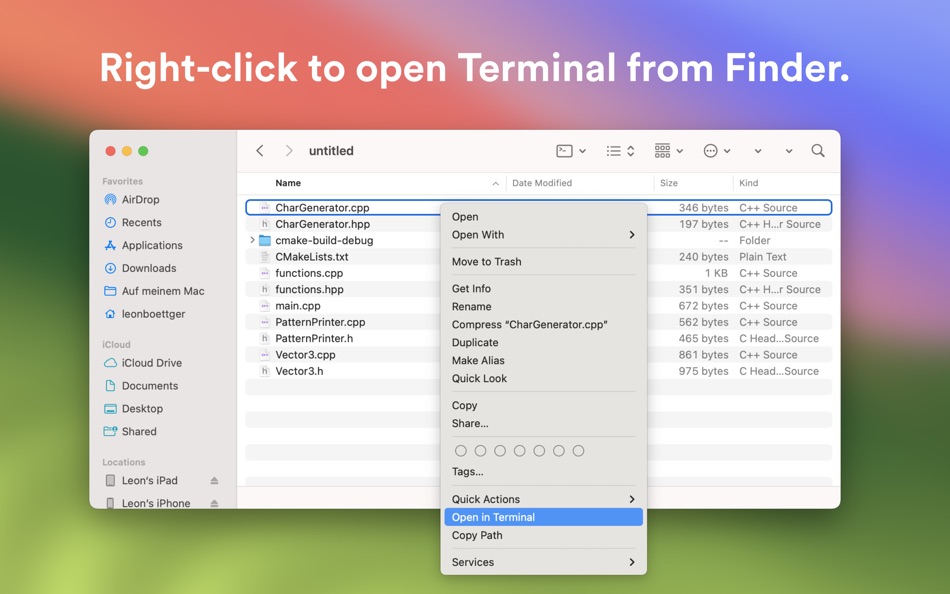
- Open a new terminal window or copy the current file's path by right-clicking inside a Finder window and selecting the app’s context menu option.
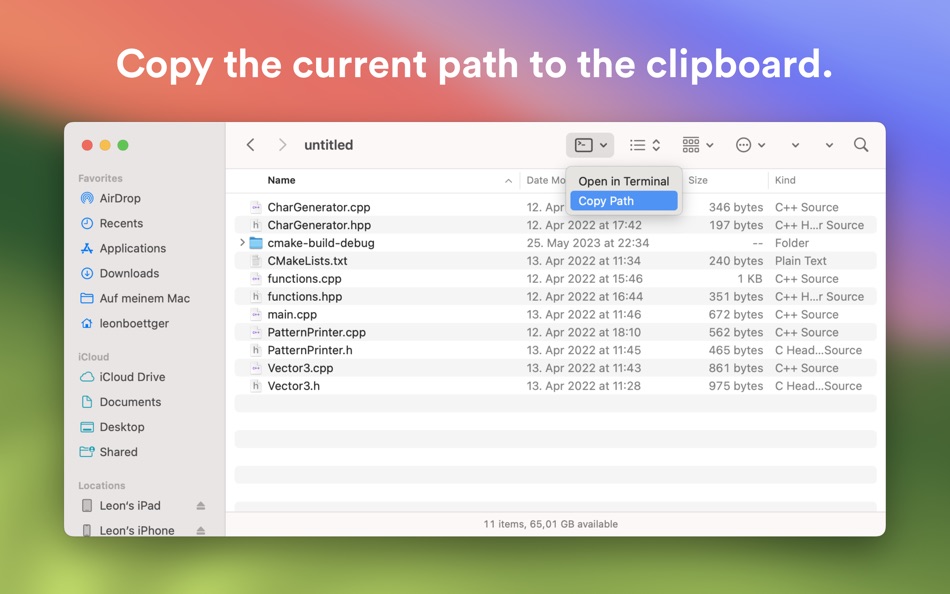
- Launch a Terminal window or copy the current folder's path using the app’s toolbar button in the Finder’s toolbar.
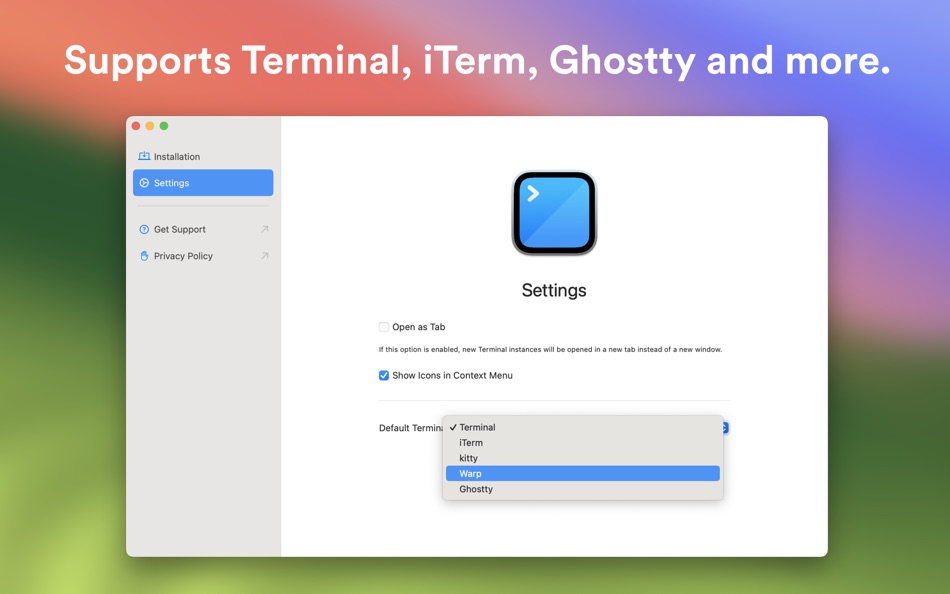
- Configure if new terminal instances should be opened as a new window or in a new tab.
- Customize if the context menu shows icons.
- Choose if new terminal instances should be opened in Apple's Terminal, iTerm, kitty, Warp, Ghostty, or Prompt.
Note: iTerm, kitty, Warp, Ghostty, and Prompt are property by their respective organization below; this app is not affiliated with any of those companies.
- iTerm2: https://iterm2.com
- kitty: https://sw.kovidgoyal.net/kitty/
- Warp: https://www.warp.dev
- Ghostty: https://ghostty.org
- Prompt: https://panic.com/prompt/
The app does not have or need to have access to any file or folder. You only need to enable the Finder extension app in the app's introduction process. The main app does not have to run in order to use Shellcut.
Ad
Capturi de ecran
Ce este nou
- Versiune: 1.5
- Actualizată:
- - New: Support for Warp Preview
- New: Glyph Style for Context Menu Items
Istoricul prețurilor
- Azi: Gratuit
- Minim: Gratuit
- Maxim: $0.49
Urmăriți prețurile
Dezvoltator
- Leon Boettger
- Platforme: iOS Aplicații (5) macOS Aplicații (2)
- Liste: 0 + 1
- Punctele: 34 + 258 ¡
- Clasificări: 0
- Recenzii: 0
- Comentarii: 0
- Reduceri: 1
- Videoclipuri: 0
- RSS: Abonează-te
Punctele (8)
-

- 2,358 Kras-s-savchiK
- +1
-
- 9,774 Pui Hang Choi
- +1
-
- 287 Serg Romashov
- +1
-
- 3,530 Dragon
- +1
-
- 4,058 Brain_vv
- +1
-
- 884 thamer mohammed
- +1


Clasificări (0)
0 ☹️
Liste (0)
0 ☹️
- Shellcut - Open in Terminal
Recenzii (0)
Fii primul care a revizuit 🌟
Informații suplimentare
- Versiune: 1.5
- Categorie:
macOS Aplicații›Instrumente - SO:
macOS,macOS 11.0 sau o versiune ulterioară - Mărimea:
5 Mb - Limbă acceptată:
Arabic,Catalan,Chinese,Croatian,Czech,Danish,Dutch,English,Finnish,French,German,Greek,Hebrew,Hindi,Hungarian,Indonesian,Italian,Japanese,Korean,Malay,Norwegian,Polish,Portuguese,Romanian,Russian,Spanish,Swedish,Thai,Turkish,Ukrainian,Vietnamese - Evaluarea conținutului:
4+ - Mac App Store Evaluare:
0 - Actualizată:
- Data lansării:
«Shellcut - Open in Terminal». Platforma: macOS. Categorie: Instrumente. Dezvoltator: «Leon Boettger». Prima lansare: . Ultima actualizare: . Prețul actual: gratuit. Acest titlu nu a primit încă evaluări sau recenzii pe AppAgg. Puncte urmărite: confirmate 8, indirecte 0. Limbi disponibile: Arabic, Catalan, Chinese, Croatian, Czech, Danish, Dutch, English, Finnish, French, German, Greek, Hebrew, Hindi, Hungarian, Indonesian, Italian, Japanese, Korean, Malay, Norwegian, Polish, Portuguese, Romanian, Russian, Spanish, Swedish, Thai, Turkish, Ukrainian, Vietnamese. AppAgg urmărește istoricul prețurilor, evaluările și feedbackul utilizatorilor pentru «Shellcut - Open in Terminal». Urmăriți reducerile și actualizările viitoare prin RSS. AppAgg nu găzduiește aplicații și nu distribuie software. Toate mărcile comerciale, siglele și capturile de ecran aparțin proprietarilor respectivi.
Comentarii (0)
Fii primul care comentează 🌟
Shellcut - Open in Terminal Adresă URL scurtă: Copiate!- 🌟 Trimite
- Mac App Store
Ad
S-ar putea sa-ti placa si
-
- Open Directory in Terminal
- macOS Aplicații: Instrumente De: App Tyrant Corp
- $1.99
- Liste: 0 + 0 Clasificări: 0 Recenzii: 0
- Punctele: 0 + 0 Comentarii: 0 Versiune: 2.0 This app allows you to open a new Terminal window from Finder with the current working directory set to the directory being displayed in the Finder window. You can also open a new ... ⥯
-
- Termius: SSH Client & Terminal
- macOS Aplicații: Instrumente De: Termius Corporation
- * Gratuit
- Liste: 2 + 2 Clasificări: 0 Recenzii: 0
- Punctele: 6 + 0 Comentarii: 0 Versiune: 9.37.2 Termius is a modern SSH client designed for productivity and collaboration. Connect with one click from desktop and mobile no re-entering IP addresses, ports, and passwords. With a ... ⥯
-
- New Terminal Here
- macOS Aplicații: Instrumente De: 兰桂 吴
- $1.99
- Liste: 0 + 0 Clasificări: 0 Recenzii: 0
- Punctele: 1 + 0 Comentarii: 0 Versiune: 1.4.2 New Terminal Here allows you to open the current Finder folder in Terminal / iTerm2 / Hyper / kitty / Warp / Ghostty via the right-click context menu / toolbar item. New Terminal Here ... ⥯
-
- DartShell - Remote Terminal
- macOS Aplicații: Instrumente De: 雪峰 阳
- Gratuit
- Liste: 0 + 0 Clasificări: 0 Recenzii: 0
- Punctele: 3 + 0 Comentarii: 0 Versiune: 5.5.45 All-in-one remote tool supporting multiple protocols including SSH,RDP, and Telnet VNC. **Free Version:** - SSH connection and SFTP functionality - Maximum 3 servers - Maximum 3 ... ⥯
- Nou
- Master Coder - Terminal Studio
- macOS Aplicații: Instrumente De: SECKIN SEFA DURASI
- $1.99
- Liste: 0 + 0 Clasificări: 0 Recenzii: 0
- Punctele: 0 + 0 Comentarii: 0 Versiune: 4.0 Master Coder - Terminal Studio is the most powerful and customizable terminal application for macOS. Built for developers and designers who demand the best. KEY FEATURES: - Multi-Tab ... ⥯
-
- Bay Terminal
- macOS Aplicații: Instrumente De: Parag Arora
- * Gratuit
- Liste: 0 + 0 Clasificări: 0 Recenzii: 0
- Punctele: 0 + 0 Comentarii: 0 Versiune: 1.1 SSH client and terminal emulator for macOS with built-in AI assistant. Connect to remote Linux servers, VPS, AWS EC2, DigitalOcean, and cloud instances with real-time monitoring and ... ⥯
-
- Termial – AI SSH Terminal
- macOS Aplicații: Instrumente De: Virtual Vertex S.R.L.
- * Gratuit
- Liste: 0 + 0 Clasificări: 0 Recenzii: 0
- Punctele: 1 + 0 Comentarii: 0 Versiune: 1.2.1 Termial is a modern, AI-powered terminal application for developers, system administrators, and DevOps professionals who need to manage local and remote servers efficiently. AI Agent ... ⥯
-
- Corgi - Terminal Manager
- macOS Aplicații: Instrumente De: Berat Unver
- Gratuit
- Liste: 0 + 0 Clasificări: 0 Recenzii: 0
- Punctele: 0 + 0 Comentarii: 0 Versiune: 1.0 Corgi is a beautiful, native macOS app for managing your shell aliases. Stop typing the same long commands over and over create short, memorable shortcuts instead. FEATURES Visual ... ⥯
-
- Serial Terminal
- macOS Aplicații: Instrumente De: 志健 袁
- $3.99
- Liste: 0 + 0 Clasificări: 0 Recenzii: 0
- Punctele: 0 + 0 Comentarii: 0 Versiune: 1.3.0 Serial Terminal is a macOS serial debugging tool for IoT and embedded engineers. Connect to USB-to-Serial / UART devices, send and receive data reliably, and troubleshoot protocols ... ⥯
-
- MetaPeek - Open Graph Checker
- macOS Aplicații: Instrumente De: Dor Pascal
- $0.99
- Liste: 0 + 0 Clasificări: 0 Recenzii: 0
- Punctele: 0 + 0 Comentarii: 0 Versiune: 1.4 MetaPeek is your essential Safari companion for validating Open Graph meta tags and inspecting webpage source code. Perfect for developers, marketers, and content creators who need to ... ⥯
-
- CC Terminal Proxy
- macOS Aplicații: Instrumente De: 骏晨 彭
- $1.99
- Liste: 0 + 0 Clasificări: 0 Recenzii: 0
- Punctele: 0 + 0 Comentarii: 0 Versiune: 1.0.1 CC CLI supports any OpenAI-compatible model now. Config OpenAI-compatible server, local or remote, one-click. Proxy-ready, custom host/port, auto-detect models, copy-to-launch across ... ⥯
-
- Xloc
- macOS Aplicații: Instrumente De: Furnace Creek Software LLC
- $4.99
- Liste: 1 + 1 Clasificări: 0 Recenzii: 0
- Punctele: 7 + 0 Comentarii: 0 Versiune: 1.3.1 Xloc is a native macOS app that lets you easily count lines of code in source files. Simply drag and drop a folder or a single source file to get started -- no need to open Terminal. ... ⥯
-
- Command Helper
- macOS Aplicații: Instrumente De: 鹏 张
- * Gratuit
- Liste: 0 + 0 Clasificări: 0 Recenzii: 0
- Punctele: 0 + 0 Comentarii: 0 Versiune: 1.0.14 Command Helper is your all-in-one solution for managing, organizing, and executing shell commands on macOS. Whether you re a developer, system administrator, or power user, Command ... ⥯
-
- MDB ACCDB Viewer
- macOS Aplicații: Instrumente De: Jakob Egger
- $18.99
- Liste: 0 + 1 Clasificări: 0 Recenzii: 0
- Punctele: 0 + 0 Comentarii: 0 Versiune: 2.3.3 Open Microsoft Access databases on your Mac regardless if they are in the older MDB or the newer ACCDB format. view, search and export your data the only universal Access database ... ⥯