
| ผู้พัฒนา: | Keisuke Chinone (8) | ||
| ราคา: | $1.49 | ||
| การจัดอันดับ: | 0 | ||
| ความเห็น: | 0 เขียนความเห็น | ||
| รายการ: | 0 + 0 | ||
| แต้มแล: | 0 + 0 ¡ | ||
| Mac App Store | |||
คำอธิบาย

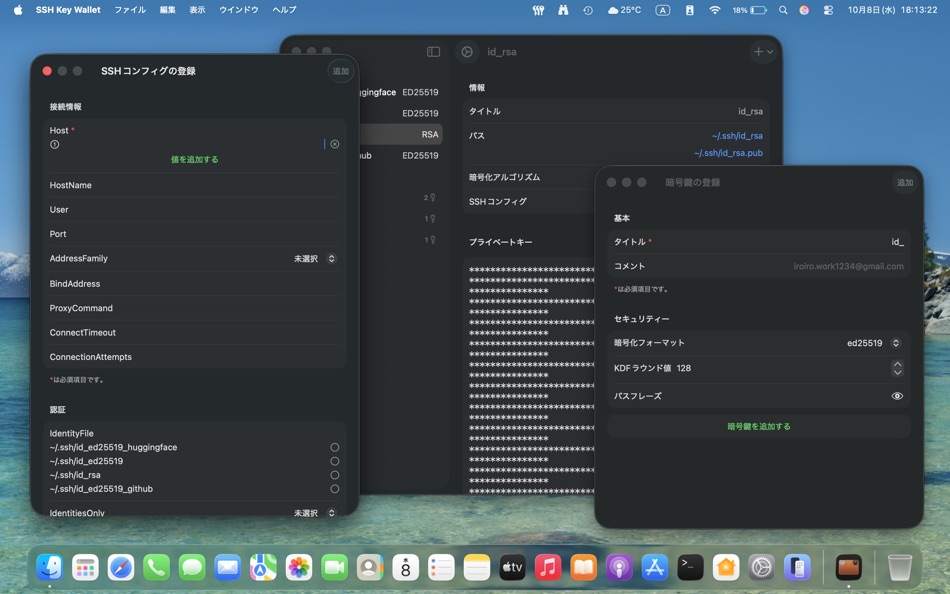
There is no need to use a terminal-based command line tool to manage encryption keys on this application.
This application includes the following features
Easy management of encryption keys
・Create encryption keys
・Deletion of encryption keys
・Edit configuration of encryption keys
・Easy copying of private and public key values
Configure SSH connection with SSH Config file
・Edit Config file
This application uses the following commands to use the functions
・/usr/bin/yes
・/usr/bin/ssh-keygen
ภาพหน้าจอ


ราคา
- วันนี้: $1.49
- ต่ำสุด: $1.49
- มากที่สุด: $1.49
ติดตามราคา
ผู้พัฒนา
- Keisuke Chinone
- แพลตฟอร์ม: macOS แอป (8)
- รายการ: 0 + 0
- แต้มแล: 8 + 3 ¡
- การจัดอันดับ: 0
- ความเห็น: 0
- ลดราคา: 0
- วิดีโอ: 0
- RSS: ติดตาม
แต้มแล
0 ☹️
การจัดอันดับ
0 ☹️
รายการ
0 ☹️
- SSH Key Wallet
ความเห็น
แสดงรีวิวเป็นคนแรกเลย 🌟
ข้อมูลเพิ่มเติม
- เวอร์ชัน: 1.1
- หมวดหมู่:
macOS แอป›เครื่องมือ - ระบบปฏิบัติการ:
macOS,macOS 15.0 และสูงกว่า - ขนาด:
4 Mb - ภาษาที่สนับสนุน:
English,Japanese - การจัดประเภทเนื้อหา:
4+ - Mac App Store คะแนนโดย:
0 - อัปเดต:
- วันที่วางจำหน่าย:
รายชื่อติดต่อ
- เว็บไซท์:
 https://iroiro.dev
SSH Key Wallet URL แบบสั้น: คัดลอกแล้ว!- 🌟 แชร์
- Mac App Store
คุณอาจชอบ
-
- SSH Proxy: Tunnel Forwarding
- macOS แอป: เครื่องมือ โดย: Shenyang Yuzu Technology Co., Ltd
- $0.99
- รายการ: 0 + 0 การจัดอันดับ: 0 ความเห็น: 0
- แต้มแล: 0 + 0 เวอร์ชัน: 1.5 SSH Proxy is a macOS status bar application for port forwarding through SSH tunnels. Main Features: - Supports local and remote port forwarding. Local forwarding maps a remote server ... ⥯
-
- SSH&SFTP Tool
- macOS แอป: เครื่องมือ โดย: Beijing Lucky Journey Technology Co., Ltd
- ฟรี
- รายการ: 0 + 0 การจัดอันดับ: 0 ความเห็น: 0
- แต้มแล: 1 + 0 เวอร์ชัน: 1.0.8 SSHTool is a modern cross-platform SSH client supporting macOS, iPhone, and iPad, providing developers and system administrators with a consistent, efficient, and secure remote server ... ⥯
-
- SSH Tunnel Menu
- macOS แอป: เครื่องมือ โดย: Henry Schober
- $0.99
- รายการ: 0 + 0 การจัดอันดับ: 0 ความเห็น: 0
- แต้มแล: 0 + 0 เวอร์ชัน: 1.2 SSH Tunnel Menu simplifies the management of secure SSH tunnels directly from your macOS menu bar. Perfect for developers, system administrators, and anyone who regularly connects to ... ⥯
-
- SSH Copy
- macOS แอป: เครื่องมือ โดย: Codinn Technologies
- $9.99
- รายการ: 0 + 0 การจัดอันดับ: 0 ความเห็น: 0
- แต้มแล: 0 + 0 เวอร์ชัน: 17.03.1 SSH Copy is an intuitive SFTP (Secure File Transfer Protocol) client lets you manage remote files as in Finder. Notable Features: - Uploading / downloading your remote files or folders ⥯
-
- SSH VPN - Port Forwarding
- macOS แอป: เครื่องมือ โดย: Hexa Software
- * ฟรี
- รายการ: 0 + 0 การจัดอันดับ: 0 ความเห็น: 0
- แต้มแล: 0 + 18 (3.4) เวอร์ชัน: 2.6 SSH VPN is a VPN app that can tunnel SSH via DNS with UDP Gateway (UDPGW) support And Port Forwarding. Simple and Easy Tunneling VPN with our VPN Client App. Features: - Port ... ⥯
-
- Key Core
- macOS แอป: เครื่องมือ โดย: 华耀 刘
- $1.99
- รายการ: 0 + 0 การจัดอันดับ: 0 ความเห็น: 0
- แต้มแล: 0 + 0 เวอร์ชัน: 1.0 Key Core is a managing AI API keys, helping developers, AI researchers, and content creators efficiently manage API keys for various AI services. [Secure & Reliable] - AES-256-GCM ... ⥯
-
- Key Codes
- macOS แอป: เครื่องมือ โดย: Many Tricks
- ฟรี
- รายการ: 0 + 1 การจัดอันดับ: 0 ความเห็น: 0
- แต้มแล: 1 + 0 เวอร์ชัน: 2.2.3 Key Codes is a little utility that displays the key code, unicode value, and modifier keys state for any key combination you press. If you're a developer, this might be useful to ... ⥯
-
- SSH Client - Terminal, Telnet
- macOS แอป: เครื่องมือ โดย: Moon Technolabs Pvt Ltd
- ฟรี
- รายการ: 1 + 2 การจัดอันดับ: 0 ความเห็น: 0
- แต้มแล: 5 + 393 (3.5) เวอร์ชัน: 4.9.4 Here is one of the most intelligent & advanced SSH Client apps to manage and connect remote servers for your iOS and Mac devices About SSH Client: SSH Client is an on-the-go SSH-Telnet ⥯
-
- SSH Client - Secure ShellFish
- macOS แอป: เครื่องมือ โดย: Anders Borum
- ฟรี
- รายการ: 4 + 2 การจัดอันดับ: 0 ความเห็น: 0
- แต้มแล: 12 + 1,217 (4.8) เวอร์ชัน: 2026.5 Lightning fast SSH terminal with remote file access. No other app fuses your SSH servers and iOS devices as well as Secure ShellFish. Tap Get and see for yourself. Terminal supports ... ⥯
-
- SSH Config Editor
- macOS แอป: เครื่องมือ โดย: Petr Hejkal
- $9.99
- รายการ: 1 + 0 การจัดอันดับ: 0 ความเห็น: 0
- แต้มแล: 1 + 0 เวอร์ชัน: 2.6.10 Handy tool for manage your OpenSSH ssh client configuration file. You can add or edit identity files, port forwardings (with graphical preview) and any other ssh config option. ... ⥯
-
- TxThinking SSH
- macOS แอป: เครื่องมือ โดย: TxThinking, Inc.
- $19.99
- รายการ: 0 + 0 การจัดอันดับ: 0 ความเห็น: 0
- แต้มแล: 0 + 3 (4.7) เวอร์ชัน: 20240201.0.0 A SSH Terminal. [Just make a one-time purchase, and you can download it on your iPhone, iPad, and macOS devices!] - Manage multiple servers - Supports opening multiple SSH sessions ... ⥯
-
- NeoServer: SSH Client|Terminal
- macOS แอป: เครื่องมือ โดย: Space-Time Transformation Technology Co., Ltd.
- ฟรี
- รายการ: 2 + 4 การจัดอันดับ: 0 ความเห็น: 0
- แต้มแล: 17 + 258 (4.7) เวอร์ชัน: 8.0.4 NeoServer offers a comprehensive management solution via SSH without additional software installation for your servers, NAS (Network Attached Storage), and Linux-based routers across ... ⥯
-
- iTerminus: SSH Client Terminal
- macOS แอป: เครื่องมือ โดย: Ravi Kakadiya
- ฟรี
- รายการ: 1 + 0 การจัดอันดับ: 0 ความเห็น: 0
- แต้มแล: 12 + 15 (4.5) เวอร์ชัน: 1.8.2 QuickSSH - SSH Terminal & Shell Fast, Secure, & Powerful SSH Client QuickSSH is a lightning-fast, secure, and feature-rich SSH terminal app designed for developers, system admins, and ... ⥯
-
- Termius: SSH Client & Terminal
- macOS แอป: เครื่องมือ โดย: Termius Corporation
- * ฟรี
- รายการ: 2 + 2 การจัดอันดับ: 0 ความเห็น: 0
- แต้มแล: 6 + 0 เวอร์ชัน: 9.37.0 Termius is a modern SSH client designed for productivity and collaboration. Connect with one click from desktop and mobile no re-entering IP addresses, ports, and passwords. With a ... ⥯