
| Developer: | Hien Nguyen (28) | ||
| Price: | * Free | ||
| Rankings: | 0 | ||
| Reviews: | 0 Write a Review | ||
| Lists: | 0 + 0 | ||
| Points: | 0 + 0 ¡ | ||
| Mac App Store | |||
Description

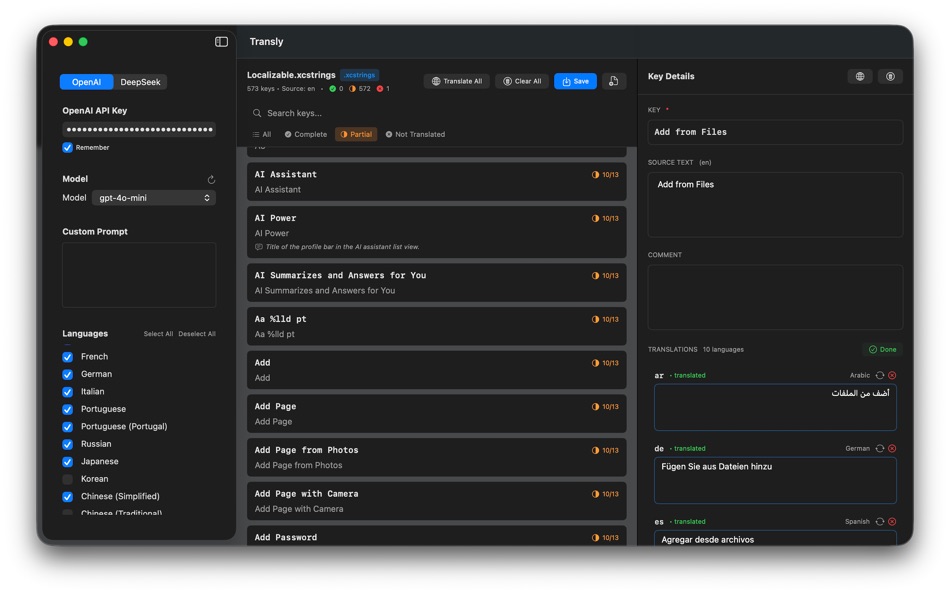
Edit, review, and translate app strings with clarity—without leaving your Mac or touching Xcode.
Designed as a standalone developer tool, Transly helps you manage localized content efficiently while keeping full control over your files and translation process.
Key Features
Edit .xcstrings with confidence
• Open and edit .xcstrings files in a clean, focused interface
• Review all languages side by side
• Make precise edits without modifying your Xcode project
Translate app strings easily
• Translate individual keys or selected languages
• Use your own API key for translation services
• Review results before applying changes
Built for developer workflows
• Batch operations for faster localization
• Clear visibility into keys and languages
• No project scanning, no hidden background processes
Privacy-first by design
• Files stay on your machine
• API keys are stored securely in Keychain
• No analytics, no tracking, no cloud sync
Free vs Premium
Free Version
• Open and edit .xcstrings files
• Manually edit localized strings
• Translate individual keys (limited)
• Preview translations before applying
The free version is fully usable for editing and testing translation quality.
Premium (One-time Purchase)
Unlock advanced productivity features:
• Automatically translate all keys
• Translate across all supported languages
• Batch and bulk translation
• Translation memory for consistent results
• Glossary support for fixed terminology
• Detect missing or incomplete localizations
Premium is a one-time purchase—no subscriptions required.
Who is Transly for?
• iOS and macOS developers using .xcstrings
• Developers maintaining multilingual apps
• Teams looking for a faster alternative to manual localization edits
• Anyone who wants better control over app string translations
Notes
• Transly is a standalone macOS app and does not modify Xcode.
• Translation features require a user-provided API key.
• No user data or project files are collected or transmitted.
Ad
Screenshots



What's new
- Version: 1.0
- Updated:
Price History
-
* In-App Purchases - Today: Free
- Minimum: Free
- Maximum: Free
Track prices
Ad
Developer
- Hien Nguyen
- Platforms: iOS Apps (13) iOS Games (14) macOS Apps (1)
- Lists: 1 + 0
- Points: 10 + 3,978 ¡
- Rankings: 0
- Reviews: 0
- Discounts: 0
- Videos: 0
- RSS: Subscribe
Points
0 ☹️
Rankings
0 ☹️
Lists
0 ☹️
- Transly - XCStrings Editor
Reviews
Be the first to review 🌟
Additional Information
- Version: 1.0
- Category:
macOS Apps›Developer Tools - OS:
macOS,macOS 12.0 and up - Size:
4 Mb - Supported Languages:
English - Content Rating:
4+ - Mac App Store Rating:
0 - Updated:
- Release Date:
Contacts
- Website:
 https://cuchuoigame.com
«Transly - XCStrings Editor» is a Developer Tools app for macOS, developed by «Hien Nguyen». It was first released on and last updated on . This app is currently free. This app has not yet received any ratings or reviews on AppAgg. Available languages: English. AppAgg continuously tracks the price history, ratings, and user feedback for «Transly - XCStrings Editor». Subscribe to this app or follow its RSS feed to get notified about future discounts or updates. AppAgg does not host applications or distribute software. All trademarks, logos and screenshots belong to their respective owners.
Transly - XCStrings Editor Short URL: Copied!- 🌟 Share
- Mac App Store
You may also like
-
- XCStrings Catalog Docx Convert
- macOS Apps: Developer Tools By: Alexander Tech
- * Free
- Lists: 0 + 1 Rankings: 0 Reviews: 0
- Points: 0 + 0 Version: 1.0.6 XCStrings Catalog Docx Converter is a localization tool which connects developers and translators. In a nutshell, the app has the following features: - Convert XCStrings to Docx: ... ⥯
-
- XCStrings Pro
- macOS Apps: Developer Tools By: YongKui Zhao
- $9.99
- Lists: 0 + 0 Rankings: 0 Reviews: 0
- Points: 0 + 0 Version: 1.0.1 XCStrings Pro is a powerful developer tool designed for macOS, built to streamline your app localization workflow. With just one click, you can translate your entire Xcode .xcstrings ... ⥯
-
- XCStrings AI: AI Localization
- macOS Apps: Developer Tools By: Kai Chi Tsao
- $0.99
- Lists: 0 + 1 Rankings: 5 (1) Reviews: 0
- Points: 5 + 0 Version: 1.0.2 ## Lightning-Fast Localization: Get Your App Supporting Global Languages in 5 Minutes! Streamline your iOS and macOS app localization workflow with XCStrings AI the ultimate AI-powered ⥯
-
- XCStrings Buddy: AI Translator
- macOS Apps: Developer Tools By: NBApps
- * Free
- Lists: 0 + 0 Rankings: 0 Reviews: 0
- Points: 0 + 0 Version: 1.2.0 Open your String Catalog file (.xcstrings) in XCStrings Buggy, click on the « Translate » button, save changes and Voila, your App is now understandable by new users. To open the ... ⥯
-
- Editor Usage for Cursor AI
- macOS Apps: Developer Tools By: Inside Internet
- $3.99
- Lists: 0 + 0 Rankings: 0 Reviews: 0
- Points: 0 + 0 Version: 1.3.2 Effortlessly track your Cursor AI editor usage with our powerful menubar app, designed to keep you informed and in control of your requests. Whether you re a heavy user or just want to ⥯
-
- WYSIWYG HTML Editor
- macOS Apps: Developer Tools By: Wicher B Donga
- $17.99
- Lists: 0 + 0 Rankings: 5 (1) Reviews: 0
- Points: 0 + 0 Version: 26 Unleash your creativity with our intuitive WYSIWYG HTML Editor. Seamlessly create, edit, and preview HTML, CSS, PHP and JavaScript in real-time. Designed for both experienced ... ⥯
-
- Py Editor for Python
- macOS Apps: Developer Tools By: Andromeda Corp LTD
- * Free
- Lists: 1 + 0 Rankings: 0 Reviews: 0
- Points: 2 + 0 Version: 26.0.1 Python Editor is a native macOS application that lets you write and run Python code instantly, with no installation or configuration required. Python 3.11 is embedded directly in the ... ⥯
-
- Xliff Editor
- macOS Apps: Developer Tools By: SweetP Productions, Inc.
- $19.99
- Lists: 0 + 2 Rankings: 0 Reviews: 0
- Points: 0 + 0 Version: 3.3.2 Xliff Editor - its fast to load, easy to use, and has a low memory footprint. Did we forget to mention Inline tag protection, Search & Replace, Regex search, Fuzzy search, intuitive ... ⥯
-
- Mermaid Live Editor
- macOS Apps: Developer Tools By: Omer UCEL
- $4.99
- Lists: 0 + 0 Rankings: 0 Reviews: 0
- Points: 2 + 0 Version: 4.1 Transform text into beautiful diagrams with AI-powered assistance. This professional diagram editor supports Mermaid syntax to create flowcharts, timelines, user journey maps, charts, ... ⥯
-
- Brackets JSON Editor
- macOS Apps: Developer Tools By: junichi nakamura
- $2.99
- Lists: 0 + 0 Rankings: 0 Reviews: 0
- Points: 0 + 0 Version: 1.4 Brackets JSON Editor is simple and easy-to-use JSON editor. You can edit the JSON data displayed in the outline. ⥯
-
- JSON Editor for SSEM DEV
- macOS Apps: Developer Tools By: DongSeop Kim
- Free
- Lists: 0 + 0 Rankings: 0 Reviews: 0
- Points: 0 + 0 Version: 1.0 JSON Editor is a web-based tool to view, edit, format, and validate JSON data. Features: Tree view and code view modes Syntax highlighting with Ace Editor JSON validation and ... ⥯
-
- RESX Editor
- macOS Apps: Developer Tools By: Oebele Beetstra
- $1.99
- Lists: 0 + 0 Rankings: 0 Reviews: 0
- Points: 0 + 0 Version: 1.0 When you make use of Visual Studio for Mac to build multi-platform apps with Xamarin Forms, you can make them support multiple languages by adding so called RESX files. A RESX file is ... ⥯
-
- EDI Viewer – Editor PDF Export
- macOS Apps: Developer Tools By: Metin Karaduman
- $14.99
- Lists: 0 + 0 Rankings: 0 Reviews: 0
- Points: 0 + 0 Version: 1.0 EDI Viewer Pro is a powerful Mac app for viewing, understanding, and exporting EDIFACT EDI documents in a clean, Notepad style editor experience. If you work with EDI daily in retail, ... ⥯
-
- Verba - String Catalog Editor
- macOS Apps: Developer Tools By: Wessley Roche
- * Free
- Lists: 0 + 0 Rankings: 0 Reviews: 0
- Points: 0 + 0 Version: 1.2 Verba is a native macOS app for editing .xcstrings files, built specifically for developers using Apple s Swift String Catalog format. It looks and feels like Xcode s own editor, so ... ⥯