
| ผู้พัฒนา: | Hien Nguyen (28) | ||
| ราคา: | * ฟรี | ||
| การจัดอันดับ: | 0 | ||
| ความเห็น: | 0 เขียนความเห็น | ||
| รายการ: | 0 + 0 | ||
| แต้มแล: | 0 + 0 ¡ | ||
| Mac App Store | |||
คำอธิบาย

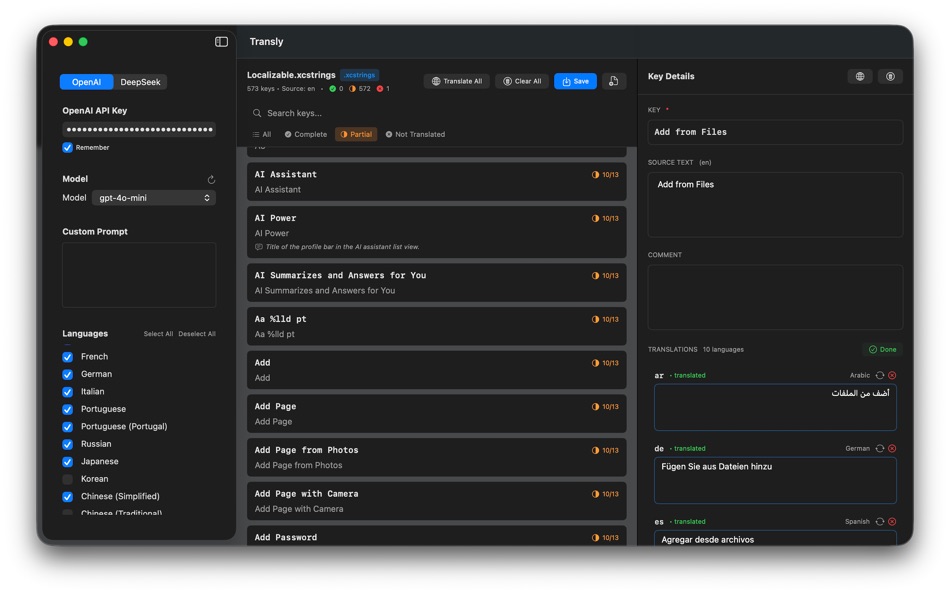
Edit, review, and translate app strings with clarity—without leaving your Mac or touching Xcode.
Designed as a standalone developer tool, Transly helps you manage localized content efficiently while keeping full control over your files and translation process.
Key Features
Edit .xcstrings with confidence
• Open and edit .xcstrings files in a clean, focused interface
• Review all languages side by side
• Make precise edits without modifying your Xcode project
Translate app strings easily
• Translate individual keys or selected languages
• Use your own API key for translation services
• Review results before applying changes
Built for developer workflows
• Batch operations for faster localization
• Clear visibility into keys and languages
• No project scanning, no hidden background processes
Privacy-first by design
• Files stay on your machine
• API keys are stored securely in Keychain
• No analytics, no tracking, no cloud sync
Free vs Premium
Free Version
• Open and edit .xcstrings files
• Manually edit localized strings
• Translate individual keys (limited)
• Preview translations before applying
The free version is fully usable for editing and testing translation quality.
Premium (One-time Purchase)
Unlock advanced productivity features:
• Automatically translate all keys
• Translate across all supported languages
• Batch and bulk translation
• Translation memory for consistent results
• Glossary support for fixed terminology
• Detect missing or incomplete localizations
Premium is a one-time purchase—no subscriptions required.
Who is Transly for?
• iOS and macOS developers using .xcstrings
• Developers maintaining multilingual apps
• Teams looking for a faster alternative to manual localization edits
• Anyone who wants better control over app string translations
Notes
• Transly is a standalone macOS app and does not modify Xcode.
• Translation features require a user-provided API key.
• No user data or project files are collected or transmitted.
Ad
ภาพหน้าจอ



มีอะไรใหม่
- เวอร์ชัน: 1.0
- อัปเดต:
ราคา
-
* การซื้อภายในแอพ - วันนี้: ฟรี
- ต่ำสุด: ฟรี
- มากที่สุด: ฟรี
ติดตามราคา
Ad
ผู้พัฒนา
แต้มแล
0 ☹️
การจัดอันดับ
0 ☹️
รายการ
0 ☹️
- Transly - XCStrings Editor
ความเห็น
แสดงรีวิวเป็นคนแรกเลย 🌟
ข้อมูลเพิ่มเติม
- เวอร์ชัน: 1.0
- หมวดหมู่:
macOS แอป›เครื่องมือ - ระบบปฏิบัติการ:
macOS,macOS 12.0 และสูงกว่า - ขนาด:
4 Mb - ภาษาที่สนับสนุน:
English - การจัดประเภทเนื้อหา:
4+ - Mac App Store คะแนนโดย:
0 - อัปเดต:
- วันที่วางจำหน่าย:
รายชื่อติดต่อ
- เว็บไซท์:
 https://cuchuoigame.com
Transly - XCStrings Editor URL แบบสั้น: คัดลอกแล้ว!- 🌟 แชร์
- Mac App Store
คุณอาจชอบ
-
- XCStrings Catalog Docx Convert
- macOS แอป: เครื่องมือ โดย: Alexander Tech
- * ฟรี
- รายการ: 0 + 1 การจัดอันดับ: 0 ความเห็น: 0
- แต้มแล: 0 + 0 เวอร์ชัน: 1.0.6 XCStrings Catalog Docx Converter is a localization tool which connects developers and translators. In a nutshell, the app has the following features: - Convert XCStrings to Docx: ... ⥯
-
- XCStrings Pro
- macOS แอป: เครื่องมือ โดย: YongKui Zhao
- $9.99
- รายการ: 0 + 0 การจัดอันดับ: 0 ความเห็น: 0
- แต้มแล: 0 + 0 เวอร์ชัน: 1.0.1 XCStrings Pro is a powerful developer tool designed for macOS, built to streamline your app localization workflow. With just one click, you can translate your entire Xcode .xcstrings ... ⥯
-
- XCStrings AI: AI Localization
- macOS แอป: เครื่องมือ โดย: Kai Chi Tsao
- $0.99
- รายการ: 0 + 1 การจัดอันดับ: 5 (1) ความเห็น: 0
- แต้มแล: 5 + 0 เวอร์ชัน: 1.0.2 ## Lightning-Fast Localization: Get Your App Supporting Global Languages in 5 Minutes! Streamline your iOS and macOS app localization workflow with XCStrings AI the ultimate AI-powered ⥯
-
- XCStrings Buddy: AI Translator
- macOS แอป: เครื่องมือ โดย: NBApps
- * ฟรี
- รายการ: 0 + 0 การจัดอันดับ: 0 ความเห็น: 0
- แต้มแล: 0 + 0 เวอร์ชัน: 1.2.0 Open your String Catalog file (.xcstrings) in XCStrings Buggy, click on the « Translate » button, save changes and Voila, your App is now understandable by new users. To open the ... ⥯
-
- Editor Usage for Cursor AI
- macOS แอป: เครื่องมือ โดย: Inside Internet
- $3.99
- รายการ: 0 + 0 การจัดอันดับ: 0 ความเห็น: 0
- แต้มแล: 0 + 0 เวอร์ชัน: 1.3.2 Effortlessly track your Cursor AI editor usage with our powerful menubar app, designed to keep you informed and in control of your requests. Whether you re a heavy user or just want to ⥯
-
- WYSIWYG HTML Editor
- macOS แอป: เครื่องมือ โดย: Wicher B Donga
- $17.99
- รายการ: 0 + 0 การจัดอันดับ: 5 (1) ความเห็น: 0
- แต้มแล: 0 + 0 เวอร์ชัน: 26 Unleash your creativity with our intuitive WYSIWYG HTML Editor. Seamlessly create, edit, and preview HTML, CSS, PHP and JavaScript in real-time. Designed for both experienced ... ⥯
-
- Py Editor for Python
- macOS แอป: เครื่องมือ โดย: Andromeda Corp LTD
- * ฟรี
- รายการ: 1 + 0 การจัดอันดับ: 0 ความเห็น: 0
- แต้มแล: 2 + 0 เวอร์ชัน: 26.0.1 Python Editor is a native macOS application that lets you write and run Python code instantly, with no installation or configuration required. Python 3.11 is embedded directly in the ... ⥯
-
- Xliff Editor
- macOS แอป: เครื่องมือ โดย: SweetP Productions, Inc.
- $19.99
- รายการ: 0 + 2 การจัดอันดับ: 0 ความเห็น: 0
- แต้มแล: 0 + 0 เวอร์ชัน: 3.3.2 Xliff Editor - its fast to load, easy to use, and has a low memory footprint. Did we forget to mention Inline tag protection, Search & Replace, Regex search, Fuzzy search, intuitive ... ⥯
-
- Mermaid Live Editor
- macOS แอป: เครื่องมือ โดย: Omer UCEL
- $4.99
- รายการ: 0 + 0 การจัดอันดับ: 0 ความเห็น: 0
- แต้มแล: 2 + 0 เวอร์ชัน: 4.0 Transform text into beautiful diagrams with AI-powered assistance. This professional diagram editor supports Mermaid syntax to create flowcharts, timelines, user journey maps, charts, ... ⥯
-
- Brackets JSON Editor
- macOS แอป: เครื่องมือ โดย: junichi nakamura
- $2.99
- รายการ: 0 + 0 การจัดอันดับ: 0 ความเห็น: 0
- แต้มแล: 0 + 0 เวอร์ชัน: 1.4 Brackets JSON Editor is simple and easy-to-use JSON editor. You can edit the JSON data displayed in the outline. ⥯
-
- JSON Editor for SSEM DEV
- macOS แอป: เครื่องมือ โดย: DongSeop Kim
- ฟรี
- รายการ: 0 + 0 การจัดอันดับ: 0 ความเห็น: 0
- แต้มแล: 0 + 0 เวอร์ชัน: 1.0 JSON Editor is a web-based tool to view, edit, format, and validate JSON data. Features: Tree view and code view modes Syntax highlighting with Ace Editor JSON validation and ... ⥯
-
- RESX Editor
- macOS แอป: เครื่องมือ โดย: Oebele Beetstra
- $1.99
- รายการ: 0 + 0 การจัดอันดับ: 0 ความเห็น: 0
- แต้มแล: 0 + 0 เวอร์ชัน: 1.0 When you make use of Visual Studio for Mac to build multi-platform apps with Xamarin Forms, you can make them support multiple languages by adding so called RESX files. A RESX file is ... ⥯
-
- EDI Viewer – Editor PDF Export
- macOS แอป: เครื่องมือ โดย: Metin Karaduman
- $14.99
- รายการ: 0 + 0 การจัดอันดับ: 0 ความเห็น: 0
- แต้มแล: 0 + 0 เวอร์ชัน: 1.0 EDI Viewer Pro is a powerful Mac app for viewing, understanding, and exporting EDIFACT EDI documents in a clean, Notepad style editor experience. If you work with EDI daily in retail, ... ⥯
-
- Verba - String Catalog Editor
- macOS แอป: เครื่องมือ โดย: Wessley Roche
- * ฟรี
- รายการ: 0 + 0 การจัดอันดับ: 0 ความเห็น: 0
- แต้มแล: 0 + 0 เวอร์ชัน: 1.2 Verba is a native macOS app for editing .xcstrings files, built specifically for developers using Apple s Swift String Catalog format. It looks and feels like Xcode s own editor, so ... ⥯