
| ผู้พัฒนา: | Apple (168) | ||
| ราคา: | ฟรี | ||
| การจัดอันดับ: | 0 | ||
| ความเห็น: | 0 เขียนความเห็น | ||
| ความเห็น: | 0 โพสต์ความคิดเห็น | ||
| รายการ: | 1 + 3 | ||
| แต้มแล: | 1 + 0 ¡ | ||
| Mac App Store | |||
คำอธิบาย
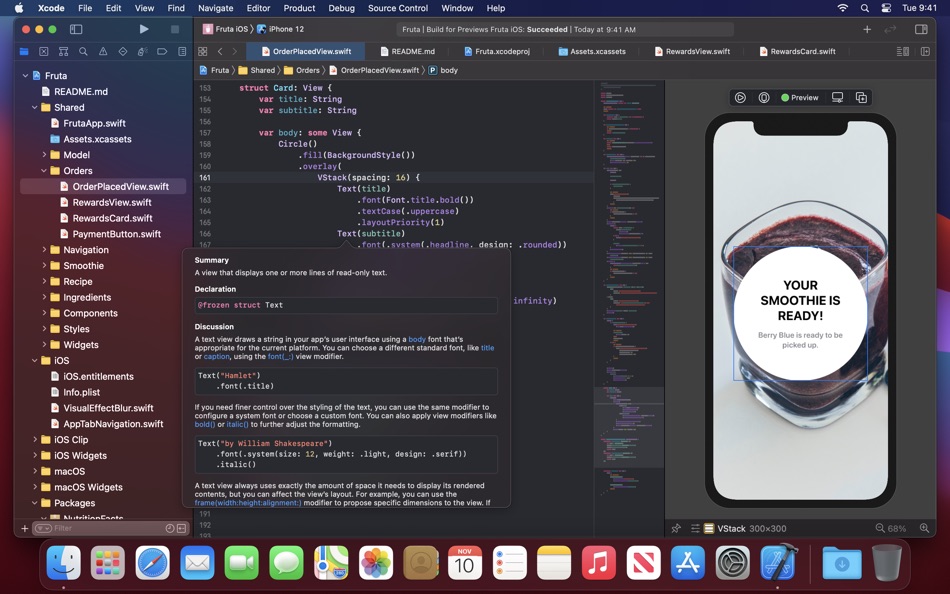
Xcode includes the Xcode IDE, Swift and C/C++/Objective-C compilers, Instruments analysis tool, simulators, the latest SDKs, and hundreds of powerful features:
Innovative tools help you create great apps
• Swift is an intuitive programming language that is safe, fast, and modern
• SwiftUI is a revolutionary framework to create user interfaces with a declarative Swift syntax
• Playgrounds are a fun way to experiment and interact with Swift code
• View debugging shows a 3D stack of all your app's UI view layers at runtime
• Split editors in virtually unlimited ways, show previews, or choose an assistant to see related content
• Live issues display errors as you type, and Fix-its improve your code with just a click
• Source control navigator and service integrations help you manage code across a team
SwiftUI and Interface Builder make it easy to design your interface
• SwiftUI uses declarative Swift code that clearly describes your interface
• Design canvas graphically builds UI views using the library of controls and modifyers
• Preview SwiftUI code or UIKit interfaces in different screen sizes, orientations, and font sizes
• SwiftUI code is always in perfect sync with the graphical design canvas and previews
• Animations are built using simple commands that describe the action you want to see
Professional editor and debugger keep your code front and center
• Refactoring makes it easy to modify the structure of Swift, Objective-C, C, and C++ code
• Open Quickly instantly opens any file within your project
• Data tips and Quick Look can inspect a variable by hovering your mouse over code while debugging
Instruments for performance analysis
• Compare CPU, disk, memory, and GPU performance as graphical tracks over time
• Identify performance bottlenecks, then dive deep into the code to uncover the cause
• Analyze your app directly, or sample the entire system with very little overhead
• Create custom instruments with unique visualizations to analyze your own code and frameworks
To test or run applications on an iPhone, iPad, Apple TV, or Apple Watch all you need is a free Apple ID. To submit your apps to the App Store you must be a member of the Apple Developer Program. Some features may require Internet access.
Ad
ภาพหน้าจอ


ประวัติราคา
- วันนี้: ฟรี
- ต่ำสุด: ฟรี
- มากที่สุด: ฟรี
ติดตามราคา
มีอะไรใหม่
- เวอร์ชัน: 12.4
- อัปเดต:
- Xcode 12.4 supports iOS 14.4, iPadOS 14.4, tvOS 14.4, watchOS 7.3, and macOS Big Sur 11.2
New in Xcode 12.4
• Fixed an issue that prevented debugging iPhone or iPad apps running on an M1-powered Mac
• Additional bug fixes and stability improvements
ผู้พัฒนา
แต้มแล (1)
-

- 1,123 m374
- +1

การจัดอันดับ (0)
0 ☹️
รายการ (1)
- Xcode

ความเห็น (0)
แสดงรีวิวเป็นคนแรกเลย 🌟
ข้อมูลเพิ่มเติม
- เวอร์ชัน: 12.4
- หมวดหมู่:
macOS แอป›เครื่องมือ - ระบบปฏิบัติการ:
macOS,macOS 10.15.4 และสูงกว่า - ขนาด:
11 Gb - ภาษาที่สนับสนุน:
English - การจัดประเภทเนื้อหา:
4+ - Mac App Store คะแนนโดย:
0 - อัปเดต:
- วันที่วางจำหน่าย:
รายชื่อติดต่อ
- เว็บไซท์:
 http://developer.apple.com/xcode
«Xcode». แพลตฟอร์ม: macOS. หมวดหมู่: เครื่องมือ. ผู้พัฒนา: «Apple». การเปิดตัวครั้งแรก: . อัปเดตล่าสุด: . ราคาปัจจุบัน: ฟรี. ชื่อนี้ยังไม่ได้รับการให้คะแนนหรือบทวิจารณ์บน AppAgg รายการ: สาธารณะ 1, ส่วนตัว 3. จุดที่ติดตาม: ยืนยันแล้ว 1, ทางอ้อม 0. ภาษาที่ใช้ได้: English. AppAgg ติดตามประวัติราคา การให้คะแนน และคำติชมของผู้ใช้ «Xcode». ส่วนลดและอัปเดตในอนาคต: RSS. AppAgg ไม่ได้โฮสต์แอปพลิเคชันหรือแจกจ่ายซอฟต์แวร์ เครื่องหมายการค้า โลโก้ และภาพหน้าจอทั้งหมดเป็นของเจ้าของที่เกี่ยวข้อง
ความเห็น (0)
เป็นคนแรกที่แสดงความเห็น 🌟
Xcode URL แบบสั้น: คัดลอกแล้ว!- 🌟 แชร์
- Mac App Store
Ad
คล้ายกัน
-
- Xcode
- macOS แอป: เครื่องมือ โดย: Apple
- ฟรี
- รายการ: 22 + 8 การจัดอันดับ: 5 (1) ความเห็น: 0
- แต้มแล: 11 + 0 0 เวอร์ชัน: 26.4 Xcode offers the tools you need to develop, test, and distribute apps for Apple platforms, including predictive code completion, generative intelligence powered by the best coding ... ⥯
-
- Xcode app Icons: Icon Crafter
- macOS แอป: เครื่องมือ โดย: Mahmoud Suliman
- * ฟรี
- รายการ: 0 + 0 การจัดอันดับ: 0 ความเห็น: 0
- แต้มแล: 0 + 0 0 เวอร์ชัน: 1.2 IconCrafter Effortless App Icon Generation for Apple Platforms Create beautiful, Xcode-ready app icons for iOS, iPadOS, macOS, visionOS, watchOS, and tvOS in seconds! IconCrafter is ... ⥯
-
- Swiftify for Xcode
- macOS แอป: เครื่องมือ โดย: Swiftify, Inc.
- * ฟรี
- รายการ: 0 + 2 การจัดอันดับ: 1 (1) ความเห็น: 0
- แต้มแล: 0 + 0 0 เวอร์ชัน: 6.2 To install Swiftify for Xcode in Xcode 26 (or Xcode 16) on macOS Sequoia (or Sonoma): Quit Xcode Launch Swiftify for Xcode from your Applications folder and follow the link to get your ⥯
-
- DevTools App for Xcode
- macOS แอป: เครื่องมือ โดย: 星晨 易
- * ฟรี
- รายการ: 0 + 0 การจัดอันดับ: 0 ความเห็น: 0
- แต้มแล: 0 + 0 0 เวอร์ชัน: 1.5.2 Built by developers, for developers. DevTools for Xcode is the essential companion for your Mac development workflow. We know how Xcode devours disk space with redundant files and the ... ⥯
-
- SimCleaner for Xcode
- macOS แอป: เครื่องมือ โดย: Ivan Stepanok
- * ฟรี
- รายการ: 0 + 0 การจัดอันดับ: 0 ความเห็น: 0
- แต้มแล: 0 + 0 0 เวอร์ชัน: 1.1 SimCleaner for Xcode is your control panel for Xcode simulators. It shows all your devices in one clean window, helps you launch the ones you need, and safely remove those you no ... ⥯
-
- DirtyWords for Xcode
- macOS แอป: เครื่องมือ โดย: 萧玉 杨
- ฟรี
- รายการ: 0 + 0 การจัดอันดับ: 0 ความเห็น: 0
- แต้มแล: 0 + 0 0 เวอร์ชัน: 1.0 Highlight dirty words in Xcode. Many developers like to write dirty words in the code. This tool will highlight these dirty words in the code. It urge developers to correct these ... ⥯
-
- PrettySwift for Xcode
- macOS แอป: เครื่องมือ โดย: Tony Coconate
- ฟรี
- รายการ: 0 + 1 การจัดอันดับ: 0 ความเห็น: 0
- แต้มแล: 0 + 0 0 เวอร์ชัน: 1.2 PrettySwift is a Xcode Source Editor Extension that formats and lints your Swift code. It uses swift-format to format or lint and takes a zero-configuration approach. ⥯
-
- Alignment for Xcode
- macOS แอป: เครื่องมือ โดย: Atsushi Kiwaki
- ฟรี
- รายการ: 0 + 0 การจัดอันดับ: 0 ความเห็น: 0
- แต้มแล: 0 + 0 0 เวอร์ชัน: 1.2.0 This is Xcode source editor extension that align your assignment statement. ⥯
-
- Evaluate for Xcode
- macOS แอป: เครื่องมือ โดย: Iulian Onofrei
- ฟรี
- รายการ: 0 + 0 การจัดอันดับ: 0 ความเห็น: 0
- แต้มแล: 0 + 0 0 เวอร์ชัน: 1.0.8 Xcode extension that evaluates selected mathematical expressions and replaces them with the result. The source code is now available on GitHub: ... ⥯
-
- AI Vibe Coding for Xcode
- macOS แอป: เครื่องมือ โดย: Dmitry Suvorov
- * ฟรี
- รายการ: 0 + 1 การจัดอันดับ: 0 ความเห็น: 0
- แต้มแล: 8 + 0 0 เวอร์ชัน: 2.0.2 Boost your Swift development with an AI-powered assistant inside Xcode. AI Vibe Coding Assistant for Xcode brings advanced LLM capabilities into your workflow with a seamless sidebar ... ⥯
-
- RocketSim for Xcode Simulator
- macOS แอป: เครื่องมือ โดย: SwiftLee
- * ฟรี
- รายการ: 1 + 3 การจัดอันดับ: 0 ความเห็น: 0
- แต้มแล: 9 + 0 0 เวอร์ชัน: 14.5.0 Join thousands of iOS developers who build, test, and debug apps up to 2x faster with RocketSim. Supercharge your Xcode Simulator with 30+ powerful tools designed to boost ... ⥯
-
- Lightning for Xcode
- macOS แอป: เครื่องมือ โดย: 业坤 张
- $1.99
- รายการ: 0 + 2 การจัดอันดับ: 0 ความเห็น: 0
- แต้มแล: 4 + 0 0 เวอร์ชัน: 1.0.10 Lightning for XcodeLightning for Xcode is an Xcode developer plugin that improves development efficiency for iOS and Mac developers. Lightning for Xcode has the following features: - ... ⥯
-
- Notifier for Xcode
- macOS แอป: เครื่องมือ โดย: Jhonatan Avalos Garcia
- ฟรี
- รายการ: 0 + 1 การจัดอันดับ: 0 ความเห็น: 0
- แต้มแล: 0 + 0 0 เวอร์ชัน: 1.0 Are you one of the many who prefer to download Xcode from the official site to avoid automatic updates? Downside being, you don't get notifications when a new version is available. ... ⥯
-
- MyUtils for Xcode
- macOS แอป: เครื่องมือ โดย: 文涛 隋
- ฟรี
- รายการ: 0 + 1 การจัดอันดับ: 0 ความเห็น: 0
- แต้มแล: 1 + 0 0 เวอร์ชัน: 1.5 该项目为项目 Xcode Source Editor Extension 项目 该项目是一个开源项目 https://github.com/wintelsui/MyUtilsForXcode MyUtils For Xcode Xcode's Best Assistant 我的 Xcode 工具集 开发好帮手 #FFFFFF -> [UIColor ... ⥯