
ที่บันทึกไว้
เลือกชื่อที่จะแสดงในเมนูที่บันทึกไว้ของคุณ
เสร็จแล้ว
| ผู้พัฒนา: | BraveCloud (10) | ||
| ราคา: | $9.99 | ||
| การจัดอันดับ: | 0 | ||
| ความเห็น: | 0 โพสต์ความคิดเห็น | ||
| รายการ: | 0 + 0 | ||
| แต้มแล: | 0 + 0 ¡ | ||
| Mac App Store | |||
คำอธิบาย

Enter any text, URL, or data, and your QR code appears within 300ms — live as you type. Then make it yours: choose custom foreground and background colors, add your logo at the center, or apply a watermark image. Pick from three distinct shapes, browse 100 decorative frames across 10 categories, and export in your preferred format. Every code you create is uniquely branded and ready to share.
FULL CREATIVE CONTROL
▸ Three Shapes — Square, Circle, and Diamond to match your brand aesthetic
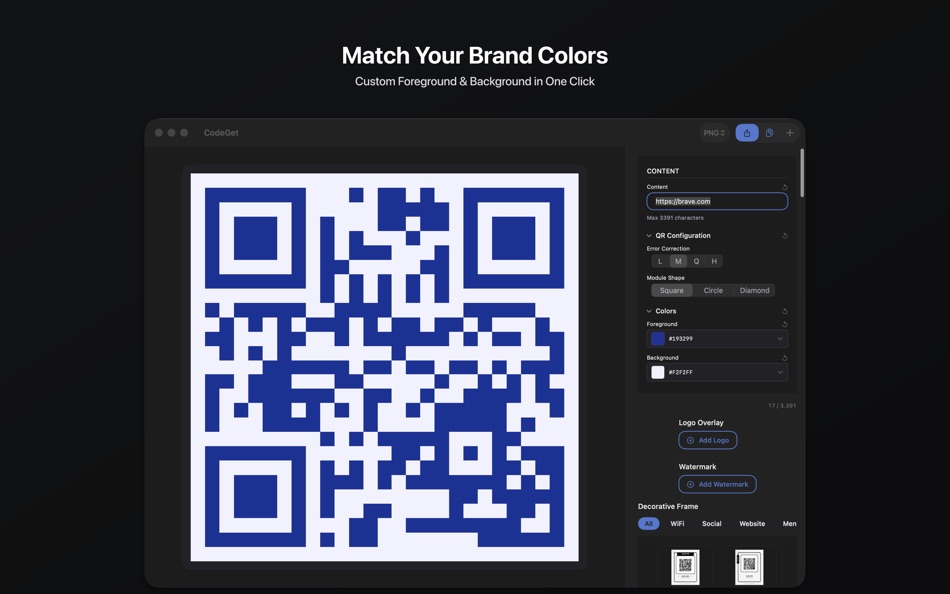
▸ Custom Colors — Set foreground and background colors with live preview
▸ WCAG Contrast Check — Warns you before export if your color combination fails accessibility standards
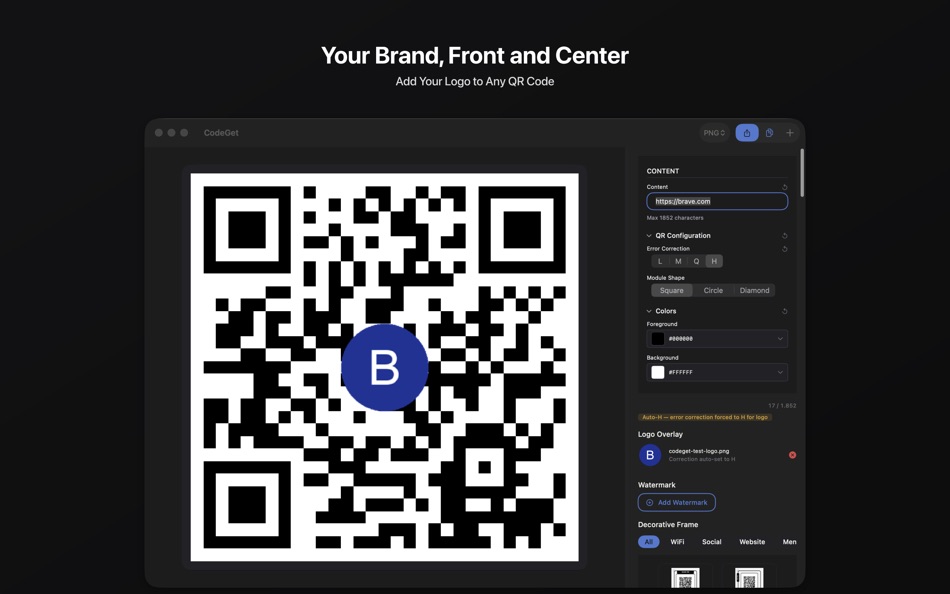
▸ Logo Overlay — Place your brand logo at the center; error correction auto-elevates to ensure scannability
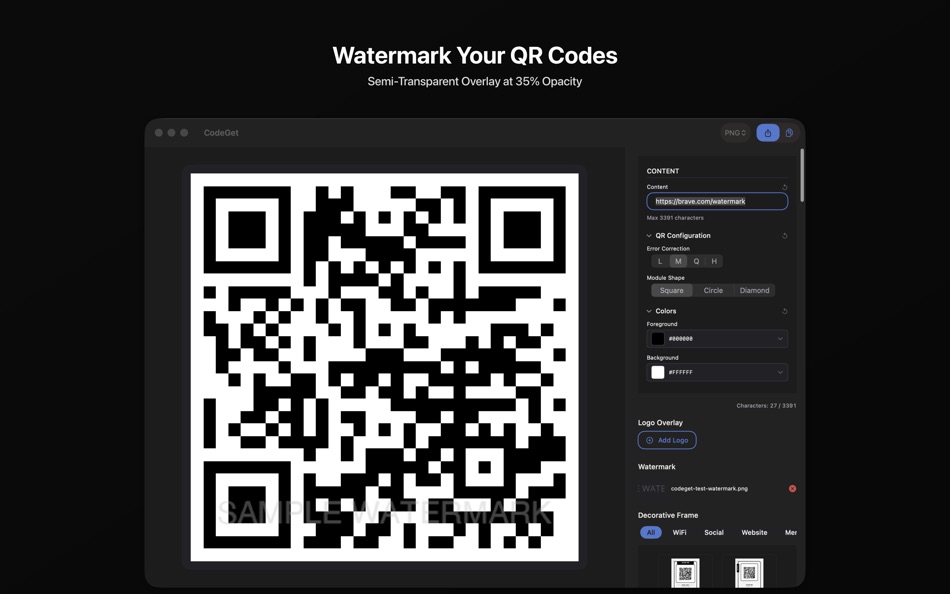
▸ Watermark Overlay — Layer a semi-transparent watermark on top of your QR code at 35% opacity for distinctive brand presence
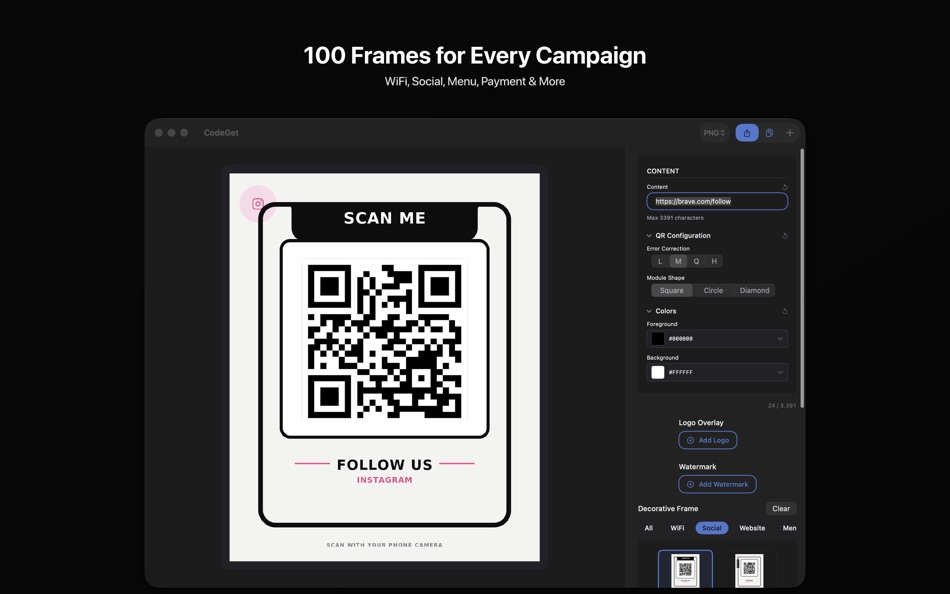
▸ 100 Decorative Frames — Browse 10 categories: WiFi, Social, Website, Menu, Payment, Promo, Event, Info, Booking, and Review
▸ Error Correction — Four levels ensure reliable scanning, even with logos or partial coverage
EXPORT YOUR WAY
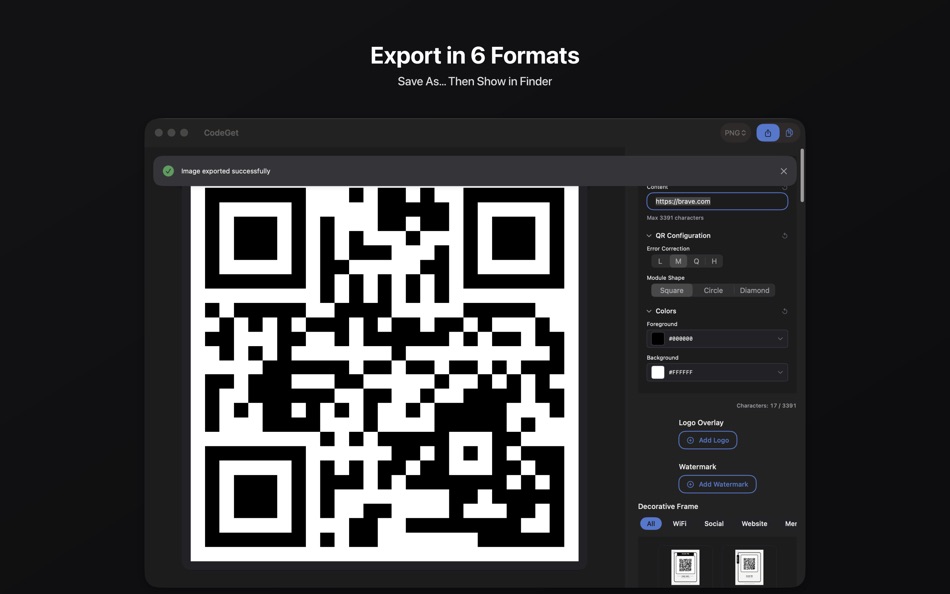
▸ Six Formats — Save as PNG, JPEG, JPEG 2000, TIFF, BMP, or HEIC
▸ High Resolution — Sharp, print-ready codes for any medium
▸ Save As… Modal — Press Export, choose your file location and name, then use Show in Finder to open the saved file directly
MADE FOR YOUR WORKFLOW
Whether you are creating branded codes for marketing campaigns, sharing Wi-Fi passwords and menus at your restaurant, distributing event check-in codes, or linking customers to your website — CodeGet handles it without subscriptions, without watermarks, and without uploading your data to external servers. Everything stays on your Mac.
HOW IT WORKS
1. Enter your content — any URL, text, Wi-Fi credentials, or data.
2. Choose your error correction level for scan reliability.
3. Pick a shape and set your colors to match your brand.
4. Add your logo, a watermark, or one of 100 decorative frames.
5. Export in your preferred format.
Download CodeGet and create professional, branded QR codes directly on your Mac.
Ad
ภาพหน้าจอ
ประวัติราคา
- วันนี้: $9.99
- ต่ำสุด: $9.99
- มากที่สุด: $9.99
ติดตามราคา
มีอะไรใหม่
- เวอร์ชัน: 2.0
- อัปเดต:
- Version 2.0 — Major Update
• Watermark overlay — Apply a semi-transparent watermark image on top of your QR code at 35% opacity. Previously the watermark was composited behind the QR background and invisible — now it is clearly visible.
• Redesigned export flow — Press Export to open a modal sheet with Save As. Choose your file location and name, save, then tap Show in Finder to jump straight to your file. The modal closes automatically.
• Instant error correction — Changing the L/M/Q/H correction level now regenerates the QR code immediately. No more stale previews.
• Auto-H for logos — Adding a logo automatically elevates error correction to H and shows the Auto-H indicator. Your branded QR codes are always scannable.
• WCAG contrast check — Before exporting, CodeGet warns you if your foreground/background color combination fails WCAG AA accessibility standards. Never print an unscannable code again.
• 100 decorative frames across 10 categories: WiFi, Social, Website, Menu, Payment, Promo, Event, Info, Booking, and Review.
• 3 module shapes — Square, Circle, and Diamond.
• 6 export formats — PNG, JPEG, JPEG 2000, TIFF, BMP, and HEIC.
• Everything runs on your Mac — no subscriptions, no data uploads, no accounts.
ข้อมูลเพิ่มเติม
- วันที่วางจำหน่าย:
- หมวดหมู่:
macOS แอป›กราฟิกและการออกแบบ - ระบบปฏิบัติการ:
macOS,macOS 26.0 และสูงกว่า - ขนาด:
8 Mb - ภาษาที่สนับสนุน:
English - การจัดประเภทเนื้อหา:
4+ - Mac App Store คะแนนโดย:
0
 https://bravecl.com/apps/codeget.com.bravecl
ผู้พัฒนา
- BraveCloud
- แพลตฟอร์ม: macOS แอป (4) Windows แอป (6)
- รายการ: 0 + 0
- แต้มแล: 1 + 6 ¡
- การจัดอันดับ: 0
- ความเห็น: 0
- ลดราคา: 0
- วิดีโอ: 0
- RSS: ติดตาม
รายการ (0)
0 ☹️
- CodeGet
แต้มแล (0)
0 ☹️
การจัดอันดับ (0)
0 ☹️
ความเห็น (0)
เป็นคนแรกที่แสดงความเห็น 🌟
«CodeGet». แพลตฟอร์ม: macOS. หมวดหมู่: กราฟิกและการออกแบบ. ผู้พัฒนา: «BraveCloud». การเปิดตัวครั้งแรก: . อัปเดตล่าสุด: . ราคาปัจจุบัน: $9.99. ราคาต่ำสุดที่บันทึกไว้: $9.99. ราคาสูงสุดที่บันทึกไว้: $9.99. ชื่อนี้ยังไม่ได้รับการให้คะแนนหรือบทวิจารณ์บน AppAgg ภาษาที่ใช้ได้: English. AppAgg ติดตามประวัติราคา การให้คะแนน และคำติชมของผู้ใช้ «CodeGet». ส่วนลดและอัปเดตในอนาคต: RSS. AppAgg ไม่ได้โฮสต์แอปพลิเคชันหรือแจกจ่ายซอฟต์แวร์ เครื่องหมายการค้า โลโก้ และภาพหน้าจอทั้งหมดเป็นของเจ้าของที่เกี่ยวข้อง
CodeGet URL แบบสั้น: คัดลอกแล้ว!- 🌟 แชร์
- Mac App Store
คล้ายกัน
-
- Aztec Code Generator
- macOS แอป: กราฟิกและการออกแบบ โดย: Marek Hrušovský
- $9.99
- รายการ: 0 + 1 0 0
- แต้มแล: 0 เวอร์ชัน: 1.7 * Features * * High-resolution PNG output (with transparency, up to 4,000 px) * PDF vector output (with transparency & RGB/Gray/CMYK color space support) * SVG support (available in ... ⥯
-
- BarnQR - Barcode & QR Code
- macOS แอป: กราฟิกและการออกแบบ โดย: ARIPRA INFOTECH PRIVATE LTD
- $4.99
- รายการ: 0 0 0
- แต้มแล: 0 เวอร์ชัน: 1.6 BarnQR is simple and easy to use the application to create colored Barcode and QR codes. It also allows you to scan Barcode or QR code using FaceTime, external web camera or even you ... ⥯
-
- G-Code Simple Viewer
- macOS แอป: กราฟิกและการออกแบบ โดย: Victor Bovio
- $3.99
- รายการ: 0 + 1 0 0
- แต้มแล: 0 เวอร์ชัน: 1.0.3 G-Code Simple Viewer is a great light app to quickly view GCODE, CNC, CN, GC & NGC files Features: - Export to PDF, SVG, DXF, IGES - Load from a ZIP or RAR file one or multiple files. ... ⥯
-
- QR Code Generator Light
- macOS แอป: กราฟิกและการออกแบบ โดย: Serge Kornew
- ฟรี
- รายการ: 0 0 0
- แต้มแล: 0 เวอร์ชัน: 1.0 QR Code Generator Plus A simple yet powerful desktop app for creating, saving, and copying QR codes. It works offline, keeping your data secure and generation fast. - Choose QR code & ... ⥯
-
- AI Home Design - Home AI
- macOS แอป: กราฟิกและการออกแบบ โดย: Code Vision Labs
- * ฟรี
- รายการ: 0 0 0
- แต้มแล: 0 เวอร์ชัน: 1.1.3 Ai Interior Design | Home Ai Welcome to Ai Interior Design | Home Ai, your ultimate tool for transforming your living space with the power of AI interior design. Whether you're ... ⥯
-
- Home Interior Design - 3D Room
- macOS แอป: กราฟิกและการออกแบบ โดย: Quicken Code, LLC
- * ฟรี
- รายการ: 0 0 0
- แต้มแล: 1 เวอร์ชัน: 1.3.5 Always dreamed of changing your interior but didn't know where to start? Our app is here to help you! Home Interior Design puts the power of a professional designer right in your ... ⥯
-
- CorelDRAW
- macOS แอป: กราฟิกและการออกแบบ โดย: Corel Corporation
- * ฟรี
- รายการ: 2 + 2 0 0
- แต้มแล: 6 เวอร์ชัน: 2026.0.0 Get your FIRST WEEK FREE when you sign-up for a subscription. Try the full-featured product and cancel at any time before the free week is over, at no cost to you. Creativity meets ... ⥯
-
- Image Tools Pro
- macOS แอป: กราฟิกและการออกแบบ โดย: Abdul Rahim Khurram
- ฟรี
- รายการ: 0 0 0
- แต้มแล: 0 เวอร์ชัน: 2.0 Get Image Tools Pro with 75% discount! It's a time limited offer, so hurry up and get it now A Simple and Easy application to perform multiple function very easily and quickly. Simple ... ⥯
-
- GoodTimes - Collages
- macOS แอป: กราฟิกและการออกแบบ โดย: Vogelbusch & Co
- $19.99
- รายการ: 0 0 0
- แต้มแล: 0 เวอร์ชัน: 2.1.1 Get creative with GoodTimes if you want even right in Photos app. Until you have used GoodTimes you cannot imaging the impact even simple snapshots can have. Yet GoodTimes is an ... ⥯
-
- Photo Art Filters: DeepStyle
- macOS แอป: กราฟิกและการออกแบบ โดย: 秀英 朱
- $7.99
- รายการ: 1 + 3 0 0
- แต้มแล: 28 เวอร์ชัน: 1.0.2 * "Super PhotoCut" - A great photo background eraser. 50% OFF! Get it Now! DeepStyle is a cool revolutionary photo editor that combines neural networks and AI to make your digital art ... ⥯
-
- Mybrushes-Sketch,Paint,Design
- macOS แอป: กราฟิกและการออกแบบ โดย: effectmatrix
- $7.99
- รายการ: 0 + 1 0 0
- แต้มแล: 20 เวอร์ชัน: 2.1.6 - On sale. Original $29.99. - Pay one time only. Get FREE regular updates and technical support forever. MyBrushes is an unique, INFINITE canvas drawing tool. Packed with an ultimate ... ⥯
-
- Pixave
- macOS แอป: กราฟิกและการออกแบบ โดย: YoungHo Kim
- ฟรี
- รายการ: 3 + 3 0 0
- แต้มแล: 10 เวอร์ชัน: 2.3.13 ** BEST OF 2015 APP BY APPLE ** ** FEATURED WORLDWIDE 2015, 2016 AS "BEST NEW APPS" BY APPLE ** Stay Inspired. There is a whole world that we get from images. A single picture can fill ⥯
-
- Graphic
- macOS แอป: กราฟิกและการออกแบบ โดย: Picta, Inc
- $29.99
- รายการ: 6 + 4 0 0
- แต้มแล: 0 เวอร์ชัน: 3.1 Graphic is a powerful feature-packed vector drawing and illustration application for macOS. "Lightweight vector drawing; easy to use; 9/10" - Mac.AppStorm.net Featured in "Amazing Mac ... ⥯
-
- Art Text 4 - AI Graphic Design
- macOS แอป: กราฟิกและการออกแบบ โดย: Belight Software, ltd
- * ฟรี
- รายการ: 3 + 3 0 0
- แต้มแล: 9 เวอร์ชัน: 4.5.8 Design eye-catching text based graphics, logos, postcards and greetings with Art Text - a graphic design app that powers up typography and lettering in your desktop publishing, social ... ⥯