
| ผู้พัฒนา: | 沦 彭 (13) | ||
| ราคา: | $29.99 | ||
| การจัดอันดับ: | 0 | ||
| ความเห็น: | 0 เขียนความเห็น | ||
| รายการ: | 0 + 0 | ||
| แต้มแล: | 0 + 0 ¡ | ||
| Mac App Store | |||
คำอธิบาย

Supported formats:
PDF: PDF files must contain vector graphics.
Main Feature:
1. Conversion Modes for PDF to CAD: Output All Entities.
Output All Entities: Convert all the entities in the PDF file, including lines and text, etc.
2. Automatically match missing fonts to ensure text content is displayed correctly.
3. Support conversion of text in different languages, including English, Simplified Chinese, Traditional Chinese, Japanese, etc.
4. Output Format: The default output format is DWG 2018. You can choose to export to the specified version of the DWG and DXF file.
5. Convert all pages in PDF to DXF files, each page is stored as a DXF file.(Note: When a PDF file contains many pages(>10), it may take a long time to convert because it converts all pages by default. Conversion time depends on the content and size of the PDF file.)
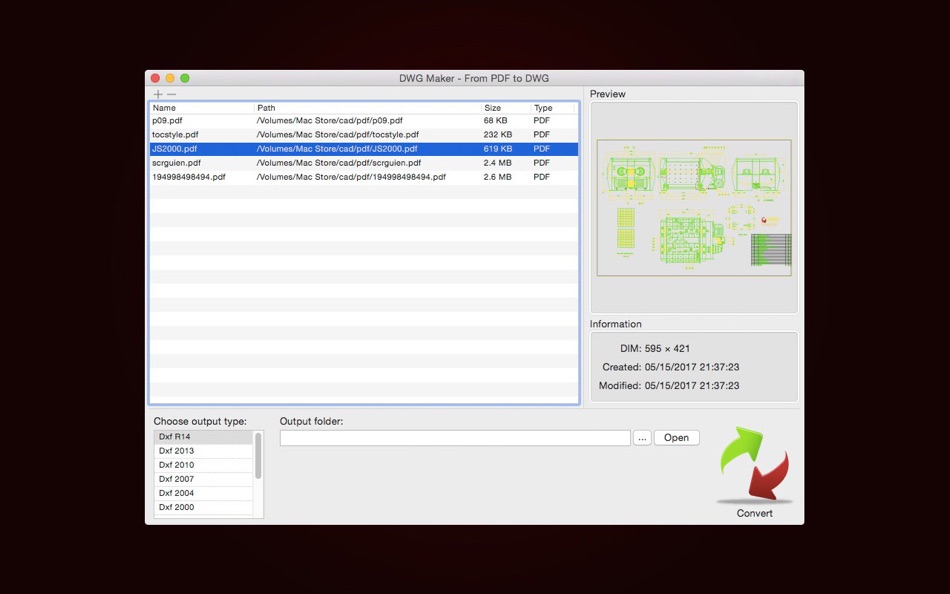
6. User-friendly Interface: Click on the header to sort column, open the source file directory with "Show in Finder", open the output directory, batch conversion of PDF files to CAD, etc.
Note: This tool only supports vector graphics, when you convert PDF files, you need to pay attention to whether your PDF file is a vector graphics. When your vector graphic file size is large(size>10M), the conversion may take a long time, the tool will not respond to your operation(appears color wheel), please be patient. In the test, there is a PDF vector file, the size is 28.6M, the output dxf file is 39M, conversion takes about 4 minutes, you can use this time to estimate your own conversion time.
We regularly update the product, if you have any questions or suggestions, please send a message to the mailbox(moonlight_beauty@yeah.net), or leave a message on our website.
If you are enjoying the app, please consider leaving a review or rating.
ภาพหน้าจอ


มีอะไรใหม่
- เวอร์ชัน: 5.1
- อัปเดต:
- Version 5.1
● Application interface optimization.
● Support macOS Sonoma 14.2.1.
● Bug fixes and improving converting PDF to CAD.
ราคา
- วันนี้: $29.99
- ต่ำสุด: $12.99
- มากที่สุด: $29.99
ติดตามราคา
ผู้พัฒนา
แต้มแล
0 ☹️
การจัดอันดับ
0 ☹️
รายการ
0 ☹️
ความเห็น
แสดงรีวิวเป็นคนแรกเลย 🌟
ข้อมูลเพิ่มเติม
- เวอร์ชัน: 5.1
- หมวดหมู่:
macOS แอป›กราฟิกและการออกแบบ - ระบบปฏิบัติการ:
macOS,macOS 10.11 และสูงกว่า - ขนาด:
94 Mb - ภาษาที่สนับสนุน:
English - การจัดประเภทเนื้อหา:
4+ - Mac App Store คะแนนโดย:
0 - อัปเดต:
- วันที่วางจำหน่าย:
รายชื่อติดต่อ
- เว็บไซท์:
 http://moobe.mystrikingly.com
DWG Import - For PDF to DWG URL แบบสั้น: คัดลอกแล้ว!- 🌟 แชร์
- Mac App Store
คุณอาจชอบ
-
- DWG Viewer 3D - For DWG to PDF
- macOS แอป: กราฟิกและการออกแบบ โดย: 沦 彭
- $9.99
- รายการ: 0 + 0 การจัดอันดับ: 0 ความเห็น: 0
- แต้มแล: 0 + 0 เวอร์ชัน: 4.2 DWG Viewer 3D is a tool for quickly viewing and printing 2D and 3D CAD files and supports all versions of DWG and DXF, as well as quickly converting .dwg and .dxf files to PDF, which ... ⥯
-
- DGN Lab - View & Convert DGN Files (to DWG & PDF)
- macOS แอป: กราฟิกและการออกแบบ โดย: Hui Xiang
- $12.99
- รายการ: 0 + 0 การจัดอันดับ: 0 ความเห็น: 0
- แต้มแล: 0 + 0 เวอร์ชัน: 3.3 A multifunctional tool for viewing and coverting DGN files in Mac. DGN Lab provides you with a powerful file list, because of it, you can easily manage your DGN files, for example, you ⥯
-
- DWG Viewer 3
- macOS แอป: กราฟิกและการออกแบบ โดย: Microspot Ltd.
- $29.99
- รายการ: 0 + 0 การจัดอันดับ: 0 ความเห็น: 0
- แต้มแล: 0 + 0 เวอร์ชัน: 3.0.1 DWG Viewer is an easy to use app for viewing your AutoCAD DWG files and Microspot MacDraft documents on the Mac. Perfect for teams collaborating on projects. View files stored locally ... ⥯
-
- PDF to Image Converter Lite
- macOS แอป: กราฟิกและการออกแบบ โดย: 方成 印
- ฟรี
- รายการ: 0 + 0 การจัดอันดับ: 0 ความเห็น: 0
- แต้มแล: 0 + 0 เวอร์ชัน: 1.5.1 PDF to Image Converter Lite PDF to Image Converter lets you convert PDFs into a wide variety of image formats, like BMPs, GIFs, PNGs, TIFFs, JPEGs and JPGs. Converting PDFs with PDF to ⥯
-
- PDF Draw Pro
- macOS แอป: กราฟิกและการออกแบบ โดย: Mach Software Design
- $4.99
- รายการ: 0 + 0 การจัดอันดับ: 0 ความเห็น: 0
- แต้มแล: 0 + 0 เวอร์ชัน: 1.2.2 **Please visit our website or search for "PDF Draw Pro" in the iOS App Store to download the iOS version, it's free!** PDF Draw Pro is a flexible and powerful new iCloud PDF Note ... ⥯
-
- PDF Image Extractor Pro
- macOS แอป: กราฟิกและการออกแบบ โดย: Dmitry Kozlov
- $6.99
- รายการ: 0 + 0 การจัดอันดับ: 0 ความเห็น: 0
- แต้มแล: 0 + 0 เวอร์ชัน: 2.2.6 Extract and convert pdf images from PDF file easily. We can help you to extract images from Adobe Acrobat PDF files. The PDF Image Extractor is a mac image converter that allows you to ⥯
-
- Visual PDF Editor
- macOS แอป: กราฟิกและการออกแบบ โดย: Tien Thinh Vu
- * ฟรี
- รายการ: 0 + 0 การจัดอันดับ: 0 ความเห็น: 0
- แต้มแล: 1 + 0 เวอร์ชัน: 2.3 [Visual PDF Editor] application could help you to import PDF (as well as VSD, VSDX, SVG, image files), edit then save/export to popular vector file formats like PDF, VSDX, VSD, SVG. (* ⥯
-
- Graphic
- macOS แอป: กราฟิกและการออกแบบ โดย: Picta, Inc
- $29.99
- รายการ: 7 + 4 การจัดอันดับ: 0 ความเห็น: 0
- แต้มแล: 0 + 0 เวอร์ชัน: 3.1 Graphic is a powerful feature-packed vector drawing and illustration application for macOS. "Lightweight vector drawing; easy to use; 9/10" - Mac.AppStorm.net Featured in "Amazing Mac ... ⥯
-
- ViaCAD 2D3D 12
- macOS แอป: กราฟิกและการออกแบบ โดย: Encore
- $199.99
- รายการ: 0 + 0 การจัดอันดับ: 0 ความเห็น: 0
- แต้มแล: 0 + 0 เวอร์ชัน: 12.0.16 including architectural plans, mechanical plans, electrical schematics, furniture designs, and more. All you need is an idea and ViaCAD. Our surprisingly affordable 2D and 3D design ... ⥯
-
- Shapeover
- macOS แอป: กราฟิกและการออกแบบ โดย: Elena Drozhzhina
- $14.99
- รายการ: 0 + 1 การจัดอันดับ: 0 ความเห็น: 0
- แต้มแล: 0 + 0 เวอร์ชัน: 1.5.3 Shapeover is a unique tool for artists and designers, allowing creating artworks by means of filling (galvanization) of an image with shapes. Shapes can be performed by Compound Path ... ⥯
-
- Lithium 2D/3D CAD
- macOS แอป: กราฟิกและการออกแบบ โดย: Ashlar-Vellum
- * ฟรี
- รายการ: 0 + 0 การจัดอันดับ: 0 ความเห็น: 0
- แต้มแล: 0 + 0 เวอร์ชัน: 12.1204.210 Sketch ideas with precision faster than ever. Lithium CAD combines the speed of sketching with the accuracy of professional drafting. Create floor plans, technical diagrams, or 3D ... ⥯
-
- Seahorse Image Editor
- macOS แอป: กราฟิกและการออกแบบ โดย: Robert Engels
- $6.99
- รายการ: 0 + 0 การจัดอันดับ: 0 ความเห็น: 0
- แต้มแล: 0 + 0 เวอร์ชัน: 2.16 From the developer of Seashore comes Seahorse - a highly advanced yet easy to use image editor. 100% GPU enabled. Major features include: - create high quality panorama images with a ... ⥯
-
- LeedPDF
- macOS แอป: กราฟิกและการออกแบบ โดย: DoublOne Studio Limited
- $39.99
- รายการ: 0 + 0 การจัดอันดับ: 0 ความเห็น: 0
- แต้มแล: 0 + 0 เวอร์ชัน: 1.1 Unlike traditional PDF editors that feel mechanical and clunky, LeedPDF brings the natural experience of drawing on paper to your digital workflow. Perfect for students, professionals, ⥯
-
- Pixelmator Pro
- macOS แอป: กราฟิกและการออกแบบ โดย: Apple
- $49.99
- รายการ: 28 + 21 การจัดอันดับ: 0 ความเห็น: 0
- แต้มแล: 22 + 0 เวอร์ชัน: 3.7.1 Pixelmator Pro is an incredibly powerful, beautiful, and easy-to-use image editor designed exclusively for Mac. With over 50 image editing tools, Pixelmator Pro has everything you need ⥯