
ที่บันทึกไว้
เลือกชื่อที่จะแสดงในเมนูที่บันทึกไว้ของคุณ
เสร็จแล้ว
| ผู้พัฒนา: | Moosia LLC (8) | ||
| ราคา: | ฟรี | ||
| การประเมิน: | 3,370 | ||
| การจัดอันดับ: | 0 | ||
| ความเห็น: | 0 โพสต์ความคิดเห็น | ||
| รายการ: | 0 + 0 | ||
| แต้มแล: | 0 + 0 ¡ | ||
| +1 แต้มแล | |||
คำอธิบาย

Every developer, writer, and thinker knows the pain: you jot down a quick thought, paste some code, draft a temporary message... and before you know it, you have hundreds of orphaned text files cluttering your Mac.
Self Destruct solves this with one simple principle: not all notes are meant to last forever.
HOW IT WORKS
Every document gets a countdown timer. Choose from 10 minutes to 1 month, and your note automatically deletes itself when time's up. No manual cleanup. No guilty "I should probably delete this" moments. No endless open windows.
Perfect for:
• Quick code snippets while debugging
• Temporary drafts and brainstorming
• Sensitive notes you don't want lingering
• Meeting notes that expire after the project ships
• Daily todos that reset automatically
• Anything transient
FEATURES
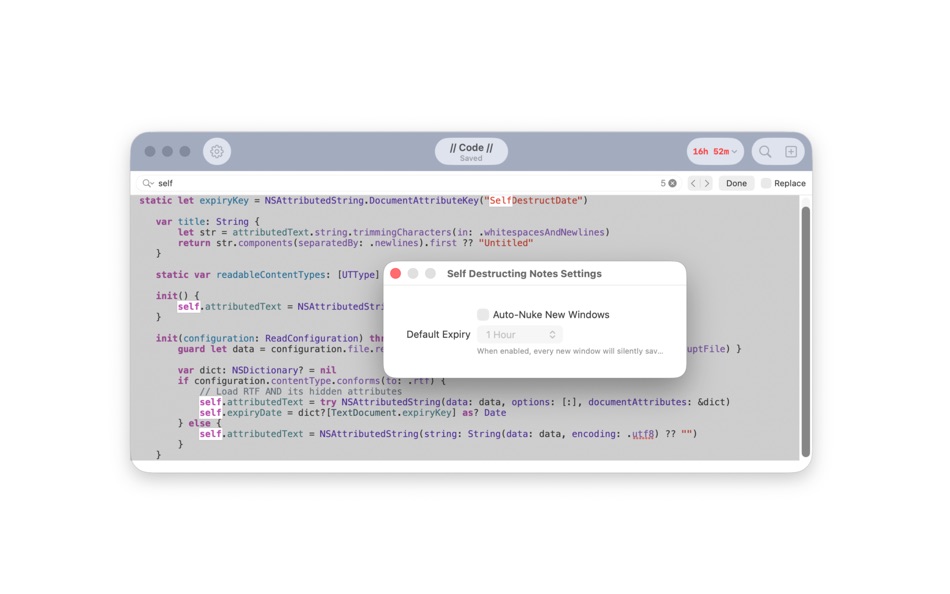
Auto-Nuke Mode - Every new window automatically starts a timer. Set it once in settings, never think about it again.
Cancel Anytime - Change your mind? One click disarms the timer and lets you save permanently.
Smart Saving - Hit ⌘S on a temporary note? It becomes a "Save As" dialog, moving it out of the vault to safety.
Find & Replace - Full-featured search with macOS Find Bar. Perfect for cleaning up code snippets or batch editing before they disappear.
Rich Text Support - Not just plain text. Format, style, and organize your thoughts properly.
Session Restore - Choose to restore your previous session or start fresh every time you launch.
Clean Interface - No distractions. Just a toolbar timer showing exactly how long your note has left.
WHO IT'S FOR
If you've ever looked at your Desktop and seen 47 files named "Untitled", "Untitled 2", "notes", "temp", "asdf", and "DELETE ME"... this app is for you.
PRIVACY
Your notes never leave your Mac. No accounts. No cloud sync. No tracking. Just local files that delete themselves on schedule.
A BETTER WAY TO THINK
Some thoughts are permanent. Others are scaffolding - useful for a moment, then clutter. Self Destruct gives both types of thinking their proper home.
Stop managing temporary files. Start letting them manage themselves.
ภาพหน้าจอ

Ad
ประวัติราคา
- ราคาปัจจุบัน: ฟรี
- ต่ำสุด: ฟรี
- มากที่สุด: ฟรี
ติดตามราคา
การประเมิน AppAgg
3,370
การประเมิน AppAgg โดยประมาณสำหรับ
Exploding Notes
3,370
การประเมินที่สูงขึ้นมักหมายถึงสัญญาณบน AppAgg ที่แข็งแกร่งขึ้น
อิงจาก: 🔥 ความนิยม · ⭐ คะแนนจากผู้ใช้ · 🕒 ความสดใหม่ · 🏷️ ดีล · 🏬 ข้อมูลร้านค้า · 👥 กิจกรรมชุมชน
คำนวณใหม่ทุกวันจากข้อมูล AppAgg ล่าสุด.
URL แบบสั้น: คัดลอกแล้ว!
ข้อมูลเพิ่มเติม
- วันที่วางจำหน่าย:
- หมวดหมู่:
macOS แอป›ประสิทธิภาพการผลิต - ระบบปฏิบัติการ:
macOS,macOS 14.6 และสูงกว่า - ขนาด:
1007 Kb - ภาษาที่สนับสนุน:
English - การจัดประเภทเนื้อหา:
4+ - Mac App Store คะแนนโดย:
0 - เว็บไซท์:
 https://www.moosia.com/self-destruct/
ผู้พัฒนา
- Moosia LLC
- แพลตฟอร์ม: iOS แอป (7) macOS แอป (1)
- รายการ: 0 + 0
- แต้มแล: 2 + 284 ¡
- การจัดอันดับ: 0
- ความเห็น: 0
- ลดราคา: 0
- วิดีโอ: 0
- RSS: ติดตาม
รายการ (0)
0 ☹️
- Exploding Notes
แต้มแล (0)
0 ☹️
การจัดอันดับ (0)
0 ☹️
ความเห็น (0)
เป็นคนแรกที่แสดงความเห็น 🌟
«Exploding Notes». แพลตฟอร์ม: macOS. หมวดหมู่: ประสิทธิภาพการผลิต. ผู้พัฒนา: «Moosia LLC». การเปิดตัวครั้งแรก: . อัปเดตล่าสุด: . ราคาปัจจุบัน: ฟรี. ชื่อนี้ยังไม่ได้รับการให้คะแนนหรือบทวิจารณ์บน AppAgg ภาษาที่ใช้ได้: English. AppAgg ติดตามประวัติราคา การให้คะแนน และคำติชมของผู้ใช้ «Exploding Notes». ส่วนลดและอัปเดตในอนาคต: RSS. AppAgg ไม่ได้โฮสต์แอปพลิเคชันหรือแจกจ่ายซอฟต์แวร์ เครื่องหมายการค้า โลโก้ และภาพหน้าจอทั้งหมดเป็นของเจ้าของที่เกี่ยวข้อง
Exploding Notes URL แบบสั้น: คัดลอกแล้ว!- 🌟 แชร์
- Mac App Store
คล้ายกัน
-
- Notes Hub & Tasks
- macOS แอป: ประสิทธิภาพการผลิต โดย: ALEKSANDR KOFMAN
- $1.99
- รายการ: 0 0 0
- แต้มแล: 0 + 0 3K เวอร์ชัน: 1.0 Notes Hub is a beautifully designed, clutter-free productivity app that combines note-taking and task management in one seamless experience. Perfect for professionals, students, and ... ⥯
-
- Notes Web Clipper
- macOS แอป: ประสิทธิภาพการผลิต โดย: Anton Podviaznikov
- ฟรี
- รายการ: 1 0 0
- แต้มแล: 1 + 0 2K เวอร์ชัน: 1.0 Save content from the web to the Notes app. ⥯
-
- Notes Writer - for Note Taking
- macOS แอป: ประสิทธิภาพการผลิต โดย: Global Executive Consultants (Shanghai) Ltd
- $4.99
- รายการ: 0 0 0
- แต้มแล: 0 + 0 2K เวอร์ชัน: 6.8 Students, teachers, and business professionals use Note Writer daily to take notes, annotate PDFs, mark-up photos, record lectures, provide audio feedback and more. It is uniquely ... ⥯
-
- Notes for Safari
- macOS แอป: ประสิทธิภาพการผลิต โดย: luca calciano
- $0.99
- รายการ: 0 0 0
- แต้มแล: 0 + 0 2K เวอร์ชัน: 1.3 The quickest way to take notes on Safari! Need to take notes and save them when you are browsing on internet? This will no longer be a problem when using this app... you will always ... ⥯
-
- Temp Notes
- macOS แอป: ประสิทธิภาพการผลิต โดย: Ebey Tech LLC
- $0.99
- รายการ: 0 + 1 0 0
- แต้มแล: 14 + 0 5K เวอร์ชัน: 1.2 Sometimes I find myself needing to jot some quick notes or capture a screenshot. A lot of times I don't intend to keep the content, but need it readily accessible for a bit. ... ⥯
-
- Daily Notes Planner
- macOS แอป: ประสิทธิภาพการผลิต โดย: Truth Honest Messaging, Inc.
- * ฟรี
- รายการ: 0 + 2 0 0
- แต้มแล: 5 + 0 6K เวอร์ชัน: 10.15 As a much simpler calendar app than the built-in iCalendar app, Daily Notes Planner allows you to type in plain-text-notes for every date (no complicated hourly scheduling or reminders ⥯
-
- Floating Notes for Obsidian
- macOS แอป: ประสิทธิภาพการผลิต โดย: Ilarion Ioannidis
- $4.99
- รายการ: 0 0 0
- แต้มแล: 0 + 0 4K เวอร์ชัน: 1.3.2 Never lose a thought again with Floating Notes for Obsidian! Obsidian Floating Notes is a macOS menu bar app that puts your Obsidian vault one keystroke away. Capture ideas, meeting ... ⥯
-
- Quick Notes
- macOS แอป: ประสิทธิภาพการผลิต โดย: loay setrak
- $0.99
- รายการ: 0 0 0
- แต้มแล: 0 + 0 2K เวอร์ชัน: 2.0.1 Quick Notes is a simple note taking App and Menu bar widget Features: - 15 Notes - Today View Widget - 13 Font Colours - 27 Font Sizes - Text Alignment options - iCloud Sync - App and ... ⥯
-
- Sticky Notes for Safari
- macOS แอป: ประสิทธิภาพการผลิต โดย: Pierre Stanislas
- $2.99
- รายการ: 0 0 0
- แต้มแล: 2 + 0 5K เวอร์ชัน: 1.3 Sticky Notes for Safari is a powerful yet lightweight extension for macOS and iOS that lets you create, manage, and customize sticky notes directly on the websites you visit. Whether ... ⥯
-
- Sticky Notes - Post-it notes
- macOS แอป: ประสิทธิภาพการผลิต โดย: Pawan Dixit
- $1.99
- รายการ: 0 + 1 0 0
- แต้มแล: 0 + 0 3K เวอร์ชัน: 1.0.5 Refund available within 14 days, no questions asked. To do that, click on 'Report a problem' on the app page and select 'Request a refund'. *Features at a glance* 1. Put sticky notes ... ⥯
-
- Lucid-Notes
- macOS แอป: ประสิทธิภาพการผลิต โดย: Sardorbek Rakhimov
- * ฟรี
- รายการ: 0 0 0
- แต้มแล: 2 + 0 6K เวอร์ชัน: 1.9.9 Your Mac already has a notes app. Lucid Notes isn't here to replace it it's the companion tool that sits on top of everything else. Read your script hands-free with a built-in ... ⥯
-
- Tab Notes Theme Editor
- macOS แอป: ประสิทธิภาพการผลิต โดย: Catalystwo
- ฟรี
- รายการ: 0 0 0
- แต้มแล: 2 + 0 2K เวอร์ชัน: 1.0.4 You can create your own themes for Tab Notes. * Please note: The header sizing bar in the preview popover is for preview purpose only. If you need to adjust size, please use Tab Notes ... ⥯
-
- Tab Notes
- macOS แอป: ประสิทธิภาพการผลิต โดย: Catalystwo Limited
- * $24.99
- รายการ: 0 0 0
- แต้มแล: 1 + 0 6K เวอร์ชัน: 2.5 Tab Notes is a Menu Bar application which keeps your notes tidy and easy to access and your screen uncluttered. Click on your screen edge, then a note pops up! Watch the demonstration ... ⥯
-
- Quill - Notes app
- macOS แอป: ประสิทธิภาพการผลิต โดย: ASHVIN SUTHAR
- $0.99
- รายการ: 0 0 0
- แต้มแล: 1 + 0 4K เวอร์ชัน: 1.0.1 Forget messy notes and scattered thoughts! Quill Notes App keep your life organized with: → Easy writing made even easier: Type & edit notes instantly with a handy toolbar that puts ... ⥯
คุณอาจชอบ
ดูล่าสุด
อัปเดตล่าสุด:
โอเปอเรเตอร์การค้นหาที่คุณสามารถใช้กับ AppAgg