
| Dezvoltator: | Groovy Lab (1) | ||
| Preț: | Gratuit | ||
| Clasificări: | 0 | ||
| Recenzii: | 0 Scrie o recenzie | ||
| Comentarii: | 0 Postează comentariu | ||
| Liste: | 0 + 0 | ||
| Punctele: | 0 + 0 ¡ | ||
| Mac App Store | |||
Descriere

FAST & PRIVATE
• All transcription happens locally on your device
• No audio ever leaves your Mac
• No internet connection required
• No subscription fees
SIMPLE TO USE
• Global hotkey works in any app
• Speak naturally - HushType handles the rest
• Text automatically copies to clipboard
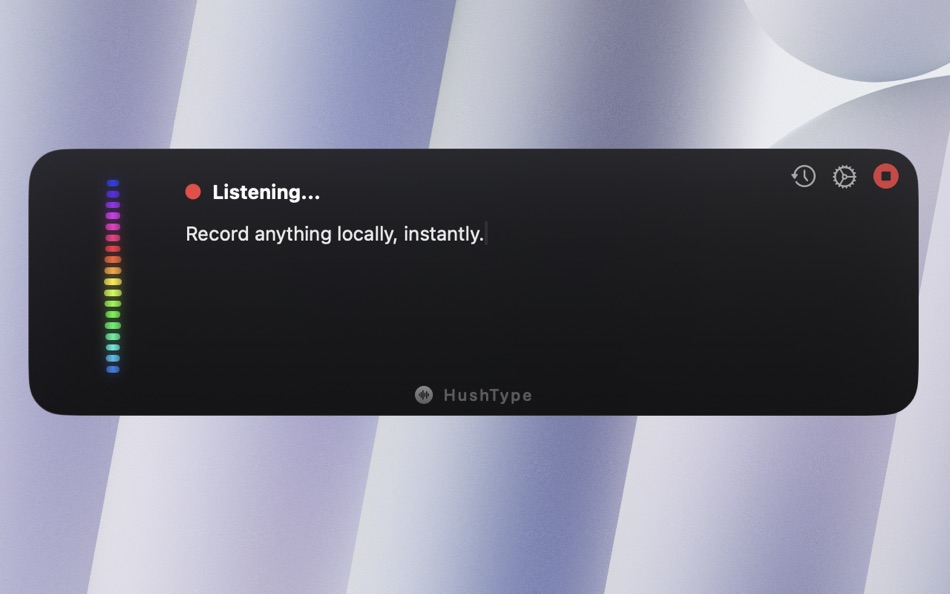
• Beautiful floating panel with live visualization
POWERFUL TRANSCRIPTION
• Powered by Whisper AI for accurate speech recognition
• Supports multiple languages
• Works offline, anywhere
• Optimized for Apple Silicon
Perfect for:
• Writing emails and messages faster
• Vibe Coding
• Taking quick notes
• Drafting documents hands-free
• Anyone who thinks faster than they type
How It Works
Press ⌘` to start speaking. Press again to stop. Your transcription is automatically copied to your clipboard, ready to paste anywhere.
HushType runs quietly in your menu bar, ready when you need it. No accounts, no cloud, no complexity — just fast, private voice typing.
Getting Started
1. Launch HushType from Applications
2. The app runs in your menu bar (look for the speech bubble icon in the top-right)
3. Grant microphone permission when prompted
Basic Usage
1. Press ⌘` (Command + Backtick) to start recording
2. Speak naturally - you'll see a floating panel with a live equalizer
3. Press ⌘` again to stop and transcribe
4. Text is automatically copied to your clipboard
First-Time Setup
- On first launch, you'll be prompted to download a speech model
- Select Distil Large V3 (Recommended) for best accuracy
- Download takes ~1-2 minutes depending on connection
Menu Bar Options
Right-click the menu bar icon to access:
- Toggle Recording
- History
- Settings
- Quit
Ad
Capturi de ecran
Ce este nou
- Versiune: 1.0.1
- Actualizată:
Istoricul prețurilor
- Azi: Gratuit
- Minim: Gratuit
- Maxim: Gratuit
Urmăriți prețurile
Ad
Dezvoltator
- Groovy Lab
- Platforme: macOS Aplicații (1)
- Liste: 0 + 0
- Punctele: 0 + 0 ¡
- Clasificări: 0
- Recenzii: 0
- Comentarii: 0
- Reduceri: 0
- Videoclipuri: 0
- RSS: Abonează-te
Punctele (0)
0 ☹️
Clasificări (0)
0 ☹️
Liste (0)
0 ☹️
- HushType
Recenzii (0)
Fii primul care a revizuit 🌟
Comentarii (0)
Fii primul care comentează 🌟
Informații suplimentare
- Versiune: 1.0.1
- Categorie:
macOS Aplicații›Productivitate - SO:
macOS,macOS 14.0 sau o versiune ulterioară - Mărimea:
2 Mb - Limbă acceptată:
English - Evaluarea conținutului:
4+ - Mac App Store Evaluare:
0 - Actualizată:
- Data lansării:
Agendă
- Website:
 https://www.groovylab.org/hushtype/
«HushType». Platforma: macOS. Categorie: Productivitate. Dezvoltator: «Groovy Lab». Prima lansare: . Ultima actualizare: . Prețul actual: gratuit. Acest titlu nu a primit încă evaluări sau recenzii pe AppAgg. Limbi disponibile: English. AppAgg urmărește istoricul prețurilor, evaluările și feedbackul utilizatorilor pentru «HushType». Urmăriți reducerile și actualizările viitoare prin RSS. AppAgg nu găzduiește aplicații și nu distribuie software. Toate mărcile comerciale, siglele și capturile de ecran aparțin proprietarilor respectivi.
HushType Adresă URL scurtă: Copiate!- 🌟 Trimite
- Mac App Store
S-ar putea sa-ti placa si
-
- Type With Voice - AI Dictation
- macOS Aplicații: Productivitate De: Kreate Ventures FZE
- * Gratuit
- Liste: 0 + 0 Clasificări: 0 Recenzii: 0
- Punctele: 0 + 0 Comentarii: 0 Versiune: 3.2.1 SpeakWrite is a simple and efficient macOS menu bar app that lets you speak and instantly convert your words into text. Just click the menu bar icon or use the keyboard shortcut to ... ⥯
-
- Quick Note Taking – Type
- macOS Aplicații: Productivitate De: Papercones Inc.
- * Gratuit
- Liste: 1 + 1 Clasificări: 0 Recenzii: 0
- Punctele: 11 + 0 Comentarii: 0 Versiune: 1.5.1 Type lets you quickly capture notes from anywhere. Type does quick note-taking better than Quick Notes Justin Pot, Lifehacker Being able to quickly note without being taken out of my ... ⥯
-
- Focus Type
- macOS Aplicații: Productivitate De: Michael Baron
- Gratuit
- Liste: 0 + 0 Clasificări: 0 Recenzii: 0
- Punctele: 1 + 0 Comentarii: 0 Versiune: 1.0 Ever felt writer's block? Well use Focus Type to push yourself to keep typing your first draft. It lets you just worry about writing. You can edit once you have a first draft. When you ⥯
-
- Voice Type: Local Dictation
- macOS Aplicații: Productivitate De: Saravanan Pitchaimani
- * Gratuit
- Liste: 0 + 0 Clasificări: 0 Recenzii: 0
- Punctele: 0 + 0 Comentarii: 0 Versiune: 1.00.54 Voice Type is an offline dictation app that turns speech into clean text in any app. Hold a hotkey, speak, release. Voice Type inserts clean text where your cursor is. No internet ... ⥯
-
- TypeApp
- macOS Aplicații: Productivitate De: Type App Inc
- Gratuit
- Liste: 0 + 0 Clasificări: 0 Recenzii: 0
- Punctele: 1 + 0 Comentarii: 0 Versiune: 3.21.208 TypeApp provides a top-notch email experience while managing all your email accounts securely. TypeApp intuitive & easy to use design makes emailing productive and fun. All Your Mail ... ⥯
-
- Turtl
- macOS Aplicații: Productivitate De: Charvi Bansal
- Gratuit
- Liste: 0 + 0 Clasificări: 0 Recenzii: 0
- Punctele: 0 + 0 Comentarii: 0 Versiune: 1.2 Type your task once. Turtl takes care of the rest smartly scheduling it into your day. ⥯
-
- Things 3
- macOS Aplicații: Productivitate De: Cultured Code GmbH & Co. KG
- $49.99
- Liste: 20 + 13 Clasificări: 0 Recenzii: 0
- Punctele: 12 + 0 Comentarii: 0 Versiune: 3.22.10 Get things done! The award-winning Things app helps you plan your day, manage your projects, and make real progress toward your goals. Best of all, it s easy to use. Within the hour, ... ⥯
-
- Fantastical - Calendar
- macOS Aplicații: Productivitate De: Flexibits Inc.
- * Gratuit
- Liste: 5 + 7 Clasificări: 0 Recenzii: 0
- Punctele: 9 + 0 Comentarii: 0 Versiune: 4.1.10 Fantastical is the multiple award-winning calendar app with powerful features including intuitive natural language text parsing, a full calendar window with day, week, month, quarter ... ⥯
-
- Floating Clipboard
- macOS Aplicații: Productivitate De: Ebey Tech LLC
- $1.99
- Liste: 1 + 1 Clasificări: 0 Recenzii: 0
- Punctele: 21 + 0 Comentarii: 0 Versiune: 1.0 Features: -Clipboard history. -Auto fetching of clipboard contents (optional). -Float Window above other apps & windows (optional). -Fast & fluid type-based filtering. -Inserted ... ⥯
-
- Climber 2
- macOS Aplicații: Productivitate De: 斌 虞
- $2.99
- Liste: 1 + 1 Clasificări: 0 Recenzii: 0
- Punctele: 13 + 0 Comentarii: 0 Versiune: 1.0.26 The squirrel climbing the file system tree quickly. Climber 2, a practical utility that developed to fast find files in large folders with complex logic calculation of file attributes. ⥯
-
- Pastebot
- macOS Aplicații: Productivitate De: Tapbots
- $12.99
- Liste: 4 + 4 Clasificări: 0 Recenzii: 0
- Punctele: 4 + 0 Comentarii: 0 Versiune: 2.4.7 If copy & paste is a part of your workflow, Pastebot is an indispensible tool to improve your productivity. Quickly recall clippings that you have copied before and apply powerful text ⥯
-
- Clips : Clipboard Manager
- macOS Aplicații: Productivitate De: AppYogi Software
- $2.99
- Liste: 0 + 2 Clasificări: 0 Recenzii: 0
- Punctele: 13 + 0 Comentarii: 0 Versiune: 2.2 Clipsy stores all that you have copied text, files and allowed you to quickly find text or image or doc from the clipboard history you have been looking for. Access the clipboard ... ⥯
-
- Applight – Smart App Switcher
- macOS Aplicații: Productivitate De: Seungwoo Choe
- * Gratuit
- Liste: 0 + 3 Clasificări: 0 Recenzii: 0
- Punctele: 13 + 0 Comentarii: 0 Versiune: 1.1 A smarter, faster way to switch apps. Instead of endless Command-Tabs or Spotlight searches, Applight learns your workflow and predicts what you ll need next so you can jump to the ... ⥯
-
- Grila • calendar for typers
- macOS Aplicații: Productivitate De: THE LOW-TECH GUYS SRL
- Gratuit
- Liste: 0 + 1 Clasificări: 0 Recenzii: 0
- Punctele: 13 + 0 Comentarii: 0 Versiune: 2.0.4 Grila is a keyboard-driven instantly available calendar. The calendar can be shown instantly using ⌥ Right Option + \ (backslash), which is configurable to any other hotkey. Navigating ⥯