
| ผู้พัฒนา: | Boonyawat Laongthong (1) | ||
| ราคา: | * ฟรี | ||
| การจัดอันดับ: | 0 | ||
| ความเห็น: | 0 เขียนความเห็น | ||
| รายการ: | 0 + 0 | ||
| แต้มแล: | 2 + 22 (4.6) ¡ | ||
| Mac App Store | |||
คำอธิบาย

Key Features
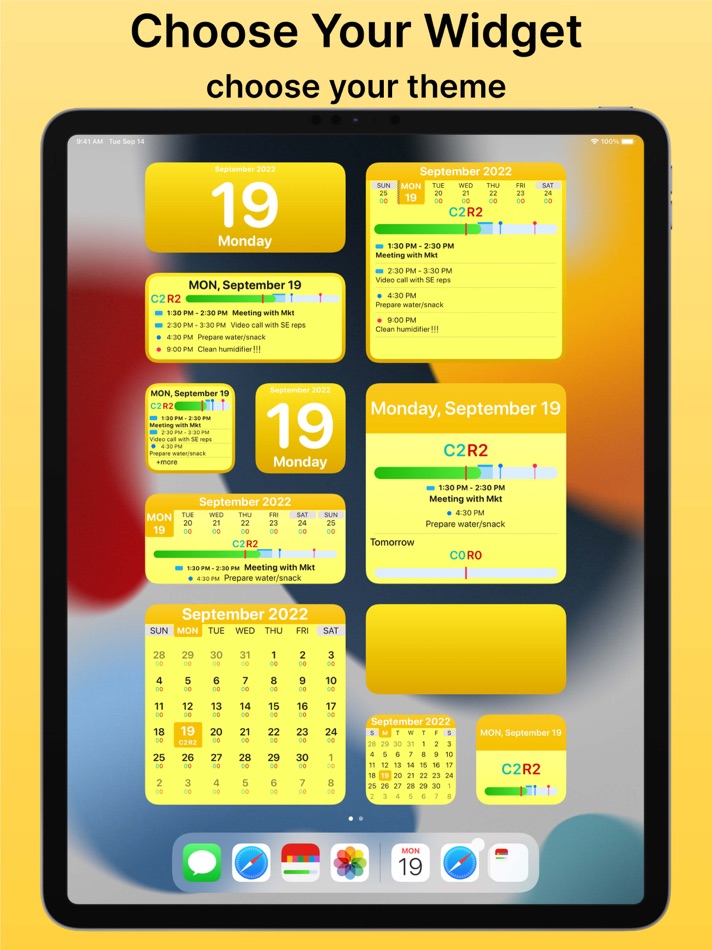
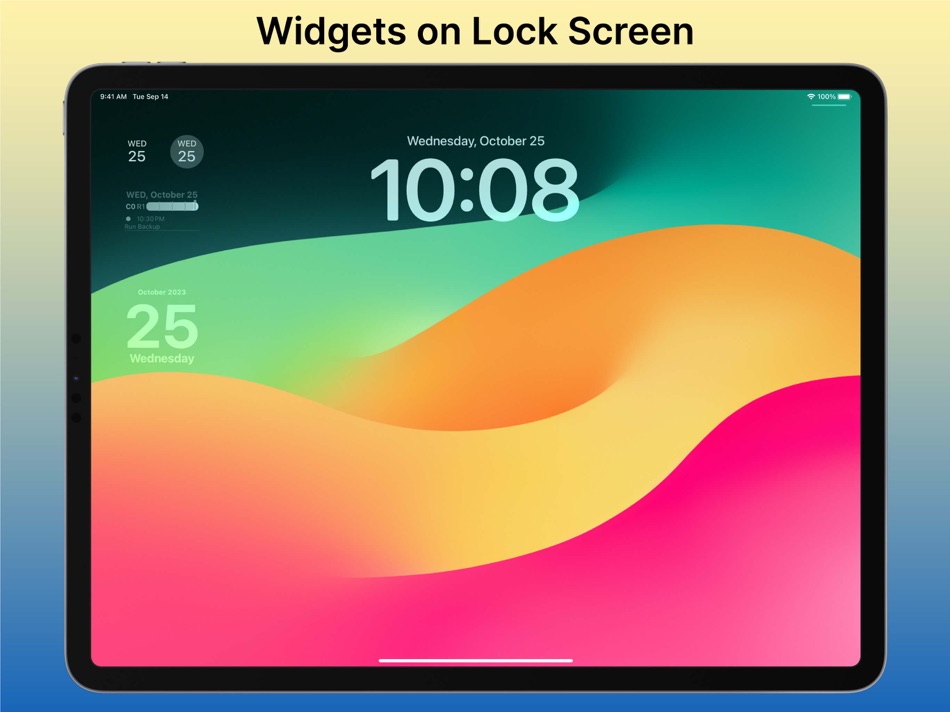
- Widgets on Home Screen, Lock Screen, iPhone’s StandBy
- For Apple Watch: Watch Face Complications & Smart Stack Widgets
- Widgets in Mac Notification Center and on Desktop
- Option to sync with Apple’s calendar and reminder app
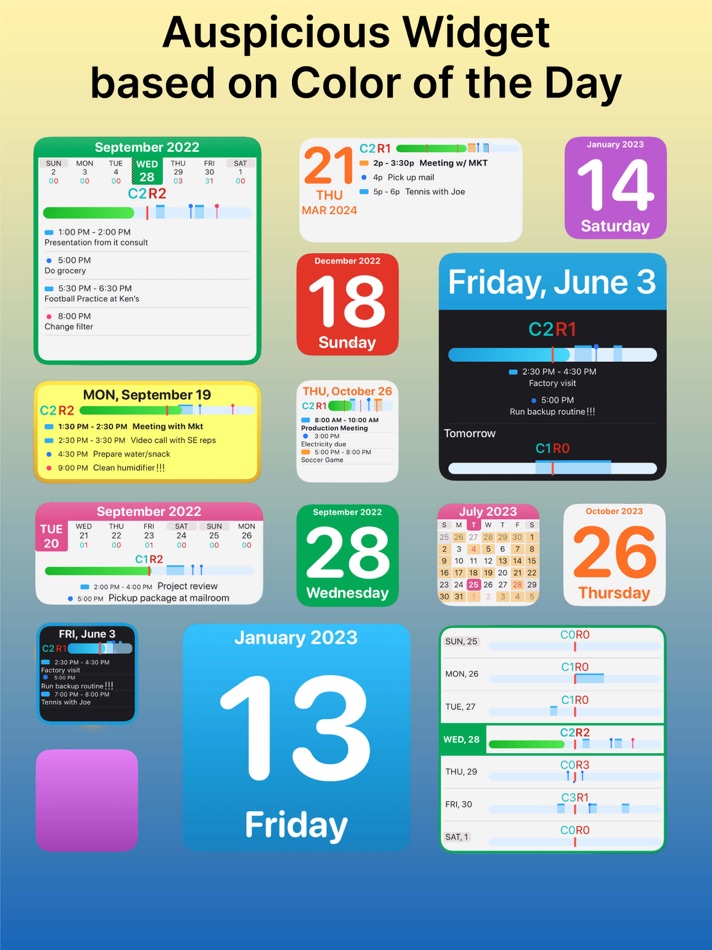
- Color of widgets are based on color of day
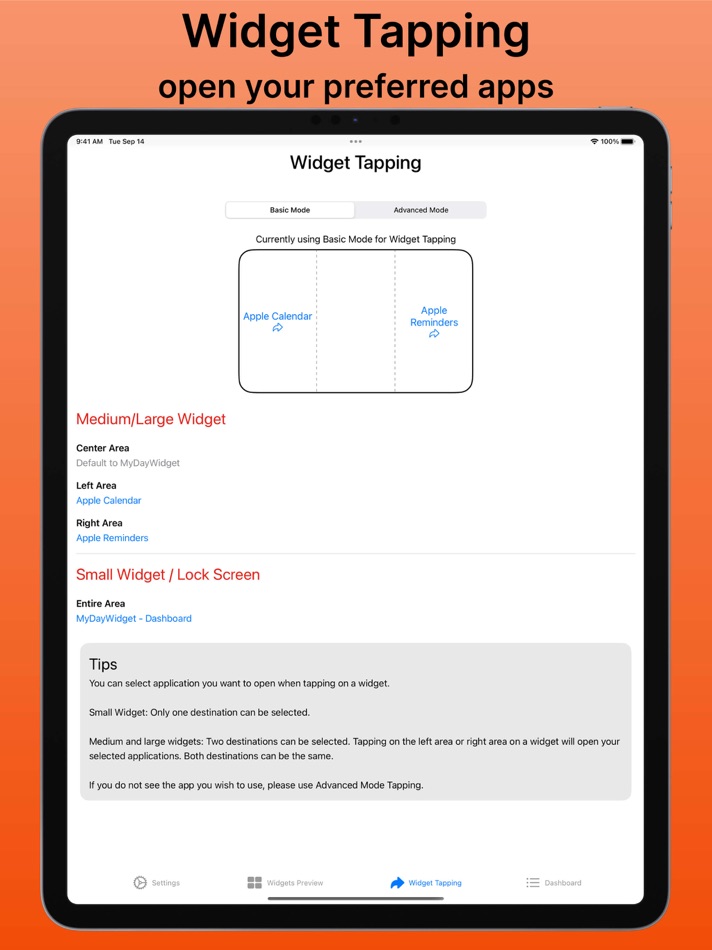
- Open your preferred app by tapping on the widget
- Busy Day Highlights
- Lots of customization to suit your preference
- 9 days free trial after which LIFETIME one-time purchase is required. Thank you.
A widget app that helps you stay on top of your schedule. With a day-color system, you will never miss what day is today. MyDayWidget is the only widget you need on your Home Screen!
*** IMPORTANT ***
MyDayWidget is free to download and comes with 9 days free trial period. During this free trial, you can use the app with full access to all available widgets. After that you would need to make a one-time LIFETIME purchase for continuing using the app with full access. No subscription, just one-time purchase.
- The app is a widget app that can integrate data from Apple’s Calendar and Reminder apps. No personal data is collected or shared by us.
- Universal Purchase supported: Buy once and use it on all of your devices - iPhone, iPad, Apple Watch, and Mac.
************
COLOR OF DAY
Know today’s date and day of week at a glance with day-color system. Color of the day is based on ancient astrological mythology. Wearing auspicious color for each day is believed to bring luck and success to self. And YES, decorate your devices with the right color is also important. :D
Monday – Yellow
Tuesday – Pink
Wednesday – Green
Thursday – Orange
Friday – Light Blue
Saturday – Purple
Sunday - Red
DAY PROGRESS BAR
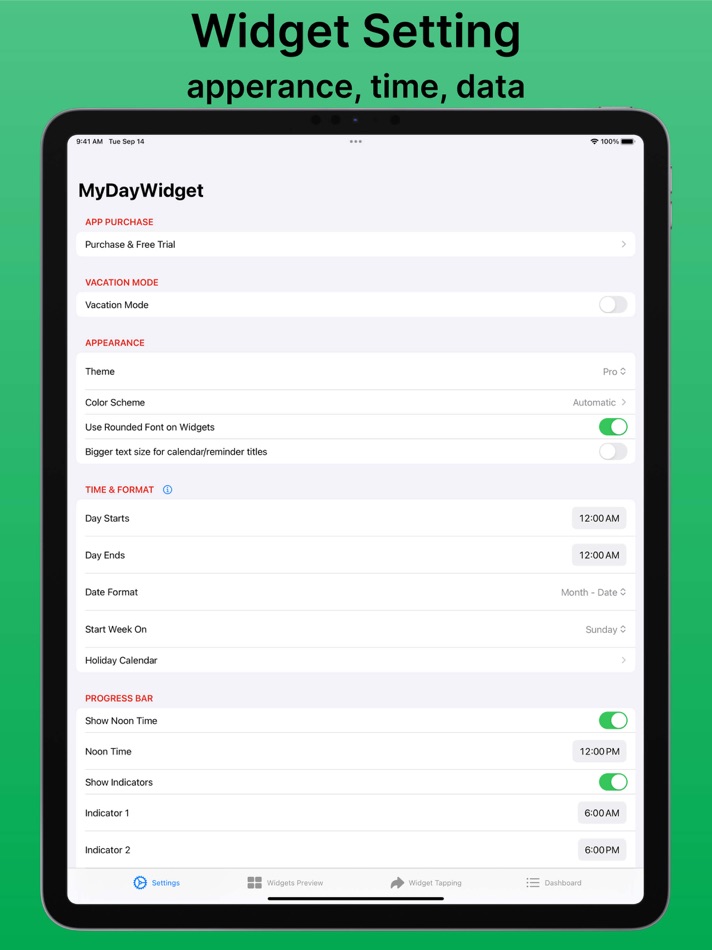
Go through your day with Day Progress Bar. Optionally (yet recommend) you can include your calendar and reminder data to be displayed on Day Progress Bar. Indicator bars help you visualize noon time and working hours.
GET MOTIVATED
With widget ‘Planner’, you can configure how you want to walk through day to day. Get motivated by seeing your movement through the day, 7 days a week. Have a sense of achievement.
CUSTOMIZATION
MyDayWidget offers several kinds of widgets to be added to your Home Screen & Lock Screen, Mac Notification Center, and watch face complications on Apple Watch. You use the app interface to set its appearances, select what data you want to include in the widgets. Dark mode is supported.
WIDGET TAPPING
MyDayWidget’s widget acts as a summary view of your day. Tapping on a widget can be configured to open your preferred calendar and reminder apps.
APPLE WATCH COMPLICATION
Offers several kinds of complications to suit your preference.
PRIVACY FIRST
MyDayWidget never collects or shares your information. The app retrieves your calendar & reminder data from your device and display them on the widget. Access Permission is required for Calendars, Reminders, and in some cases, Contacts.
Download MyDayWidget today and enjoy a colorful and productive home screen!
Thank you for supporting us.
Privacy Policy: https://mydaywidget.com/privacy-policy
ภาพหน้าจอ




มีอะไรใหม่
- เวอร์ชัน: 3.9.1
- อัปเดต:
- - Bugs fixed and performance improvements.
Thank you for using our app! We're constantly working to bring you new features and improvements to enhance your productivity.
If you have enjoyed using MyDayWidget, please consider supporting us by leaving a rating on the App Store. We greatly appreciate your support and feedback. Thank you.
ราคา
-
* การซื้อภายในแอพ - วันนี้: ฟรี
- ต่ำสุด: ฟรี
- มากที่สุด: ฟรี
ติดตามราคา
ผู้พัฒนา
- Boonyawat Laongthong
- แพลตฟอร์ม: macOS แอป (1)
- รายการ: 0 + 0
- แต้มแล: 2 + 22 ¡
- การจัดอันดับ: 0
- ความเห็น: 0
- ลดราคา: 0
- วิดีโอ: 0
- RSS: ติดตาม


การจัดอันดับ
0 ☹️
รายการ
0 ☹️
ความเห็น
แสดงรีวิวเป็นคนแรกเลย 🌟
ข้อมูลเพิ่มเติม
- เวอร์ชัน: 3.9.1
- หมวดหมู่:
macOS แอป›ประสิทธิภาพการผลิต - ระบบปฏิบัติการ:
Apple Watch,iPad,iPhone,macOS,macOS 16.6 และสูงกว่า - ขนาด:
16 Mb - ภาษาที่สนับสนุน:
Chinese,English,French,German,Italian,Japanese,Korean,Spanish - การจัดประเภทเนื้อหา:
4+ - Mac App Store คะแนนโดย:
4.6(22) - อัปเดต:
- วันที่วางจำหน่าย:
รายชื่อติดต่อ
- เว็บไซท์:
 https://mydaywidget.com
MyDayWidget - Calendar Widgets URL แบบสั้น: คัดลอกแล้ว!- 🌟 แชร์
- Mac App Store
คุณอาจชอบ
-
- My Password Book
- macOS แอป: ประสิทธิภาพการผลิต โดย: Proson Technologies
- $0.99
- รายการ: 2 + 2 การจัดอันดับ: 0 ความเห็น: 0
- แต้มแล: 13 + 2 (5.0) เวอร์ชัน: 3.7 My Password Book allows the user to access all their encrypted passwords and personal information using their normal Apple device login method, Passcode , TouchID or FaceID . Use My ... ⥯
-
- Calendar 366 II
- macOS แอป: ประสิทธิภาพการผลิต โดย: Vincent Miethe
- $14.99
- รายการ: 4 + 8 การจัดอันดับ: 0 ความเห็น: 0
- แต้มแล: 9 + 0 เวอร์ชัน: 2.15.7 For all your plans! Appointments and to-dos, meetings and deadlines, birthdays and dates - make the most of your time with Calendar 366! Anything a calendar can do... Calendar 366 can ... ⥯
-
- Calendar Daily Planner: EzyCal
- macOS แอป: ประสิทธิภาพการผลิต โดย: AppYogi Software
- $9.99
- รายการ: 0 + 1 การจัดอันดับ: 0 ความเห็น: 0
- แต้มแล: 17 + 0 เวอร์ชัน: 2.4 EzyCal calendar is a system of organizing days for social, religious, commercial or administrative purposes. It is a Gregorian calendar with natural language events and reminder ... ⥯
-
- Day Progress
- macOS แอป: ประสิทธิภาพการผลิต โดย: Sindre Sorhus
- $4.00
- รายการ: 1 + 2 การจัดอันดับ: 0 ความเห็น: 0
- แต้มแล: 4 + 0 เวอร์ชัน: 2.0.3 Keep track of the time remaining in your day, right in the menu bar. Use this as a visual cue to stay motivated and manage time more efficiently. You can customize your day's start and ⥯
-
- Widget X : Desktop Widgets
- macOS แอป: ประสิทธิภาพการผลิต โดย: DigitalDream Apps LLC
- ฟรี
- รายการ: 0 + 0 การจัดอันดับ: 0 ความเห็น: 0
- แต้มแล: 1 + 0 เวอร์ชัน: 1.3.1 Make your Mac more personalized, efficient, and inspiring. Widgets brings a collection of powerful and beautifully designed mini-apps to your desktop and menu bar. Whether you want to ... ⥯
-
- Calendar. Simple Calendars
- macOS แอป: ประสิทธิภาพการผลิต โดย: Vitaly Kuz'menko
- $1.99
- รายการ: 0 + 1 การจัดอันดับ: 0 ความเห็น: 0
- แต้มแล: 3 + 2 (5.0) เวอร์ชัน: 3.0.2 Cross-Platform Convenience: Just Calendar seamlessly integrates with your Mac, iPhone, and iPad, providing a consistent and user-friendly calendar experience across all your Apple ... ⥯
-
- File Rename Widget
- macOS แอป: ประสิทธิภาพการผลิต โดย: Keen Widget
- * ฟรี
- รายการ: 0 + 0 การจัดอันดับ: 0 ความเห็น: 0
- แต้มแล: 2 + 0 เวอร์ชัน: 1.04 Stop wasting time renaming files one by one. File Rename Widget is a powerful tool that lets you rename hundreds of files and folders in seconds. Simply drag and drop your files, ... ⥯
-
- Calendar Focus Sync
- macOS แอป: ประสิทธิภาพการผลิต โดย: Andrew Glago
- ฟรี
- รายการ: 0 + 1 การจัดอันดับ: 0 ความเห็น: 0
- แต้มแล: 1 + 0 เวอร์ชัน: 0.6 MacOS app that automatically activates Focus Mode when calendar events begin. It's useful for blocking out distractions for meetings, deep work, or other activities. Features Sync With ⥯
-
- My Notes AI: AI Note Taker
- macOS แอป: ประสิทธิภาพการผลิต โดย: With Bytes
- ฟรี
- รายการ: 0 + 0 การจัดอันดับ: 0 ความเห็น: 0
- แต้มแล: 0 + 19 (3.2) เวอร์ชัน: 6.0 Meet My Notes AI, your ultimate AI note-taking assistant. Whether you re in a meeting, attending a class, or watching videos, My Notes AI works seamlessly to transcribe, summarize, and ⥯
-
- My Applications
- macOS แอป: ประสิทธิภาพการผลิต โดย: Sergii Kryvoblotskyi
- $0.99
- รายการ: 1 + 1 การจัดอันดับ: 0 ความเห็น: 0
- แต้มแล: 6 + 0 เวอร์ชัน: 1.0.2 My Applications is a simple yet powerful applications launcher and categorizer. It shows all the apps installed on the system in a convenient way: grouped by vendors, categories, and ... ⥯
-
- My Plans: Daily Planner
- macOS แอป: ประสิทธิภาพการผลิต โดย: 哲铭 葛
- ฟรี
- รายการ: 0 + 0 การจัดอันดับ: 0 ความเห็น: 0
- แต้มแล: 0 + 2 (4.5) เวอร์ชัน: 1.5 My Plans is your ultimate daily task management tool, helping you stay focused and efficient. - Focus on Today: Track current time periods and easily monitor weekly, monthly, and ... ⥯
-
- Calendar for Google Calendar
- macOS แอป: ประสิทธิภาพการผลิต โดย: Fokusek Enterprise
- * ฟรี
- รายการ: 0 + 0 การจัดอันดับ: 0 ความเห็น: 0
- แต้มแล: 1 + 0 เวอร์ชัน: 2.2.1 Calendar for Google Calendar is your best choice when you want to perform operations with your Google Calendar account. Using the Calendar for Google Calendar you will unleash the full ⥯
-
- My INFO i n d e x
- macOS แอป: ประสิทธิภาพการผลิต โดย: South Wall Corporation
- * ฟรี
- รายการ: 0 + 0 การจัดอันดับ: 0 ความเห็น: 0
- แต้มแล: 0 + 0 เวอร์ชัน: 2.3 My INFO i n d e x is a container for all your information. You can save Notes, PDF's, Photos, Files, Contacts, Websites and many other types of information in one place. It's easy to ... ⥯
-
- My Twins - AI Chatbot
- macOS แอป: ประสิทธิภาพการผลิต โดย: Hanva,LLC
- * ฟรี
- รายการ: 0 + 0 การจัดอันดับ: 0 ความเห็น: 0
- แต้มแล: 0 + 1 (2.0) เวอร์ชัน: 2.2 My Twins - amazing AI app that allows you to chat and voice converse with powerful AI. This app is for developers and content creators to enhance their proficiency in large language ... ⥯