
| Dezvoltator: | ALAN FERREIRA DE LIMA FILHO (3) | ||
| Preț: | $4.99 | ||
| Clasificări: | 0 | ||
| Recenzii: | 0 Scrie o recenzie | ||
| Comentarii: | 0 Postează comentariu | ||
| Liste: | 0 + 0 | ||
| Punctele: | 0 + 0 ¡ | ||
| Mac App Store | |||
Descriere

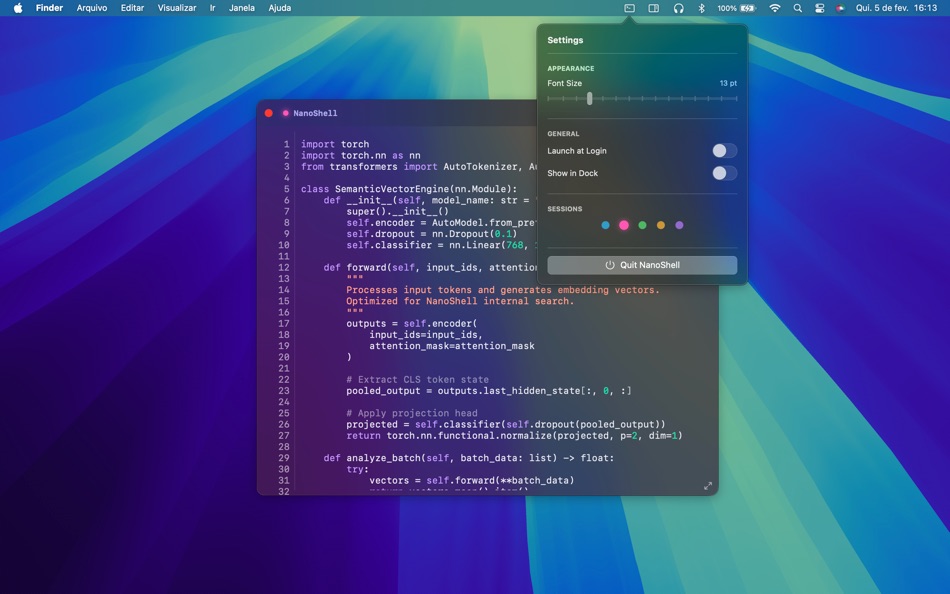
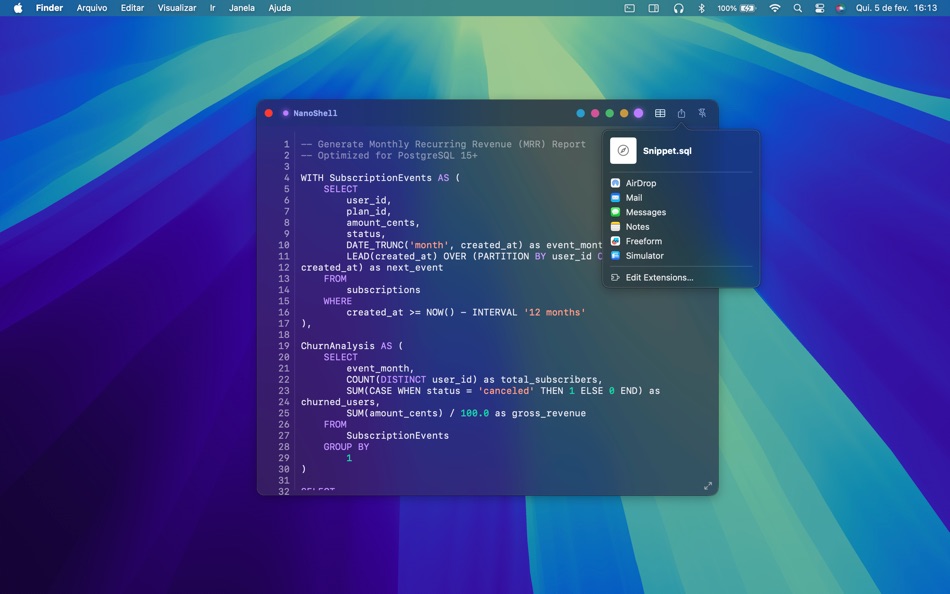
Unlike standard notes apps, NanoShell is built for code. It features 5 fixed, persistent sessions (tabs) that are always accessible from your menu bar or dock. Perfect for cleaning JSON, storing snippets, or drafting logic before committing.
WHY DEVELOPERS LOVE NANOSHELL:
5 Fixed Sessions
No infinite tabs to get lost in. Five dedicated spaces force you to focus on what matters now.
Syntax Highlighting
Automatic highlighting for 17+ languages including Swift, Python, JSON, JavaScript, HTML, CSS, C#, and more. Works instantly.
Always Ready
Lives in your Dock or Menu Bar. Drag and drop text in, edit quickly with a monospaced font, and drag it out to your IDE.
Native Performance
Built with Swift 6. Lightweight, instant startup, and respects your system's Dark Mode.
Stop cluttering your IDE with temporary files. Use NanoShell.
Ad
Capturi de ecran


Ce este nou
- Versiune: 1.0
- Actualizată:
Preț
- Azi: $4.99
- Minim: $4.99
- Maxim: $4.99
Urmăriți prețurile
Ad
Dezvoltator
- ALAN FERREIRA DE LIMA FILHO
- Platforme: macOS Aplicații (3)
- Liste: 0 + 0
- Punctele: 0 + 0 ¡
- Clasificări: 0
- Recenzii: 0
- Reduceri: 0
- Videoclipuri: 0
- RSS: Abonează-te
Punctele (0)
0 ☹️
Clasificări (0)
0 ☹️
Liste (0)
0 ☹️
- NanoShell
Recenzii (0)
Fii primul care a revizuit 🌟
Comentarii (0)
Alăturați-vă discuției
Fii primul care comentează.
Informații suplimentare
- Versiune: 1.0
- Categorie:
macOS Aplicații›Productivitate - SO:
macOS,macOS 14.6 sau o versiune ulterioară - Mărimea:
2 Mb - Limbă acceptată:
Arabic,Chinese,Dutch,English,French,German,Hindi,Indonesian,Italian,Japanese,Korean,Polish,Portuguese,Russian,Spanish,Swedish,Turkish,Vietnamese - Evaluarea conținutului:
4+ - Mac App Store Evaluare:
0 - Actualizată:
- Data lansării:
Agendă
 https://www.alanferreira.com/en/nanoshellNanoShell Adresă URL scurtă: Copiate!
- 🌟 Trimite
- Mac App Store
S-ar putea sa-ti placa si
-
- Nano Sticky
- macOS Aplicații: Productivitate De: Chaleepa Mallawa
- $4.99
- Liste: 0 + 0 Clasificări: 0 Recenzii: 0
- Punctele: 0 + 0 Comentarii: 0 Versiune: 1.0 Nano Sticky brings the simplicity of paper sticky notes to your Mac desktop lightweight, beautiful, and always within reach. Capture Ideas Instantly Create colorful notes that float ... ⥯
-
- Mobile-VPN
- macOS Aplicații: Productivitate De: NANO ELECTRONICS RESEARCH MUHENDISLIK ARASTIRMA GELISTIRME LIMITED SIRKETI
- Gratuit
- Liste: 0 + 0 Clasificări: 0 Recenzii: 0
- Punctele: 0 + 0 Comentarii: 0 Versiune: 1.0 Mobile VPN - Your Essential Productivity Companion Stay productive while staying secure. Mobile VPN is designed for professionals who need reliable, fast, and secure internet access ... ⥯
-
- Lifofinn
- macOS Aplicații: Productivitate De: 斌 虞
- * $14.99
- Liste: 1 + 2 Clasificări: 0 Recenzii: 0
- Punctele: 19 + 0 Comentarii: 0 Versiune: 2.1.0 Ultra small, strong will. Enjoy editing code with an ultra small code editor. Fav features: * Immediately syntax checking, run code and debugging without complex boring configurations. ⥯
-
- LaunchPalette – App Switcher
- macOS Aplicații: Productivitate De: Seungwoo Choe
- * Gratuit
- Liste: 0 + 3 Clasificări: 0 Recenzii: 0
- Punctele: 13 + 0 Comentarii: 0 Versiune: 1.12 Switch between apps and projects in milliseconds, without breaking your flow. LaunchPalette brings keyboard-first navigation to macOS, letting you instantly jump to any app, project, ... ⥯
-
- iShot-ScreenShot Recording OCR
- macOS Aplicații: Productivitate De: 宁波上官科技有限公司
- * Gratuit
- Liste: 0 + 1 Clasificări: 0 Recenzii: 0
- Punctele: 8 + 0 Comentarii: 0 Versiune: 2.6.5 [Native support for Apple M series and Intel chips] Screenshot/Long Screenshot/Shell Screenshot/Texture/Annotation/Color Picking/Screen Recording/Recording/OCR/Screenshot Translation ... ⥯
-
- Marked 2 - Markdown Preview
- macOS Aplicații: Productivitate De: Brett Terpstra
- * $13.99
- Liste: 1 + 5 Clasificări: 0 Recenzii: 0
- Punctele: 4 + 0 Comentarii: 0 Versiune: 2.6.46 Marked 2 is a previewer (*not an editor*) for Markdown, MultiMarkdown and other text markup languages. It updates live every time you save your document in your favorite text editor, ... ⥯
- -50%
- Action
- macOS Aplicații: Productivitate De: Jan Valta
- $1.99
$3.99-50% - Liste: 2 + 0 Clasificări: 0 Recenzii: 0
- Punctele: 8 + 0 Comentarii: 0 Versiune: 1.3.0 Action launcher that speeds up work with your Mac. Key Features Open URL Actions - Actions for search from your favorite website. AppleScript Actions - Actions to run an AppleScript ... ⥯
-
- Xactions - Automation Executor
- macOS Aplicații: Productivitate De: Shanghai Troll Technology Co., Ltd.
- $9.99
- Liste: 0 + 2 Clasificări: 0 Recenzii: 0
- Punctele: 11 + 0 Comentarii: 0 Versiune: 2.5.3 Using Xactions app can help you free your hands from repetitive and boring actions. - Xactions can set the timing of keystrokes and set the number of repetitions and intervals. - ... ⥯
-
- iCircuit
- macOS Aplicații: Productivitate De: Krueger Systems, Inc.
- * $12.99
- Liste: 1 + 2 Clasificări: 0 Recenzii: 0
- Punctele: 0 + 0 Comentarii: 0 Versiune: 1.15 iCircuit is the easiest way to design and experiment with circuits. Its advanced simulation engine can handle both analog and digital circuits, Arduino microcontrollers, and features ... ⥯
-
- Auto Mouse
- macOS Aplicații: Productivitate De: Jiulong Zhao
- $9.99
- Liste: 0 + 1 Clasificări: 0 Recenzii: 0
- Punctele: 7 + 0 Comentarii: 0 Versiune: v1.36 Auto Mouse simulates mouse clicking automatically, topmost accessing all menus, and works above fullscreen games & apps! Yes, it works with Full Screen Apps & Games. features: v1.20 - ... ⥯
- -100%
- SpeedLauncher
- macOS Aplicații: Productivitate De: Nicholas Fay
- ▼ Gratuit
$1.99-100% - Liste: 0 + 1 Clasificări: 0 Recenzii: 0
- Punctele: 7 + 0 Comentarii: 0 Versiune: 1.6.2 SpeedLauncher is a lightweight menu bar utility designed to streamline access to your most-used applications, Apple Shortcuts, and folders. With a single customizable keyboard ... ⥯
-
- Nozzle Orientation Calculator
- macOS Aplicații: Productivitate De: Imran Pinjara
- $2.99
- Liste: 0 + 0 Clasificări: 0 Recenzii: 0
- Punctele: 0 + 0 Comentarii: 0 Versiune: 1.0 Nozzle Orientation Calculator is a professional engineering tool designed to calculate accurate nozzle orientation and marking dimensions for pressure vessels, storage tanks, and ... ⥯
-
- Manager for Arduino
- macOS Aplicații: Productivitate De: Fabrizio Boco
- * $10.99
- Liste: 0 + 0 Clasificări: 0 Recenzii: 0
- Punctele: 0 + 0 Comentarii: 0 Versiune: 23.2.0 Supported Boards: UNO R4 WiFi, UNO, Nano, MEGA2560, ESP32/8622, Zero, MKR1000, Nano 33 IoT, Teensy e nRF52 BLE, Raspberry Pico Pi W (also using SDK). ESP32, Raspberry Pico and Pico W ... ⥯
-
- New File Menu Lite
- macOS Aplicații: Productivitate De: 兰桂 吴
- Gratuit
- Liste: 1 + 0 Clasificări: 0 Recenzii: 0
- Punctele: 2 + 0 Comentarii: 0 Versiune: 1.8.4 New File Menu allows you to create new files quickly via the Finder context menu. New File Menu is simply the coolest way to create a new file on the macOS platform, you can right ... ⥯