
| Developer: | Matthew Grdinic (3) | ||
| Price: | $8.99 | ||
| Rankings: | 0 | ||
| Reviews: | 0 Write a Review | ||
| Lists: | 0 + 0 | ||
| Points: | 0 + 0 ¡ | ||
| Mac App Store | |||
Description

Key Features:
Professional Video Capture
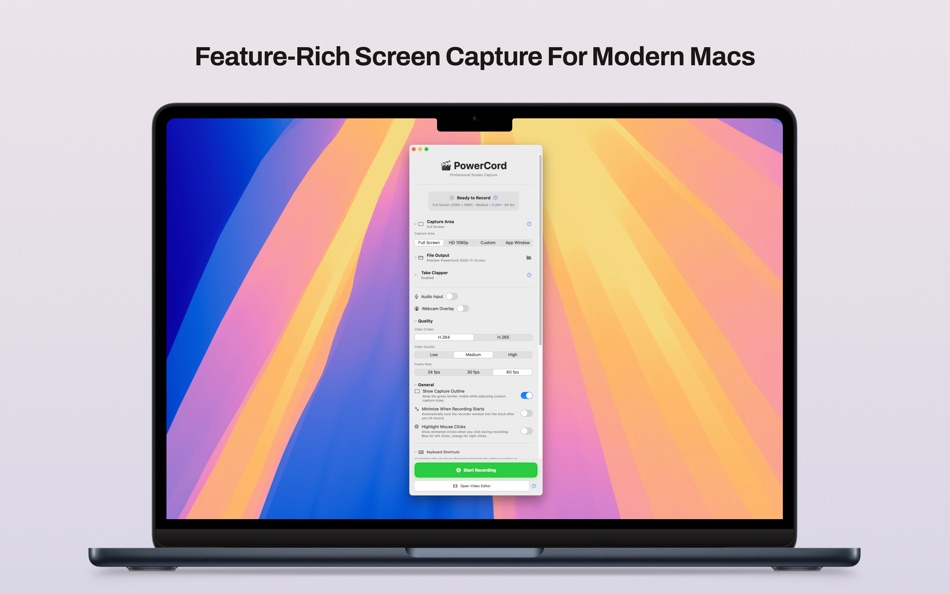
• Record your entire screen or custom capture areas in stunning HD
• H.264 and H.265 (HEVC) codec support with adjustable quality presets
• Smooth 60fps recording for crystal-clear motion
Studio-Quality Audio
• Capture system audio and microphone simultaneously
• Advanced audio quality controls with AAC encoding
• Sample rates up to 48kHz for professional sound
• Choose from multiple input devices
Webcam Integration
• Picture-in-picture webcam overlay with customizable positioning
• Choose from multiple frame shapes: circle, square, or tall oval
• Multiple border effects
• Real-time preview of your webcam feed
• Webcam priority mode: Quickly toggle webcam to full screen and back again!
Flexible Recording Options
• Preset capture areas (Full Screen, 1080p HD, or Custom)
• Live border overlay shows exactly what you're recording
• Customizable file naming with date/time stamps
• Automatic file organization to your preferred location
Built for Creators
• Clean, intuitive interface that stays out of your way
• Start recording with a single click
• Real-time preview of all capture settings
• Native macOS design with support for Dark Mode
Perfect For:
• YouTube creators and streamers
• Online course instructors and educators
• Software developers creating tutorials
• Product demos and presentations
• Customer support and training videos
• Game streaming and commentary
**Why Choose PowerCord?**
Unlike basic screen recorders, PowerCord offers professional-grade features without the complexity. Every setting has been carefully crafted to give you maximum creative control while maintaining an elegant, easy-to-use interface. Whether you're creating your first tutorial or your thousandth, PowerCord adapts to your needs.
Screenshots


What's new
- Version: 1.0
- Updated:
Price History
- Today: $8.99
- Minimum: $8.99
- Maximum: $8.99
Track prices
Developer
- Matthew Grdinic
- Platforms: iOS Apps (1) macOS Apps (2)
- Lists: 1 + 0
- Points: 1 + 6 ¡
- Rankings: 0
- Reviews: 0
- Discounts: 0
- Videos: 0
- RSS: Subscribe
Points
0 ☹️
Rankings
0 ☹️
Lists
0 ☹️
Reviews
Be the first to review 🌟
Additional Information
- Version: 1.0
- Category:
macOS Apps›Productivity - OS:
macOS,macOS 15.0 and up - Size:
2 Mb - Supported Languages:
English - Content Rating:
4+ - Mac App Store Rating:
0 - Updated:
- Release Date:
Contacts
- Website:
 https://powercord.rackforms.com/
«PowerCord: Screen & Camera» is a Productivity app for macOS, developed by «Matthew Grdinic». It was first released on and last updated on . The lowest historical price was $8.99, and the highest was $8.99. This app has not yet received any ratings or reviews on AppAgg. Available languages: English. AppAgg continuously tracks the price history, ratings, and user feedback for «PowerCord: Screen & Camera». Subscribe to this app or follow its RSS feed to get notified about future discounts or updates.
PowerCord: Screen & Camera Short URL: Copied!- 🌟 Share
- Mac App Store
You may also like
-
- Screen Recorder by Omi
- macOS Apps: Productivity By: JingZhi He
- * Free
- Lists: 1 + 0 Rankings: 0 Reviews: 0
- Points: 10 + 0 Version: 1.3.22 Screen Recorder for Mac is a powerful tool that allows you to quickly and easily capture your computer screen in high-quality video format. With just one click, you can record the full ⥯
-
- Screen Mirror: Cast Anywhere
- macOS Apps: Productivity By: Erik Wegener
- $2.99
- Lists: 0 + 0 Rankings: 0 Reviews: 0
- Points: 0 + 0 Version: 1.4 Screen Mirror makes your screen accessible on any device in your network that has a web browser. Simply start Screen Mirror and open the URL on your other device, and you will see a ... ⥯
-
- Screen Recorder - Pro Lite
- macOS Apps: Productivity By: Alessandro Gimenes Ferri
- $2.99
- Lists: 1 + 0 Rankings: 0 Reviews: 0
- Points: 7 + 0 Version: 4.66 Record your screen, camera, and mic together or separately perfect for tutorials, actions, and seamless PiP. Capture Screen and Camera, Together or Separately! Elevate your content ... ⥯
-
- Screen Bandit for Mac OS X
- macOS Apps: Productivity By: Milos Rankovic
- Free
- Lists: 0 + 0 Rankings: 0 Reviews: 0
- Points: 0 + 0 Version: 1.0 Ever wondered why floating windows do not really float? With Screen Bandit anything can be made to actually float, glide, hover, move out of your way, yet remain always visible. To see ⥯
-
- Screen Barcode Detector
- macOS Apps: Productivity By: Masaharu Tsukamoto
- $0.99
- Lists: 1 + 0 Rankings: 0 Reviews: 0
- Points: 4 + 0 Version: 1.0.1 Screen Barcode Detector is an application that scans QR and barcode displayed on the screen. How to use Launch this application and display a QR or barcode on the screen, and it will ... ⥯
-
- Screen Tint
- macOS Apps: Productivity By: FIPLAB Ltd
- $2.99
- Lists: 0 + 1 Rankings: 0 Reviews: 0
- Points: 0 + 0 Version: 1.0.5 Screen Tint is a handy utility app that is designed to reduce the brightness of your Mac s screen, proving particularly useful for users with sensitive eyes and for those that wish to ... ⥯
-
- Screen-Record
- macOS Apps: Productivity By: 育平 姚
- $4.99
- Lists: 0 + 0 Rankings: 0 Reviews: 0
- Points: 1 + 0 Version: 3.1 Screen-Record is a powerful screen record app. It can screen record and support edit the video. Select Area Auto-identify windows, menus etc Magnifying glass help you accurate select ... ⥯
-
- Screen Mirror to TV & Device
- macOS Apps: Productivity By: Raymond NG
- * Free
- Lists: 1 + 0 Rankings: 0 Reviews: 0
- Points: 3 + 0 Version: 2.3.4 Mirror your Mac's screen to multiple devices simultaneously with virtually zero-second delay! You can mirror your Mac's screen to multiple devices simultaneously. Any digital device ... ⥯
-
- Screen Size Tools
- macOS Apps: Productivity By: 君 许
- * Free
- Lists: 1 + 0 Rankings: 0 Reviews: 0
- Points: 1 + 0 Version: 5.6 Introducing Screen Size Tools, the ultimate utility app designed to enhance your Mac experience with a suite of powerful and convenient features. Whether you're a multitasker, a ... ⥯
-
- Screen Cursor
- macOS Apps: Productivity By: 意 田
- Free
- Lists: 0 + 0 Rankings: 0 Reviews: 0
- Points: 1 + 0 Version: 1.2 The screen cursor is a tool to highlight the cursor position. Make cursor movement and click clear at a glance. It is suitable for use in conferences, teaching, video tutorial ... ⥯
-
- Screen Video & Webcam Recorder
- macOS Apps: Productivity By: Tempo Labs, LLC
- * Free
- Lists: 0 + 0 Rankings: 0 Reviews: 0
- Points: 0 + 0 Version: 1.1.7 Handy screen recorder for any purpose. Record calls, online lectures or webinars with ease. Customize the look and make recording even more professional. Essential features: - ... ⥯
-
- Screen text getter
- macOS Apps: Productivity By: AKATSUKI, LIMITED LIABILITY CO.
- $4.99
- Lists: 0 + 0 Rankings: 0 Reviews: 0
- Points: 0 + 0 Version: 1.0.4 Extract text by OCR from the screenshot of the screen. 1.Press Take a screenshot button 2.Select where you want to extract the text 3.Extracts text that can be copied to the clipboard ... ⥯
-
- Camera Translator language
- macOS Apps: Productivity By: luca calciano
- $0.99
- Lists: 0 + 0 Rankings: 0 Reviews: 0
- Points: 1 + 0 Version: 1.4 Try this year s latest novelty! This app recognizes the objects in the photos you take and translates them into the language you want. An advanced photo recognition system and a ... ⥯
-
- Vidline Screen Recorder Master
- macOS Apps: Productivity By: Vidline Inc.
- * Free
- Lists: 0 + 0 Rankings: 0 Reviews: 0
- Points: 1 + 0 Version: 1.7.5 Vidline is a powerful screen recorder for you to record screen and cam on Mac easily. You can record screen with camera and audio, share video notes instantly with links, leave ... ⥯