
| ผู้พัฒนา: | Tennyson McCalla (1) | ||
| ราคา: | ฟรี | ||
| การจัดอันดับ: | 0 | ||
| ความเห็น: | 0 เขียนความเห็น | ||
| รายการ: | 0 + 0 | ||
| แต้มแล: | 0 + 0 ¡ | ||
| Mac App Store | |||
คำอธิบาย

Features:
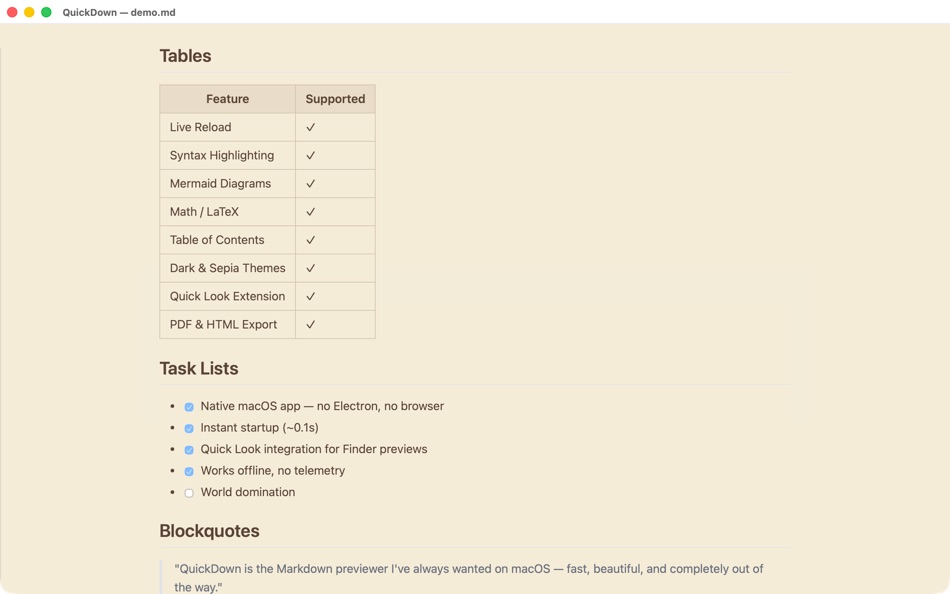
• Syntax highlighting for code blocks
• Mermaid diagram rendering
• Math and LaTeX support
• Table of contents navigation
• Light, dark, and sepia themes
• Search inside a markdown file for text
• Quick Look integration. Preview Markdown files from Finder without opening the app
• Live reload. Edits in your text editor appear in real time
• Export to PDF and HTML
QuickDown is built for developers, writers, and anyone who works with Markdown daily. It stays out of your way and just shows you your content.
Ad
ภาพหน้าจอ




มีอะไรใหม่
- เวอร์ชัน: 0.4.0
- อัปเดต:
ราคา
- วันนี้: ฟรี
- ต่ำสุด: ฟรี
- มากที่สุด: ฟรี
ติดตามราคา
Ad
ผู้พัฒนา
- Tennyson McCalla
- แพลตฟอร์ม: macOS แอป (1)
- รายการ: 0 + 0
- แต้มแล: 0 + 0 ¡
- การจัดอันดับ: 0
- ความเห็น: 0
- ลดราคา: 0
- วิดีโอ: 0
- RSS: ติดตาม
แต้มแล
0 ☹️
การจัดอันดับ
0 ☹️
รายการ
0 ☹️
- QuickDown
ความเห็น
แสดงรีวิวเป็นคนแรกเลย 🌟
ข้อมูลเพิ่มเติม
- เวอร์ชัน: 0.4.0
- หมวดหมู่:
macOS แอป›ประสิทธิภาพการผลิต - ระบบปฏิบัติการ:
macOS,macOS 14.0 และสูงกว่า - ขนาด:
1 Mb - การจัดประเภทเนื้อหา:
4+ - Mac App Store คะแนนโดย:
0 - อัปเดต:
- วันที่วางจำหน่าย:
QuickDown URL แบบสั้น: คัดลอกแล้ว!- 🌟 แชร์
- Mac App Store
คุณอาจชอบ
-
- Quick Notes
- macOS แอป: ประสิทธิภาพการผลิต โดย: loay setrak
- $0.99
- รายการ: 0 + 0 การจัดอันดับ: 0 ความเห็น: 0
- แต้มแล: 0 + 0 เวอร์ชัน: 2.0.1 Quick Notes is a simple note taking App and Menu bar widget Features: - 15 Notes - Today View Widget - 13 Font Colours - 27 Font Sizes - Text Alignment options - iCloud Sync - App and ... ⥯
-
- Quick Join: Google Meet & Zoom
- macOS แอป: ประสิทธิภาพการผลิต โดย: Erik Wegener
- ฟรี
- รายการ: 0 + 1 การจัดอันดับ: 0 ความเห็น: 0
- แต้มแล: 4 + 0 เวอร์ชัน: 1.7.1 Quick Join lets you join your meetings faster - no more digging around for that invite link! Quick Join retrieves the upcoming events over the next seven days from your calendar and ... ⥯
-
- Quick Blackout Redactor
- macOS แอป: ประสิทธิภาพการผลิต โดย: Teus Benschop
- ฟรี
- รายการ: 0 + 0 การจัดอันดับ: 0 ความเห็น: 0
- แต้มแล: 2 + 0 เวอร์ชัน: 1.01 Use Quick Blackout Redactor to quickly and safely black out certain parts of your images and PDF files. Drag and drop an image file or a PDF file into the application. Use the mouse to ⥯
-
- Quick Reminder: ADHD-friendly
- macOS แอป: ประสิทธิภาพการผลิต โดย: Digital Hole Pvt. Ltd.
- $1.99
- รายการ: 0 + 1 การจัดอันดับ: 0 ความเห็น: 0
- แต้มแล: 6 + 0 เวอร์ชัน: 1.0 Quick Reminder is a fast, simple menu bar app designed to help you stay on track throughout the day. When a task is due, it shows a full-screen reminder that appears above all other ... ⥯
-
- Quick Note
- macOS แอป: ประสิทธิภาพการผลิต โดย: Diigo Inc.
- ฟรี
- รายการ: 0 + 1 การจัดอันดับ: 0 ความเห็น: 0
- แต้มแล: 2 + 0 เวอร์ชัน: 1.3.11 Quick Note is especially designed for lightweight note-taking. 【Quick to add and edit 】 Add and edit note in the app 【Quick to search 】 Instant search for all notes 【Quick to access ... ⥯
-
- Quick Capture - Markdown notes
- macOS แอป: ประสิทธิภาพการผลิต โดย: Pradeep Burugu
- * ฟรี
- รายการ: 0 + 0 การจัดอันดับ: 0 ความเห็น: 0
- แต้มแล: 0 + 0 เวอร์ชัน: 1.6 Quick Capture - Markdown Notes It's an app designed for taking notes throughout your day in markdown files, allowing you to capture notes instantly from anywhere on macOS. You don't ... ⥯
-
- Quick Apps Launcher
- macOS แอป: ประสิทธิภาพการผลิต โดย: Harshad Jadav
- $0.99
- รายการ: 0 + 0 การจัดอันดับ: 0 ความเห็น: 0
- แต้มแล: 2 + 0 เวอร์ชัน: 1.3 Quick App Launcher Open your favorite Mac apps instantly Quick App Launcher helps you launch apps faster using custom keyboard shortcuts. Stop digging through folders or Dock open what ⥯
-
- Quick Sticky Notes
- macOS แอป: ประสิทธิภาพการผลิต โดย: Prakash Joshi
- * ฟรี
- รายการ: 0 + 0 การจัดอันดับ: 0 ความเห็น: 0
- แต้มแล: 1 + 0 เวอร์ชัน: 1.32 Quick Sticky Notes brings modern note-taking to your Mac. Create floating notes that stay visible while you work. KEY FEATURES: Always-on-top notes Beautiful color themes Markdown ... ⥯
-
- Quick Translate - Fast & Smart
- macOS แอป: ประสิทธิภาพการผลิต โดย: Veysel Bozkurt
- * ฟรี
- รายการ: 0 + 0 การจัดอันดับ: 0 ความเห็น: 0
- แต้มแล: 0 + 0 เวอร์ชัน: 1.4 Quick Translator lives quietly in your menu bar, ready the moment you need it. Press Cmd+C twice on any text, anywhere on your Mac, and the translation appears instantly. No need to ... ⥯
-
- Quick App Launcher (QAL) Lite
- macOS แอป: ประสิทธิภาพการผลิต โดย: Baser Kandehir
- ฟรี
- รายการ: 0 + 0 การจัดอันดับ: 0 ความเห็น: 0
- แต้มแล: 1 + 0 เวอร์ชัน: 1.4.9 Quick App Launcher (QAL) is a fast, minimalistic, customizable app launcher. There are 2 versions available: QAL Lite, the free version, has the core functionality and then some. QAL ... ⥯
-
- Quick Note Taking – Type
- macOS แอป: ประสิทธิภาพการผลิต โดย: Papercones Inc.
- * ฟรี
- รายการ: 1 + 1 การจัดอันดับ: 0 ความเห็น: 0
- แต้มแล: 11 + 0 เวอร์ชัน: 1.5.1 Type lets you quickly capture notes from anywhere. Type does quick note-taking better than Quick Notes Justin Pot, Lifehacker Being able to quickly note without being taken out of my ... ⥯
-
- Quick Switcher-Set Resolution
- macOS แอป: ประสิทธิภาพการผลิต โดย: 雅 田
- $1.99
- รายการ: 1 + 1 การจัดอันดับ: 0 ความเห็น: 0
- แต้มแล: 10 + 0 เวอร์ชัน: 1.4.2 Use Quick Switcher to hide desktop icons with one click, prevent computer from sleeping, modify computer screen resolution (support HIDPI (Retina) and non-HIPID (non-Retina) settings), ⥯
-
- Quick Launcher - Easy Launch
- macOS แอป: ประสิทธิภาพการผลิต โดย: 经纬 宛
- ฟรี
- รายการ: 2 + 1 การจัดอันดับ: 0 ความเห็น: 0
- แต้มแล: 3 + 0 เวอร์ชัน: 1.1 Are you upset about the messy icons on the Dock? Quick Launcher can solve this problem very well. Place a floating window on your desktop, add "applications, system preferences, ... ⥯
-
- Quick Print Connect
- macOS แอป: ประสิทธิภาพการผลิต โดย: 威如 张
- $24.99
- รายการ: 0 + 0 การจัดอันดับ: 0 ความเห็น: 0
- แต้มแล: 0 + 0 เวอร์ชัน: 1.1 Simply print email attachments, documents, web pages and more right from your iPhone, iPad! Quick Print Connect(Mac) helps your iPhone and iPad to connect your printer attached on your ⥯