
| ผู้พัฒนา: | Vitor Monteiro (2) | ||
| ราคา: | $0.99 | ||
| การจัดอันดับ: | 0 | ||
| ความเห็น: | 0 เขียนความเห็น | ||
| รายการ: | 0 + 0 | ||
| แต้มแล: | 0 + 0 ¡ | ||
| Mac App Store | |||
คำอธิบาย

A colored indicator tells you everything you need to know:
• Green — you're online
• Red — you're offline
• Grey — no network adapter detected
HOW IT WORKS
StatusDot opens a quick TCP connection to reliable public servers (1.1.1.1 and 8.8.8.8). No DNS lookups, no HTTP requests, no cached results — just a raw handshake to confirm reachability. It requires two consecutive identical results before changing state, so a brief WiFi hiccup won't trigger a false alarm. On launch and wake from sleep, a 10-second grace period gives your Mac time to reconnect before reporting.
FEATURES
• Lives in your menu bar — no Dock icon, no windows to manage
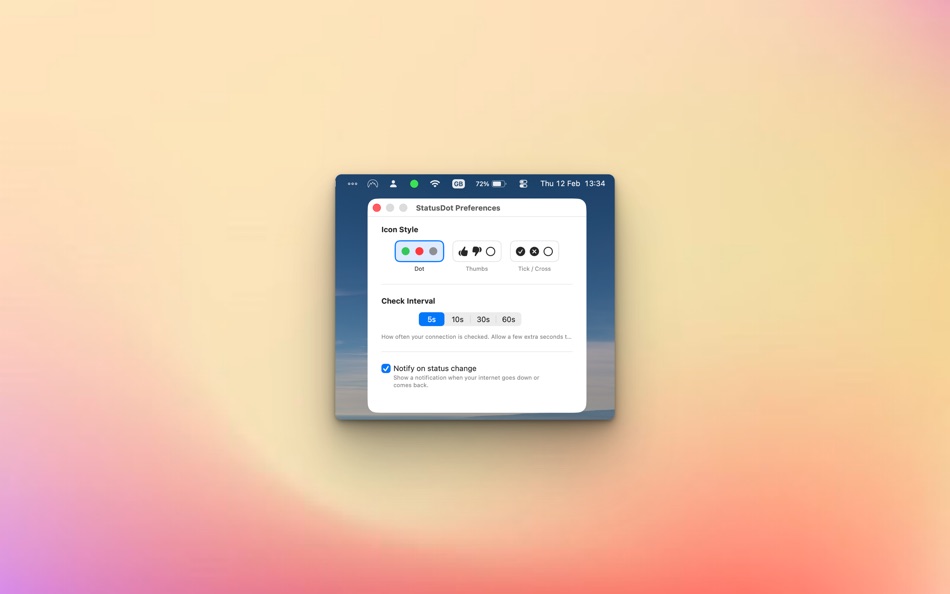
• Three icon styles: colored dot, thumbs up/down, or tick/cross
• Configurable check interval: 5, 10, 30, or 60 seconds
• Optional notifications when your connection changes
• Reconnecting state with grace period to avoid false alarms
• Launch at login support
• Pure SwiftUI — lightweight and native, no Electron, no dependencies
PRIVACY
StatusDot does not collect, store, or transmit any personal data. No analytics, no telemetry, no crash reports, no accounts, no servers. Your preferences are stored locally on your Mac and never leave your device.
Works with WiFi, Ethernet, USB tethering, and VPN — if packets can reach the outside world, you're green.
Requires macOS 13 (Ventura) or later.
Ad
ภาพหน้าจอ


มีอะไรใหม่
- เวอร์ชัน: 1.1
- อัปเดต:
- We've significantly upgraded how StatusDot detects connection issues to give you far fewer false alarms and more accurate offline reporting.
- DNS Awareness: We've shifted our connection tests from raw IP addresses to reliable domains (apple.com and cloudflare.com). Now, if your router is connected to the internet but your DNS server crashes (which feels like the internet is down to you), StatusDot will correctly turn red.
- Smart Debouncing (Fast-Up, Slow-Down): StatusDot now waits a few seconds to absorb tiny, transient Wi-Fi drops (like roaming between router bands) before declaring you offline, drastically reducing annoying "flickering" false-positives. But when you reconnect? It still switches to green instantly.
- Fixes & Optimizations: Fixed edge-case bugs around network interface discovery, meaning "No Network" state transitions are now structurally sound and instantaneous.
Green means go. Red means suffer (but accurately now).
ราคา
- วันนี้: $0.99
- ต่ำสุด: $0.99
- มากที่สุด: $0.99
ติดตามราคา
Ad
ผู้พัฒนา
- Vitor Monteiro
- แพลตฟอร์ม: iOS แอป (1) macOS แอป (1)
- รายการ: 0 + 0
- แต้มแล: 0 + 0 ¡
- การจัดอันดับ: 0
- ความเห็น: 0
- ลดราคา: 0
- วิดีโอ: 0
- RSS: ติดตาม
แต้มแล
0 ☹️
การจัดอันดับ
0 ☹️
รายการ
0 ☹️
- StatusDot
ความเห็น
แสดงรีวิวเป็นคนแรกเลย 🌟
ข้อมูลเพิ่มเติม
- เวอร์ชัน: 1.1
- หมวดหมู่:
macOS แอป›ประสิทธิภาพการผลิต - ระบบปฏิบัติการ:
macOS,macOS 13.0 และสูงกว่า - ขนาด:
1 Mb - ภาษาที่สนับสนุน:
English - การจัดประเภทเนื้อหา:
4+ - Mac App Store คะแนนโดย:
0 - อัปเดต:
- วันที่วางจำหน่าย:
รายชื่อติดต่อ
- เว็บไซท์:
 https://statusdot.app
StatusDot URL แบบสั้น: คัดลอกแล้ว!- 🌟 แชร์
- Mac App Store
คุณอาจชอบ
-
- Status bar to-do list
- macOS แอป: ประสิทธิภาพการผลิต โดย: Tien Nguyen
- ฟรี
- รายการ: 0 + 2 การจัดอันดับ: 0 ความเห็น: 0
- แต้มแล: 2 + 0 เวอร์ชัน: 1.0.2 Todo StatusBar is the ultimate productivity tool for macOS users. With its convenient and easy-to-use interface, you can quickly input and organize your to-do list right from your ... ⥯
-
- New Status Colors PRO for Jira
- macOS แอป: ประสิทธิภาพการผลิต โดย: Tecnofor Solutions
- ฟรี
- รายการ: 0 + 0 การจัดอันดับ: 0 ความเห็น: 0
- แต้มแล: 1 + 0 เวอร์ชัน: 7.7.0 This extension allows you to customize the colors of your JIRA statuses. Customize Jira status colors across all screens so you can tell the urgency of issues at a glance! Why should ... ⥯
-
- Ethernet Status Lite – Menu
- macOS แอป: ประสิทธิภาพการผลิต โดย: AppYogi Software
- * ฟรี
- รายการ: 0 + 0 การจัดอันดับ: 0 ความเห็น: 0
- แต้มแล: 3 + 0 เวอร์ชัน: 2.1 Simple Ethernet Monitoring Right in Your Menu Bar Ethernet Status Lite is a streamlined utility that lets you instantly see your wired network connection status and IP address, without ⥯
-
- Clipboard Status
- macOS แอป: ประสิทธิภาพการผลิต โดย: YUKI KUWASHIMA
- $0.49
- รายการ: 0 + 1 การจัดอันดับ: 0 ความเห็น: 0
- แต้มแล: 1 + 0 เวอร์ชัน: 1.0 クリップボード内の情報を見ることができるアプリです。 文字をコピーすると、その瞬間に文字数や行数がポップアップで表示されます。 画像をコピーしたりすると、その瞬間に画像のサイズが表示されます。 Macのステータスバーに常駐してくれるアプリなので普段は存在感が薄いですが、必要な時にはちゃんと現れてくれます。 ⥯
-
- Lume - System Activity Monitor
- macOS แอป: ประสิทธิภาพการผลิต โดย: Boring Design LLC
- ฟรี
- รายการ: 0 + 0 การจัดอันดับ: 0 ความเห็น: 0
- แต้มแล: 1 + 0 เวอร์ชัน: 0.1.3 This is a modern, minimalist system monitoring software that allows you to say goodbye to complex configurations and options. It provides a simple way to understand the current CPU, ... ⥯
-
- Busy Display
- macOS แอป: ประสิทธิภาพการผลิต โดย: Marta Cybulska
- $3.99
- รายการ: 0 + 0 การจัดอันดับ: 0 ความเห็น: 0
- แต้มแล: 1 + 0 เวอร์ชัน: 1.2.2 Status Display is a simple, networked busy/available screen for these working from home, podcaster, streamers, recording and broadcast studios, created because I needed an easy way for ⥯
-
- NEVER SLEEP - Even Lid Closed!
- macOS แอป: ประสิทธิภาพการผลิต โดย: 翔 何
- ฟรี
- รายการ: 0 + 1 การจัดอันดับ: 5 (1) ความเห็น: 0
- แต้มแล: 10 + 0 เวอร์ชัน: 1.1 Yes! This may be the simplest & professional anti-sleep app on Mac. - Prevent display & system sleep. - Prevent sleep even when the lid is CLOSED. I know someone really needs this ... ⥯
-
- Graph Galaxy - Visual Thinking
- macOS แอป: ประสิทธิภาพการผลิต โดย: 天勇 唐
- $29.99
- รายการ: 0 + 1 การจัดอันดับ: 0 ความเห็น: 0
- แต้มแล: 4 + 0 เวอร์ชัน: 13.6 Graph Galaxy is a modern user interface for Graphviz - a great graph visualization tool loved by many people. It comes with two approaches to compose graphs: Source Code Editor with ... ⥯
-
- ScrollStickies
- macOS แอป: ประสิทธิภาพการผลิต โดย: Jiulong Zhao
- * $9.99
- รายการ: 0 + 1 การจัดอันดับ: 0 ความเห็น: 0
- แต้มแล: 9 + 0 เวอร์ชัน: v3.88 A sticker app with a teleprompter-like text scrolling mode! Leave as many colorful, resizable stickies on your desktop with reminders, notes, and clippings as possible. Contents are ... ⥯
-
- GlanceCal - Menu Bar Calendar
- macOS แอป: ประสิทธิภาพการผลิต โดย: Henri Bredt
- $1.99
- รายการ: 3 + 1 การจัดอันดับ: 0 ความเห็น: 0
- แต้มแล: 5 + 0 เวอร์ชัน: 1.6.2 Work more productively on your Mac with GlanceCal. Get a quick and easy overview of the day and see which appointment is next. With the arrow keys you can switch the view to any day to ⥯
-
- Dropzone 3
- macOS แอป: ประสิทธิภาพการผลิต โดย: Aptonic LLC
- $9.99
- รายการ: 4 + 3 การจัดอันดับ: 0 ความเห็น: 0
- แต้มแล: 2 + 0 เวอร์ชัน: 3.8.4 Dropzone makes it faster and easier to copy and move files, open applications and share files with many different services. Dropzone 3 is a unique and amazing app that's like nothing ... ⥯
- -50%
- Action
- macOS แอป: ประสิทธิภาพการผลิต โดย: Jan Valta
- $1.99
$3.99-50% - รายการ: 2 + 0 การจัดอันดับ: 0 ความเห็น: 0
- แต้มแล: 8 + 0 เวอร์ชัน: 1.3.0 Action launcher that speeds up work with your Mac. Key Features Open URL Actions - Actions for search from your favorite website. AppleScript Actions - Actions to run an AppleScript ... ⥯
-
- FolderX - MenuBar Launchpad
- macOS แอป: ประสิทธิภาพการผลิต โดย: 尚辉 李
- * ฟรี
- รายการ: 1 + 1 การจัดอันดับ: 0 ความเห็น: 0
- แต้มแล: 7 + 0 เวอร์ชัน: 3.1.0 FolderX: Your Ultimate Mac Productivity Companion Say goodbye to the hassle of navigating through multiple windows and applications just to access your files and folders. With FolderX, ⥯
-
- QSpace
- macOS แอป: ประสิทธิภาพการผลิต โดย: 文达 田
- * $12.99
- รายการ: 3 + 1 การจัดอันดับ: 0 ความเห็น: 0
- แต้มแล: 3 + 0 เวอร์ชัน: 6.1.3 QSpace is a clean and efficient Multi-Pane File Manager, also can connect to FTP, SFTP, WebDAV, Dropbox, OneDrive, Google Drive, Aliyun Drive, Baidu Netdisk, Amazon S3(and S3 ... ⥯