
| ผู้พัฒนา: | Daniel Gauthier (13) | ||
| ราคา: | $3.99 | ||
| การจัดอันดับ: | 0 | ||
| ความเห็น: | 0 เขียนความเห็น | ||
| รายการ: | 0 + 0 | ||
| แต้มแล: | 0 + 0 ¡ | ||
| Mac App Store | |||
คำอธิบาย
Unlock the true potential of your audio hardware with Audio Connection Information, the essential menu bar utility for audio professionals, developers, and Mac power users. Go beyond the system defaults and get a detailed, real-time look at exactly how your audio interfaces, microphones, and output devices are performing.
Whether you're an audio engineer needing to confirm your sample rate, a podcaster checking input channels, or a developer debugging Core Audio, Audio Connection Info provides the critical information you need with a single click.
Key Features:
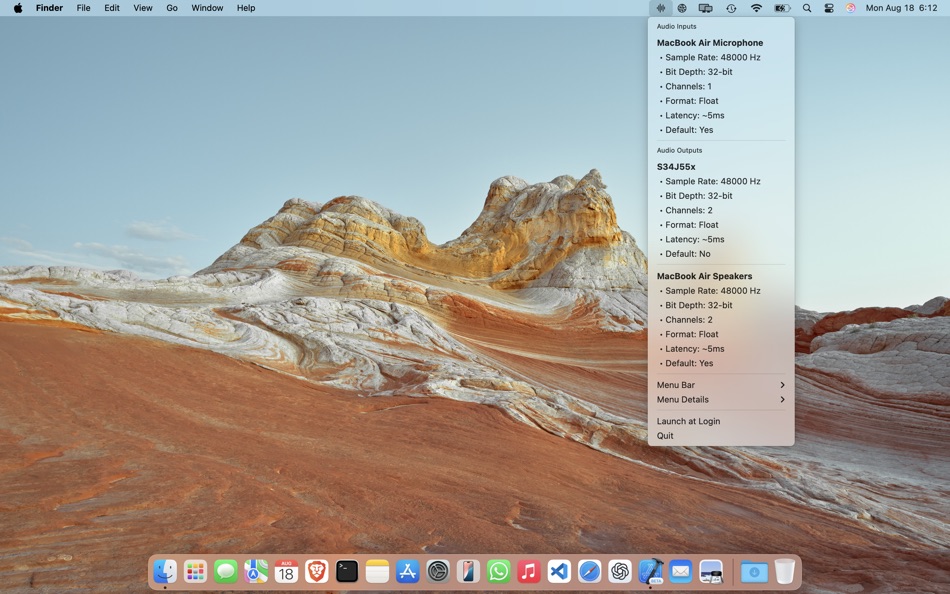
- See Everything at a Glance: Instantly view the specs for all connected audio inputs and outputs directly from your menu bar.
- Professional Audio Specs: Verify the exact sample rate, bit depth, channel count, and audio format (e.g., Float, Signed Integer) your devices are using.
- Real-Time Monitoring: Device information updates automatically, so you always see the current state of your audio setup.
- Customizable Menu Bar Display: Choose to display a key stat like the current sample rate or device count directly in your menu bar for at-a-glance monitoring.
- Developer & Power User Details: Instantly access advanced information like Device ID, UID, and latency for debugging and configuration.
- Default Device Status: Clearly see which devices are set as your system's default input and output.
- Launch at Login: Set it and forget it. Audio Connection Info can launch automatically when you start your Mac.
- Lightweight & Native: Built for macOS using Core Audio, it's efficient, small, clean, and respects your system's resources.
Stop guessing about your audio setup. Download Audio Connection Info to take full control of your sound.
ภาพหน้าจอ


มีอะไรใหม่
- เวอร์ชัน: 26.0
- อัปเดต:
- Updates required for macOS 26.0 release. Minor bug fixes and improvements.
ราคา
- วันนี้: $3.99
- ต่ำสุด: $3.99
- มากที่สุด: $3.99
ติดตามราคา
ผู้พัฒนา
แต้มแล
0 ☹️
การจัดอันดับ
0 ☹️
รายการ
0 ☹️
ความเห็น
แสดงรีวิวเป็นคนแรกเลย 🌟
ข้อมูลเพิ่มเติม
- เวอร์ชัน: 26.0
- หมวดหมู่:
macOS แอป›ยูทิลิตี้ - ระบบปฏิบัติการ:
macOS,macOS 13.0 และสูงกว่า - ขนาด:
7 Mb - ภาษาที่สนับสนุน:
Chinese,Danish,Dutch,French,German,Italian,Japanese,Korean,Norwegian,Portuguese,Russian,Spanish,Swedish - การจัดประเภทเนื้อหา:
4+ - Mac App Store คะแนนโดย:
0 - อัปเดต:
- วันที่วางจำหน่าย:
Audio Connection Information URL แบบสั้น: คัดลอกแล้ว!- 🌟 แชร์
- Mac App Store
คุณอาจชอบ
-
- Connection Information Center
- macOS แอป: ยูทิลิตี้ โดย: Daniel Gauthier
- $12.99
- รายการ: 0 + 0 การจัดอันดับ: 0 ความเห็น: 0
- แต้มแล: 0 + 0 เวอร์ชัน: 25.0 Stop guessing, start knowing. Understand ALL your connections. Connection Information Center is the essential utility that provides a comprehensive, unified view of every major ... ⥯
-
- Dipper - Audio Capture
- macOS แอป: ยูทิลิตี้ โดย: Existential Audio
- * ฟรี
- รายการ: 0 + 1 การจัดอันดับ: 0 ความเห็น: 0
- แต้มแล: 6 + 0 เวอร์ชัน: 1.12 Introducing Dipper, the ultimate audio capture companion for your Mac. With its powerful capabilities, Dipper revolutionizes the way you effortlessly capture and manipulate audio from ... ⥯
-
- Audio Viewer
- macOS แอป: ยูทิลิตี้ โดย: Hideaki Tsukioka
- $0.99
- รายการ: 0 + 0 การจัดอันดับ: 0 ความเห็น: 0
- แต้มแล: 1 + 0 เวอร์ชัน: 1.3 This app displays the waveform of audio files. It can quickly display the waveform of a large file size over 1GB. ⥯
-
- Audio Logger
- macOS แอป: ยูทิลิตี้ โดย: Pavel Aristov
- $5.99
- รายการ: 0 + 0 การจัดอันดับ: 0 ความเห็น: 0
- แต้มแล: 1 + 0 เวอร์ชัน: 2.0.1 This program is designed for archiving of audio content, e.g. live radio broadcasts, to AAC, MP3, WAV or Apple Lossless files. As a source, you can use a microphone or any sound card ... ⥯
-
- Audio Book
- macOS แอป: ยูทิลิตี้ โดย: 栋 陈
- * ฟรี
- รายการ: 1 + 0 การจัดอันดับ: 0 ความเห็น: 0
- แต้มแล: 14 + 0 เวอร์ชัน: 1.9.8 Audio Book is a powerful and practical macOS Text-to-Speech, Document-to-Audio application, which enables you to convert text content and various types of document file to audio ... ⥯
-
- Audio Analyst
- macOS แอป: ยูทิลิตี้ โดย: 嘉欣 胡
- * ฟรี
- รายการ: 1 + 0 การจัดอันดับ: 0 ความเห็น: 0
- แต้มแล: 3 + 1 (5.0) เวอร์ชัน: 1.8.11 Audio Analyszer is a professional audio analysis software. Supports a variety of measurement modes such as spectrum analysis, phase spectrum analysis, audio oscilloscope, persistence ... ⥯
-
- Audio Owl
- macOS แอป: ยูทิลิตี้ โดย: Deniz Polat
- $3.99
- รายการ: 0 + 0 การจัดอันดับ: 0 ความเห็น: 0
- แต้มแล: 0 + 0 เวอร์ชัน: 1.1.1 Audio Owl - Smart Audio Switching for macOS Effortlessly manage and prioritize your audio devices with intelligent automatic switching. Audio Owl is a powerful yet simple menu bar ... ⥯
-
- Audio Profile Manager
- macOS แอป: ยูทิลิตี้ โดย: Septimal Mind Limited
- $4.99
- รายการ: 0 + 0 การจัดอันดับ: 0 ความเห็น: 0
- แต้มแล: 0 + 0 เวอร์ชัน: 1.1.7.18 Audio Profile Manager allows you to lock default input and output audio devices so it will be impossible for other apps to switch your microphone and speaker. Also, it allows you to ... ⥯
-
- Audio Lock
- macOS แอป: ยูทิลิตี้ โดย: Elena Kryvytska
- $0.99
- รายการ: 0 + 1 การจัดอันดับ: 0 ความเห็น: 0
- แต้มแล: 0 + 0 เวอร์ชัน: 1.0 Small but very powerful application for saving your audio input/output. How much time you have connect you new audio device to macOS and system automatically choose new input/output ... ⥯
- -100%
- Audio Transcribe Pro
- macOS แอป: ยูทิลิตี้ โดย: Emanuele Floris
- ▼ * ฟรี
$24.99-100% - รายการ: 1 + 0 การจัดอันดับ: 0 ความเห็น: 0
- แต้มแล: 2 + 0 เวอร์ชัน: 2.1 Tired of spending hours transcribing interviews, lectures, or voice notes? This app transforms your Mac into a powerful transcription studio. Stop hitting 'pause' and 'play' hundreds ... ⥯
-
- Audio file and text conversion
- macOS แอป: ยูทิลิตี้ โดย: xiao dong zhou
- ฟรี
- รายการ: 1 + 0 การจัดอันดับ: 0 ความเห็น: 0
- แต้มแล: 2 + 0 เวอร์ชัน: 1.0.0 Features * Convert audio files to text. * Convert text to audio, and can export to audio file. Audio file support formats: aac, aif, aifc, aiff, caf, mp3, m4a, wav Export to audio file ⥯
-
- Audio Conversion Studio
- macOS แอป: ยูทิลิตี้ โดย: SCORPIOX, INC LIMITED
- $2.99
- รายการ: 0 + 0 การจัดอันดับ: 0 ความเห็น: 0
- แต้มแล: 0 + 0 เวอร์ชัน: 1.0 Effortlessly convert between a wide array of audio and video formats to your preferred audio file type. Our studio supports a comprehensive list of formats, including but not limited ... ⥯
-
- Audio Capture, Sound Recorder
- macOS แอป: ยูทิลิตี้ โดย: Stanislav Duplinskiy
- $1.99
- รายการ: 0 + 0 การจัดอันดับ: 0 ความเห็น: 0
- แต้มแล: 0 + 0 เวอร์ชัน: 0.2 Record high-quality audio from any application or the entire system with ease. Whether you're a content creator, developer, or professional, this tool is your gateway to flawless audio ⥯
-
- Audio Splitter and Converter
- macOS แอป: ยูทิลิตี้ โดย: Michael Holloway
- * ฟรี
- รายการ: 0 + 0 การจัดอันดับ: 0 ความเห็น: 0
- แต้มแล: 0 + 0 เวอร์ชัน: 1.0 A straightforward app that lets you split audio files based by time in seconds. It supports file formats such as MP3, M4A, WAV, FLAC, and OGG. You can select the output format to ... ⥯