
| ผู้พัฒนา: | CARSTEN SACHSE (9) | ||
| ราคา: | $3.99 | ||
| การจัดอันดับ: | 0 | ||
| ความเห็น: | 0 เขียนความเห็น | ||
| ความเห็น: | 0 โพสต์ความคิดเห็น | ||
| รายการ: | 0 + 0 | ||
| แต้มแล: | 0 + 0 ¡ | ||
| Mac App Store | |||
คำอธิบาย

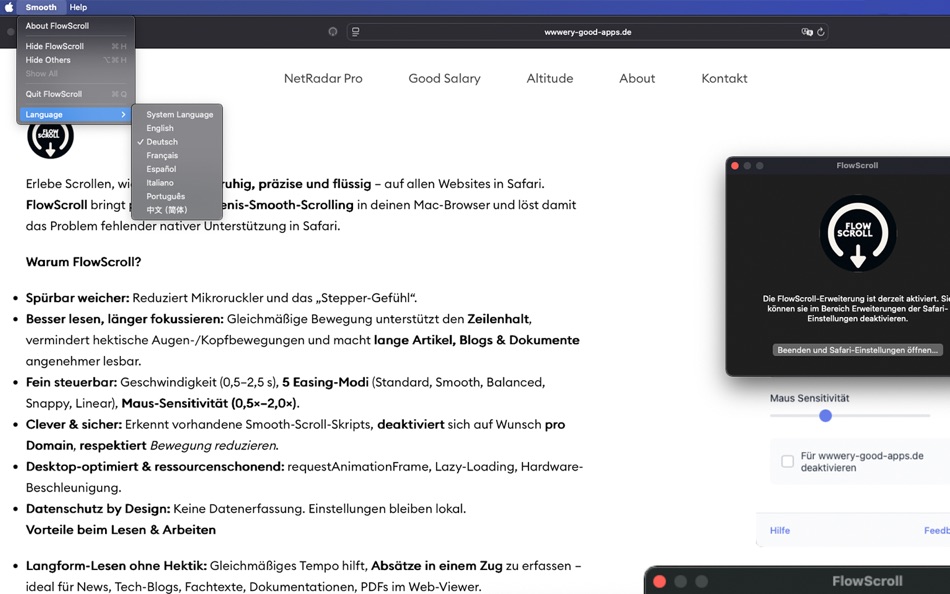
Why FlowScroll?
• Noticeably smoother: Reduces micro-stutter and the “stepper” feel.
• Read better, focus longer: Even motion supports line tracking, reduces rapid eye/head movements, and makes long articles, blogs & documents more comfortable to read.
• Fine-tuned control: Speed (0.5–2.5 s), 5 easing modes (Standard, Smooth, Balanced, Snappy, Linear), mouse sensitivity (0.5×–2.0×).
• Smart & safe: Detects existing smooth-scroll scripts, can disable per domain, respects Reduce Motion.
• Desktop-optimized & efficient: requestAnimationFrame, lazy loading, hardware acceleration.
• Privacy by design: No data collection. Settings stay local.
Reading & Work Benefits
• Long-form without haste: Even cadence helps capture paragraphs in one go — ideal for news, tech blogs, documentation, web-viewed PDFs.
• Flow over stop-and-go: Smooth accel/decel enables continuous comprehension — great for research, study, code reviews.
• Precise positioning: Gentle easing makes pixel-accurate stops at headings, captions, code blocks easier.
• Ergonomic scrolling: Fewer aggressive wheel flicks → happier wrists, calmer trackpad use.
• Cleaner screen recordings: Demos, tutorials, Loom videos look more professional.
• Accessible reading: Respects Reduce Motion and allows very gentle presets.
• Stay in flow: Fewer visual edges while scrolling → fewer distractions, more deep work.
Creative Use Cases
• Design & content review: Audit landing pages, parallax and typography at natural motion speed.
• Story-scrolling: A subtle camera-move feel for articles & presentations.
• UX testing: Vary easing/speed to validate reading-flow hypotheses.
• Education & talks: Clean scrolling for lectures, classes, workshops.
Features at a Glance
• Lenis smooth scrolling on all websites
• Adjustable speed & easing
• Mouse sensitivity control
• Per-domain exclusions
• Auto-detection of existing scroll solutions
• Live changes without reload
• Accessibility support (Reduce Motion)
• 7 languages (EN/DE/IT/FR/ES/PT/zh-CN)
Compatibility
• macOS 10.14+ • Safari 14.0+
• Not supported: iOS/iPadOS Safari, system pages (about:, file://), extension pages
Pricing
One-time purchase
Privacy
• No data collection
• Minimal permissions (activeTab & storage)
• Fully sandboxed in Safari
Ad
ภาพหน้าจอ




มีอะไรใหม่
- เวอร์ชัน: 1.0
- อัปเดต:
ประวัติราคา
- วันนี้: $3.99
- ต่ำสุด: $3.99
- มากที่สุด: $3.99
ติดตามราคา
Ad
ผู้พัฒนา
- CARSTEN SACHSE
- แพลตฟอร์ม: Android แอป (2) iOS แอป (6) macOS แอป (1)
- รายการ: 0 + 0
- แต้มแล: 2 + 0 ¡
- การจัดอันดับ: 0
- ความเห็น: 0
- ความเห็น: 0
- ลดราคา: 0
- วิดีโอ: 0
- RSS: ติดตาม
แต้มแล (0)
0 ☹️
การจัดอันดับ (0)
0 ☹️
รายการ (0)
0 ☹️
- FlowScroll
ความเห็น (0)
แสดงรีวิวเป็นคนแรกเลย 🌟
ความเห็น (0)
เป็นคนแรกที่แสดงความเห็น 🌟
ข้อมูลเพิ่มเติม
รายชื่อติดต่อ
- เว็บไซท์:
 https://wwwery-good-apps.de/
«FlowScroll». แพลตฟอร์ม: macOS. หมวดหมู่: ยูทิลิตี้. ผู้พัฒนา: «CARSTEN SACHSE». การเปิดตัวครั้งแรก: . อัปเดตล่าสุด: . ราคาปัจจุบัน: $3.99. ราคาต่ำสุดที่บันทึกไว้: $3.99. ราคาสูงสุดที่บันทึกไว้: $3.99. ชื่อนี้ยังไม่ได้รับการให้คะแนนหรือบทวิจารณ์บน AppAgg ภาษาที่ใช้ได้: English. AppAgg ติดตามประวัติราคา การให้คะแนน และคำติชมของผู้ใช้ «FlowScroll». ส่วนลดและอัปเดตในอนาคต: RSS. AppAgg ไม่ได้โฮสต์แอปพลิเคชันหรือแจกจ่ายซอฟต์แวร์ เครื่องหมายการค้า โลโก้ และภาพหน้าจอทั้งหมดเป็นของเจ้าของที่เกี่ยวข้อง
FlowScroll URL แบบสั้น: คัดลอกแล้ว!- 🌟 แชร์
- Mac App Store
คุณอาจชอบ
-
- Flow VPN - Global Internet
- macOS แอป: ยูทิลิตี้ โดย: Portable Ltd
- * ฟรี
- รายการ: 0 + 0 การจัดอันดับ: 0 ความเห็น: 0
- แต้มแล: 0 + 0 ความเห็น: 0 เวอร์ชัน: 2.9 Get better Internet with FlowVPN - Start your 7 day free trial now! Global VPN + AI: Includes AI chatbot powered by OpenAI's GPT 4o Enjoy secure unlimited Internet access Global access ⥯
-
- Scroll the Countdown
- macOS แอป: ยูทิลิตี้ โดย: Stefano Bergamini
- ฟรี
- รายการ: 0 + 1 การจัดอันดับ: 0 ความเห็น: 0
- แต้มแล: 6 + 0 ความเห็น: 0 เวอร์ชัน: 1.3 Scroll the Countdown is a sleek and intuitive macOS app designed to help you stay on top of your most important dates. With its innovative trackpad scrolling feature, setting your ... ⥯
-
- Flow by Cherrium
- macOS แอป: ยูทิลิตี้ โดย: Cherrium LLC
- $4.99
- รายการ: 0 + 0 การจัดอันดับ: 0 ความเห็น: 0
- แต้มแล: 1 + 0 ความเห็น: 0 เวอร์ชัน: 1.4.3 Flow brings your macOS desktop to life by allowing you to set loopable wallpapers using video files, GIFs, or PNG images. Whether you want a dynamic video background, a looping GIF, or ⥯
-
- Drag to Scroll
- macOS แอป: ยูทิลิตี้ โดย: Sargun Vohra
- $4.99
- รายการ: 0 + 0 การจัดอันดับ: 0 ความเห็น: 0
- แต้มแล: 0 + 0 ความเห็น: 0 เวอร์ชัน: 1.1 Drag to Scroll brings middle-click-and-drag scrolling to macOS. Hold your middle mouse button and move the mouse to scroll in any direction. Particularly useful for trackball users who ⥯
-
- Auto Scroll and Find
- macOS แอป: ยูทิลิตี้ โดย: Alfredo Grassau
- $2.99
- รายการ: 0 + 1 การจัดอันดับ: 0 ความเห็น: 0
- แต้มแล: 1 + 0 ความเห็น: 0 เวอร์ชัน: 1.0.16 "Auto Scroll and Find" for Safari: Dive Deeper into Infinite Scrolling Pages! Ever tried searching for something specific on a social media feed, only to manually scroll endlessly, ... ⥯
-
- UTC Scroll
- macOS แอป: ยูทิลิตี้ โดย: Tobias Stamm
- ฟรี
- รายการ: 0 + 1 การจัดอันดับ: 0 ความเห็น: 0
- แต้มแล: 1 + 0 ความเห็น: 0 เวอร์ชัน: 1.3.10 Browse through the UTC-timeline This application allows you to browse through dates and times with nanosecond-accuracy and correct support for UTC with leap seconds, including time ... ⥯
-
- Display Flow + Care
- macOS แอป: ยูทิลิตี้ โดย: Longwave Studio
- $0.99
- รายการ: 0 + 0 การจัดอันดับ: 0 ความเห็น: 0
- แต้มแล: 0 + 0 ความเห็น: 0 เวอร์ชัน: 1.5 Display Flow + Care is your essential macOS app for maintaining the health of your external display, whether it s an OLED, Mini Led, IPS, or any other screen technology. Display Flow + ⥯
-
- Mouse Wheel Scroll Volume
- macOS แอป: ยูทิลิตี้ โดย: 莎 蒋
- $2.99
- รายการ: 0 + 0 การจัดอันดับ: 0 ความเห็น: 0
- แต้มแล: 0 + 0 ความเห็น: 0 เวอร์ชัน: 1.3.0 MouseWheelScrollVolume is a lightweight system utility that lets you adjust macOS system volume by simply holding a modifier key and scrolling your mouse wheel. No need to switch apps ... ⥯
-
- Office Flow - Merge Tables
- macOS แอป: ยูทิลิตี้ โดย: 文 郭
- * ฟรี
- รายการ: 1 + 1 การจัดอันดับ: 0 ความเห็น: 0
- แต้มแล: 0 + 0 ความเห็น: 0 เวอร์ชัน: 1.1.0 Office Flow: Elevate Your Office Efficiency. This app is meticulously crafted for users who need to merge Excel tables swiftly, catering to both data consolidation and report ... ⥯
-
- Shift Scroll
- macOS แอป: ยูทิลิตี้ โดย: Yiqun Shen
- ฟรี
- รายการ: 0 + 1 การจัดอันดับ: 0 ความเห็น: 0
- แต้มแล: 0 + 0 ความเห็น: 0 เวอร์ชัน: 1.1 In macOS, when you hold the shift key, the mouse scrolling horizontally instead of vertically. However, it is not the desired behaviour when you play some games because the shift key ... ⥯
-
- Auto Scroll Wheel
- macOS แอป: ยูทิลิตี้ โดย: 代莉 陈
- * ฟรี
- รายการ: 0 + 0 การจัดอันดับ: 0 ความเห็น: 0
- แต้มแล: 0 + 0 ความเห็น: 0 เวอร์ชัน: 3.0 Tired of constantly swiping or wheeling to read long articles, browse websites, or review code? The App is your ultimate Mac productivity booster! Activate smooth, fully automatic ... ⥯
-
- Voice Flow Pro
- macOS แอป: ยูทิลิตี้ โดย: 奇 李
- * ฟรี
- รายการ: 0 + 1 การจัดอันดับ: 0 ความเห็น: 0
- แต้มแล: 14 + 0 ความเห็น: 0 เวอร์ชัน: 1.7 VoiceFlowPro is an all-in-one, on-device AI assistant for audio/video creators. It transcribes editable subtitles, trims pauses automatically, clones and enhances voices, and exports ... ⥯
-
- Network Flow
- macOS แอป: ยูทิลิตี้ โดย: 波 冯
- ฟรี
- รายการ: 0 + 0 การจัดอันดับ: 0 ความเห็น: 0
- แต้มแล: 0 + 0 ความเห็น: 0 เวอร์ชัน: 1.0 NetFlow is a lightweight network speed monitoring tool designed exclusively for macOS, keeping you informed about your network status at all times. Key Features Real-time upload and ... ⥯
-
- OP Auto Clicker
- macOS แอป: ยูทิลิตี้ โดย: MERIDIAN FLOW LTD
- ฟรี
- รายการ: 0 + 0 การจัดอันดับ: 0 ความเห็น: 0
- แต้มแล: 0 + 0 ความเห็น: 0 เวอร์ชัน: 1.4 A full-fledged autoclicker with two modes of autoclicking, at your dynamic cursor location or at a prespecified location. The maximum amounts of clicked can also be set (or left as ... ⥯