
| Udvikler: | 松平 洪 (16) | ||
| Pris: | $4.99 | ||
| Rangeringer: | 0 | ||
| Anmeldelser: | 0 Skriv en anmeldelse | ||
| Lister: | 0 + 0 | ||
| Point: | 0 + 0 ¡ | ||
| Mac App Store | |||
Beskrivelse
JPG to PDF Feature:
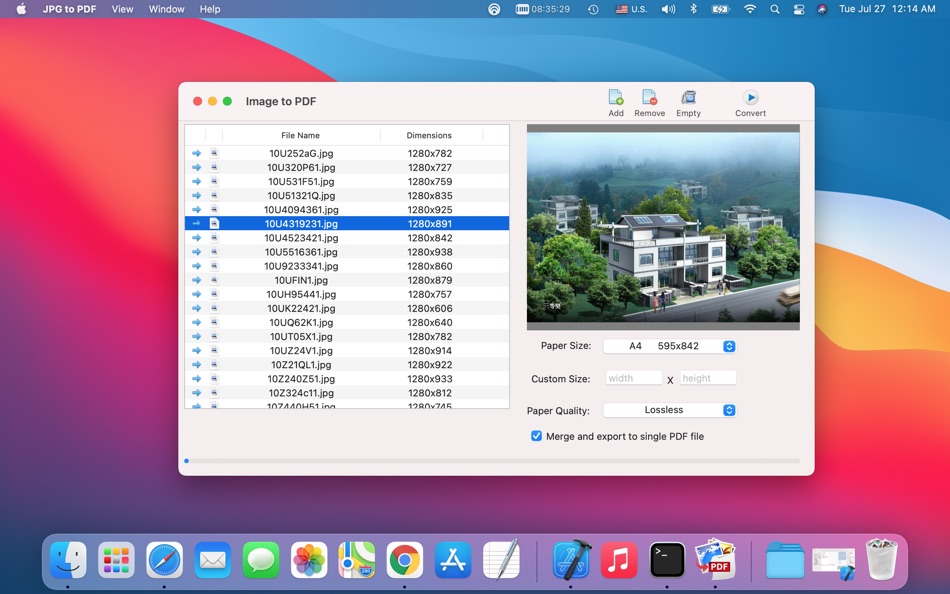
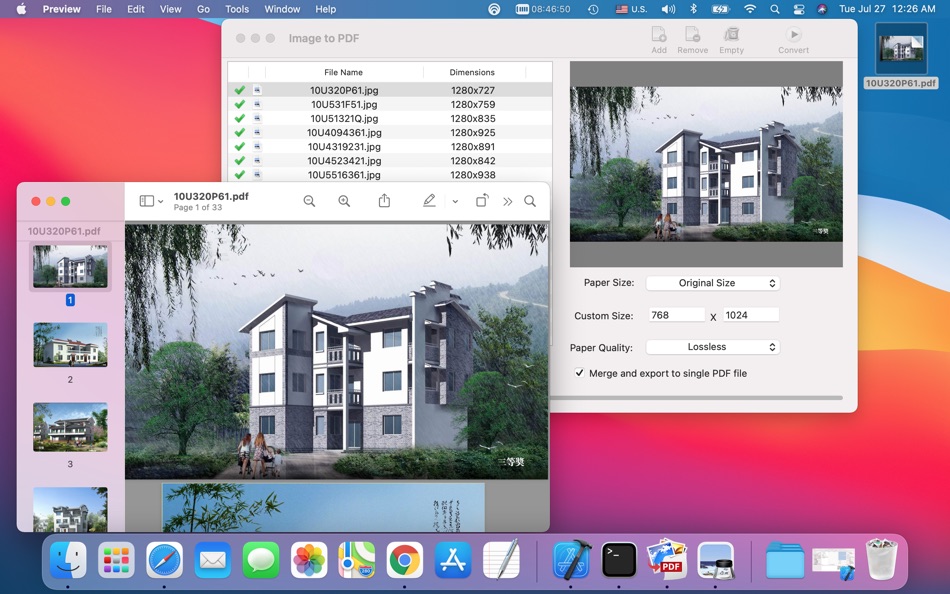
(1) Merge multiple image files in one PDF file.
(2) Easy to use, convert image files to PDF format you only need few click.
(3) Support drag and drop image files, so you add files for converting easily;
(4) High quality and high speed converting engine.
(5) Convert the most popular image file formats to PDF format.
(6) Convert multiple images in batch.
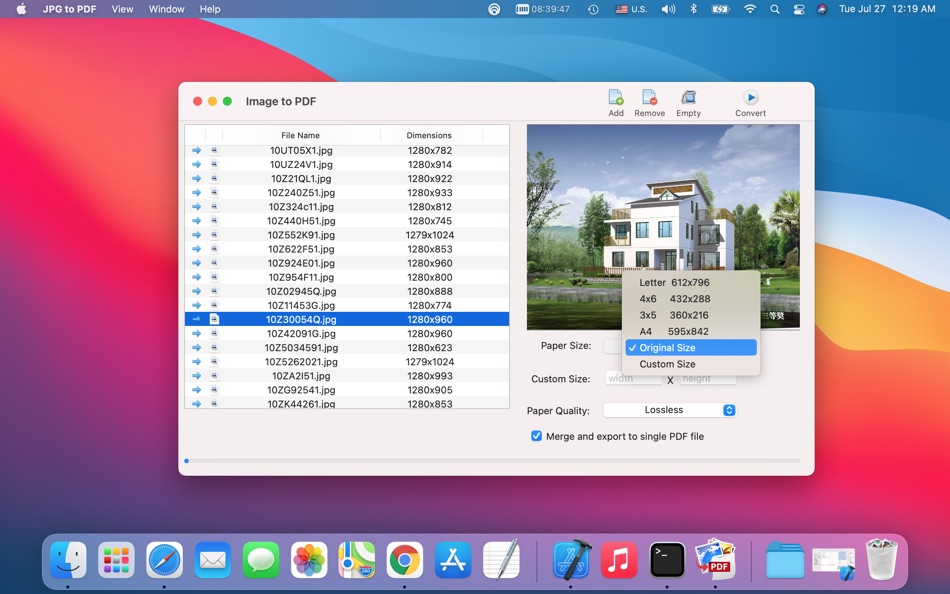
(7) Easy select output PDF paper size and paper quality.
Skærmbilleder
Pris
- I dag: $4.99
- Minimum: $4.99
- Maksimalt: $4.99
Overvåg priser
Udvikler
- 松平 洪
- Platforme: macOS Apps (16)
- Lister: 1 + 1
- Point: 11 + 0 ¡
- Rangeringer: 0
- Anmeldelser: 0
- Rabatter: 0
- Videoer: 0
- RSS: Abonner
Point
0 ☹️
Rangeringer
0 ☹️
Lister
0 ☹️
Anmeldelser
Vær den første til at gennemgå 🌟
Yderligere oplysninger
- Version: 2.0
- Kategori:
macOS Apps›Hjælpeprogrammer - Operativsystem:
macOS,macOS 10.9 eller nyere - Størrelse:
1 Mb - Understøttet sprog:
English - Indholdsklassificering:
4+ - Mac App Store Bedømmelse:
0 - Opdateret:
- Udgivelsesdato:
Kontaktpersoner
- Websted:
 http://www.nextappsoft.com/
JPG to PDF - PDF Generator Kort webadresse: Kopieret!- 🌟 Del
- Mac App Store
Du vil måske også kunne lide
-
- PDF Reader Pro: Convert & Edit
- macOS Apps: Hjælpeprogrammer Ved: PDF Technologies, Inc.
- * Gratis
- Lister: 0 + 0 Rangeringer: 0 Anmeldelser: 0
- Point: 2 + 0 Version: 5.2.1 PDF Reader Pro, available on Mac, iPad, and iPhone, will fulfill all your document needs across all platforms. Building on solid features such as AI tool, comment, text and image edit, ⥯
-
- PDF Split-Page Number Split
- macOS Apps: Hjælpeprogrammer Ved: 崴 杨
- * Gratis
- Lister: 0 + 0 Rangeringer: 0 Anmeldelser: 0
- Point: 0 + 0 Version: 1.1.5 "PDF Split" can split PDF files in batches. Support splitting all pages of PDF files and save all pages separately. Support page number input, you can input a certain page or ... ⥯
-
- PDF Protector
- macOS Apps: Hjælpeprogrammer Ved: Daniel Witt
- $9.99
- Lister: 0 + 2 Rangeringer: 1 (1) Anmeldelser: 0
- Point: 0 + 0 Version: 1.6 PDF Protector is an easy-to-use tool to encrypt or decrypt your PDF documents. Set a password and let PDF Protector encrypt your documents to hinder others from opening it. You can ... ⥯
-
- PDF Lock
- macOS Apps: Hjælpeprogrammer Ved: Joaquin Garcia
- $1.99
- Lister: 0 + 0 Rangeringer: 0 Anmeldelser: 0
- Point: 0 + 0 Version: 1.0.4 PDF Lock: Simple and Secure Protection for Your Documents Instant Protection: PDF Lock offers you a quick and hassle-free way to secure your PDF files. With our intuitive drag-and-drop ⥯
-
- PDF Metadata Editor
- macOS Apps: Hjælpeprogrammer Ved: Matusalem Marques
- $3.99
- Lister: 0 + 0 Rangeringer: 0 Anmeldelser: 0
- Point: 0 + 0 Version: 1.11 PDF Metadata Editor lets you gain control of the hidden metadata on your PDF files. Metadata helps your computer find documents for you, both in your system and online. Metadata is ... ⥯
-
- PDF Compressor
- macOS Apps: Hjælpeprogrammer Ved: HurryApp LTD
- Gratis
- Lister: 0 + 0 Rangeringer: 0 Anmeldelser: 0
- Point: 1 + 52 (4.2) Version: 1.9.3 Introducing the ultimate tool for compressing your PDF documents. With this app, you can easily compress, merge and share your PDF files from anywhere, anytime. ⥯
-
- PDF Converter: Reader & Editor
- macOS Apps: Hjælpeprogrammer Ved: Maham Naeem
- * Gratis
- Lister: 0 + 0 Rangeringer: 0 Anmeldelser: 0
- Point: 0 + 0 Version: 1.8 All-in-One PDF Converter, Reader Easily convert your documents and images with our powerful PDF Converter, Reader app! Supporting a wide range of formats, this app enables seamless ... ⥯
-
- PDF Pro Editor
- macOS Apps: Hjælpeprogrammer Ved: Alex Gameli Heyman
- Gratis
- Lister: 0 + 0 Rangeringer: 0 Anmeldelser: 0
- Point: 3 + 0 Version: 1.0.2 Introducing our powerful PDF Editor app that lets you edit, annotate, and manage your PDF documents on-the-go! With a user-friendly interface and a wide range of features, our app is ... ⥯
-
- PDF±
- macOS Apps: Hjælpeprogrammer Ved: Ruizheng Liu
- $14.99
- Lister: 0 + 0 Rangeringer: 0 Anmeldelser: 0
- Point: 0 + 0 Version: 6.0 SUMMARY 1. PDF± never change your original PDF document. 2. Batch merge multiple PDF files with drag & drop support. 3. Flexible ways to split PDF files: Split to multiple single page ... ⥯
-
- PDF Compressor - ThinPDF
- macOS Apps: Hjælpeprogrammer Ved: Pierre Stanislas
- $2.99
- Lister: 0 + 0 Rangeringer: 0 Anmeldelser: 0
- Point: 0 + 0 Version: 1.1 Effortlessly reduce PDF file sizes without compromising quality. ThinPDF is a powerful, lightweight macOS app designed to intelligently compress PDF files by optimizing their embedded ... ⥯
-
- PDF & Doc Image Extractor
- macOS Apps: Hjælpeprogrammer Ved: 论 李
- $0.99
- Lister: 0 + 0 Rangeringer: 0 Anmeldelser: 0
- Point: 0 + 0 Version: 1.0 Extract images from your PDF, Word, PPT, and Excel files with ease! Simply click or drag a document into the app, wait for the extraction to finish, and select the images you want to ... ⥯
-
- PDF Professional-Annotate,Sign
- macOS Apps: Hjælpeprogrammer Ved: Build to Connect, Inc.
- Gratis
- Lister: 1 + 0 Rangeringer: 0 Anmeldelser: 0
- Point: 4 + 0 Version: 2.10.0 PDF Professional is a feature-rich PDF Ultimate Solution for reading, annotating, form filling, editing, signing, and converting PDFs on your Mac, iPhone and iPad. PDF Professional ... ⥯
-
- PDF to Image Converter Expert
- macOS Apps: Hjælpeprogrammer Ved: 路 张
- Gratis
- Lister: 1 + 0 Rangeringer: 0 Anmeldelser: 0
- Point: 1 + 0 Version: 3.1.0 PDF to Image Converter Expert is a program that is developed for converting PDF to image.The program can convert PDF to JPEG, GIF, PNG, BMP, TIFF. It also supports extract images from ... ⥯
-
- PDF Suite
- macOS Apps: Hjælpeprogrammer Ved: 方成 印
- $2.99
- Lister: 0 + 0 Rangeringer: 0 Anmeldelser: 0
- Point: 0 + 0 Version: 2.4 PDF Suite provides a set of utility functions for better working with PDF files. PDF Suite is a comprehensive editor that is strong on easy-of-use and meeting your different needs. It ... ⥯