
| ผู้พัฒนา: | 宁波上官科技有限公司 (25) | ||
| ราคา: | ฟรี | ||
| การจัดอันดับ: | 0 | ||
| ความเห็น: | 0 เขียนความเห็น | ||
| รายการ: | 0 + 0 | ||
| แต้มแล: | 3 + 0 ¡ | ||
| Mac App Store | |||
คำอธิบาย

Pane is a window management software that makes moving windows, resizing windows, placing multiple windows side-by-side, or otherwise multitasking simple and efficient, keeping your desktop organized.
Pane also supports adjusting window size and moving window positions via keyboard shortcuts and menu bar selection.
It can help you maximize, nearly maximize, half, one-third, two-thirds, one-quarter, and individually maximize the window height. You can also adjust the window's width and height simultaneously by zooming in and out, and move the window to the center of the screen while maintaining its size. All of these operations support restoring the window to its original position and size.
Features:
* Maximize: The window fills the screen instead of going full screen.
* Near Maximize: By using white space, the window's four sides maintain a certain distance from the screen edges, reducing eye strain.
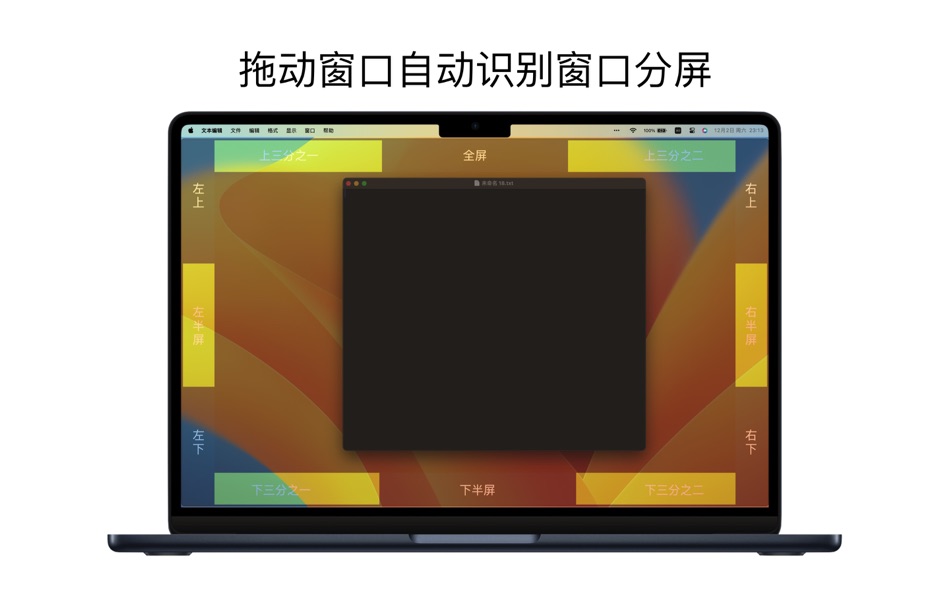
Half-screen: Supports left half-screen, right half-screen, top half-screen, bottom half-screen, and middle half-screen.
One-third-screen: Supports left 1/3-screen, middle 1/3-screen, and right 1/3-screen.
Two-thirds-screen: Supports left 2/3-screen and right 2/3-screen.
Quarter-screen: Supports top left 1/4-screen, top right 1/4-screen, bottom left 1/4-screen, and bottom right 1/4-screen.
Zoom In/Zoom Out: Adjusts the window's length and width simultaneously.
Center: Moves the window to the center of the screen while maintaining its original size.
Restore: Restores the window to its initial position and size.
Terms of Use: https://www.better365.cn/Terms.html
ภาพหน้าจอ

มีอะไรใหม่
- เวอร์ชัน: 1.1.0
- อัปเดต:
- 1. Optimized user experience
Thank you for your enthusiastic and positive feedback. We welcome your feedback on the official website's user support page. Click the "Support" button in the App Store.
Submit your issue on the official website, and a dedicated person will follow up and handle it one-on-one. Thank you.
QQ Group: 437642037
ราคา
- วันนี้: ฟรี
- ต่ำสุด: ฟรี
- มากที่สุด: ฟรี
ติดตามราคา
ผู้พัฒนา
- 宁波上官科技有限公司
- แพลตฟอร์ม: macOS แอป (25)
- รายการ: 8 + 2
- แต้มแล: 77 + 2 ¡
- การจัดอันดับ: 0
- ความเห็น: 0
- ลดราคา: 0
- วิดีโอ: 0
- RSS: ติดตาม
แต้มแล
-

- 7 Tibor Seres
- +1
-
- 432 QenTox
- +1
-
- 2,926 Dragon
- +1


การจัดอันดับ
0 ☹️
รายการ
0 ☹️
ความเห็น
แสดงรีวิวเป็นคนแรกเลย 🌟
ข้อมูลเพิ่มเติม
รายชื่อติดต่อ
- เว็บไซท์:
 http://www.better365.com
Pane- window control tool URL แบบสั้น: คัดลอกแล้ว!- 🌟 แชร์
- Mac App Store
คุณอาจชอบ
-
- iBar-Menubar icon control tool
- macOS แอป: ยูทิลิตี้ โดย: 宁波上官科技有限公司
- * ฟรี
- รายการ: 4 + 1 การจัดอันดับ: 0 ความเห็น: 0
- แต้มแล: 14 + 0 เวอร์ชัน: 2.0.2 【Native support for Apple M series and Intel chips】 Powerful menu bar management tool Hide and display menu bar icons Perfectly solve the problem of menu bar icons blocking on notch ... ⥯
-
- Window Recorder
- macOS แอป: ยูทิลิตี้ โดย: Rene Hansen
- ฟรี
- รายการ: 0 + 0 การจัดอันดับ: 0 ความเห็น: 0
- แต้มแล: 1 + 0 เวอร์ชัน: 2.2.0 Window Recorder is the screen recording counterpart, to the macOS screenshot tool. In a similar manner to the screenshot tool, Window Recorder allows you constrain a screen recording ... ⥯
-
- Window Tidy
- macOS แอป: ยูทิลิตี้ โดย: Light Pillar Software Ltd
- $4.99
- รายการ: 0 + 0 การจัดอันดับ: 0 ความเห็น: 0
- แต้มแล: 0 + 0 เวอร์ชัน: 2.1.5 How many times have you had to keep switching between documents when you wished you could just see them all at the same time? For example, composing an email whilst referencing ... ⥯
-
- Control Center for Safari
- macOS แอป: ยูทิลิตี้ โดย: Gaolan Huang
- * ฟรี
- รายการ: 0 + 0 การจัดอันดับ: 0 ความเห็น: 0
- แต้มแล: 0 + 0 เวอร์ชัน: 1.1 All-in-one toolbox for Safari, designed to match the native macOS look and feel, and gives you instant access to useful features like: - Navigate through the URL hierarchy. - Open the ... ⥯
-
- Window Refresh
- macOS แอป: ยูทิลิตี้ โดย: Workflow Network
- $9.99
- รายการ: 0 + 0 การจัดอันดับ: 0 ความเห็น: 0
- แต้มแล: 0 + 0 เวอร์ชัน: 25.1 We love our SANs, NASes, and all the fun when working with shared / network storage. But! You have probably seen a time or two that you know a file should be in a folder, but don't see ⥯
-
- Window Management: snApp
- macOS แอป: ยูทิลิตี้ โดย: Starlight Apps LLP
- * ฟรี
- รายการ: 0 + 0 การจัดอันดับ: 0 ความเห็น: 0
- แต้มแล: 4 + 0 เวอร์ชัน: 1.1.1 snApp is a powerful window management utility, built for the Mac. At its core, it is powered by the award-winning Siri Shortcut, Snap. It lives in your macOS menu bar, and features two ⥯
-
- Window Manager .
- macOS แอป: ยูทิลิตี้ โดย: Emanuele Floris
- $2.99
- รายการ: 1 + 0 การจัดอันดับ: 0 ความเห็น: 0
- แต้มแล: 1 + 0 เวอร์ชัน: 1.4 Try the most effective and simple window manager for mac. Tidy up all the chaotic windows of the various programs. Move and resize applications windows to be able to work on multiple ... ⥯
-
- Focus Sessions • Self control
- macOS แอป: ยูทิลิตี้ โดย: Denk Alexandru
- * ฟรี
- รายการ: 1 + 0 การจัดอันดับ: 0 ความเห็น: 0
- แต้มแล: 2 + 0 เวอร์ชัน: 4.2.1 Focus Sessions is a simple utility that can block applications and websites. It can be used as a parental control system or a self control tool. It makes the computer safer for your ... ⥯
- ใหม่
- audio-control
- macOS แอป: ยูทิลิตี้ โดย: 禹 袁
- $0.99
- รายการ: 0 + 0 การจัดอันดับ: 0 ความเห็น: 0
- แต้มแล: 0 + 0 เวอร์ชัน: 1.2.0 Main Features: Device Management - Automatically identify all audio devices (speakers, headphones, AirPlay, etc.) - Real-time display of device status and system default device - ... ⥯
-
- Distance Tool
- macOS แอป: ยูทิลิตี้ โดย: Applorium Ltd
- ฟรี
- รายการ: 0 + 0 การจัดอันดับ: 0 ความเห็น: 0
- แต้มแล: 0 + 1,915 (4.5) เวอร์ชัน: 4.7 Distance Tool allows for quick and easy calculations to find distances between points on a map, including area calculations for non-overlapping polygons drawn. Includes metric (meters, ⥯
-
- mDNS Tool
- macOS แอป: ยูทิลิตี้ โดย: Kenny Millar
- $1.99
- รายการ: 0 + 0 การจัดอันดับ: 0 ความเห็น: 0
- แต้มแล: 0 + 0 เวอร์ชัน: 1.3 The mDNS Tool allows you to view and browse all the Multicast DNS (mDNS / Bonjour) services that are visible on your network. This is useful both as a diagnostic tool and for finding ... ⥯
-
- ASUSTOR Control Center
- macOS แอป: ยูทิลิตี้ โดย: ASUSTOR Inc.
- ฟรี
- รายการ: 0 + 0 การจัดอันดับ: 0 ความเห็น: 0
- แต้มแล: 0 + 0 เวอร์ชัน: 2.0.5 ASUSTOR Control Center makes it easy to find your NAS on your home network by providing an easy-to-read list of all available ASUSTOR NAS devices on your network. ASUSTOR Control ... ⥯
-
- FT-Control for YAESU
- macOS แอป: ยูทิลิตี้ โดย: Marcus Roskosch
- $89.99
- รายการ: 0 + 0 การจัดอันดับ: 0 ความเห็น: 0
- แต้มแล: 0 + 0 เวอร์ชัน: 1.92 FT-Control for YAESU is an innovative Software Defined Radio (SDR) client designed specifically for macOS users, allowing comprehensive control and operation of selected YAESU ... ⥯
-
- GS_AutoID_FW_Tool-desktop
- macOS แอป: ยูทิลิตี้ โดย: YoctoTech
- ฟรี
- รายการ: 0 + 0 การจัดอันดับ: 0 ความเห็น: 0
- แต้มแล: 0 + 0 เวอร์ชัน: 1.0.3 GS AutoID FW Tool-desktop 專為 Gainscha 標籤印表機搭配使用而設計。 透過USB / 無線網路 / 串列埠方式連線印表機 即可對印表機進行韌體版本更新。 主要功能 印表機狀態讀取 印表機韌體版本更新 詳細機型資訊可參照Gainscha官方網站 https://www.gainscha.com.tw/sc ⥯