
| Developer: | 小舟 苏 (9) | ||
| Price: | * Free | ||
| Rankings: | 0 | ||
| Reviews: | 0 Write a review | ||
| Comments: | 0 Add a comment | ||
| Lists: | 0 + 0 | ||
| Points: | 0 + 0 ¡ | ||
| Mac App Store | |||
Description

Ad
Screenshots


What's new
- Version: 2.1.0
- Updated:
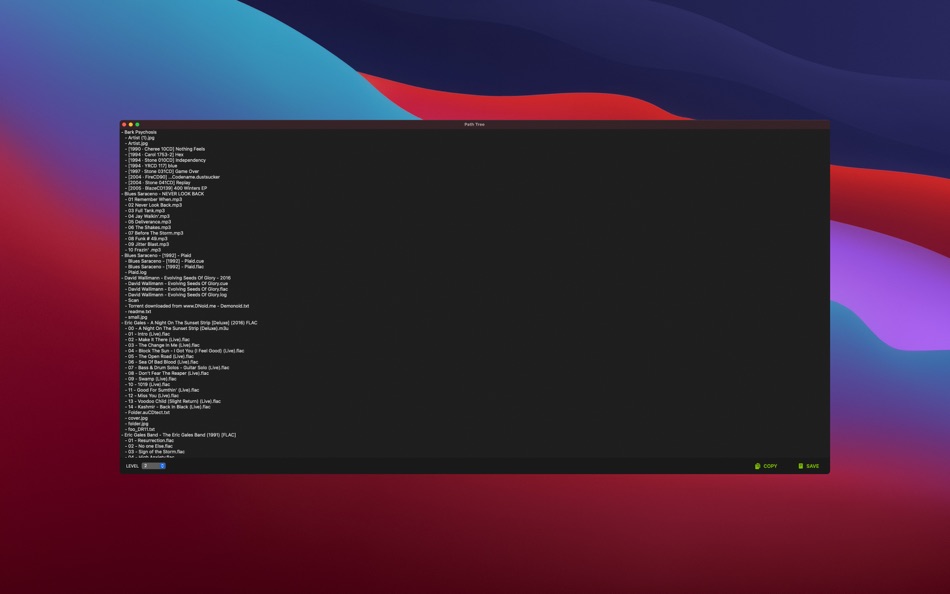
- - Automatically rebuild the directory tree when the level changes
Price History
-
* In-App Purchases - Today: Free
- Minimum: Free
- Maximum: Free
Track prices
Developer
Ad
Points (0)
0 ☹️
Rankings (0)
0 ☹️
Lists (0)
0 ☹️
- Path Tree
Reviews (0)
Be the first to review 🌟
Additional Information
- Version: 2.1.0
- Category:
macOS Apps›Utilities - OS:
macOS,macOS 11.0 and up - Size:
696 Kb - Supported Languages:
English - Content Rating:
4+ - Mac App Store Rating:
0 - Updated:
- Release Date:
Contacts
- Website:
 https://soulreload.com
Comments (0)
Be the first to comment 🌟
«Path Tree» is a Utilities app for macOS, developed by «小舟 苏». It was first released on and last updated on . This app is currently free. This app has not yet received any ratings or reviews on AppAgg. Available languages: English. AppAgg continuously tracks the price history, ratings, and user feedback for «Path Tree». Subscribe to this app or follow its RSS feed to get notified about future discounts or updates. AppAgg does not host applications or distribute software. All trademarks, logos and screenshots belong to their respective owners.
Path Tree Short URL: Copied!- 🌟 Share
- Mac App Store
You may also like
-
- Tree to csv
- macOS Apps: Utilities By: Stuart Marshall
- * Free
- Lists: 0 + 0 Rankings: 0 Reviews: 0
- Points: 0 + 0 Comments: 0 Version: 1.1.1 Tree to CSV lets you convert GEDCOM genealogy files into CSV spreadsheets. Family tree software and websites allow you to store and visualise your family history in a great many ways. ... ⥯
-
- Tree Size
- macOS Apps: Utilities By: 冬洋 梁
- $9.99
- Lists: 0 + 0 Rankings: 0 Reviews: 0
- Points: 0 + 0 Comments: 0 Version: 3.0.1 Tree Size is easy to find large files,Powerful tool to cleaning up disk,also can find hide files.Use tree to display a list of files and folders.Show with size,Arrange By (Size, Name, ... ⥯
-
- Tree ToDo - Hierarchical ToDos
- macOS Apps: Utilities By: Yohei Tamura
- $1.99
- Lists: 0 + 0 Rankings: 0 Reviews: 0
- Points: 0 + 0 Comments: 0 Version: 1.2 Tree Todo - Hierarchical Task Management for Mac Elevate your task management with Tree Todo! This Mac app lets you organize and manage your tasks in a hierarchical structure, making ... ⥯
-
- Purple Tree
- macOS Apps: Utilities By: Thomas Jgenti
- $2.99
- Lists: 0 + 1 Rankings: 0 Reviews: 0
- Points: 1 + 0 Comments: 0 Version: 3.4.2 Purple Tree is a visual analysis tool for your Mac's storage usage. Nested treemap display allows you to see all your large folders and files at a glance! You can visually compare ... ⥯
-
- Easy Copy Path
- macOS Apps: Utilities By: wei jiang
- $0.99
- Lists: 1 + 0 Rankings: 0 Reviews: 0
- Points: 4 + 0 Comments: 0 Version: 1.1 『Easy Copy Path』 is a lightweight utility that allows you to copy file paths quickly in Finder. 『Easy Copy Path』 makes it easy to copy the full paths or file and directory names of the ⥯
-
- QuickPath - Copy File Path
- macOS Apps: Utilities By: Edusoft Limited
- $4.99
- Lists: 0 + 0 Rankings: 0 Reviews: 0
- Points: 0 + 0 Comments: 0 Version: 1.0 Stop typing file paths manually. QuickPath adds a powerful "Copy Path" action directly to your Finder right-click menu, making it effortless to grab the location of any file or folder ... ⥯
-
- Big Files Tree Map
- macOS Apps: Utilities By: ValiQ Security
- Free
- Lists: 1 + 0 Rankings: 0 Reviews: 0
- Points: 0 + 0 Comments: 0 Version: 1.0 Big File Map shows a list of the largest files and folders, with an intuitive visualization in order to facilitate the process of making space on the storage device of a MacBook or ... ⥯
-
- Folders File Manager
- macOS Apps: Utilities By: Andriy Konstantynov
- * Free
- Lists: 3 + 3 Rankings: 0 Reviews: 0
- Points: 14 + 0 Comments: 0 Version: 2.2.0 Folders File Manager is designed for users who recently transitioned from a PC as well as for those who have always missed a tree-style file manager on their Mac. Everything in Folders ⥯
-
- iMenuX - New File & Tools
- macOS Apps: Utilities By: 小芳 龙
- $4.99
- Lists: 0 + 1 Rankings: 0 Reviews: 0
- Points: 11 + 0 Comments: 0 Version: 2.0 iMenuX - New File & Tools iMenuX is a lightweight Finder extension that brings essential file operations to your right-click menu. Designed to fill the gaps in macOS Finder, it helps ... ⥯
-
- Noob Search
- macOS Apps: Utilities By: Sigurdur Tomasson
- $6.99
- Lists: 0 + 1 Rankings: 0 Reviews: 0
- Points: 9 + 0 Comments: 0 Version: 2.7.2 Noob Search requests access to your folders and files when typing in file path to path input. This is required to be able to list files and folders for suggestions as well as granting ... ⥯
-
- The Keywords
- macOS Apps: Utilities By: Ebey Tech LLC
- $1.99
- Lists: 0 + 1 Rankings: 0 Reviews: 0
- Points: 4 + 0 Comments: 0 Version: 1.0 Use The Keywords app to assign keywords to files and folders. Utilize keywords to filter files & folders to access items fast and efficiently. Click + button to create a new Tree Item. ⥯
-
- MouseBoost
- macOS Apps: Utilities By: 惠源 赵
- * Free
- Lists: 2 + 1 Rankings: 0 Reviews: 0
- Points: 8 + 0 Comments: 0 Version: 4.1.3 Unlock your Mac's full potential with MouseBoost! Add over 30 powerful tools directly to your right-click menu. Fully customizable for programmers, designers, and power users, it s the ⥯
-
- GrandPerspective
- macOS Apps: Utilities By: Erwin Bonsma
- $2.99
- Lists: 1 + 1 Rankings: 0 Reviews: 0
- Points: 1 + 0 Comments: 0 Version: 3.6.1 GrandPerspective is a small utility application that graphically shows the disk usage within a file system. It can help you to manage your disk, as you can easily spot which files and ... ⥯
-
- DirEqual
- macOS Apps: Utilities By: Umaporn Staszczyk
- * Free
- Lists: 1 + 1 Rankings: 0 Reviews: 0
- Points: 7 + 0 Comments: 0 Version: 7.4.2 DirEqual Advanced Directory Comparison for Mac DirEqual is a powerful and intuitive directory comparison tool designed exclusively for Mac users. It accurately detects even the ... ⥯