
| ผู้พัฒนา: | Carmine Studios (2) | ||
| ราคา: | ฟรี | ||
| การจัดอันดับ: | 0 | ||
| ความเห็น: | 0 เขียนความเห็น | ||
| ความเห็น: | 0 โพสต์ความคิดเห็น | ||
| รายการ: | 0 + 0 | ||
| แต้มแล: | 0 + 0 ¡ | ||
| Mac App Store | |||
คำอธิบาย

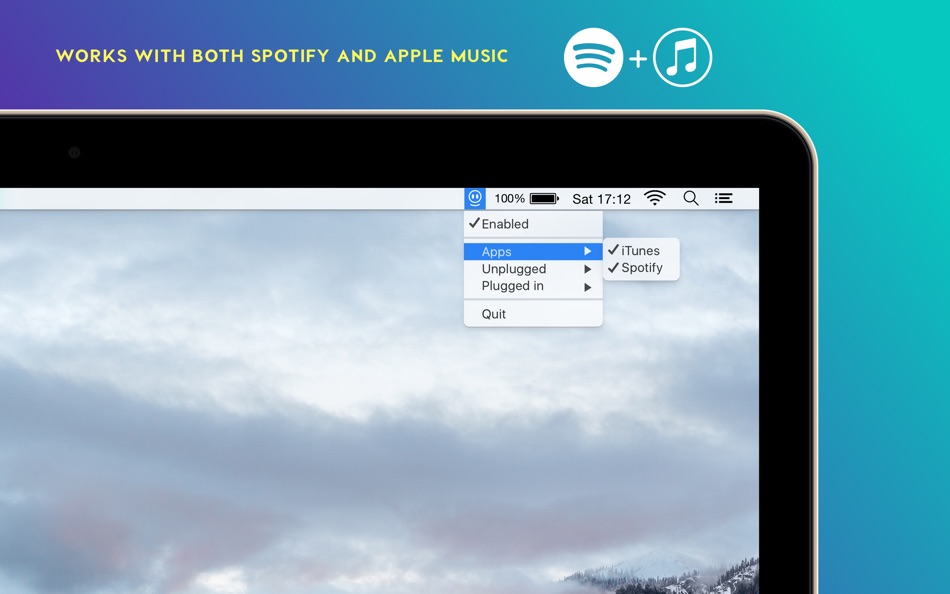
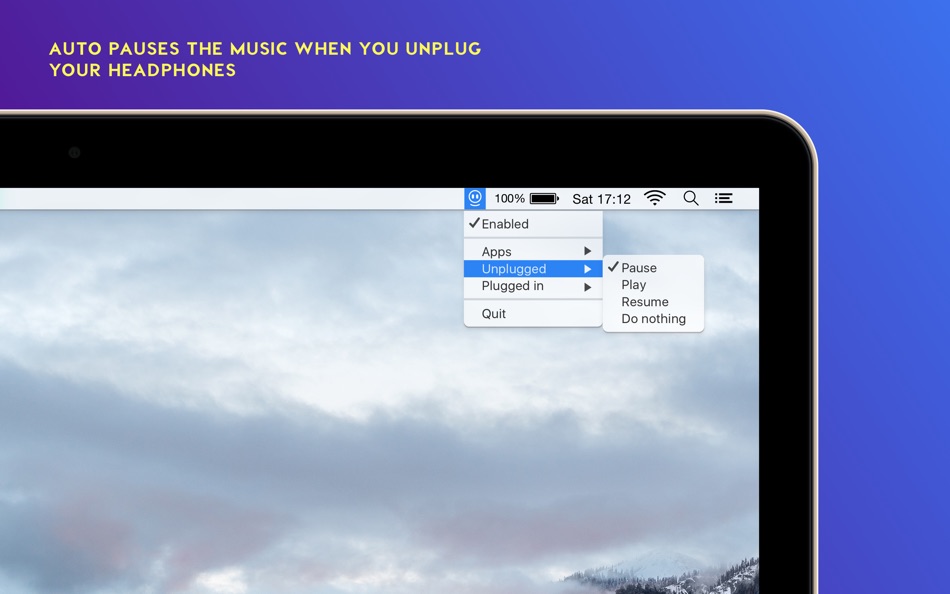
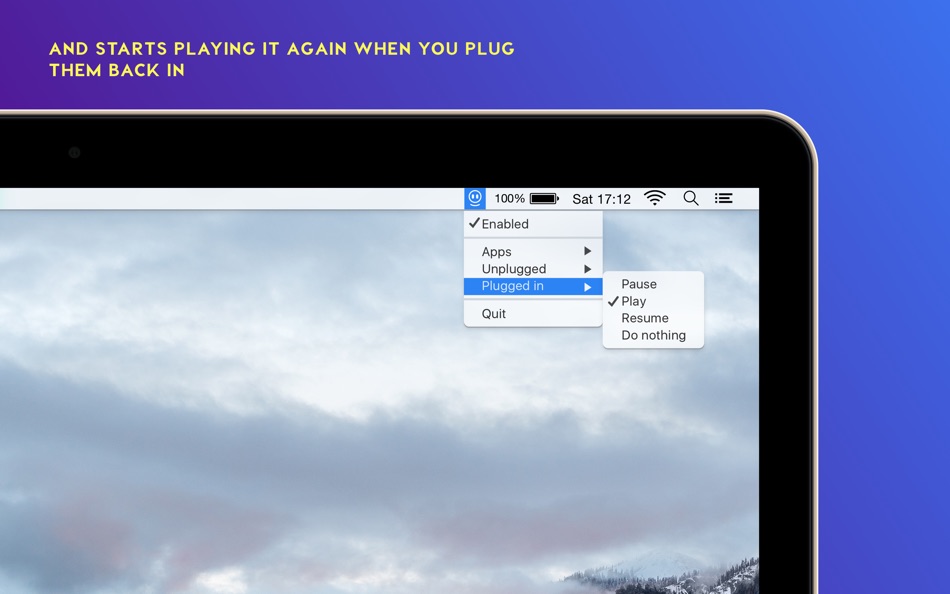
This makes your Mac behave the same way as your iPhone already does when you unplug your headphones. No more embarrassing moments when you listen to your "guilty pleasure" playlists.
Ad
ภาพหน้าจอ
มีอะไรใหม่
- เวอร์ชัน: 1.1.3
- อัปเดต:
ประวัติราคา
- วันนี้: ฟรี
- ต่ำสุด: ฟรี
- มากที่สุด: ฟรี
ติดตามราคา
ผู้พัฒนา
- Carmine Studios
- แพลตฟอร์ม: iOS แอป (1) macOS แอป (1)
- รายการ: 1 + 0
- แต้มแล: 0 + 1 ¡
- การจัดอันดับ: 0
- ความเห็น: 0
- ความเห็น: 0
- ลดราคา: 0
- วิดีโอ: 0
- RSS: ติดตาม
แต้มแล (0)
0 ☹️
การจัดอันดับ (0)
0 ☹️
รายการ (0)
0 ☹️
- PauseMate
ความเห็น (0)
แสดงรีวิวเป็นคนแรกเลย 🌟
ข้อมูลเพิ่มเติม
«PauseMate». แพลตฟอร์ม: macOS. หมวดหมู่: ยูทิลิตี้. ผู้พัฒนา: «Carmine Studios». การเปิดตัวครั้งแรก: . อัปเดตล่าสุด: . ราคาปัจจุบัน: ฟรี. ชื่อนี้ยังไม่ได้รับการให้คะแนนหรือบทวิจารณ์บน AppAgg ภาษาที่ใช้ได้: English. AppAgg ติดตามประวัติราคา การให้คะแนน และคำติชมของผู้ใช้ «PauseMate». ส่วนลดและอัปเดตในอนาคต: RSS. AppAgg ไม่ได้โฮสต์แอปพลิเคชันหรือแจกจ่ายซอฟต์แวร์ เครื่องหมายการค้า โลโก้ และภาพหน้าจอทั้งหมดเป็นของเจ้าของที่เกี่ยวข้อง
ความเห็น (0)
เป็นคนแรกที่แสดงความเห็น 🌟
PauseMate URL แบบสั้น: คัดลอกแล้ว!- 🌟 แชร์
- Mac App Store
Ad
คุณอาจชอบ
-
- Clean Mate: Duplicate Finder
- macOS แอป: ยูทิลิตี้ โดย: Chromakey Media Ltd
- * ฟรี
- รายการ: 0 + 1 การจัดอันดับ: 0 ความเห็น: 0
- แต้มแล: 9 + 0 ความเห็น: 0 เวอร์ชัน: 2 Free up space, simplify your Mac. Clean Mate is the ultimate tool to reclaim valuable disk space in seconds. Whether your storage is full, your Mac is running slow, or you simply want ... ⥯
-
- Micro AI Mate - Chat Bot
- macOS แอป: ยูทิลิตี้ โดย: MICRO INTELLIGENT TECHNOLOGY LIMITED
- ฟรี
- รายการ: 0 + 1 การจัดอันดับ: 0 ความเห็น: 0
- แต้มแล: 1 + 0 ความเห็น: 0 เวอร์ชัน: 1.0.6 Micro AI Mate - Chat Bot is an intelligent computer program designed to simulate human conversation through text or voice interactions. It is a virtual assistant that can help you with ⥯
-
- AutoPause: Pause Music on Mic
- macOS แอป: ยูทิลิตี้ โดย: Poyan Nabati
- * $3.99
- รายการ: 0 + 0 การจัดอันดับ: 0 ความเห็น: 0
- แต้มแล: 0 + 0 ความเห็น: 0 เวอร์ชัน: 1.2.2 AutoPause automatically pauses your music when your microphone turns on - and resumes it when you re done. Never manually pause again during calls, meetings, recordings, dictation, or ... ⥯
-
- QuietMeet: Auto-Pause Music
- macOS แอป: ยูทิลิตี้ โดย: Pedro Jose Pereira Vieito
- $3.99
- รายการ: 0 + 1 การจัดอันดับ: 0 ความเห็น: 0
- แต้มแล: 0 + 0 ความเห็น: 0 เวอร์ชัน: 1.9 QuietMeet detects video-calls in supported web browsers and apps and automatically pauses and resumes the Music app playback as needed. For example, if you open a Zoom or Google Meet ... ⥯
-
- NinjaBrowser - browser mate
- macOS แอป: ยูทิลิตี้ โดย: 鹏 郭
- ฟรี
- รายการ: 0 + 1 การจัดอันดับ: 0 ความเห็น: 0
- แต้มแล: 0 + 0 ความเห็น: 0 เวอร์ชัน: 1.0.2 NinjaBrowser isn't a browser itself, it's your browsing companion. With just one click, swiftly open the incognito window of your installed browser, eliminating cumbersome steps. ... ⥯
-
- Switch Mate Pro
- macOS แอป: ยูทิลิตี้ โดย: GPTsMotion Tech LLC
- * ฟรี
- รายการ: 0 + 0 การจัดอันดับ: 0 ความเห็น: 0
- แต้มแล: 0 + 0 ความเห็น: 0 เวอร์ชัน: 1.0 Your exclusive keyboard switching companion,Seven-day trial, ¥1.99 permanent use。 ⥯
-
- Breik Smart Screen Pause
- macOS แอป: ยูทิลิตี้ โดย: Raul Hernandez
- ฟรี
- รายการ: 0 + 0 การจัดอันดับ: 0 ความเห็น: 0
- แต้มแล: 0 + 0 ความเห็น: 0 เวอร์ชัน: 1.0.3 Let's be real, the desk slouch is a real problem. One minute you're sitting straight, the next you're basically a human croissant. BREIK is the simple, smart menu bar app designed to ... ⥯
-
- Trypa
- macOS แอป: ยูทิลิตี้ โดย: Tom Woodhams
- $12.99
- รายการ: 1 + 3 การจัดอันดับ: 5 (2) ความเห็น: 5 (2)
- แต้มแล: 5 + 0 ความเห็น: 0 เวอร์ชัน: 1.8.6 Automate your Automations In a few seconds, automate your automations and set up triggers using different environmental, hardware and network scenarios. Trigger any Mac shortcut ... ⥯
-
- Dynamic Wallpaper Studio
- macOS แอป: ยูทิลิตี้ โดย: 豪 文
- * $4.99
- รายการ: 1 + 3 การจัดอันดับ: 0 ความเห็น: 0
- แต้มแล: 7 + 0 ความเห็น: 0 เวอร์ชัน: 25.0 Dynamic Wallpaper Studio is the most popular live wallpaper app on Mac. Dynamic Wallpaper Studio redefines your desktop & screensaver experience by replacing static wallpapers with ... ⥯
-
- ClipMark
- macOS แอป: ยูทิลิตี้ โดย: Smart-Byte GmbH
- $4.99
- รายการ: 0 + 1 การจัดอันดับ: 0 ความเห็น: 0
- แต้มแล: 10 + 0 ความเห็น: 0 เวอร์ชัน: 1.3.4 ClipMark, the ultimate tool for optimizing your workflow and enhancing productivity. With its intuitive interface and powerful features, ClipMark revolutionizes the way you manage your ⥯
-
- Screen Mirroring App -1001 TVs
- macOS แอป: ยูทิลิตี้ โดย: Nero AG
- * ฟรี
- รายการ: 0 + 1 การจัดอันดับ: 0 ความเห็น: 0
- แต้มแล: 12 + 0 ความเห็น: 0 เวอร์ชัน: 3.0.2 1001 TVs: Mirror your phone/tablet screen to your Mac, also can mirror your Mac screen to TV. We are a professional team on screen mirroring, always focus on the core features: * ... ⥯
-
- Coffee Break Timer
- macOS แอป: ยูทิลิตี้ โดย: Stefano Bergamini
- ฟรี
- รายการ: 0 + 1 การจัดอันดับ: 0 ความเห็น: 0
- แต้มแล: 8 + 0 ความเห็น: 0 เวอร์ชัน: 1.2 Whether you need a quick pause or a longer break to recharge, Coffee Break Timer puts you in control of your downtime. Features: Seamless Menu Bar Integration: Keep your timer at a ... ⥯
-
- Scrollow
- macOS แอป: ยูทิลิตี้ โดย: Nikita Zubkov
- $0.99
- รายการ: 0 + 1 การจัดอันดับ: 0 ความเห็น: 0
- แต้มแล: 9 + 0 ความเห็น: 0 เวอร์ชัน: 1.7.1 Scrollow adds a new way to control your Mac via scrolling at certain locations or with selected modifier keys. Adjust system volume, screen brightness and keyboard illumination in a ... ⥯
-
- Gamepad Mapper
- macOS แอป: ยูทิลิตี้ โดย: Takahide Noro
- * ฟรี
- รายการ: 0 + 1 การจัดอันดับ: 0 ความเห็น: 0
- แต้มแล: 9 + 0 ความเห็น: 0 เวอร์ชัน: 1.8 Introducing Gamepad Mapper, the ultimate app that allows you to control your Mac and its applications using your gamepad or joystick, while simulating both mouse and keyboard inputs. ... ⥯