
ที่บันทึกไว้
เลือกชื่อที่จะแสดงในเมนูที่บันทึกไว้ของคุณ
เสร็จแล้ว
| ผู้พัฒนา: | forYou inc. (9) | ||
| ราคา: | * ฟรี | ||
| การจัดอันดับ: | 0 | ||
| ความเห็น: | 0 โพสต์ความคิดเห็น | ||
| รายการ: | 0 + 0 | ||
| แต้มแล: | 0 + 0 ¡ | ||
| +1 แต้มแล | |||
คำอธิบาย

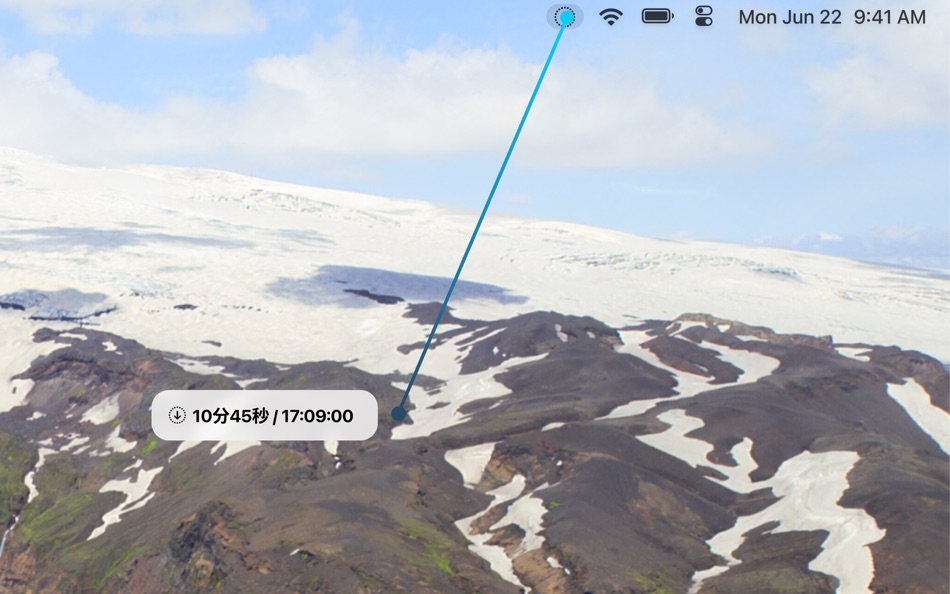
◆ Drag to Create a Timer
Pull the menu bar icon downward to set a timer. The further you drag, the longer the duration. Release to confirm. No typing required. Supports 5 seconds to 6 hours.
◆ Live Countdown in Your Menu Bar
See the remaining time at a glance, right in your menu bar. Stay focused on your work without switching windows.
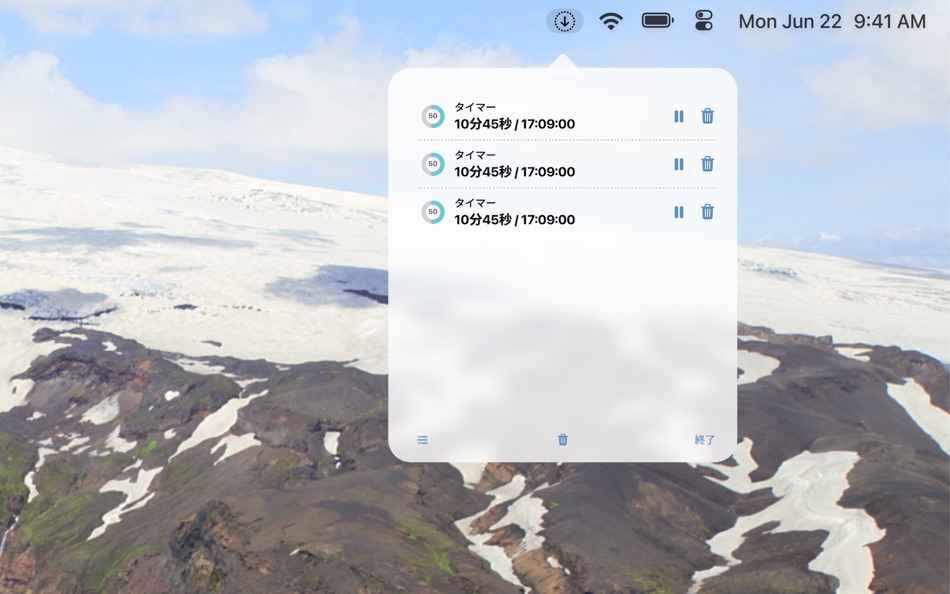
◆ Simple Timer Management
Click the icon to view all your timers. Pause, resume, repeat, or delete with a single click. Visual progress rings show how much time is left.
◆ Reminders Integration
Optionally add timers to macOS Reminders when you create them. Keep your tasks and timers in sync.
◆ Native macOS Design
Lives in your menu bar — never in the Dock. Supports launch at login and customizable notification sounds. Built with SwiftUI for a clean, modern experience.
◆ 7-Day Free Trial
Try all features free for 7 days. Love it? Unlock Pro with a one-time purchase.
Ad
ภาพหน้าจอ
ประวัติราคา
-
* การซื้อภายในแอพ - ราคาปัจจุบัน: ฟรี
- ต่ำสุด: ฟรี
- มากที่สุด: ฟรี
ติดตามราคา
ข้อมูลเพิ่มเติม
- วันที่วางจำหน่าย:
- หมวดหมู่:
macOS แอป›ยูทิลิตี้ - ระบบปฏิบัติการ:
macOS,macOS 14.0 และสูงกว่า - ขนาด:
345 Kb - ภาษาที่สนับสนุน:
Japanese - การจัดประเภทเนื้อหา:
4+ - Mac App Store คะแนนโดย:
0 - เว็บไซท์:
 https://uuuu.to
มีอะไรใหม่
- เวอร์ชัน: 1.3.1
- อัปเดต:
- The maximum notification volume has been significantly increased (approximately 2× louder than before). Setting short timers is now easier — durations under a minute like 5, 10, or 30 seconds can be selected smoothly via drag.
ผู้พัฒนา
รายการ (0)
0 ☹️
- PullTimer - Pull the Menu
แต้มแล (0)
0 ☹️
การจัดอันดับ (0)
0 ☹️
ความเห็น (0)
เป็นคนแรกที่แสดงความเห็น 🌟
«PullTimer - Pull the Menu». แพลตฟอร์ม: macOS. หมวดหมู่: ยูทิลิตี้. ผู้พัฒนา: «forYou inc.». การเปิดตัวครั้งแรก: . อัปเดตล่าสุด: . ราคาปัจจุบัน: ฟรี. ชื่อนี้ยังไม่ได้รับการให้คะแนนหรือบทวิจารณ์บน AppAgg ภาษาที่ใช้ได้: Japanese. AppAgg ติดตามประวัติราคา การให้คะแนน และคำติชมของผู้ใช้ «PullTimer - Pull the Menu». ส่วนลดและอัปเดตในอนาคต: RSS. AppAgg ไม่ได้โฮสต์แอปพลิเคชันหรือแจกจ่ายซอฟต์แวร์ เครื่องหมายการค้า โลโก้ และภาพหน้าจอทั้งหมดเป็นของเจ้าของที่เกี่ยวข้อง
PullTimer - Pull the Menu URL แบบสั้น: คัดลอกแล้ว!- 🌟 แชร์
- Mac App Store
คล้ายกัน
-
- Timer Squirrel
- macOS แอป: ยูทิลิตี้ โดย: Danny Bolick
- $0.99
- รายการ: 0 0 0
- แต้มแล: 0 เวอร์ชัน: 1.0 Timer Squirrel lives in your menu bar, ready whenever you need a quick countdown. SET TIMERS IN SECONDS Type naturally: "20 minutes", "1 hour 30 min", "90 seconds" One-click presets: ... ⥯
- ใหม่
- Menu Stats
- macOS แอป: ยูทิลิตี้ โดย: 晨一 倪
- $0.99
- รายการ: 0 0 0
- แต้มแล: 1 เวอร์ชัน: 1.1 Menu Stats is a lightweight system monitor built for the macOS menu bar. Keep CPU, GPU, memory, swap, disk and network activity visible at a glance without opening a full app. Menu ... ⥯
-
- Menu Bar Shortcuts
- macOS แอป: ยูทิลิตี้ โดย: Present Day Media LLC
- $3.99
- รายการ: 0 0 0
- แต้มแล: 0 เวอร์ชัน: 1.14 Menu Bar Shortcuts brings four everyday productivity tools to the one place you check all day long the macOS menu bar. Instant Calculator A full-featured calculator that supports ... ⥯
-
- Menu Bar Manager
- macOS แอป: ยูทิลิตี้ โดย: 泳诗 陈
- $5.99
- รายการ: 0 + 1 0 0
- แต้มแล: 15 เวอร์ชัน: 1.7 With Menu Bar Manager, you can customize the display or hiding of your menu bar to help users solve the problem of cluttered menu bar icons. 1. Drag the Menu Bar Manager icon to the ... ⥯
-
- Menu Drop
- macOS แอป: ยูทิลิตี้ โดย: Sindre Sorhus
- ฟรี
- รายการ: 0 0 0
- แต้มแล: 2 เวอร์ชัน: 1.0.2 AirDrop files simply by dragging them onto the app's menu bar icon. You can drop files, images, and links. Note: The app uses the system AirDrop dialog. It has no control over the ... ⥯
-
- Menu World Time
- macOS แอป: ยูทิลิตี้ โดย: Steve Foster
- ฟรี
- รายการ: 0 0 0
- แต้มแล: 1 เวอร์ชัน: 1.12 Get times for cities around the world straight from the menu bar. - Show a clock for each city right in the menu bar - Click the icon in the menu bar to quickly see city times - ... ⥯
-
- Timer easy
- macOS แอป: ยูทิลิตี้ โดย: Vladimir Stepanchikov
- ฟรี
- รายการ: 0 0 0
- แต้มแล: 0 เวอร์ชัน: 1.0 A simple timer that reminds you with a beep about short breaks. Work with intervals boosts your efficiency and helps you keep a work-life balance. ⥯
-
- Menu Bar Icon Manager
- macOS แอป: ยูทิลิตี้ โดย: 金玲 李
- $1.99
- รายการ: 0 + 1 0 0
- แต้มแล: 2 เวอร์ชัน: 6.7.3 Menu Bar Icon Manager is a macOS-based menu bar icon management tool that helps users hide, aggregate, and quickly access cluttered menu bar icons. - By simulating the interaction ... ⥯
-
- Menu Wifi - Signal Monitor
- macOS แอป: ยูทิลิตี้ โดย: Z9Apps LLC
- ฟรี
- รายการ: 0 + 1 0 0
- แต้มแล: 3 เวอร์ชัน: 1.1 Menu Wifi is a system menu bar app that provides real-time insights into your Wi-Fi connection, helping you monitor signal strength, troubleshoot issues, and optimize network ... ⥯
-
- Menu Mirror
- macOS แอป: ยูทิลิตี้ โดย: Alexander Brunner
- ฟรี
- รายการ: 0 0 0
- แต้มแล: 1 เวอร์ชัน: 1.0 Menu Mirror lets you quickly toggle the camera from your menu bar ⥯
-
- Menu Calendar
- macOS แอป: ยูทิลิตี้ โดย: Roberto Panetta
- $1.99
- รายการ: 0 0 0
- แต้มแล: 0 เวอร์ชัน: 1.5.5 Menu Calendar brings a convenient and easily accessible calendar to your menu bar, no matter which application you are using. With a simple click, you can bring up a small calendar ... ⥯
-
- Menu Volume – System & Music
- macOS แอป: ยูทิลิตี้ โดย: Alexander Kohlhofer
- $1.99
- รายการ: 0 0 0
- แต้มแล: 0 เวอร์ชัน: 1.1 Menu Volume gives you two simple sliders in your menu bar: one for your Mac and one for Apple Music. Adjust each volume independently from a single, fast menu. Mac volume slider ... ⥯
- ใหม่
- Menu Divider
- macOS แอป: ยูทิลิตี้ โดย: HSU CHIA JUNG
- * ฟรี
- รายการ: 0 0 0
- แต้มแล: 0 เวอร์ชัน: 1.0 Menu Divider lets you organize your macOS menu bar with customizable separators. Features: Add multiple dividers to visually group your menu bar icons Customize text, colors, and width ⥯