
| ผู้พัฒนา: | daisuke miyagawa (1) | ||
| ราคา: | * ฟรี | ||
| การจัดอันดับ: | 0 | ||
| ความเห็น: | 0 เขียนความเห็น | ||
| รายการ: | 0 + 0 | ||
| แต้มแล: | 0 + 0 ¡ | ||
| Mac App Store | |||
คำอธิบาย

- Table Capture
Just drag to select a table on screen. Cell structure is auto-detected!
Paste directly into Excel or Google Sheets.
No more manual typing or cell-by-cell copying.
- History Feature
All your OCR results are automatically saved.
Never lose copied text again.
One-click to re-copy from history.
- 3 Simple Steps
1. Press the shortcut key
2. Drag to select the area
3. Text auto-copies to clipboard
- Perfect for
- Importing table data from PDFs/images to Excel
- Copying web tables to spreadsheets
- Extracting non-selectable text
- Re-using past OCR results
- More Features
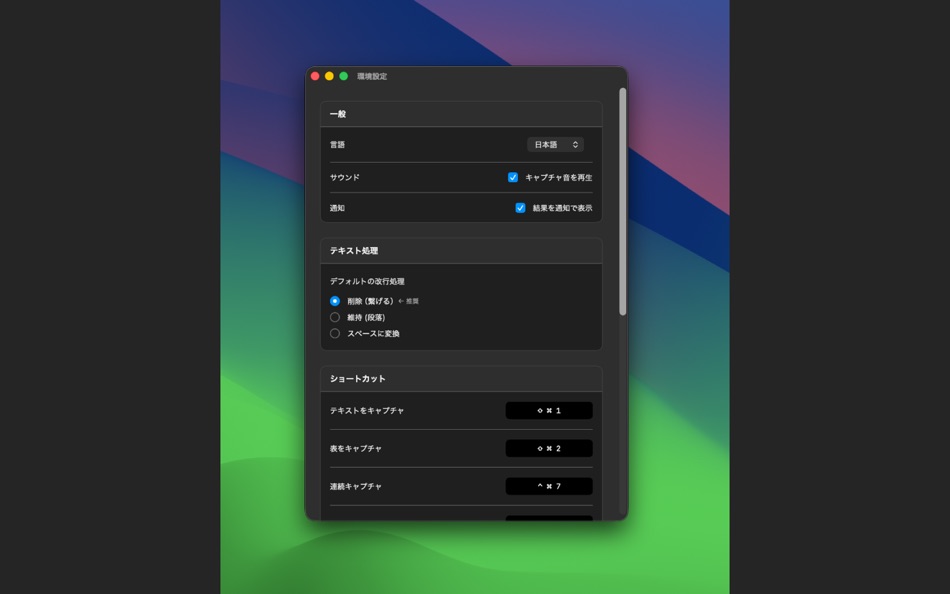
- Multi-language support (Japanese, English, etc.)
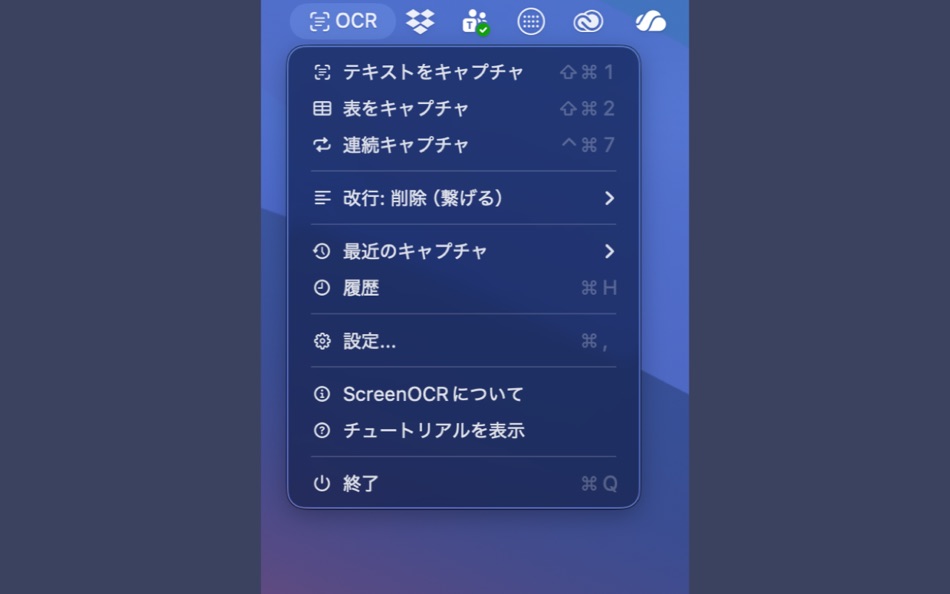
- Lives in your menu bar
- Customizable shortcut keys
No more manual typing. Copy tables and text exactly as you see them.
画面上の文字を、スクショ感覚でテキスト化。
【表キャプチャ機能】
画面に表示された表をドラッグで囲むだけで、セル構造を自動認識。
ExcelやGoogleスプレッドシートにそのまま貼り付けできます!
手入力や、1セルずつコピーする手間から解放されます。
【履歴機能】
過去にOCRしたテキストを自動で保存。
「さっきコピーした文章どこいった?」がなくなります。
履歴からワンクリックで再コピー可能。
【使い方は3ステップ】
① ショートカットキー(⌘+Shift+2)を押す
② 読み取りたい範囲をマウスでドラッグ
③ テキストが自動でクリップボードにコピー 、 ⌘+Vで貼り付け!
【こんな時に便利】
- PDF・画像内の表データをExcelに取り込みたい
- Webサイトの表をスプレッドシートにコピーしたい
- コピーできないテキストを抽出したい
- 過去にコピーしたOCR結果を再利用したい
【その他の機能】
- 日本語・英語など多言語対応
- メニューバー常駐で邪魔にならない
- カスタマイズ可能なショートカットキー
もう手入力は不要。表も文章も、見たままコピー。
Ad
ภาพหน้าจอ
มีอะไรใหม่
- เวอร์ชัน: 1.0
- อัปเดต:
ราคา
-
* การซื้อภายในแอพ - วันนี้: ฟรี
- ต่ำสุด: ฟรี
- มากที่สุด: ฟรี
ติดตามราคา
Ad
ผู้พัฒนา
- daisuke miyagawa
- แพลตฟอร์ม: macOS แอป (1)
- รายการ: 0 + 0
- แต้มแล: 0 + 0 ¡
- การจัดอันดับ: 0
- ความเห็น: 0
- ลดราคา: 0
- วิดีโอ: 0
- RSS: ติดตาม
แต้มแล
0 ☹️
การจัดอันดับ
0 ☹️
รายการ
0 ☹️
- ScreenOCR
ความเห็น
แสดงรีวิวเป็นคนแรกเลย 🌟
ข้อมูลเพิ่มเติม
ScreenOCR URL แบบสั้น: คัดลอกแล้ว!- 🌟 แชร์
- Mac App Store
คุณอาจชอบ
-
- SwiftyMenu
- macOS แอป: ยูทิลิตี้ โดย: 圣罡 汤
- * ฟรี
- รายการ: 0 + 2 การจัดอันดับ: 0 ความเห็น: 0
- แต้มแล: 22 + 0 เวอร์ชัน: 26.5.5 SwiftyMenu is a powerful macOS Finder extension that enhances your workflow with customizable context menus for quick file and folder operations. Key Features: Custom Context Menus: ... ⥯
-
- CrystalFetch ISO Downloader
- macOS แอป: ยูทิลิตี้ โดย: Turing Software, LLC
- ฟรี
- รายการ: 6 + 0 การจัดอันดับ: 0 ความเห็น: 0
- แต้มแล: 20 + 0 เวอร์ชัน: 2.2.0 CrystalFetch is a macOS application that creates Windows® 11 installer ISO images. It can be used with UTM virtual machines as well as other VM solutions. Note: CrystalFetch is not ... ⥯
-
- Parallel Disk Scanner
- macOS แอป: ยูทิลิตี้ โดย: Pedro Yamada
- ฟรี
- รายการ: 0 + 1 การจัดอันดับ: 0 ความเห็น: 0
- แต้มแล: 20 + 0 เวอร์ชัน: 1.2.2 FileSaver is a really fast disk usage scanner. It can scan a fully used SSD in a minute by scanning folder sizes in parallel. All information is displayed immediately with no waiting ... ⥯
-
- HotLaunch - App Launchpad
- macOS แอป: ยูทิลิตี้ โดย: 方 刘
- * ฟรี
- รายการ: 2 + 3 การจัดอันดับ: 0 ความเห็น: 0
- แต้มแล: 19 + 0 เวอร์ชัน: 2.5.9 Efficiently switch and open apps, folders, files, URLs. characteristic: 1 Support Option, Control, Command, Shift,fn combination shortcut keys to display switching window view. 2 When ... ⥯
-
- Duplicate Files Sweeper
- macOS แอป: ยูทิลิตี้ โดย: Wise Tech Labs Private Limited
- * ฟรี
- รายการ: 0 + 1 การจัดอันดับ: 0 ความเห็น: 0
- แต้มแล: 18 + 0 เวอร์ชัน: 3.1 Duplicate Files Sweeper is an ultimate Duplicate Files Cleaner that help you get rid of duplicate files from your Mac easily. Duplicate Files Sweeper helps you give a thorough scan to ... ⥯
-
- Shortery
- macOS แอป: ยูทิลิตี้ โดย: Unit Numberfive oHG
- * ฟรี
- รายการ: 3 + 4 การจัดอันดับ: 1 (1) ความเห็น: 0
- แต้มแล: 18 + 0 เวอร์ชัน: 8.6 Run your Shortcuts automatically with Shortery. Automate your workflows without lifting a finger. Shortery allows you to run shortcuts automatically in response to system events, ... ⥯
-
- Max NTFS - NTFS Disk Helper
- macOS แอป: ยูทิลิตี้ โดย: 全利 谢
- * ฟรี
- รายการ: 0 + 0 การจัดอันดับ: 0 ความเห็น: 0
- แต้มแล: 17 + 0 เวอร์ชัน: 2.7.6 Max NTFS is a small tool that can open NTFS format disks in read-write mode. We can support the read and write of NTFS format disks very effectively. Start the application, it will ... ⥯
-
- Disk Diag
- macOS แอป: ยูทิลิตี้ โดย: Rocky Sand Studio Ltd.
- * ฟรี
- รายการ: 4 + 1 การจัดอันดับ: 5 (1) ความเห็น: 0
- แต้มแล: 16 + 0 เวอร์ชัน: 2.0.7 Disk Diag is an amazing all-in-one disk cleaner to help you clean up your hard drive with ease. First time I ve been speechless & husband is amazed" It works with just two clicks and ... ⥯
-
- QuickFTP Server
- macOS แอป: ยูทิลิตี้ โดย: Leszek Szary
- ฟรี
- รายการ: 0 + 2 การจัดอันดับ: 0 ความเห็น: 0
- แต้มแล: 16 + 0 เวอร์ชัน: 1.1.0 QuickFTP Server allows you to share files stored on your Mac with other devices. FTP is a standard network protocol supported by many applications available on almost any device with a ⥯
-
- Clip Log
- macOS แอป: ยูทิลิตี้ โดย: WARNER WEB DEVELOPMENT LLC
- * ฟรี
- รายการ: 0 + 1 การจัดอันดับ: 0 ความเห็น: 0
- แต้มแล: 16 + 0 เวอร์ชัน: 3.3.84 Clip Log The Clipboard Manager You ve Been Waiting For! Say goodbye to losing important snippets of text and images! Clip Log is the ultimate clipboard manager, combining intelligent ... ⥯
-
- nthLink
- macOS แอป: ยูทิลิตี้ โดย: nthLink
- ฟรี
- รายการ: 2 + 0 การจัดอันดับ: 0 ความเห็น: 0
- แต้มแล: 16 + 0 เวอร์ชัน: 6.8.5 nthLink is a powerful VPN capable of getting through even the toughest network environment. Most importantly, it incorporates strong encryption to protect the users' information. ... ⥯
- -100%
- HomeControl Menu for HomeKit
- macOS แอป: ยูทิลิตี้ โดย: Pedro Jose Pereira Vieito
- ▼ * ฟรี
$7.99-100% - รายการ: 2 + 3 การจัดอันดับ: 5 (1) ความเห็น: 0
- แต้มแล: 15 + 0 เวอร์ชัน: 2.15.1 HomeControl is the ultimate HomeKit companion on macOS. Manage and automate your smart home directly from the menu bar: check your home status, trigger scenes, adjust devices, or ... ⥯