
| ผู้พัฒนา: | Pierre-Yves Lachat (1) | ||
| ราคา: | $19.99 | ||
| การจัดอันดับ: | 0 | ||
| ความเห็น: | 0 เขียนความเห็น | ||
| ความเห็น: | 0 โพสต์ความคิดเห็น | ||
| รายการ: | 0 + 0 | ||
| แต้มแล: | 1 + 0 ¡ | ||
| Mac App Store | |||
คำอธิบาย

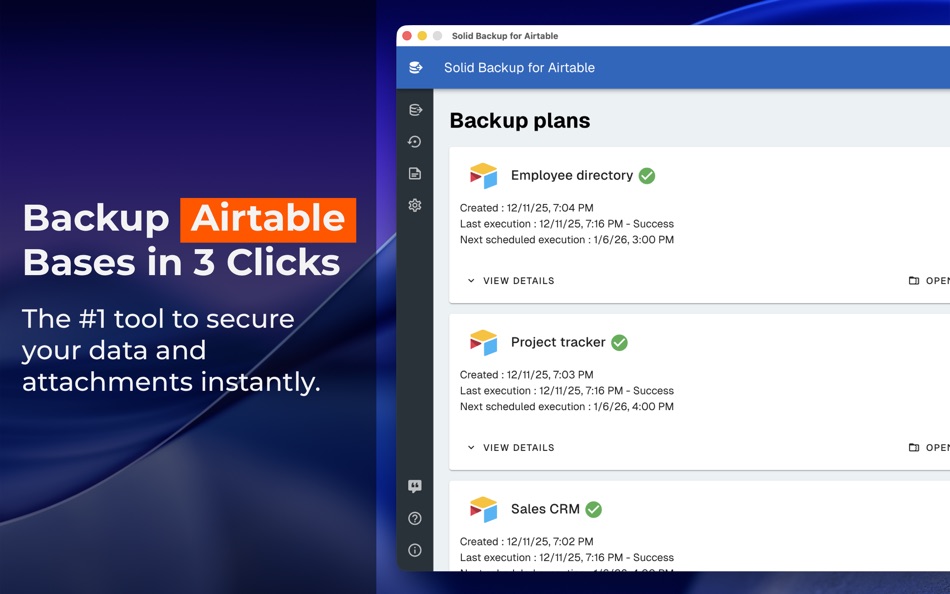
Don’t leave your mission-critical Airtable data at risk. Solid Backup is the professional’s choice for local, high-fidelity backups. In just 3 clicks, secure your entire workspace directly onto your Mac, ensuring you always stay in control of your data.
Whether it’s protection against accidental deletions, service outages, or simply the need for offline access, Solid Backup provides a rock-solid safety net for your business.
WHY CHOOSE SOLID BACKUP?
- Effortless Setup: Connect and start your first backup in under 60 seconds. No complex configuration required.
- Complete Data Ownership: Your bases are downloaded directly to your Mac in universal JSON and CSV formats, ensuring your data remains readable anywhere, anytime.
- Full Media Backups: Unlike basic exports, Solid Backup includes all your attachments by default. Your images, PDFs, and documents are safe and sound.
- True Automation: Set your schedule and forget it. Choose between daily, weekly, or monthly intervals to keep your archives up to date without lifting a finger.
- Military-Grade Encryption: Protect your sensitive backups with a master password. Using industry-standard AES-256 encryption (via 7-Zip), your data remains inaccessible to anyone but you, even on shared drives.
- Human-Readable Excel Exports: Beyond raw data, get beautifully formatted .xlsx files. We resolve Record IDs into actual names and linked records, making your backups instantly readable and ready for professional reporting.
BUILT FOR PROFESSIONALS
- Privacy First: Your data travels securely from Airtable to your Mac. We never see, store, or touch your sensitive information.
- Maximum Compatibility: Exported files are ready for Excel, Google Sheets, or custom database integrations.
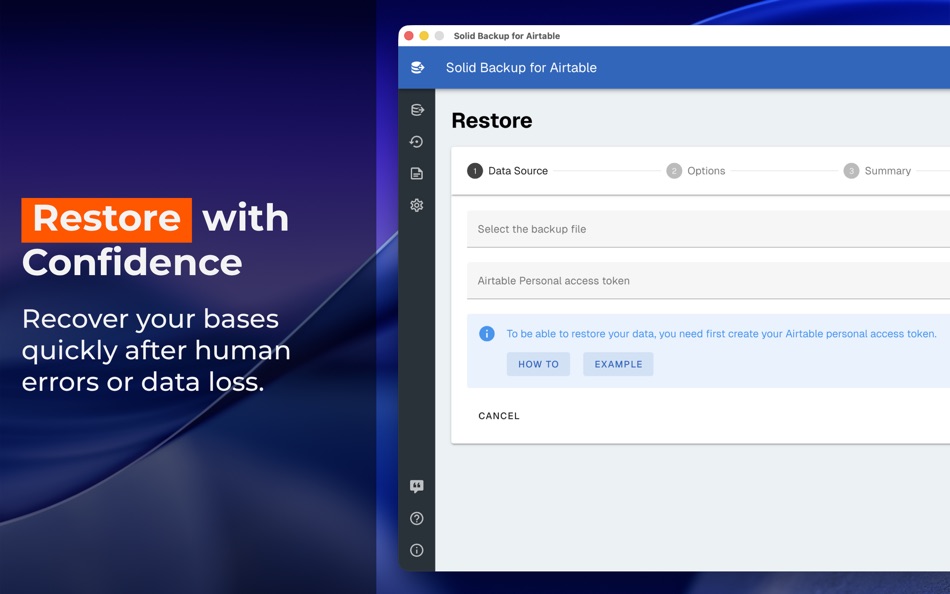
- Peace of Mind: Avoid the nightmare of "Oops, I deleted the wrong record." Restore your data with confidence.
Stop worrying about your data and start securing it today with Solid Backup.
This app is in no way affiliated with Formagrid, Inc. (Airtable) except for the fact that we use their awesome API to provide you this service.
Ad
ภาพหน้าจอ


ประวัติราคา
- วันนี้: $19.99
- ต่ำสุด: $19.99
- มากที่สุด: $39.99
ติดตามราคา
Ad
ผู้พัฒนา
- Pierre-Yves Lachat
- แพลตฟอร์ม: macOS แอป (1)
- รายการ: 0 + 0
- แต้มแล: 1 + 0 ¡
- การจัดอันดับ: 0
- ความเห็น: 0
- ความเห็น: 0
- ลดราคา: 0
- วิดีโอ: 0
- RSS: ติดตาม
แต้มแล (1)
-

- 724 Erin
- +1

การจัดอันดับ (0)
0 ☹️
รายการ (0)
0 ☹️
- Solid Backup for Airtable
ความเห็น (0)
แสดงรีวิวเป็นคนแรกเลย 🌟
ความเห็น (0)
เป็นคนแรกที่แสดงความเห็น 🌟
ข้อมูลเพิ่มเติม
รายชื่อติดต่อ
- เว็บไซท์:
 https://solidbackup.app
«Solid Backup for Airtable». แพลตฟอร์ม: macOS. หมวดหมู่: ยูทิลิตี้. ผู้พัฒนา: «Pierre-Yves Lachat». การเปิดตัวครั้งแรก: . อัปเดตล่าสุด: . ราคาปัจจุบัน: $19.99. ราคาต่ำสุดที่บันทึกไว้: $19.99 (). ราคาสูงสุดที่บันทึกไว้: $39.99 (). ชื่อนี้ยังไม่ได้รับการให้คะแนนหรือบทวิจารณ์บน AppAgg จุดที่ติดตาม: ยืนยันแล้ว 1, ทางอ้อม 0. ภาษาที่ใช้ได้: English. AppAgg ติดตามประวัติราคา การให้คะแนน และคำติชมของผู้ใช้ «Solid Backup for Airtable». ส่วนลดและอัปเดตในอนาคต: RSS. AppAgg ไม่ได้โฮสต์แอปพลิเคชันหรือแจกจ่ายซอฟต์แวร์ เครื่องหมายการค้า โลโก้ และภาพหน้าจอทั้งหมดเป็นของเจ้าของที่เกี่ยวข้อง
Solid Backup for Airtable URL แบบสั้น: คัดลอกแล้ว!- 🌟 แชร์
- Mac App Store
คุณอาจชอบ
-
- Solid Optics MFT
- macOS แอป: ยูทิลิตี้ โดย: Solid Optics NV
- ฟรี
- รายการ: 0 + 0 การจัดอันดับ: 0 ความเห็น: 0
- แต้มแล: 0 + 0 ความเห็น: 0 เวอร์ชัน: 2.0 Software to code and tune optics with the Solid Optics MFT device ⥯
-
- Backup via SSH
- macOS แอป: ยูทิลิตี้ โดย: Volodymyr Sichka
- $0.99
- รายการ: 0 + 1 การจัดอันดับ: 0 ความเห็น: 0
- แต้มแล: 8 + 0 ความเห็น: 0 เวอร์ชัน: 1.1 Backup via SSH is a native macOS app that automates backups from remote servers over SSH. Add multiple servers, select directories to back up, and run parallel backups with real-time ... ⥯
-
- Backup
- macOS แอป: ยูทิลิตี้ โดย: Jonathan Clark
- $9.99
- รายการ: 0 + 1 การจัดอันดับ: 0 ความเห็น: 0
- แต้มแล: 0 + 0 ความเห็น: 0 เวอร์ชัน: 2.4 Backup copies individual files or entire folder structures to a target destination. It duplicates the content of a source folder or file to a target folder. - Manually back up the ... ⥯
-
- Backup Guru LE
- macOS แอป: ยูทิลิตี้ โดย: FelixDev
- ฟรี
- รายการ: 0 + 0 การจัดอันดับ: 0 ความเห็น: 0
- แต้มแล: 0 + 0 ความเห็น: 0 เวอร์ชัน: 1.2 Backup Guru LE provides backup and sync of folders. The App Store version is limited to backup and sync of files which you own (not system files). The website version provides bootable ⥯
-
- Backup Scheduler: Time Editor
- macOS แอป: ยูทิลิตี้ โดย: Voros Innovation
- $6.99
- รายการ: 0 + 0 การจัดอันดับ: 0 ความเห็น: 0
- แต้มแล: 0 + 0 ความเห็น: 0 เวอร์ชัน: 1.11.0 Take control of your Mac's backup schedule with Backup Scheduler. This powerful app lets you decide when and how your important data is safeguarded, optimizing system performance and ... ⥯
-
- Backup Message Pro
- macOS แอป: ยูทิลิตี้ โดย: Emanuele Floris
- $2.99
- รายการ: 0 + 1 การจัดอันดับ: 0 ความเห็น: 0
- แต้มแล: 4 + 0 ความเห็น: 0 เวอร์ชัน: 1.3 Don t miss our new App in the Mac App Store! "Messages Backup Pro" allows you to easily backup and restore your chats on your Mac or any other Mac. With just one touch you can create a ⥯
-
- Backup for Adobe Cloud Fonts
- macOS แอป: ยูทิลิตี้ โดย: Thomas Liebl
- $7.99
- รายการ: 0 + 0 การจัดอันดับ: 0 ความเห็น: 0
- แต้มแล: 0 + 0 ความเห็น: 0 เวอร์ชัน: 1.0.4 Archiving fonts for historical projects ensures that you can maintain the integrity and consistency of old projects over time. This is especially important for designers, businesses, ... ⥯
-
- Easy Cloud Backup
- macOS แอป: ยูทิลิตี้ โดย: Colin Lyders
- * ฟรี
- รายการ: 0 + 0 การจัดอันดับ: 0 ความเห็น: 0
- แต้มแล: 0 + 0 ความเห็น: 0 เวอร์ชัน: 2.0 Easy Cloud Backup allows you to add a level of protection to your important data by backing it up to your iCloud Drive. Time Machine backups are a great way to protect your data, but ... ⥯
-
- Mail Backup
- macOS แอป: ยูทิลิตี้ โดย: Classy Geeks llc.
- * ฟรี
- รายการ: 0 + 0 การจัดอันดับ: 0 ความเห็น: 0
- แต้มแล: 0 + 0 ความเห็น: 0 เวอร์ชัน: 1.21.400 Mail Backup safely backs up email locally with checksum accuracy, scheduled backups, IMAP support, and Apple Keychain security. Reliable email backups. Total privacy. Built for ... ⥯
-
- Parachute Backup
- macOS แอป: ยูทิลิตี้ โดย: Eric Mann
- $4.99
- รายการ: 0 + 0 การจัดอันดับ: 0 ความเห็น: 0
- แต้มแล: 1 + 0 ความเห็น: 0 เวอร์ชัน: 1.4.12 Keep Your iCloud Data. Forever. Parachute is a set-and-forget backup companion for iCloud Photos and iCloud Drive. It automatically backs up your memories photos, videos, and documents ⥯
-
- Email Backup Pro
- macOS แอป: ยูทิลิตี้ โดย: Constellation Ltd
- ฟรี
- รายการ: 0 + 0 การจัดอันดับ: 0 ความเห็น: 0
- แต้มแล: 0 + 0 ความเห็น: 0 เวอร์ชัน: 1.0.1 Transform your email management with Email Archiver - Pro , the ultimate professional-grade email backup solution designed exclusively for Mac. Seamlessly backup, archive, and organize ⥯
-
- SmartArchive - Backup Tool
- macOS แอป: ยูทิลิตี้ โดย: 涵涵 闫
- $1.99
- รายการ: 0 + 0 การจัดอันดับ: 0 ความเห็น: 0
- แต้มแล: 0 + 0 ความเห็น: 0 เวอร์ชัน: 1.0.0 SmartArchive is a powerful and intuitive file backup application designed specifically for macOS. With its elegant wizard-based interface, SmartArchive makes it effortless to backup, ... ⥯
-
- File Backup
- macOS แอป: ยูทิลิตี้ โดย: Zhongshan Gaoping Technology Co.,Ltd.
- $3.99
- รายการ: 0 + 0 การจัดอันดับ: 0 ความเห็น: 0
- แต้มแล: 0 + 0 ความเห็น: 0 เวอร์ชัน: 1.3 File Backup software is a design file backup software for individual users, It has Concise Mode and Professional Mode . The Concise Mode is designed for most users, It will ... ⥯
-
- Sync - Backup & Restore
- macOS แอป: ยูทิลิตี้ โดย: Miciniti Technologies
- * ฟรี
- รายการ: 0 + 0 การจัดอันดับ: 0 ความเห็น: 0
- แต้มแล: 1 + 0 ความเห็น: 0 เวอร์ชัน: 2.0.4 Sync is a personal file sync app with built-in file manager and web server. With Sync, you can sync, backup, and restore your files to/from local drives and several cloud storage ... ⥯