
| ผู้พัฒนา: | 朝勃 郑 (2) | ||
| ราคา: | * ฟรี | ||
| การจัดอันดับ: | 0 | ||
| ความเห็น: | 0 เขียนความเห็น | ||
| ความเห็น: | 0 โพสต์ความคิดเห็น | ||
| รายการ: | 0 + 0 | ||
| แต้มแล: | 1 + 0 ¡ | ||
| Mac App Store | |||
คำอธิบาย

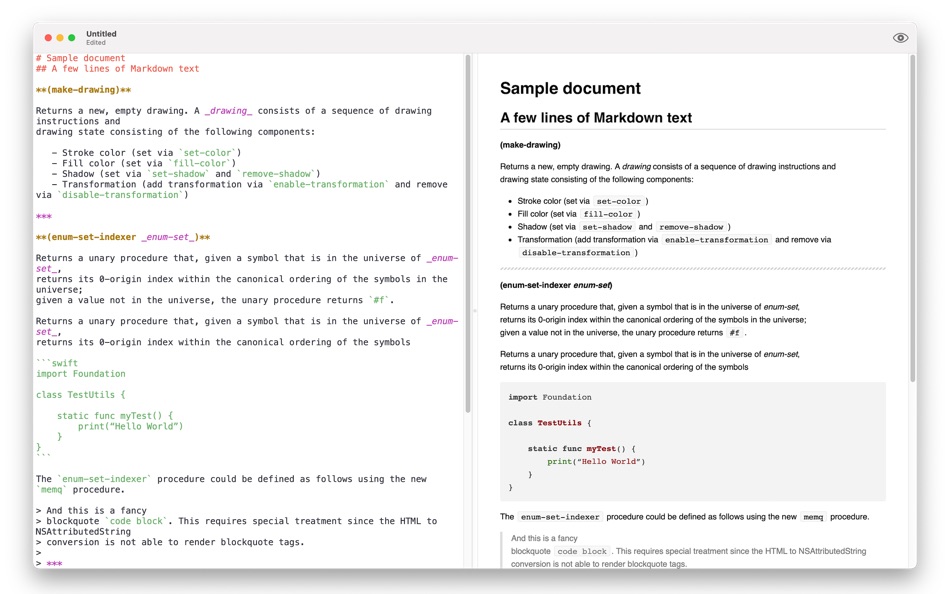
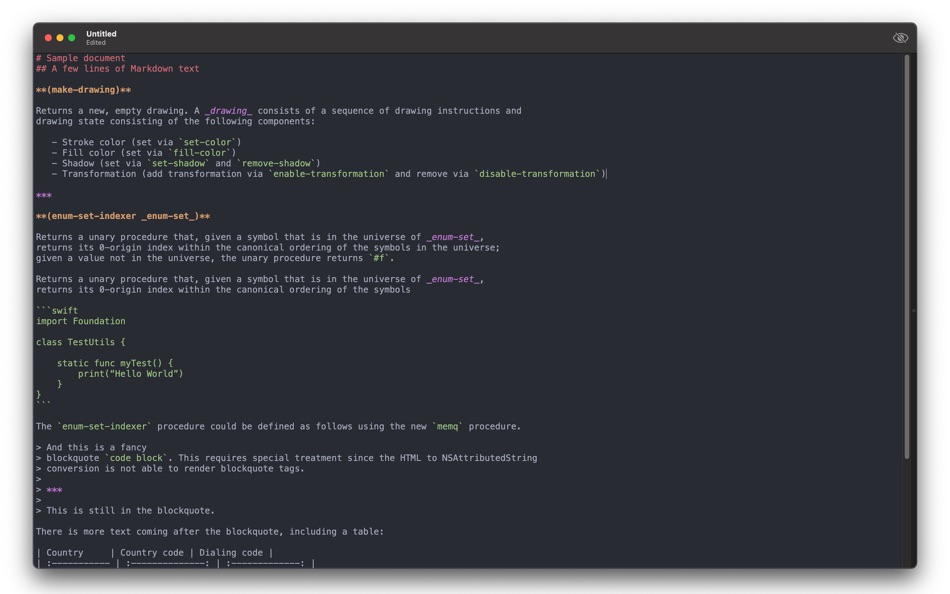
Advanced Features:
- Export to PDF file.
- Export to HTML file.
If you have any suggestion about SwiftMarkdown, please contact Email: SwiftMarkdown@outlook.com .
Ad
ภาพหน้าจอ


ประวัติราคา
-
* การซื้อภายในแอพ - วันนี้: ฟรี
- ต่ำสุด: ฟรี
- มากที่สุด: ฟรี
ติดตามราคา
ผู้พัฒนา
Ad
แต้มแล (1)
-

- 1 mugs
- +1

การจัดอันดับ (0)
0 ☹️
รายการ (0)
0 ☹️
- SwiftMarkdown
ความเห็น (0)
แสดงรีวิวเป็นคนแรกเลย 🌟
ข้อมูลเพิ่มเติม
ความเห็น (0)
เป็นคนแรกที่แสดงความเห็น 🌟
«SwiftMarkdown». แพลตฟอร์ม: macOS. หมวดหมู่: ยูทิลิตี้. ผู้พัฒนา: «朝勃 郑». การเปิดตัวครั้งแรก: . อัปเดตล่าสุด: . ราคาปัจจุบัน: ฟรี. ชื่อนี้ยังไม่ได้รับการให้คะแนนหรือบทวิจารณ์บน AppAgg จุดที่ติดตาม: ยืนยันแล้ว 1, ทางอ้อม 0. ภาษาที่ใช้ได้: Chinese, English. AppAgg ติดตามประวัติราคา การให้คะแนน และคำติชมของผู้ใช้ «SwiftMarkdown». ส่วนลดและอัปเดตในอนาคต: RSS. AppAgg ไม่ได้โฮสต์แอปพลิเคชันหรือแจกจ่ายซอฟต์แวร์ เครื่องหมายการค้า โลโก้ และภาพหน้าจอทั้งหมดเป็นของเจ้าของที่เกี่ยวข้อง
SwiftMarkdown URL แบบสั้น: คัดลอกแล้ว!- 🌟 แชร์
- Mac App Store
คุณอาจชอบ
-
- Markdown Panda
- macOS แอป: ยูทิลิตี้ โดย: Tap4Mobile do Brasil
- ฟรี
- รายการ: 0 + 0 การจัดอันดับ: 0 ความเห็น: 0
- แต้มแล: 2 + 0 ความเห็น: 0 เวอร์ชัน: 2.4.0 Markdown Panda - The elegant Markdown viewer for macOS Discover the most beautiful way to read and view Markdown files on macOS. Markdown Panda is the perfect companion for viewing ... ⥯
-
- Markdown Preview - Quick Look
- macOS แอป: ยูทิลิตี้ โดย: Anybox LTD
- $2.99
- รายการ: 1 + 0 การจัดอันดับ: 0 ความเห็น: 0
- แต้มแล: 2 + 0 ความเห็น: 0 เวอร์ชัน: 2.2 Markdown Preview provides a Quick Look extension to preview Markdown files in Finder. Before started, you will need to enable Quick Look extension in System Settings. Afterwards you ... ⥯
-
- Markdown Lens
- macOS แอป: ยูทิลิตี้ โดย: John Decker
- * ฟรี
- รายการ: 0 + 0 การจัดอันดับ: 0 ความเห็น: 0
- แต้มแล: 1 + 0 ความเห็น: 0 เวอร์ชัน: 2.00 Markdown Lens is a fast, native Markdown viewer for macOS. Simply double-click any .md file to see it beautifully rendered with full GitHub Flavored Markdown support. EXPORT WITH ... ⥯
-
- Copy to Markdown
- macOS แอป: ยูทิลิตี้ โดย: 谦 陈
- $3.99
- รายการ: 0 + 0 การจัดอันดับ: 0 ความเห็น: 0
- แต้มแล: 0 + 0 ความเห็น: 0 เวอร์ชัน: 1.0 Instantly extract clean content from any webpage and copy it as Markdown with a single click. WHAT IT DOES Copy to Markdown extracts the main article content from web pages and ... ⥯
-
- File2:Text Markdown Converter
- macOS แอป: ยูทิลิตี้ โดย: Cleverson
- * ฟรี
- รายการ: 0 + 0 การจัดอันดับ: 0 ความเห็น: 0
- แต้มแล: 0 + 0 ความเห็น: 0 เวอร์ชัน: 1.2.0 Turn any document into clean, portable Markdown or plain text without ever leaving your Mac. Discover File2Text Markdown Converter, your all-in-one solution for transforming documents, ⥯
- ใหม่
- MarkDrop - Markdown Converter
- macOS แอป: ยูทิลิตี้ โดย: Ella Sway
- * $9.99
- รายการ: 0 + 0 การจัดอันดับ: 0 ความเห็น: 0
- แต้มแล: 0 + 0 ความเห็น: 0 เวอร์ชัน: 1.0.1 Convert Markdown to beautifully formatted Word documents in one click. MarkDrop is the fastest way to turn .md files into .docx. Drag and drop, right-click in Finder, or paste from ... ⥯
-
- Side Markdown
- macOS แอป: ยูทิลิตี้ โดย: Shiming Chen
- ฟรี
- รายการ: 0 + 0 การจัดอันดับ: 0 ความเห็น: 0
- แต้มแล: 0 + 0 ความเห็น: 0 เวอร์ชัน: 1.0 A lightweight note-taking tool designed exclusively for Markdown enthusiasts, with its standout feature Side Mode that supercharges your productivity! One-click to snap the window to ... ⥯
-
- iBoysoft MagicMenu
- macOS แอป: ยูทิลิตี้ โดย: Chengdu Aibo Tech Co., Ltd.
- * ฟรี
- รายการ: 0 + 0 การจัดอันดับ: 0 ความเห็น: 0
- แต้มแล: 1 + 0 ความเห็น: 0 เวอร์ชัน: 4.3.3 iBoysoft MagicMenu - Expand your Mac's right-click context menu with add-ons, functions and features, such as "New File, Cut File, Move File to, Copy File to, Quick Access, Uninstall ... ⥯
- ใหม่
- MD Editor - Simple & Convert
- macOS แอป: ยูทิลิตี้ โดย: hirokazu murabe
- ฟรี
- รายการ: 0 + 0 การจัดอันดับ: 0 ความเห็น: 0
- แต้มแล: 0 + 0 ความเห็น: 0 เวอร์ชัน: 1.0 The SIMPLEST Markdown editor. Create beautiful documents in minutes. Why Choose This App? Just 3 Steps to Perfect Documents 1. Type your text 2. See live preview 3. Export to PDF - ... ⥯
-
- SwiftOne Quick Utility
- macOS แอป: ยูทิลิตี้ โดย: Cornell University
- ฟรี
- รายการ: 1 + 0 การจัดอันดับ: 0 ความเห็น: 0
- แต้มแล: 1 + 0 ความเห็น: 0 เวอร์ชัน: 1.1.0 SwiftOne Quick Utility is a tool for quickly connecting to a Swift or SwiftOne Recorder. The tool can quickly retrieve the device information on a macOS computer and set it into a boot ⥯
-
- LowHumming
- macOS แอป: ยูทิลิตี้ โดย: 晓枋 陈
- ฟรี
- รายการ: 0 + 0 การจัดอันดับ: 0 ความเห็น: 0
- แต้มแล: 0 + 0 ความเห็น: 0 เวอร์ชัน: 1.0.23 - markdown 编辑器 - 比传统markdown而已更加方便的 list - 支持把rss订阅也加入到文稿列表中 ⥯
-
- iMenuX - New File & Tools
- macOS แอป: ยูทิลิตี้ โดย: 小芳 龙
- $4.99
- รายการ: 0 + 1 การจัดอันดับ: 0 ความเห็น: 0
- แต้มแล: 11 + 0 ความเห็น: 0 เวอร์ชัน: 2.0 iMenuX - New File & Tools iMenuX is a lightweight Finder extension that brings essential file operations to your right-click menu. Designed to fill the gaps in macOS Finder, it helps ... ⥯
-
- Tabs Saver for Safari
- macOS แอป: ยูทิลิตี้ โดย: Denk Alexandru
- * ฟรี
- รายการ: 1 + 2 การจัดอันดับ: 0 ความเห็น: 0
- แต้มแล: 11 + 0 ความเห็น: 0 เวอร์ชัน: 4.2.1 Featured by Apple in 3 stories: Standout Safari Extensions, Super Safari Extensions, and Browse Better If you want to save your browsing session for later or you have too many tabs ... ⥯
- -50%
- Quick New File Pro
- macOS แอป: ยูทิลิตี้ โดย: Eduardo Revilla Vaquero
- $0.99
$1.99-50% - รายการ: 0 + 1 การจัดอันดับ: 0 ความเห็น: 0
- แต้มแล: 6 + 0 ความเห็น: 0 เวอร์ชัน: 1.2 Quick New File Pro transforms your macOS workflow and restores functionality that many users miss when migrating from Windows: the ability to create new files directly from the file ... ⥯