
| ผู้พัฒนา: | Khatuli Todua (9) | ||
| ราคา: | $2.99 | ||
| การจัดอันดับ: | 0 | ||
| ความเห็น: | 0 เขียนความเห็น | ||
| ความเห็น: | 0 โพสต์ความคิดเห็น | ||
| รายการ: | 0 + 0 | ||
| แต้มแล: | 0 + 0 ¡ | ||
| Mac App Store | |||
คำอธิบาย

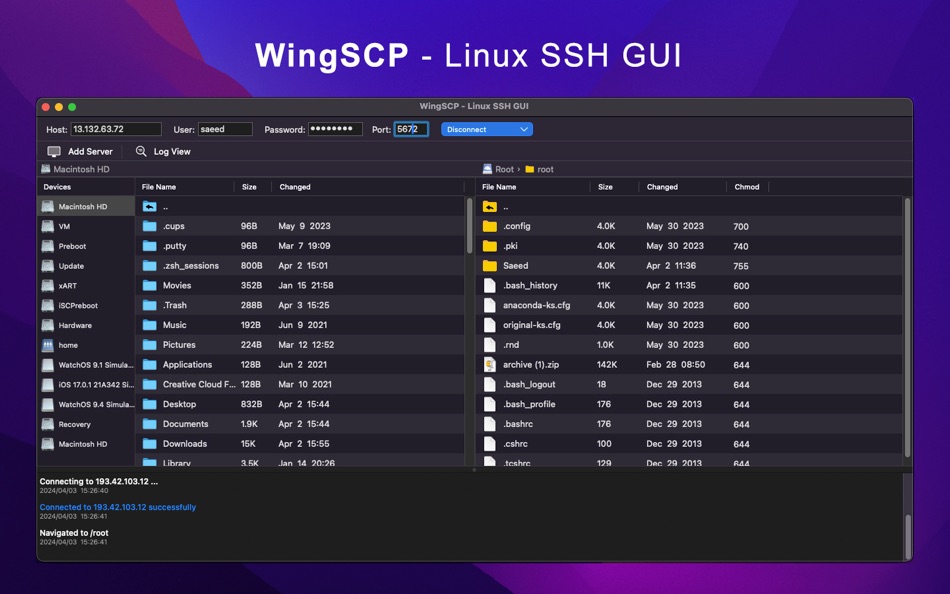
Effortless File Transfer: Upload and download folders and files between macOS and Linux servers with ease. The intuitive interface simplifies the transfer process, ensuring seamless data exchange.
Internal Copy and Paste: Enjoy the convenience of internal copy and paste functionality, enabling swift file transfers within the application. Copy files from the server to different folders or perform local copy and paste operations effortlessly.
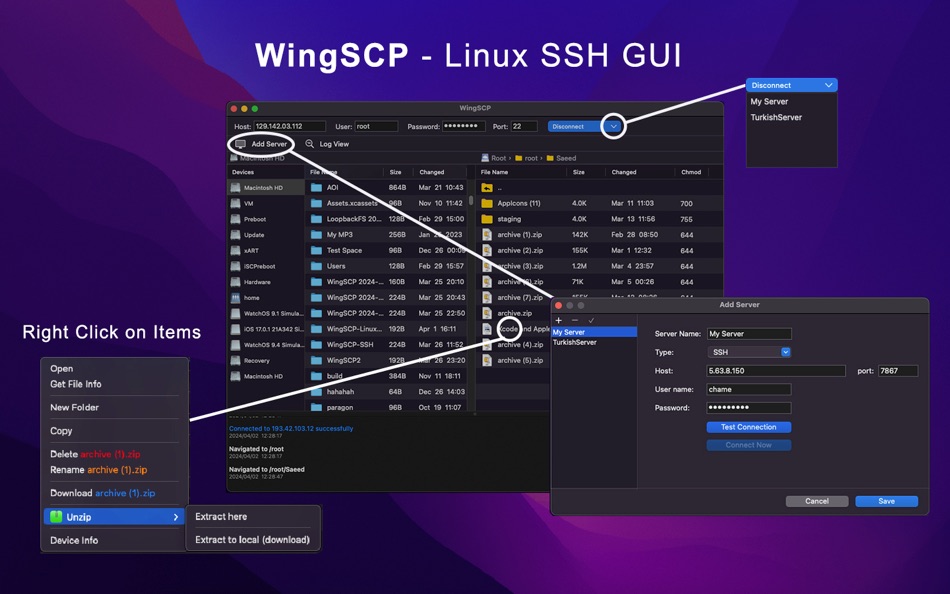
Zip Compression: Create zip archives of folders and files for efficient storage and transfer. Upload and download zip files with ease, streamlining the file transfer process.
Password-Protected Zips: Ensure data security with support for zip passwords. Protect sensitive information by encrypting zip files with passwords, providing an additional layer of security during transfer.
Auto-Generated File Names: WingSCP automatically generates file names to prevent overwriting or loss of files. Never worry about file conflicts again, as WingSCP intelligently manages file naming to ensure data integrity.
Comprehensive Log Window: Stay informed about activities with the integrated log window. Track file transfer progress, view error messages, and monitor all operations in real-time for enhanced transparency and accountability.
Server Management: Easily add and manage multiple servers, maintaining a convenient list for quick access. Set default servers for automatic connection upon app launch, streamlining workflow and enhancing efficiency.
Quick Access from macOS: Access WingSCP directly from macOS right-click menu to open paths of selected files effortlessly. Seamlessly integrate WingSCP into your workflow for convenient file management.
Persistent Connections: Enjoy uninterrupted connectivity with servers. WingSCP ensures that connections remain active even during idle periods, eliminating the need to reconnect when resuming tasks after prolonged intervals.
Integrated Source Code Editor: Edit files directly within WingSCP over SSH connection with the integrated source code editor in GUI mode. Make quick modifications to source code files and save changes effortlessly, enhancing productivity and workflow efficiency.
File Properties Management: Modify file properties such as group, owner, and chmod (octal) permissions with ease. Gain detailed insights into file counts within folders, facilitating efficient file management and organization.
System Information Display: Access essential system information with ease. Retrieve details such as machine name, operating system name, last update, device and server IP addresses, physical RAM, available RAM, and storage space, empowering informed decision-making and system management.
WingSCP Linux SSH GUI empowers users with the capability to seamlessly navigate their macOS and Linux server environments with enhanced visibility. With built-in support for displaying hidden system files, users can effortlessly uncover and manage crucial files that are typically concealed from view. Whether it's exploring system configurations or accessing sensitive data, WingSCP ensures users have complete control and visibility over their file systems, enabling them to efficiently execute tasks with confidence and precision.Experience seamless file transfer and management between macOS and Linux servers with WingSCP. Streamline your workflow, enhance productivity, and ensure secure data exchange with this comprehensive file transfer solution.
Ad
ภาพหน้าจอ



ประวัติราคา
- วันนี้: $2.99
- ต่ำสุด: $2.99
- มากที่สุด: $2.99
ติดตามราคา
ผู้พัฒนา
- Khatuli Todua
- แพลตฟอร์ม: iOS แอป (5) macOS แอป (4)
- รายการ: 0 + 0
- แต้มแล: 20 + 5 ¡
- การจัดอันดับ: 0
- ความเห็น: 0
- ความเห็น: 0
- ลดราคา: 0
- วิดีโอ: 0
- RSS: ติดตาม
Ad
แต้มแล (0)
0 ☹️
การจัดอันดับ (0)
0 ☹️
รายการ (0)
0 ☹️
- WingSCP - Linux SSH GUI
ความเห็น (0)
แสดงรีวิวเป็นคนแรกเลย 🌟
ข้อมูลเพิ่มเติม
ความเห็น (0)
เป็นคนแรกที่แสดงความเห็น 🌟
«WingSCP - Linux SSH GUI». แพลตฟอร์ม: macOS. หมวดหมู่: ยูทิลิตี้. ผู้พัฒนา: «Khatuli Todua». การเปิดตัวครั้งแรก: . อัปเดตล่าสุด: . ราคาปัจจุบัน: $2.99. ราคาต่ำสุดที่บันทึกไว้: $2.99. ราคาสูงสุดที่บันทึกไว้: $2.99. ชื่อนี้ยังไม่ได้รับการให้คะแนนหรือบทวิจารณ์บน AppAgg ภาษาที่ใช้ได้: English. AppAgg ติดตามประวัติราคา การให้คะแนน และคำติชมของผู้ใช้ «WingSCP - Linux SSH GUI». ส่วนลดและอัปเดตในอนาคต: RSS. AppAgg ไม่ได้โฮสต์แอปพลิเคชันหรือแจกจ่ายซอฟต์แวร์ เครื่องหมายการค้า โลโก้ และภาพหน้าจอทั้งหมดเป็นของเจ้าของที่เกี่ยวข้อง
WingSCP - Linux SSH GUI URL แบบสั้น: คัดลอกแล้ว!- 🌟 แชร์
- Mac App Store
คุณอาจชอบ
-
- SSH Proxy
- macOS แอป: ยูทิลิตี้ โดย: Codinn Technologies
- ฟรี
- รายการ: 0 + 0 การจัดอันดับ: 0 ความเห็น: 0
- แต้มแล: 1 + 0 ความเห็น: 0 เวอร์ชัน: 16.03 SSH Proxy can help you turn any remote SSH server into a SOCKS / HTTPS proxy, intuitive and easy to use. SSH Proxy is able to remember the SSH login password & private key passphrase ... ⥯
-
- SSH Tunnel Builder
- macOS แอป: ยูทิลิตี้ โดย: Comraich
- $1.99
- รายการ: 0 + 0 การจัดอันดับ: 0 ความเห็น: 0
- แต้มแล: 0 + 0 ความเห็น: 0 เวอร์ชัน: 1.0 This app allows you to create and manage SSH tunnels connections to remote systems. Connections to the remote servers are encrypted using standard SSH encryption, allowing secure ... ⥯
-
- Backup via SSH
- macOS แอป: ยูทิลิตี้ โดย: Volodymyr Sichka
- $0.99
- รายการ: 0 + 1 การจัดอันดับ: 0 ความเห็น: 0
- แต้มแล: 8 + 0 ความเห็น: 0 เวอร์ชัน: 1.1 Backup via SSH is a native macOS app that automates backups from remote servers over SSH. Add multiple servers, select directories to back up, and run parallel backups with real-time ... ⥯
- ใหม่
- MP4 Merge GUI
- macOS แอป: ยูทิลิตี้ โดย: Leighty Digital LLC
- * ฟรี
- รายการ: 0 + 0 การจัดอันดับ: 0 ความเห็น: 0
- แต้มแล: 0 + 0 ความเห็น: 0 เวอร์ชัน: 1.0 I have used mp4-merge for a couple years now while editing my flights video. I always wished there was a GUI for it to make it easier to use and avoid making mistakes like forgetting ... ⥯
-
- iSSH: SSH Proxy & Tunnel
- macOS แอป: ยูทิลิตี้ โดย: 兰桂 吴
- $1.99
- รายการ: 0 + 0 การจัดอันดับ: 0 ความเห็น: 0
- แต้มแล: 0 + 0 ความเห็น: 0 เวอร์ชัน: 1.1 iSSH allows you to turn any remote SSH server into a SOCKS proxy. iSSH is a GUI app for the "ssh -D" command, it frees you from the tedious command line options. Now you can turn your ... ⥯
-
- NexShell-SSH & SFTP client
- macOS แอป: ยูทิลิตี้ โดย: 贝贝 尚
- $14.99
- รายการ: 0 + 0 การจัดอันดับ: 0 ความเห็น: 0
- แต้มแล: 0 + 0 ความเห็น: 0 เวอร์ชัน: 3.2.7 Strictly adhering to Apple s data privacy standards, all data is stored locally on macOS, with no user data collection whatsoever. When iCloud sync is enabled, data is stored in the ... ⥯
-
- Mulvos for Linux
- macOS แอป: ยูทิลิตี้ โดย: Resch GmbH
- * ฟรี
- รายการ: 0 + 0 การจัดอันดับ: 0 ความเห็น: 0
- แต้มแล: 0 + 0 ความเห็น: 0 เวอร์ชัน: 1.26 Run Linux fast and easy on your Mac For any questions or just a chat: hello@mulvos.com EULA: https://www.apple.com/legal/internet-services/itunes/dev/stdeula/ Privacy Policy: ... ⥯
-
- OpenCC Chinese Convert
- macOS แอป: ยูทิลิตี้ โดย: 立剑 孙
- $9.99
- รายการ: 0 + 0 การจัดอันดับ: 0 ความเห็น: 0
- แต้มแล: 0 + 0 ความเห็น: 0 เวอร์ชัน: 1.2 This app wraps ByVoid's OpenCC module into a macOS App, helping those people (who are less familiar with Terminal) to use OpenCC to convert Chinese between Simplified and Traditional ... ⥯
-
- Dlient
- macOS แอป: ยูทิลิตี้ โดย: 羿平 江
- ฟรี
- รายการ: 0 + 0 การจัดอันดับ: 0 ความเห็น: 0
- แต้มแล: 0 + 0 ความเห็น: 0 เวอร์ชัน: 0.1.7 SSH Client - Supports track shell output to log files and replay it. - Custom yours shell snippets. - Make it yours with 7 colorful themes and adjustable fonts. - Upload and download ... ⥯
-
- Apple Remote Desktop
- macOS แอป: ยูทิลิตี้ โดย: Apple
- $79.99
- รายการ: 8 + 3 การจัดอันดับ: 0 ความเห็น: 0
- แต้มแล: 1 + 0 ความเห็น: 0 เวอร์ชัน: 3.10 Apple Remote Desktop is the best way to manage the Mac computers on your network. Distribute software, provide real-time online help to end-users, create detailed software and hardware ⥯
-
- Remote Wake Up
- macOS แอป: ยูทิลิตี้ โดย: Daniel Witt
- $9.99
- รายการ: 0 + 3 การจัดอันดับ: 0 ความเห็น: 0
- แต้มแล: 8 + 0 ความเห็น: 0 เวอร์ชัน: 2.1.1 Remote Wake Up lets you control devices on your local network or remotely over the internet using SSH, AppleScript, or Wake-on-LAN. It s designed for tech-savvy users, IT ... ⥯
-
- Network Toolbox - Net Security
- macOS แอป: ยูทิลิตี้ โดย: WHATSTICKER APPS SRL
- * ฟรี
- รายการ: 0 + 1 การจัดอันดับ: 0 ความเห็น: 0
- แต้มแล: 11 + 0 ความเห็น: 0 เวอร์ชัน: 3.6 The award winning App now available for macOS Everything you need for your Network in one App, fully integrated. Works on all Macs (including M1) running Catalina, Big Sur or Monterey. ⥯
-
- Magic Battery
- macOS แอป: ยูทิลิตี้ โดย: Sascha Simon
- $2.99
- รายการ: 1 + 1 การจัดอันดับ: 0 ความเห็น: 0
- แต้มแล: 9 + 0 ความเห็น: 0 เวอร์ชัน: 9.5.0 The App Magic Battery shows the battery level of supported input devices and headphones that are connected via Bluetooth in the menu bar. Internal batteries are also supported. The ... ⥯
-
- Server Explorer - DevOps Tools
- macOS แอป: ยูทิลิตี้ โดย: Midokpe Darrell Robin M. KIDJO
- $24.99
- รายการ: 0 + 0 การจัดอันดับ: 0 ความเห็น: 0
- แต้มแล: 3 + 0 ความเห็น: 0 เวอร์ชัน: 3.1.0 Server Explorer Server Explorer is a modern SSH client built for backend developers, solo DevOps, freelancers, indie hackers, and small technical teams who manage multiple Linux ... ⥯