
| ผู้พัฒนา: | PlayAbility (1) | ||
| ราคา: | ฟรี | ||
| การจัดอันดับ: | 0 | ||
| ความเห็น: | 0 เขียนความเห็น | ||
| ความเห็น: | 0 โพสต์ความคิดเห็น | ||
| รายการ: | 0 + 0 | ||
| แต้มแล: | 0 + 0 ¡ | ||
| Steam Store | |||
คำอธิบาย
PlayAbility Adaptive Softwareis a Windows-based accessibility tool that lets you add the controls you’re missingand build your perfect controller setup. With just a webcam and (optional) microphone, PlayAbility Adaptive Software extends your existing gear (keyboard, mouse, gamepads, adaptive devices) with new ways to play, so you can fully control any game the way youwant.
Designed for gamers of all abilities, PlayAbility Adaptive Software makes gaming more inclusive, configurable, and fun. It translates your facial expressions, head movements, and voice into seamless game inputs. Ever wanted to steer with your head, or use a smile as a button press? Now you can! The software creates a virtual controller behind the scenes, so every game thinks you’re using a standard gamepad or keyboard/mouse – meaning it works with 100% of PC games, and even on consoles via streaming or adapters. No special hardware is required beyond a simple webcam; you can even combine multiple devices and assistive tech into one unified control scheme.
Who is it for?PlayAbility Adaptive Software is built for disabled gamerswho need alternative inputs, for streamerswho want creative control setups (there’s even a Twitch chat integration!), and for tinkererswho love customizing their gaming experience. If you enjoy tweaking controls or require a unique setup to play comfortably, PlayAbility Adaptive Software gives you a friendly toolbox to play on your terms. Choose from included profile templates or create your own from scratch – every input and output is fully configurable to match your needs. Our goal is to empower every gamer to play their favorite games, their waywith a smile (literally!). 🎮🙂
Feature List
Face & Head Tracking:Use over 50different facial expressions and head movements as game inputs. For example, turn your head to steer or aim, and use a smile or eyebrow raise as button presses. (PlayAbility Adaptive Software lets these act as analog controls – not just on/off – for precise steering and aiming!)
Voice Commands:Integrated voice recognition (24 languages)lets you trigger any action with spoken words or phrases. Just say a command (e.g. "reload" or "jump") and PlayAbility Adaptive Software can press the key or button for you.
Complete Remapping:Map any input to any output. Reassign keyboard keys, mouse clicks/movement, voice commands, or face/head gestures to any gamepad button, analog stick, or trigger – or even to other keyboard/mouse actions. This means you can fully customize your control scheme for each game.
Hands-Free Mouse Control:Control your PC outside of games as well – move the mouse cursor with head movement and use facial gestures (or assigned keys) to click, drag, and scroll. It’s great for both gaming and everyday computer use when using a physical mouse is difficult.
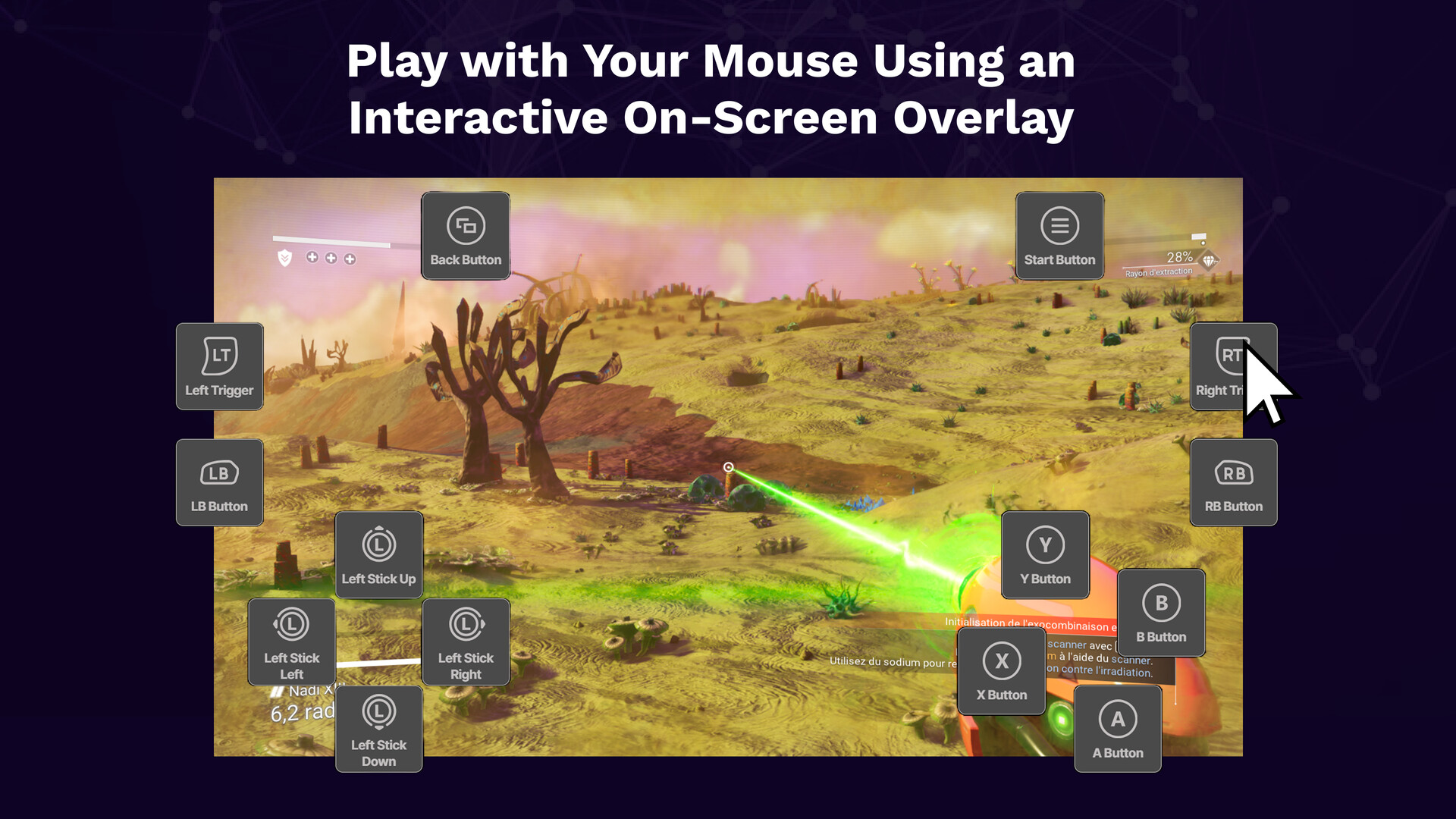
Interactive On-Screen Overlay:Control your game using on-screen buttons and virtual joysticks. Click or drag the controls to generate real gamepad, keyboard, or mouse inputs. The overlay can be used on its own or combined with face, head, voice, mouse, keyboard, or adaptive devices, even without a physical controller.
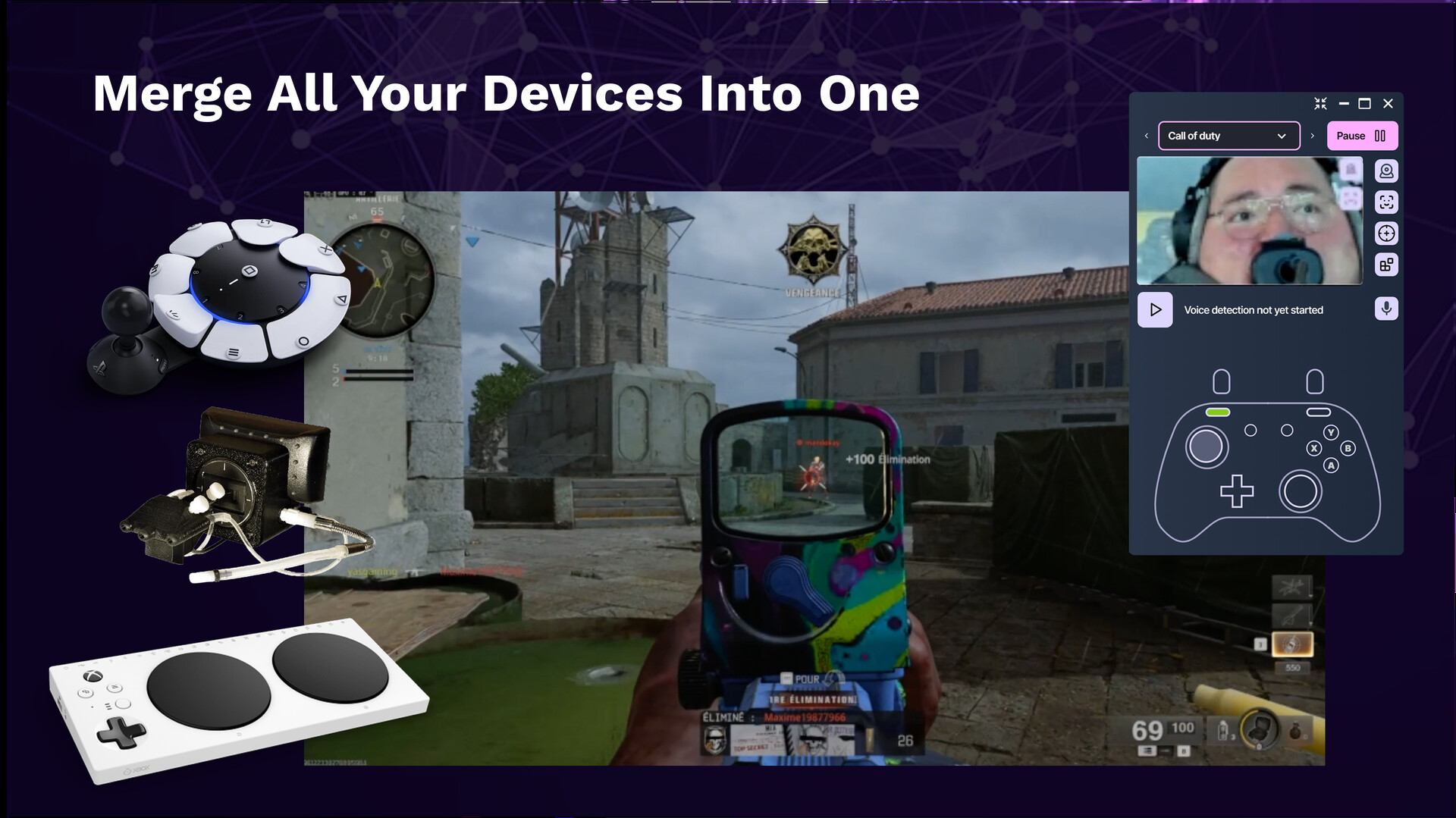
Unified Virtual Controller:Merge inputs from all your devices into one seamless output. PlayAbility Adaptive Software can combine your adaptive controllers, joysticks, pedals, and its face/voice inputs into a single virtual controller recognized by games. In other words, mix and match multiple devices and still have the game see one controller – perfect for complex setups.
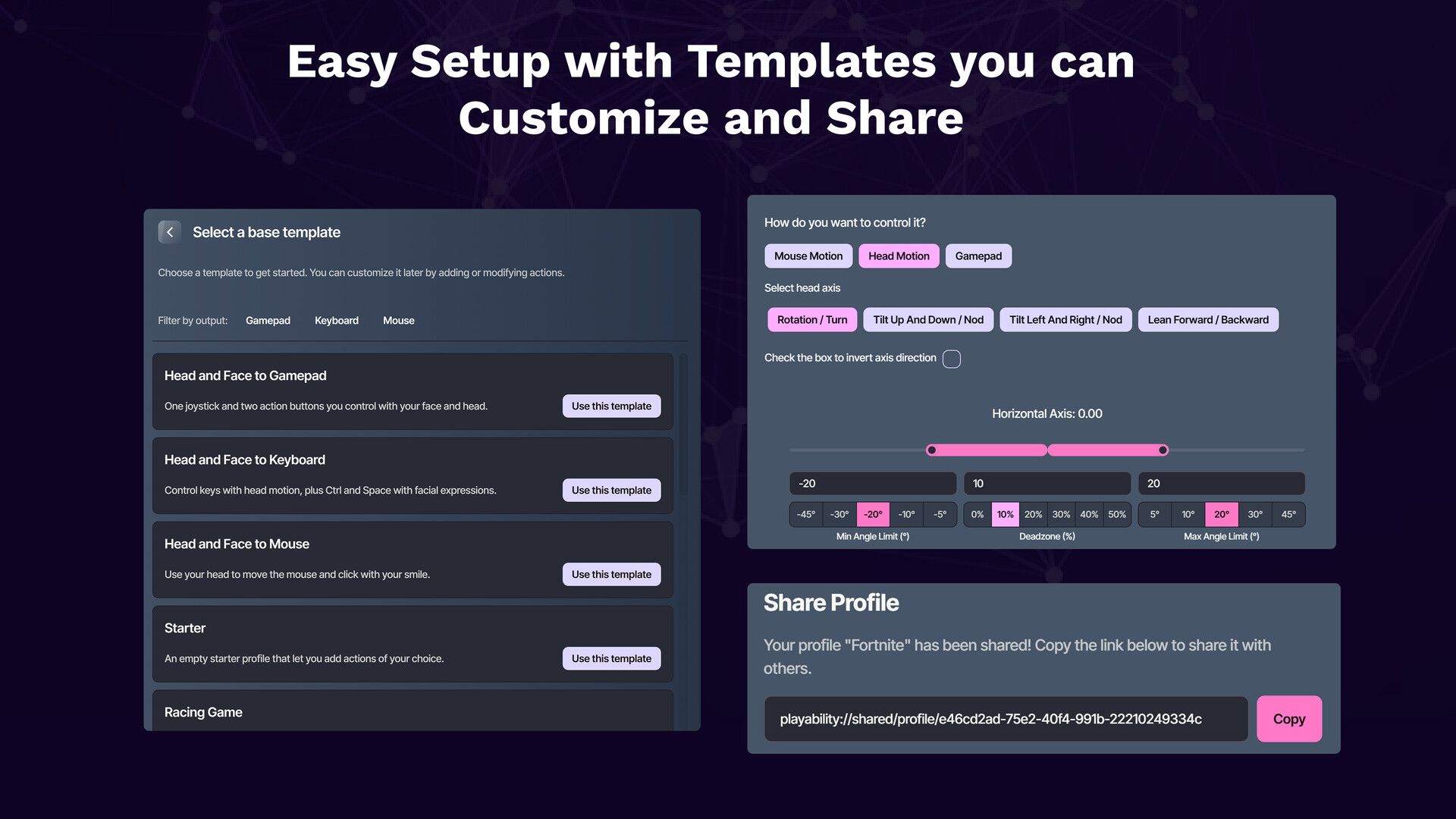
Custom Profiles & Templates:Save your configurations as profiles and switch between setups for different games or users. PlayAbility Adaptive Software comes with built-in profile templates (e.g. basic 1-stick arcade, racing setup, full gamepad, mouse control, etc.) to help you get started, all of which you can tweak or you can create a profile from scratch for complete control.
Console Compatibility:Play on more than just PC. With Remote Play or adapter support, you can use PlayAbility Adaptive Software on PlayStation 5 and Xbox consoles via Remote Play, and even on Nintendo Switch(with a compatible adapter). This extends your custom controls to console games, so you can enjoy accessible play on virtually any platform.
Twitch Integration:Streamers, have your chat join the fun! PlayAbility Adaptive Software offers Twitch chat integration, allowing viewers to trigger inputs through chat commands (using the Twitchatsystem). It’s a unique way to crowd-play or let your community assist you in-game, adding a new interactive layer to streaming.
About the Developer
PlayAbility Adaptive Software is created by Valentin Squirelo, an indie maker and developer from France with a passion for adaptive gaming tech. Valentin has been building playful inventions and accessibility projects since 2013 – from a Nerf blaster prosthetic arm to the infamous Nosulus Riftfart-smelling VR headset he made for a South Park game promo. He brings the same creativity and heart to PlayAbility.
This project didn’t start as a business venture, but as a personal mission to make gaming more accessible. Valentin began developing PlayAbility Adaptive Software in 2023 with help from his Twitch community, focusing on non-commercial, community-driven origins. He’s committed to keeping the software as open and available as possible – that’s why all features are unlocked for freewith the base app. PlayAbility’s growing community (230+ members on Discord and counting) has shaped its development through feedback and testing. Valentin’s mission is simple: enable more gamers to play the games they love. He’s dedicated to accessibility and is continuously adding features and improvements based on user requests. By supporting PlayAbility Adaptive Software, you’re not just getting a cool piece of software – you’re helping a passionate creator continue his work to make gaming better for everyone.
Pricing Model
We believe in a friendly, transparent approach to pricing. PlayAbilityAdaptive Software is completely free to download and use, with unlimited access to all features out of the box. The free base app includes one profile slotso you can create and save one custom control profile at a time. There are no time limits, no feature paywalls, and no subscriptions required– we want everyone to have a chance to play without barriers.
For power users who need more than one profile or who want to support the project, we offer an optional PlayAbility Proupgrade as a one-time DLC purchase. This upgrade unlocks unlimited profilecreation and saves. It’s a lifetime unlock, meaning you pay once and own it forever. By purchasing the Pro DLC, you not only gain the convenience of managing many profiles (for different games or setups), but you also directly support the continued development of PlayAbility Adaptive Software (and Valentin’s dream of keeping this mission going). ❤️
In summary: the core software is freefor everyone with one profile, and the Pro DLCis a completely optional, one-time upgrade for unlimited profiles. No hidden costs, no microtransactions – just a sincere effort to balance accessibility with sustainability. We’re upfront about this model because we value your trust. Whether you choose to buy the upgrade or not, you’ll always have a fully functional experience with PlayAbility’s free version. Enjoy it, and happy gaming!
Ad
ภาพหน้าจอ



มีอะไรใหม่
- เวอร์ชัน: Windows
- อัปเดต:
ประวัติราคา
- วันนี้: ฟรี
- ต่ำสุด: ฟรี
- มากที่สุด: ฟรี
ติดตามราคา
Ad
ผู้พัฒนา
- PlayAbility
- แพลตฟอร์ม: Steam เกม (1)
- รายการ: 0 + 0
- แต้มแล: 0 + 0 ¡
- การจัดอันดับ: 0
- ความเห็น: 0
- ความเห็น: 0
- ลดราคา: 0
- วิดีโอ: 0
- RSS: ติดตาม
แต้มแล (0)
0 ☹️
การจัดอันดับ (0)
0 ☹️
รายการ (0)
0 ☹️
- PlayAbility Adaptive Software
ความเห็น (0)
แสดงรีวิวเป็นคนแรกเลย 🌟
ความเห็น (0)
เป็นคนแรกที่แสดงความเห็น 🌟
ข้อมูลเพิ่มเติม
- เวอร์ชัน: Windows
- หมวดหมู่:
Steam เกม›เครื่องมือ - ระบบปฏิบัติการ:
Win - ขนาด:
1024 Mb - ความสามารถที่มีให้ใช้งาน:
Adjustable Difficulty,Adjustable Text Size,Free To Play,Full controller support,Keyboard Only Option,Mouse Only Option,Playable without Timed Input,Save Anytime,Touch Only Option,Utilities - ภาษาที่สนับสนุน:
English,French,Spanish - Steam Store คะแนนโดย:
0 - อัปเดต:
รายชื่อติดต่อ
- เว็บไซท์:
 https://www.playability.gg
«PlayAbility Adaptive Software». แพลตฟอร์ม: Steam. หมวดหมู่: เครื่องมือ. ผู้พัฒนา: «PlayAbility». การเปิดตัวครั้งแรก: . อัปเดตล่าสุด: . ราคาปัจจุบัน: ฟรี. ชื่อนี้ยังไม่ได้รับการให้คะแนนหรือบทวิจารณ์บน AppAgg คุณสมบัติที่รองรับ: Adjustable Difficulty, Adjustable Text Size, Free To Play, Full controller support, Keyboard Only Option, Mouse Only Option, Playable without Timed Input, Save Anytime, Touch Only Option, Utilities. ภาษาที่ใช้ได้: English, French, Spanish. AppAgg ติดตามประวัติราคา การให้คะแนน และคำติชมของผู้ใช้ «PlayAbility Adaptive Software». ส่วนลดและอัปเดตในอนาคต: RSS. AppAgg ไม่ได้โฮสต์แอปพลิเคชันหรือแจกจ่ายซอฟต์แวร์ เครื่องหมายการค้า โลโก้ และภาพหน้าจอทั้งหมดเป็นของเจ้าของที่เกี่ยวข้อง
PlayAbility Adaptive Software URL แบบสั้น: คัดลอกแล้ว!- 🌟 แชร์
- Steam Store
คุณอาจชอบ
-
- Gecata by Movavi 5 - Game Recording Software
- Steam เกม: เครื่องมือ โดย: Movavi Software
- $35.95
- รายการ: 0 + 0 การจัดอันดับ: 0 ความเห็น: 0
- แต้มแล: 1 + 452 ความเห็น: 0 เวอร์ชัน: Win GOOD GAME, WELL SAVED Gecata by Movavihas been designed specifically for those who want an accessible and practical program for game recording: it takes little time to set up, is easy ... ⥯
-
- MovieMator Video Editor Pro - Movie Maker, Video Editing Software
- Steam เกม: เครื่องมือ โดย: EffectMatrix
- $14.99
- รายการ: 0 + 0 การจัดอันดับ: 0 ความเห็น: 0
- แต้มแล: 0 + 793 ความเห็น: 0 เวอร์ชัน: Win/Mac Contact market@effectmatrix.com for any problem or proposal regarding Moviemator. We are pleased to assist you. MovieMator Video Editor Prois a handy and useful video editing software. ⥯
-
- D3DGear - Game Recording and Streaming Software
- Steam เกม: เครื่องมือ โดย: D3DGear Technologies
- $34.99
- รายการ: 0 + 0 การจัดอันดับ: 0 ความเห็น: 0
- แต้มแล: 1 + 383 ความเห็น: 0 เวอร์ชัน: Win D3DGear - A fast game recording and live streaming software for PC. D3DGear is a fast game recording software for PC. Users will be able to record their gameplay without slowing down ... ⥯
-
- SpaceSim - Astrophysical Simulation Software
- Steam เกม: เครื่องมือ โดย: Pavel Ševeček
- $14.99
- รายการ: 0 + 0 การจัดอันดับ: 0 ความเห็น: 0
- แต้มแล: 4 + 140 ความเห็น: 0 เวอร์ชัน: Win/Linux SpaceSim is a particle-based simulation and rendering software, primarily focused on astrophysical applications. Important! This is a non-realtime simulator. Although low-resolution ... ⥯
-
- DrumKit VR - Play drum kit in the world of VR
- Steam เกม: เครื่องมือ โดย: 0o0
- $4.99
- รายการ: 0 + 0 การจัดอันดับ: 0 ความเห็น: 0
- แต้มแล: 0 + 0 ความเห็น: 0 เวอร์ชัน: Win " DrumKit VR " is a VR game lets you play drum kit in VR world. Currently support HTC Vive. Components - Bass Drum 22in - Hi-Hat 14in - Floor Tom 14in - Crash Cymbal 18in - Snare Drum ... ⥯
-
- Cyberlink Screen Recorder 4 - Record your games, RPG, car game, shooting gameplay - Game Recording and Streaming Software
- Steam เกม: เครื่องมือ โดย: CyberLink
- $49.99
- รายการ: 0 + 0 การจัดอันดับ: 0 ความเห็น: 0
- แต้มแล: 0 + 0 ความเห็น: 0 เวอร์ชัน: Win Livestreaming Online Start creating content that engages with your followers on Twitch, YouTube or Facebook. Integrate webcam commentary into livestreams with additional overlay ... ⥯
-
- CPUCores :: Maximize Your FPS
- Steam เกม: เครื่องมือ โดย: Smorb Software
- $16.99
- รายการ: 0 + 0 การจัดอันดับ: 0 ความเห็น: 0
- แต้มแล: 1 + 10,757 ความเห็น: 0 เวอร์ชัน: Win CPUCores ADVANCED is a cutting-edge Windows-based software built--by gamers, for gamers--with one thing in mind: MAXIMIZE YOUR FPS! CPUCores ADVANCED does this better than ever before ... ⥯
-
- Programming Without Coding Technology 2.0
- Steam เกม: เครื่องมือ โดย: PWCT Software
- ฟรี
- รายการ: 0 + 1 การจัดอันดับ: 0 ความเห็น: 0
- แต้มแล: 0 + 0 ความเห็น: 0 เวอร์ชัน: Win Welcome to the second generation of the Programming Without Coding Technology (PWCT) software. A novice programmer can use PWCT as a tool to apply programming concepts and develop ... ⥯
-
- Primitive
- Steam เกม: เครื่องมือ โดย: Prime Software Systems, Inc.
- ฟรี
- รายการ: 0 + 0 การจัดอันดับ: 0 ความเห็น: 0
- แต้มแล: 0 + 0 ความเห็น: 0 เวอร์ชัน: Win/Linux Primitive Immersive Development Environment Code Immersion in Primitive Software development teams are only as good as their ability to rapidly comprehend and integrate the work of ... ⥯
-
- Typing Instructor for Kids Platinum 5
- Steam เกม: เครื่องมือ โดย: Individual Software
- $3.99
- รายการ: 0 + 0 การจัดอันดับ: 0 ความเห็น: 0
- แต้มแล: 0 + 0 ความเห็น: 0 เวอร์ชัน: Win Kids learn to type on an exciting adventure on Typer Island. They learn all keyboard basics following one of 11 age-appropriate Typing Plans. Step-by-step lessons, challenges, tests, ... ⥯
- ใหม่
- Translate Lens - BYOK & Local LLM Unlock
- Steam เกม: เครื่องมือ โดย: Abyo software
- * $3.99
- รายการ: 0 + 0 การจัดอันดับ: 0 ความเห็น: 0
- แต้มแล: 0 + 0 ความเห็น: 0 เวอร์ชัน: Win This DLC unlocks two powerful features for Translate Lens: BYOK Bring Your Own Key Use your own API keys to translate with premium AI services: Google Gemini Fast, high-quality AI ... ⥯
-
- GameLibBooster
- Steam เกม: เครื่องมือ โดย: Nurgo Software
- $19.99
- รายการ: 0 + 0 การจัดอันดับ: 0 ความเห็น: 0
- แต้มแล: 0 + 0 ความเห็น: 0 เวอร์ชัน: Win GameLibBooster is the first disk optimization software dedicated to PC gamers. Faster loading Always run your games from your fastest drive GameLibBooster analyses the performance of ... ⥯
-
- Leadwerks Game Launcher
- Steam เกม: เครื่องมือ โดย: Leadwerks Software
- ฟรี
- รายการ: 0 + 0 การจัดอันดับ: 0 ความเห็น: 0
- แต้มแล: 0 + 0 ความเห็น: 0 เวอร์ชัน: Win Leadwerks Game Launcher lets you play a variety of creative, experimental, and just plain wacky mini-games made with Leadwerks Game Engine. Fly a spaceship through an asteroid field, ... ⥯
-
- Spray Forge
- Steam เกม: เครื่องมือ โดย: Precision Software
- $3.99
- รายการ: 0 + 0 การจัดอันดับ: 0 ความเห็น: 0
- แต้มแล: 1 + 0 ความเห็น: 0 เวอร์ชัน: Win Introducing Spray Forge - the ultimate spray pattern reference tool that transforms your training setup.This small always-on-top window sits perfectly on your second monitor, giving ... ⥯