
ที่บันทึกไว้
เลือกชื่อที่จะแสดงในเมนูที่บันทึกไว้ของคุณ
เสร็จแล้ว
| ผู้พัฒนา: | parmata (27) | ||
| ราคา: | $3.34 | ||
| การประเมิน: | 500 บรอนซ์ | ||
| การจัดอันดับ: | 0 | ||
| ความเห็น: | 0 โพสต์ความคิดเห็น | ||
| รายการ: | 0 + 0 | ||
| แต้มแล: | 0 + 0 ¡ | ||
| +1 แต้มแล | |||
คำอธิบาย

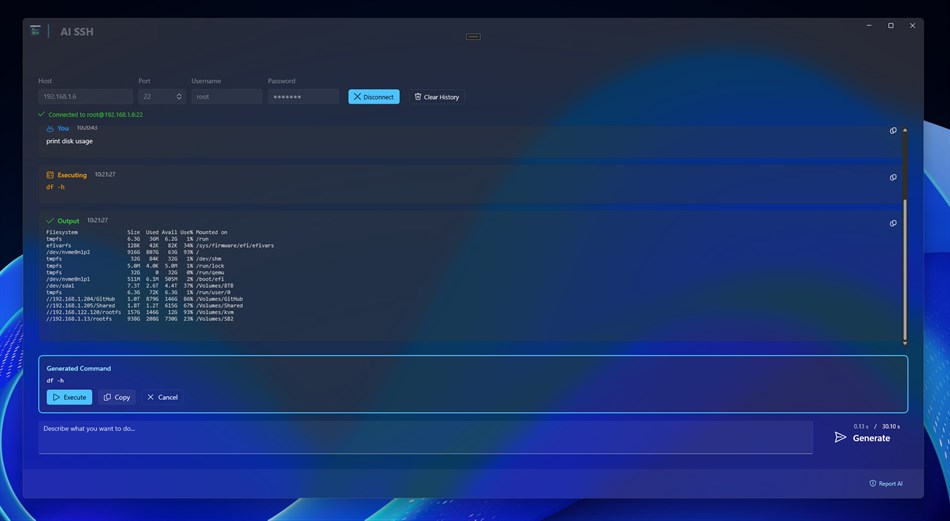
Whether you're a seasoned system administrator or just getting started with server management, AI SSH bridges the gap between intention and execution. Simply type what you want to accomplish - like "show disk usage sorted by size" or "find all log files modified today" - and watch as the AI crafts the precise command for your task.
KEY BENEFITS:
Natural Language Command Generation
Describe tasks in everyday language. AI SSH understands context and generates appropriate Linux/Unix commands for your specific needs, eliminating the need to remember arcane syntax.
Built-in SSH Client
Connect directly to your servers with secure password authentication. No need to switch between applications - generate and execute commands all in one place.
Intelligent Context Awareness
The AI remembers your conversation history and previous command outputs. If something fails, it analyzes the error and suggests corrections automatically.
Safe Command Execution
Preview every generated command before running it. The AI prioritizes safe options for potentially destructive operations, giving you confidence and control.
Real-time Output Display
Watch command outputs stream in real-time with a clean, chat-style interface. Easily copy any command or result to your clipboard with one click.
Cross-Platform Support
Works seamlessly on Windows and macOS. Connect to any Linux, Unix, or compatible server from your preferred operating system.
PERFECT FOR:
- System administrators managing multiple servers
- Developers deploying and debugging applications
- DevOps engineers automating workflows
- Students learning Linux/Unix commands
- IT professionals who need quick command references
AI SSH keeps your credentials completely local - they're never sent to the AI service. Your security is always the priority.
Transform your server management workflow today. Let AI handle the command syntax while you focus on what matters - getting things done.
ภาพหน้าจอ
Ad
ประวัติราคา
- ราคาปัจจุบัน: $3.34
- ต่ำสุด: $3.34
- มากที่สุด: $3.34
ติดตามราคา
การประเมิน AppAgg
500
การประเมิน AppAgg โดยประมาณสำหรับ
AI SSH
500 บรอนซ์
การประเมินที่สูงขึ้นมักหมายถึงสัญญาณบน AppAgg ที่แข็งแกร่งขึ้น
อิงจาก: ความนิยม · คะแนนจากผู้ใช้ · ความสดใหม่ · ดีล · ข้อมูลร้านค้า · กิจกรรมชุมชน
คำนวณใหม่ทุกวันจากข้อมูล AppAgg ล่าสุด.
URL แบบสั้น: คัดลอกแล้ว!
มีอะไรใหม่
- เวอร์ชัน: PC
- อัปเดตล่าสุด:
ข้อมูลเพิ่มเติม
- วันที่วางจำหน่าย:
- หมวดหมู่:
Windows แอป›เครื่องมือสำหรับนักพัฒนา - ระบบปฏิบัติการ:
HoloLens,Mobile,PC,Surface Hub - ขนาด:
204 Mb - ภาษาที่สนับสนุน:
Arabic,Chinese,English,French,German,Italian,Japanese,Korean,Portuguese,Russian,Spanish,Turkish - การจัดประเภทเนื้อหา:
EVERYONE - Windows Store คะแนนโดย:
0
ผู้พัฒนา
รายการ (0)
0
- AI SSH
แต้มแล (0)
0
การจัดอันดับ (0)
0
ความเห็น (0)
เป็นคนแรกที่แสดงความเห็น
สรุป
AI SSH URL แบบสั้น: คัดลอกแล้ว!- แชร์
- Windows Store
«AI SSH». แพลตฟอร์ม: Windows. หมวดหมู่: เครื่องมือสำหรับนักพัฒนา. ผู้พัฒนา: «parmata». การเปิดตัวครั้งแรก: . อัปเดตล่าสุด: . ราคาปัจจุบัน: $3.34. ราคาต่ำสุดที่บันทึกไว้: $3.34. ราคาสูงสุดที่บันทึกไว้: $3.34. ชื่อนี้ยังไม่ได้รับการให้คะแนนหรือบทวิจารณ์บน AppAgg ภาษาที่ใช้ได้: Arabic, Chinese, English, French, German, Italian, Japanese, Korean, Portuguese, Russian, Spanish, Turkish. AppAgg ติดตามประวัติราคา การให้คะแนน และคำติชมของผู้ใช้ «AI SSH». AppAgg ไม่ได้โฮสต์แอปพลิเคชันหรือแจกจ่ายซอฟต์แวร์ เครื่องหมายการค้า โลโก้ และภาพหน้าจอทั้งหมดเป็นของเจ้าของที่เกี่ยวข้อง ส่วนลดและอัปเดตในอนาคต: RSS
คล้ายกัน
-
- SSH Proxy
- Windows แอป: เครื่องมือสำหรับนักพัฒนา โดย: XSoft Studio
- $1.19
- รายการ: 0 0 0
- แต้มแล: 0 + 0 500 เวอร์ชัน: PC SSH Proxy is applications help to create proxy or local port forwarding to access blocked websites and servers over an encrypted SSH connection easily. It is able to create socks5 ... ⥯
-
- SSH Tunnel
- Windows แอป: เครื่องมือสำหรับนักพัฒนา โดย: Kostadin Gospodinov
- ฟรี
- รายการ: 0 0 0
- แต้มแล: 0 + 7 680 เวอร์ชัน: PC SSH Tunnel allows a network user to access or provide a network service that the underlying network does not support or provide directly. SSH Tunnel Provides a Secure Internet ... ⥯
-
- SSH Client - SFTP Terminal and Telnet
- Windows แอป: เครื่องมือสำหรับนักพัฒนา โดย: Moon Technolabs Pvt. Ltd.
- * ฟรี
- รายการ: 0 0 0
- แต้มแล: 0 + 0 500 เวอร์ชัน: PC Experience seamless remote access with SSH Client Terminal & Telnet! This terminus & SFTP app offers secure & easy-to-use terminal emulation for your device. Here is one of the most ... ⥯
-
- AI Terminal
- Windows แอป: เครื่องมือสำหรับนักพัฒนา โดย: parmata
- $3.34
- รายการ: 0 0 0
- แต้มแล: 0 + 0 500 เวอร์ชัน: PC Transform your computing workflow with AI Terminal, the intelligent assistant powered by Claude Opus 4.1. AI Terminal serves as your personal programming partner and technical ... ⥯
-
- Termius - Modern SSH Client
- Windows แอป: เครื่องมือสำหรับนักพัฒนา โดย: Termius Corporation
- * ฟรี
- รายการ: 0 + 4 0 0
- แต้มแล: 8 + 540 38K เวอร์ชัน: PC Termius is a modern SSH client designed for productivity and collaboration. Connect with one click from desktop and mobile no re-entering IP addresses, ports, and passwords. With a ... ⥯
-
- WSL SSH Launcher
- Windows แอป: เครื่องมือสำหรับนักพัฒนา โดย: V2BV
- $0.99
- รายการ: 0 0 0
- แต้มแล: 0 + 1 530 เวอร์ชัน: PC This is a simple yet naive program that can launch SSH daemon (or if you prefer, service) inside WSL systems. It may be useful when the distribution's RC system is not compatible with ... ⥯
-
- Tempest - Ultimate SSH client
- Windows แอป: เครื่องมือสำหรับนักพัฒนา โดย: Shompinice
- * ฟรี
- รายการ: 0 0 0
- แต้มแล: 0 + 0 500 เวอร์ชัน: PC Welcome to Tempest, the forefront of SSH clients, designed with privacy and security at its core. Tempest is not just another SSH client; it's your all-encompassing solution for ... ⥯
- ใหม่
- NerdOps AI
- Windows แอป: เครื่องมือสำหรับนักพัฒนา โดย: EvolutionITServices
- * ฟรี
- รายการ: 0 0 0
- แต้มแล: 0 + 0 500 เวอร์ชัน: PC NerdOps AI is a specialized AI assistant built exclusively for IT professionals, sysadmins, MSPs, developers, and network engineers. Unlike general-purpose AI tools, NerdOps AI is ... ⥯
-
- CSS HTML Validator 2022S
- Windows แอป: เครื่องมือสำหรับนักพัฒนา โดย: AI Internet Solutions LLC
- $4.99
- รายการ: 0 0 0
- แต้มแล: 2 + 0 530 เวอร์ชัน: PC CSS HTML Validator is a fast, powerful, highly user configurable, and easy to use web development tool that checks HTML (including HTML5), CSS, SEO, accessibility, XHTML, JavaScript, ... ⥯
-
- Ubuntu
- Windows แอป: เครื่องมือสำหรับนักพัฒนา โดย: Canonical Group Limited
- ฟรี
- รายการ: 2 + 2 0 0
- แต้มแล: 6 + 585 5K เวอร์ชัน: PC Install a complete Ubuntu terminal environment in minutes with Windows Subsystem for Linux (WSL). Develop cross-platform applications, improve your data science or web development ... ⥯
-
- Visual Studio Code
- Windows แอป: เครื่องมือสำหรับนักพัฒนา โดย: Microsoft Corporation
- ฟรี
- รายการ: 0 + 3 0 0
- แต้มแล: 1 + 8,072 5K เวอร์ชัน: PC Visual Studio Code is a free, lightweight, and extensible code editor for building web, desktop, and mobile applications, using any programming language and framework. Visual Studio ... ⥯
-
- TxThinking Terminal
- Windows แอป: เครื่องมือสำหรับนักพัฒนา โดย: TxThinking, Inc.
- $12.99
- รายการ: 0 0 0
- แต้มแล: 0 + 0 530 เวอร์ชัน: PC A SSH Terminal. - Manage multiple servers - Supports opening multiple SSH sessions simultaneously - Supports the shortcut Ctrl+N. - Support password authentication - Support private ... ⥯
-
- EasyConnect
- Windows แอป: เครื่องมือสำหรับนักพัฒนา โดย: Luke Stratman
- ฟรี
- รายการ: 3 + 2 0 0
- แต้มแล: 3 + 7 1K เวอร์ชัน: PC EasyConnect is a tabbed remote desktop application with a Chrome-like UI that supports the following types of connections: - Remote Desktop - PowerShell (local and remote) - SSH - ... ⥯
-
- Linux Process Manager
- Windows แอป: เครื่องมือสำหรับนักพัฒนา โดย: internixsystems.com
- * ฟรี
- รายการ: 0 + 1 0 0
- แต้มแล: 3 + 3 650 เวอร์ชัน: PC Inspect Linux processes from a remote windows machine. Using Linux Process Manager users are able to connect and monitor remote Linux machines via SSH instead of using complex command ... ⥯