
Marcaje
| Dezvoltator: | OPO Add Dreams (9) | ||
| Preț: | ▼ $1.59 | ||
| Scor: | 590 Bronz | ||
| Clasamente: | 0 | ||
| Comentarii: | 0 Postează comentariu | ||
| Liste: | 0 0 | ||
| Puncte: | 0 | ||
| +1 Punct | |||
Pe scurt
CustomIconFileCreator este o aplicație creată de OPO Add Dreams, din categoria „Instrumente pentru dezvoltatori”.
$1.59 în loc de $3.99. N-a fost niciodată atât de ieftină pe AppAgg. Serios, am verificat tot istoricul prețurilor.
Merge chiar și pe HoloLens: Windows în realitate mixtă.
Lansată , încă destul de proaspătă.
Există chiar și o versiune pentru Windows Mobile. Salutări din trecut.
Merge chiar și pe Surface Hub, pentru sălile mari de ședințe.
Scorul AppAgg e 590. Deocamdată „Bronz”, dar are mult loc de creștere.
Clasificare de vârstă „EVERYONE”: merge și pentru copii.
Vorbește o singură limbă, și nu e româna.
Nimeni de pe AppAgg n-a evaluat-o încă. Șansa ta să fii primul e chiar acum.
Dezvoltatorul mai are 2 jocuri și 6 aplicații pe AppAgg. Merită o privire.
Apropo, acest dezvoltator are acum 2 reduceri.
Vrei să afli primul de reduceri, actualizări și aplicații noi? Setează o alertă de preț, urmărește dezvoltatorul sau abonează-te la RSS. Notificările push vin prin aplicația AppAgg Alerts pentru Android și iOS.
Capturi de ecran 2
Alte platforme 0
 | CustomIconFileCreatorWindows Store590 BronzWindows | ▼$1.59 |
Deocamdată doar în acest magazin.
Istoricul prețurilor 1
- Prețul actual: $1.59
$3.99-60% - Minim: ▼ $1.59
- Maxim: $3.99
Propriul tău flux pe pagina principală
Descriere
■Overview
CustomIconFileCreator is a WPF desktop application for Windows that generates a single multi-size “.ico” format icon file from PNG images at six standard sizes: 256 / 128 / 64 / 48 / 32 / 16 px.
Why use size-specific PNGs? Automatically converting a single 256×256 image into 128×128, 64×64, 48×48, 32×32, 16×16 images produces blurry results on small size images, for example 32×32, 16×16 images. For crisp icons, inputting each size images individually created from a vector application such as Adobe Illustrator, Affinity Designer, or Inkscape into this application, and generate an icon file containing fine images.
#icon
#.ico
■How to Launch
Double-click EachSizeImageIconMakerApp.exe to start the application.
■Step-by-Step Instructions
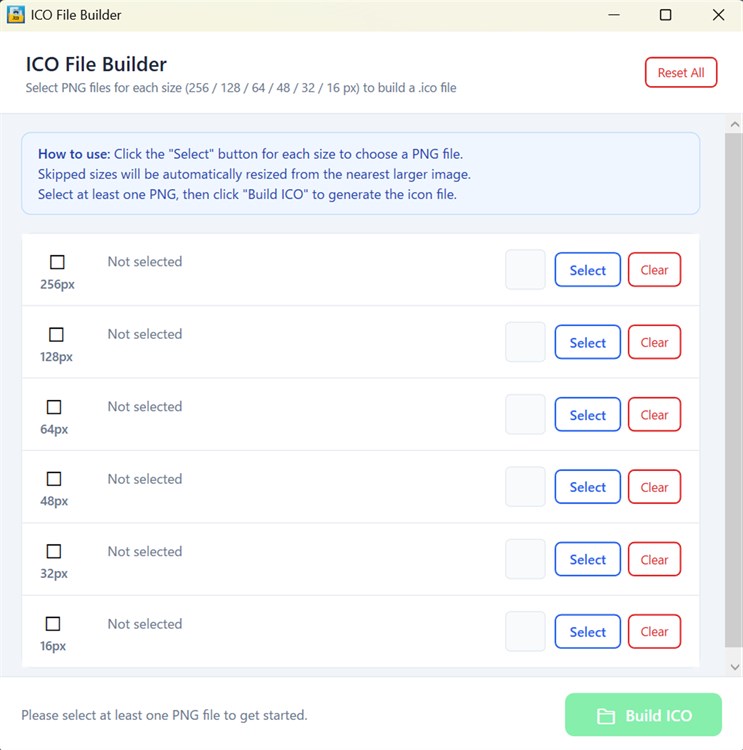
① Launch the application. Six size rows are displayed: 256 / 128 / 64 / 48 / 32 / 16.
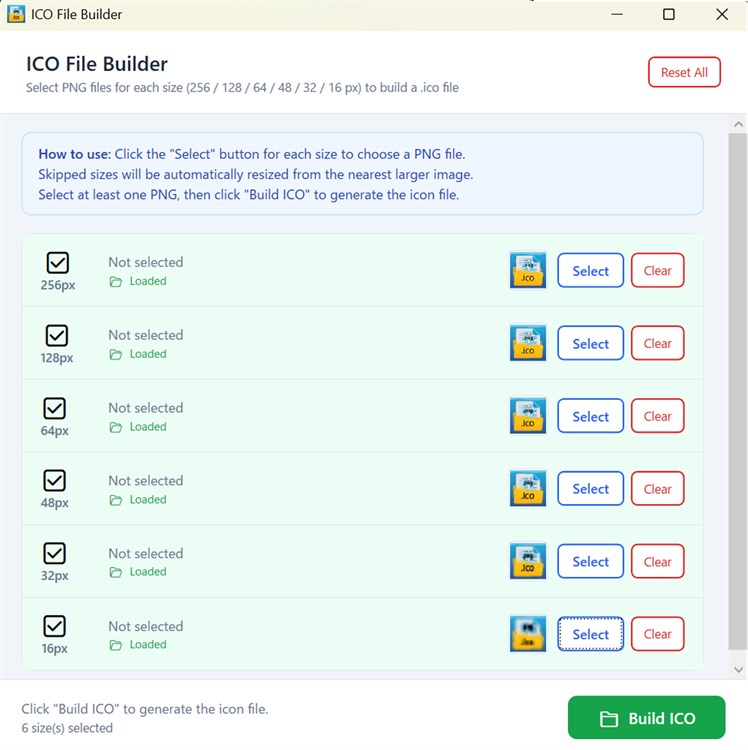
② Click the "Select" button on each row to choose the corresponding PNG file. A thumbnail preview appears immediately after loading.
③ Sizes you skip are automatically filled in by resizing the nearest larger image. Those rows turn orange and show "Will be auto-resized".
④ Once at least one PNG is loaded, the "Build ICO" button at the bottom becomes active.
⑤ Click "Build ICO", choose a destination folder and filename in the save dialog, then click Save. The .ico file is created instantly.
■ Color meanings
• ✅ Green (Loaded) — PNG file loaded successfully.
• 🔄 Orange (Auto-resize) — This size will be generated by resizing a larger loaded image.
• ⬜ White (Not set) — No source available; this size will not be included in the ICO.
■ Other Controls
• "Clear" button — Removes the PNG selection for that individual size row.
• "Reset All" button — Clears all size selections at once. A confirmation dialog is shown before clearing.
■ Auto-Resize Logic
When a size is skipped, the application scans the size array from largest to smallest (256 → 128 → 64 → 48 → 32 → 16) and uses the smallest loaded size that is still larger than the target as the resize source.
Example: If only 256 px and 64 px are loaded, then 128 px is auto-resized from 256 px, while 48, 32, and 16 px are auto-resized from 64 px.
If no larger loaded size exists for a given target (e.g., only 32 px and 16 px are provided, and 256 px is skipped), that size is omitted from the ICO entirely.
■ System Requirements
• Windows 10 or Windows 11
• .NET 8 Desktop Runtime (net8.0-windows)
• WPF (Windows Presentation Foundation)
■ Distribution
This application is available on the Microsoft Store. It can also be installed using the provided setup installer (EachSizeImageIconMakerApp_Setup_x.x.x.exe).
De la dezvoltator
Dezvoltator
- OPO Add Dreams
- Urmăritori: 0
- Platforme: Windows Aplicații (7) Windows Jocuri (2)
- Reduceri: 2
- Liste: 0 0
- Puncte: 0
- Clasamente: 0
- Comentarii: 0
- Videoclipuri: 0
- RSS: Abonează-te
Liste 0
-
 CustomIconFileCreator
Puncte 0
-

- +1 Punct

Clasamente 0
-
- Evaluarea ta
Ce este nou
- Versiune: PC
- Ultima actualizare:
Informații suplimentare
- Data lansării:
- Categorie:
Aplicații pentru Windows›Instrumente pentru dezvoltatori - SO:
HoloLensMobilePCSurface Hub - Dimensiune:
197 Mb - Funcții disponibile:
Mixed reality - Limbi disponibile:
Engleză - Evaluarea conținutului:
EVERYONE - Windows Store Evaluare: ¡
0
Comentarii 0 ¡
Scor AppAgg
Scor AppAgg estimat pentru
CustomIconFileCreator
Dezvoltator: OPO Add Dreams
Un scor mai mare reflectă de obicei rezultate mai bune pentru indicatorii urmăriți de AppAgg.
Bazat pe: popularitate · evaluări ale utilizatorilor · actualitate · oferte · date din magazine · activitatea comunității
Recalculat zilnic pe baza datelor AppAgg actualizate.
CustomIconFileCreator Adresă URL scurtă: Copiat!- Windows Store

