
ที่บันทึกไว้
เลือกชื่อที่จะแสดงในเมนูที่บันทึกไว้ของคุณ
เสร็จแล้ว
| ผู้พัฒนา: | Matt Whitwam (1) | ||
| ราคา: | ฟรี | ||
| การประเมิน: | 860 เงิน | ||
| การจัดอันดับ: | 0 | ||
| ความเห็น: | 0 โพสต์ความคิดเห็น | ||
| รายการ: | 0 + 0 | ||
| แต้มแล: | 0 + 0 ¡ | ||
| +1 แต้มแล | |||
คำอธิบาย

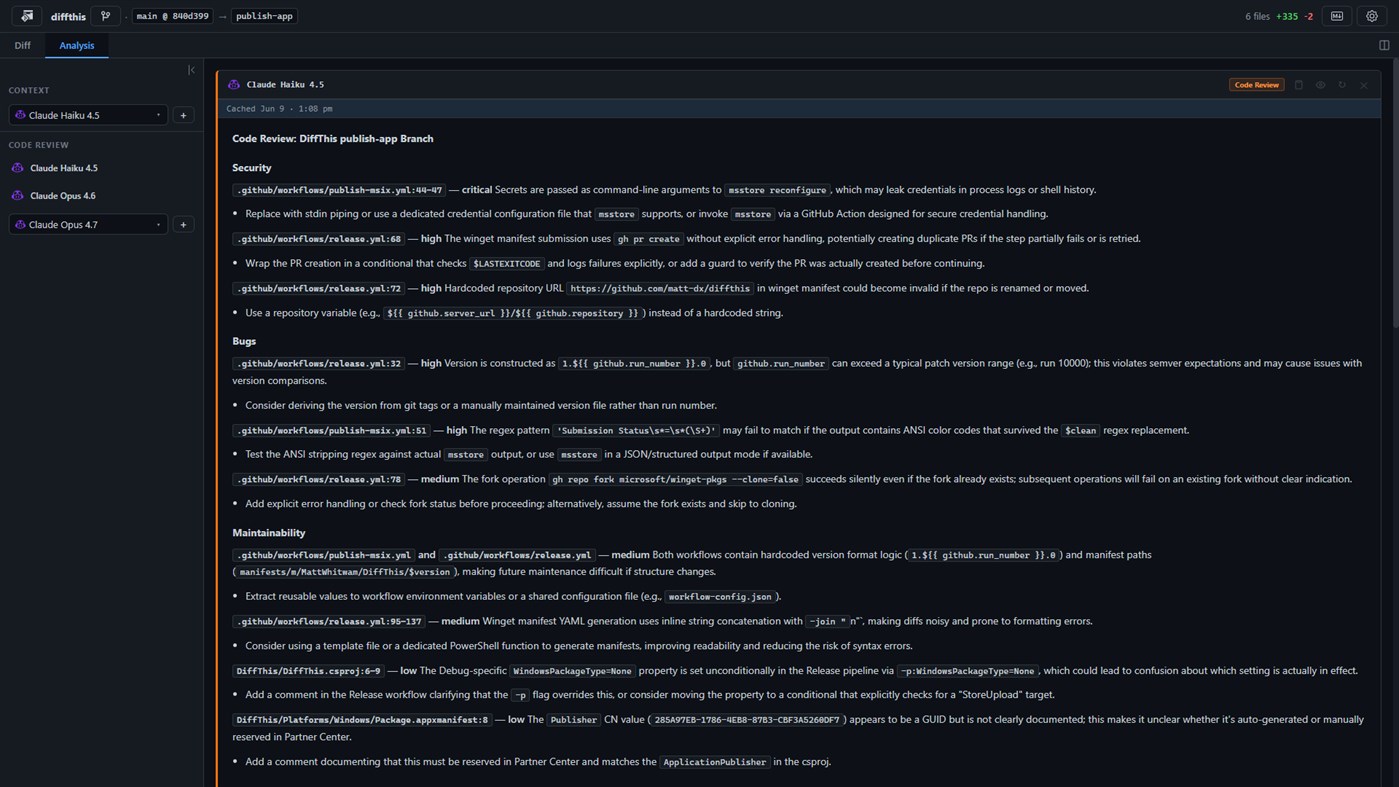
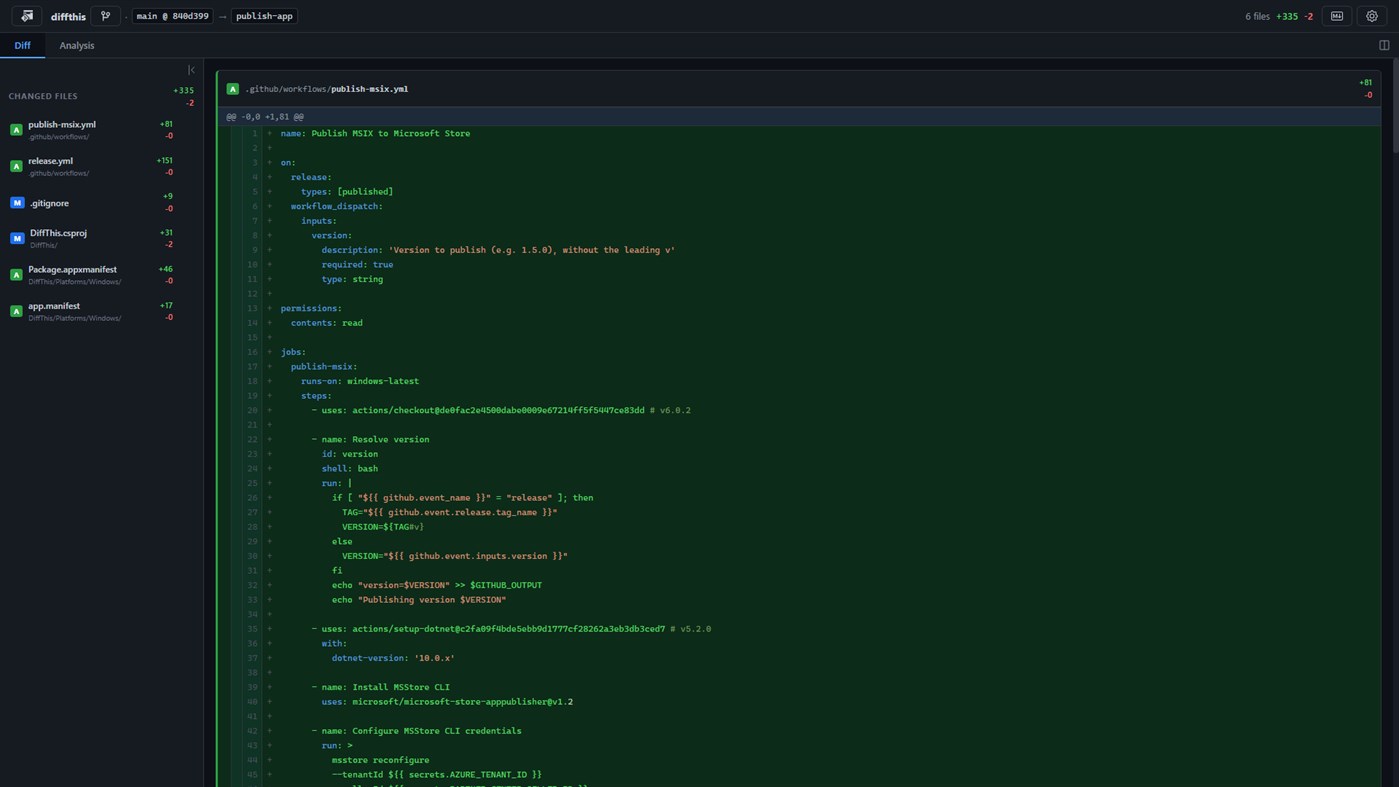
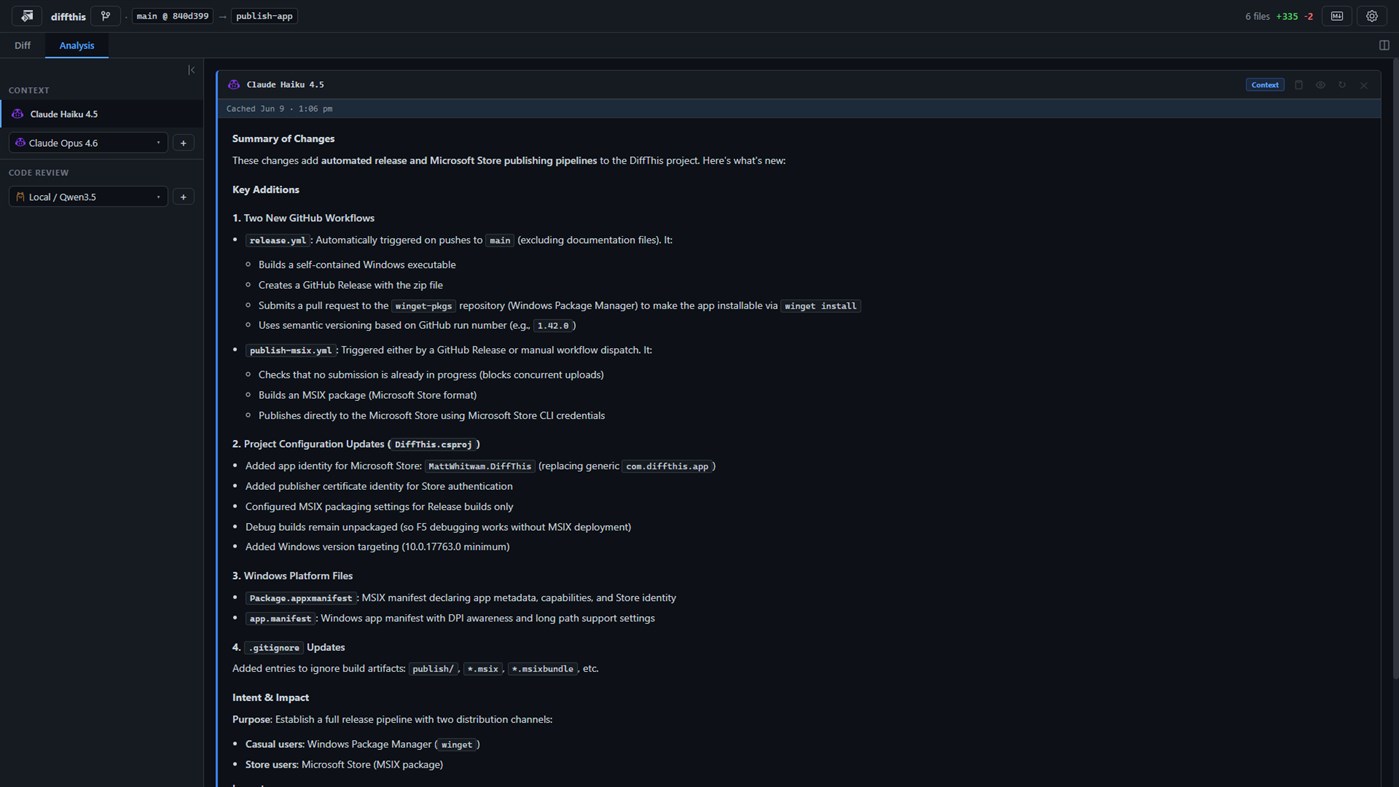
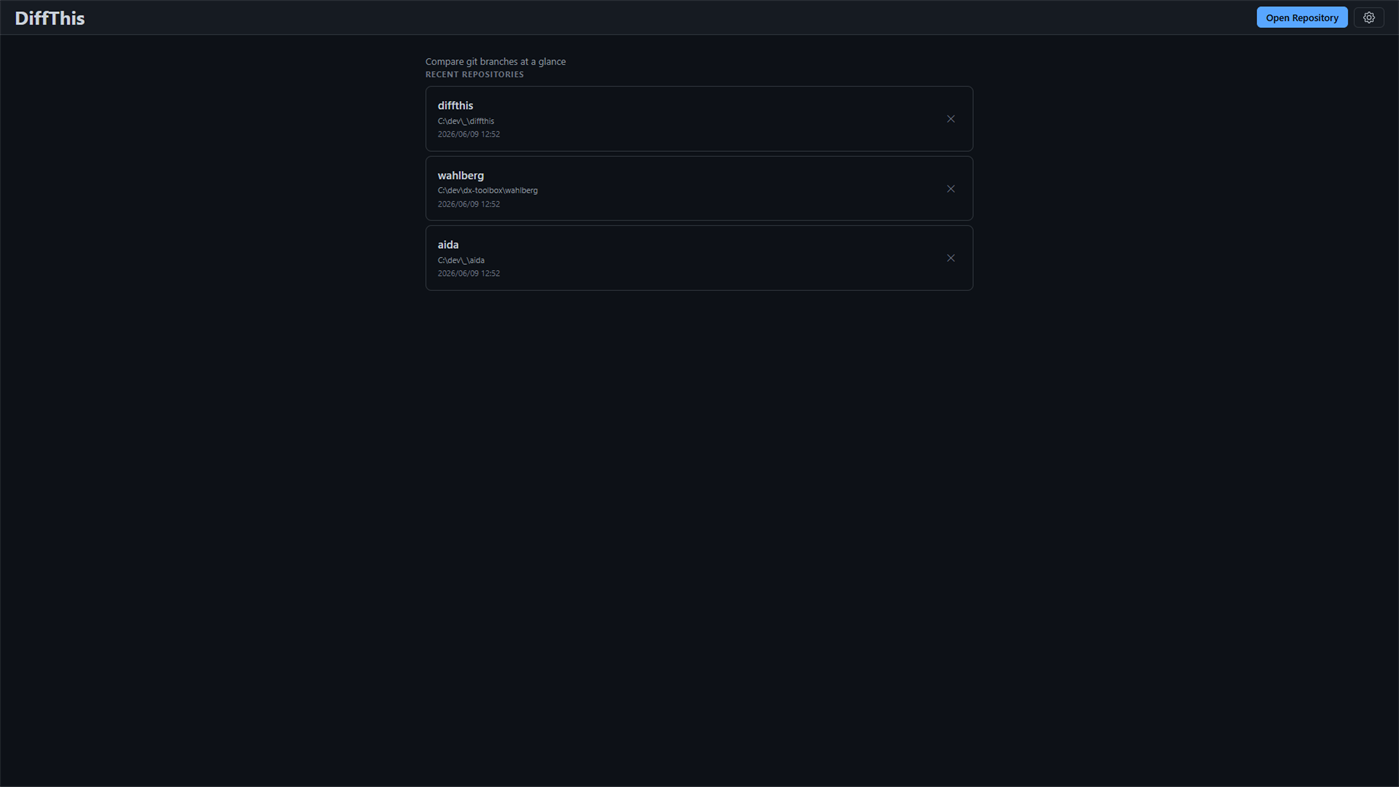
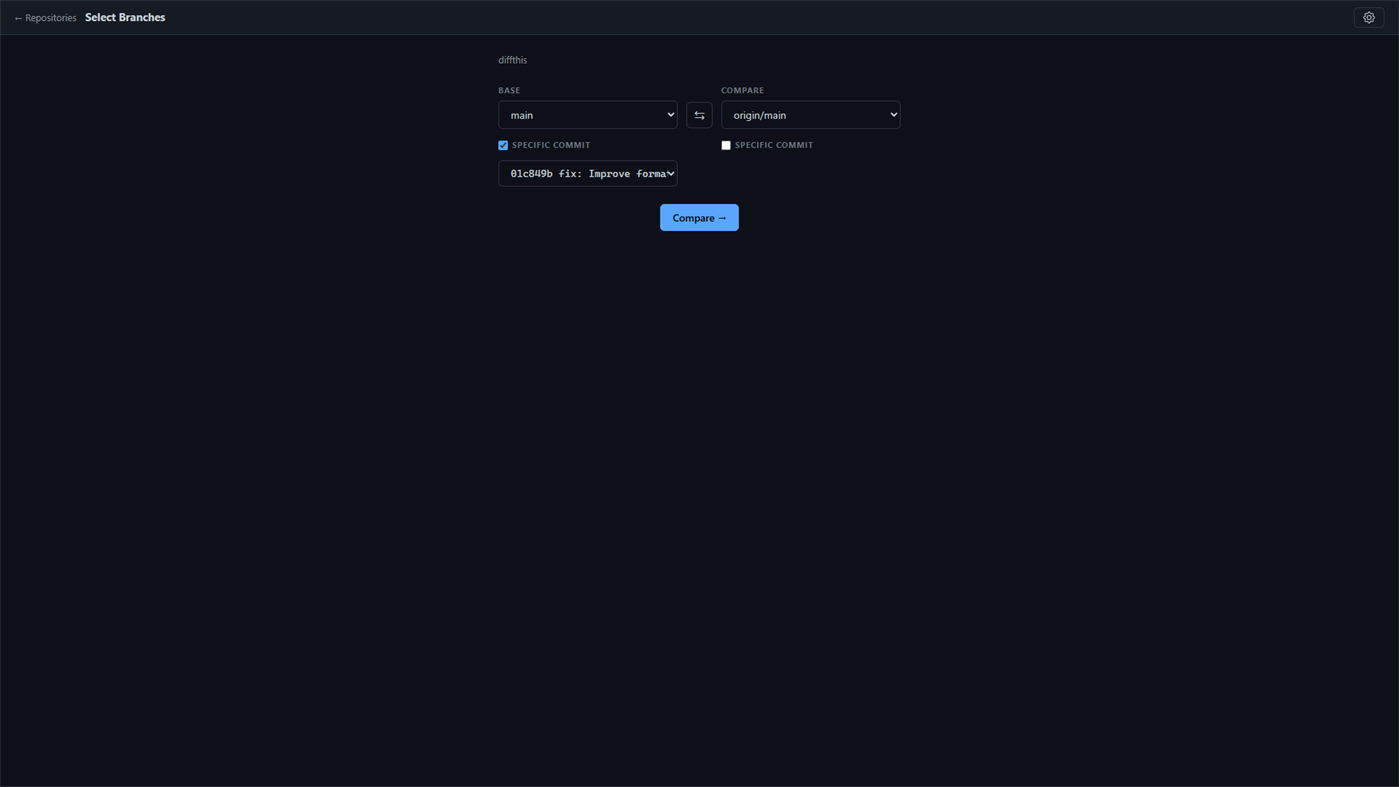
Pick any local git repository, choose two branches (or pin either side to a specific commit), and DiffThis renders a clean, syntax-highlighted diff with collapsible file sections. Then, with one click, it puts an AI reviewer to work on your changes — explaining what they do and flagging the things you actually care about.
REVIEW SMARTER, NOT HARDER
DiffThis sends your diff to the AI of your choice and surfaces real findings — bugs, logic errors, and security concerns — tagged by severity (critical, high, medium, low). Each finding is shown with matching visual intensity, so the things that matter jump out first.
JUMP STRAIGHT TO THE PROBLEM
When the AI references a file and line — like GitService.cs:42 — DiffThis makes it clickable. One click scrolls the diff straight to that line and highlights it. No more hunting through hundreds of lines to find what the review is talking about.
BRING YOUR OWN AI
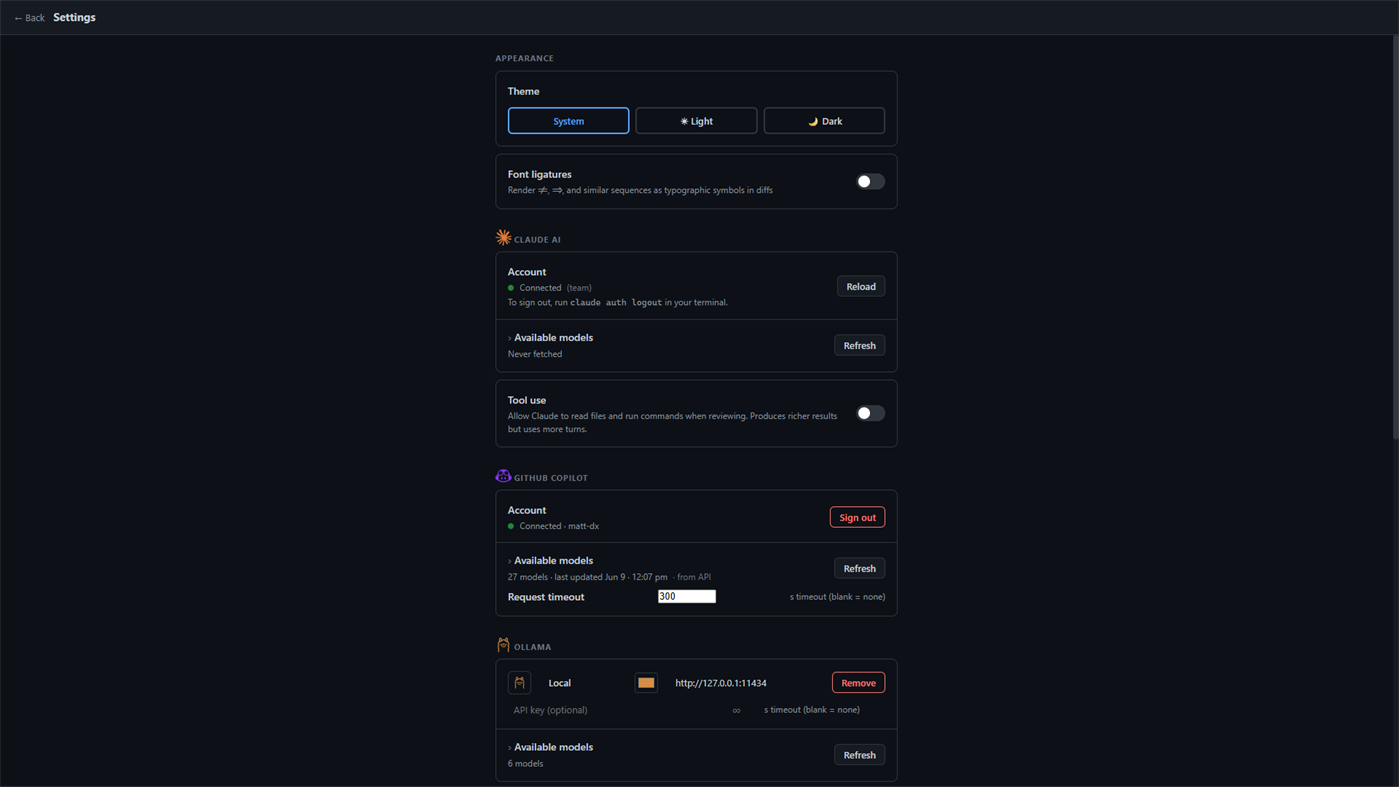
DiffThis works with three providers, so you stay in control of your code and your costs:
- Claude, via the Claude Code CLI
- GitHub Copilot, with your GitHub account
- Ollama, running models entirely on your own hardware, fully offline
BUILT FOR REAL CODEBASES
- Syntax highlighting for C#, TypeScript, JavaScript, Go, Rust, YAML, Bash, SQL, Dockerfile, and many more
- Adjustable diff context depth (3, 10, 25, or 50 lines) to give the AI as much or as little surrounding code as you want
- Add, refresh, hide, or compare multiple AI results side by side
- Export the full diff to Markdown to share or archive
- Remembers your branch selections per repository
- Light and dark themes, with an optional font-ligature toggle
FAST, NATIVE, AND PRIVATE
DiffThis is a native Windows desktop app. Your repositories never leave your machine except for the diff text you explicitly send to your chosen AI provider — and with Ollama, nothing leaves at all.
Stop skimming diffs. Start reviewing them.
Ad
ภาพหน้าจอ
ประวัติราคา
- ราคาปัจจุบัน: ฟรี
- ต่ำสุด: ฟรี
- มากที่สุด: ฟรี
ติดตามราคา เพิ่มลงในรายการเพื่อรับการแจ้งเตือนส่วนลดทางอีเมลหรือพุช
การประเมิน AppAgg
860
การประเมิน AppAgg โดยประมาณสำหรับ
DiffThis
860 เงิน
การประเมินที่สูงขึ้นมักหมายถึงสัญญาณบน AppAgg ที่แข็งแกร่งขึ้น
อิงจาก: ความนิยม · คะแนนจากผู้ใช้ · ความสดใหม่ · ดีล · ข้อมูลร้านค้า · กิจกรรมชุมชน
คำนวณใหม่ทุกวันจากข้อมูล AppAgg ล่าสุด.
URL แบบสั้น: คัดลอกแล้ว!
มีอะไรใหม่
- เวอร์ชัน: PC
- อัปเดตล่าสุด:
ข้อมูลเพิ่มเติม
- วันที่วางจำหน่าย:
- หมวดหมู่:
Windows แอป›เครื่องมือสำหรับนักพัฒนา - ระบบปฏิบัติการ:
HoloLens,Mobile,PC,Surface Hub - ขนาด:
27 Mb - ภาษาที่สนับสนุน:
English - การจัดประเภทเนื้อหา:
EVERYONE - Windows Store คะแนนโดย:
0
 https://github.com/matt-dx/diffthis/blob/main/README.md
ผู้พัฒนา
- Matt Whitwam
- แพลตฟอร์ม: Windows แอป (1)
- รายการ: 0 + 0
- แต้มแล: 0 + 0 ¡
- การจัดอันดับ: 0
- ความเห็น: 0
- ลดราคา: 0
- วิดีโอ: 0
- RSS: ติดตาม
รายการ (0)
0
- DiffThis
แต้มแล (0)
0
การจัดอันดับ (0)
0
ความเห็น (0)
เป็นคนแรกที่แสดงความเห็น
สรุป
DiffThis URL แบบสั้น: คัดลอกแล้ว!- แชร์
- Windows Store
«DiffThis». แพลตฟอร์ม: Windows. หมวดหมู่: เครื่องมือสำหรับนักพัฒนา. ผู้พัฒนา: «Matt Whitwam». การเปิดตัวครั้งแรก: . อัปเดตล่าสุด: . ราคาปัจจุบัน: ฟรี. ชื่อนี้ยังไม่ได้รับการให้คะแนนหรือบทวิจารณ์บน AppAgg ภาษาที่ใช้ได้: English. AppAgg ติดตามประวัติราคา การให้คะแนน และคำติชมของผู้ใช้ «DiffThis». AppAgg ไม่ได้โฮสต์แอปพลิเคชันหรือแจกจ่ายซอฟต์แวร์ เครื่องหมายการค้า โลโก้ และภาพหน้าจอทั้งหมดเป็นของเจ้าของที่เกี่ยวข้อง ส่วนลดและอัปเดตในอนาคต: RSS
คล้ายกัน
-
- Xaml Diff
- Windows แอป: เครื่องมือสำหรับนักพัฒนา โดย: Reflection IT
- ฟรี
- รายการ: 0 0 0
- แต้มแล: 0 + 0 1K · เงิน เวอร์ชัน: PC Generate the Visual State Setters using a diff analysis of your named elements in your XAML. Open source with MIT license - https://github.com/sonnemaf/XamlDiff
-
- DSE Inline Diff
- Windows แอป: เครื่องมือสำหรับนักพัฒนา โดย: Data Safety Expert
- ฟรี
- รายการ: 0 + 1 0 0
- แต้มแล: 2 + 0 860 · เงิน เวอร์ชัน: PC Text file comparison tool. Compares two text files and displays differences in different colors. Also compares different lines and displays different characters in different colors. ...
-
- Kubezilla Desktop
- Windows แอป: เครื่องมือสำหรับนักพัฒนา โดย: Red Function
- * ฟรี
- รายการ: 0 0 0
- แต้มแล: 0 + 0 910 · เงิน เวอร์ชัน: PC Kubezilla Desktop is a fast, native Kubernetes management GUI for engineers who'd rather click than memorize kubectl flags. Connect to any cluster local kubeconfig, SSH tunnel, or ...
- ใหม่
- Alpha DevKit
- Windows แอป: เครื่องมือสำหรับนักพัฒนา โดย: Alpha-xp
- * $24.99
- รายการ: 0 0 0
- แต้มแล: 0 + 0 1K · เงิน เวอร์ชัน: PC Alpha DevKit Every developer utility. One window. Fully offline. Alpha DevKit is a unified developer toolbox for Windows: 78 encoders, formatters, converters, generators, inspectors ...
-
- Verdure DevTools
- Windows แอป: เครื่องมือสำหรับนักพัฒนา โดย: 绿荫阿广
- * ฟรี
- รายการ: 0 0 0
- แต้มแล: 0 + 0 640 · เงิน เวอร์ชัน: PC Developer Tools is a Windows desktop toolbox designed for developers, QA engineers, IT professionals, embedded engineers, and anyone who frequently works with technical text and data. ...
- ใหม่
- GitBrother
- Windows แอป: เครื่องมือสำหรับนักพัฒนา โดย: itonx
- ฟรี
- รายการ: 0 0 0
- แต้มแล: 0 + 0 770 · เงิน เวอร์ชัน: PC Meet GitBrother Your Powerful, Native Git Companion for Windows. GitBrother is a fast, clean, and intuitive desktop Git client built natively for Windows. Designed to simplify your ...
-
- TextDiff UWP
- Windows แอป: เครื่องมือสำหรับนักพัฒนา โดย: Luandersonn Airton
- ฟรี
- รายการ: 0 + 1 0 0
- แต้มแล: 1 + 0 600 · เงิน เวอร์ชัน: PC Super basic text diff tool
-
- Redisant Toolbox
- Windows แอป: เครื่องมือสำหรับนักพัฒนา โดย: Redisant
- $12.99
- รายการ: 0 0 0
- แต้มแล: 0 + 0 940 · เงิน เวอร์ชัน: PC All-in-one toolbox for developers, over 40 commonly used development tools; Well-designed, fast and efficient; Use offline, respecting your privacy. - Backslash Escape/Unescape: ...
-
- JSON Parser Pro
- Windows แอป: เครื่องมือสำหรับนักพัฒนา โดย: Aria Vision
- $1.99
- รายการ: 0 0 0
- แต้มแล: 0 + 0 570 · บรอนซ์ เวอร์ชัน: PC Json Parser Pro is a material-styled workbench for serious JSON work: dual code/tree views, JSONPath search, pretty/minify/sort, CSV export, and file diff everything offline. A ...
-
- Developer Tools Pro
- Windows แอป: เครื่องมือสำหรับนักพัฒนา โดย: Aadhil RF
- $4.99
- รายการ: 0 0 0
- แต้มแล: 0 + 0 1K · เงิน เวอร์ชัน: PC Developer Tools Pro is a comprehensive utility app for developers, providing over 100+ essential utilities for data conversion, formatting, encoding, and analysis all in a single, ...
-
- GitComet
- Windows แอป: เครื่องมือสำหรับนักพัฒนา โดย: AutoExplore Oy
- ฟรี
- รายการ: 0 0 0
- แต้มแล: 0 + 0 760 · เงิน เวอร์ชัน: PC GitComet is a desktop Git client for developers who want speed, control, and familiar workflows without giving up local-first privacy. Built in Rust, GitComet stays responsive on large
-
- vegha
- Windows แอป: เครื่องมือสำหรับนักพัฒนา โดย: VAMC Consulting LLC
- ฟรี
- รายการ: 0 0 0
- แต้มแล: 0 + 0 590 · บรอนซ์ เวอร์ชัน: PC Vegha is a fast, native, fully local API testing desktop app built for developers, QA engineers, and integration teams who live in an API client all day. Send HTTP, REST, GraphQL, gRPC
-
- Co-Tower
- Windows แอป: เครื่องมือสำหรับนักพัฒนา โดย: ETZ HADAAT MACHINE LEARNING SERVICES LTD
- ฟรี
- รายการ: 0 0 0
- แต้มแล: 0 + 0 580 · บรอนซ์ เวอร์ชัน: PC Co-Tower is a free system-tray companion for GitHub Copilot monitor coding agent tasks, seat usage, and organization events in real time, right from your Windows desktop. Sign in once ...
-
- gitwink
- Windows แอป: เครื่องมือสำหรับนักพัฒนา โดย: var-gg
- ฟรี
- รายการ: 0 0 0
- แต้มแล: 0 + 0 590 · บรอนซ์ เวอร์ชัน: PC gitwink is a tray-resident, read-only Git glance tool. It shows a unified timeline of recent commit activity across all of your local Git repositories so you can wink at what changed, ...