
ที่บันทึกไว้
เลือกชื่อที่จะแสดงในเมนูที่บันทึกไว้ของคุณ
เสร็จแล้ว
| ผู้พัฒนา: | kazegamja (1) | ||
| ราคา: | $3.99 | ||
| การประเมิน: | 500 บรอนซ์ | ||
| การจัดอันดับ: | 0 | ||
| ความเห็น: | 0 โพสต์ความคิดเห็น | ||
| รายการ: | 0 + 0 | ||
| แต้มแล: | 0 + 0 ¡ | ||
| +1 แต้มแล | |||
คำอธิบาย

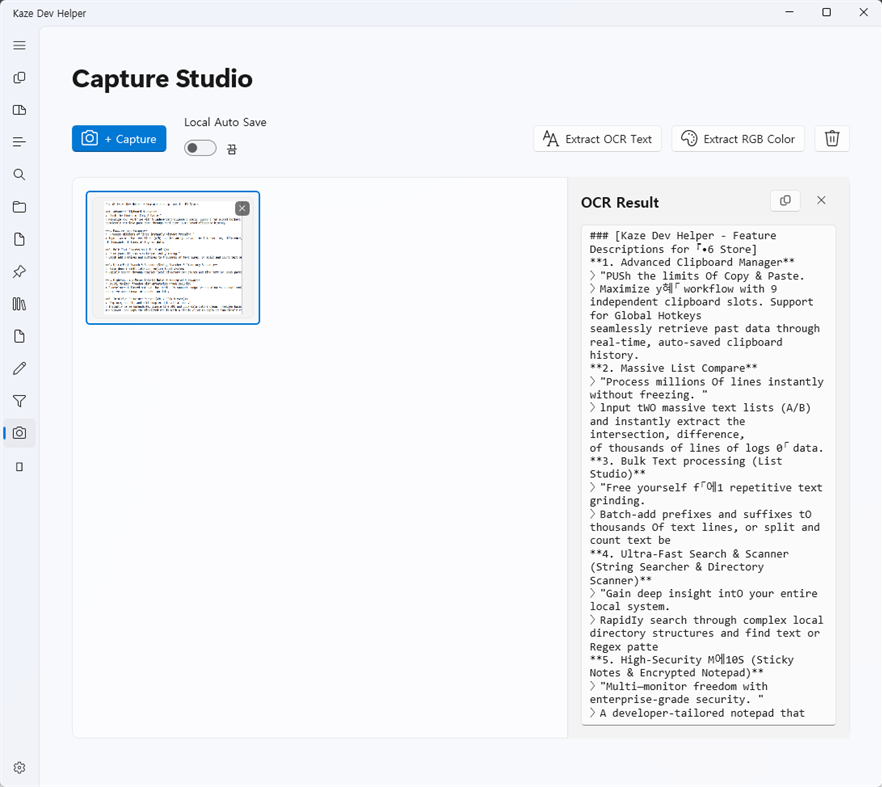
Kaze Dev Helper (KDH) is a powerful, offline-first desktop utility toolbox designed specifically for software developers, IT professionals, and data analysts. Built on the modern .NET 8 WinUI 3 framework, KDH delivers a blazing-fast, visually stunning native experience (featuring Mica backdrops and customizable drag-and-drop navigation).
Whether you are working in a highly secure enterprise intranet, an air-gapped environment, or simply value your data privacy, KDH operates 100% offline with zero external dependencies. All your workspace data—from clipboard histories to sticky notes and settings—is securely encrypted locally using AES-256 into a single file, ensuring maximum security and easy portability.
🚀 Core Developer Tools
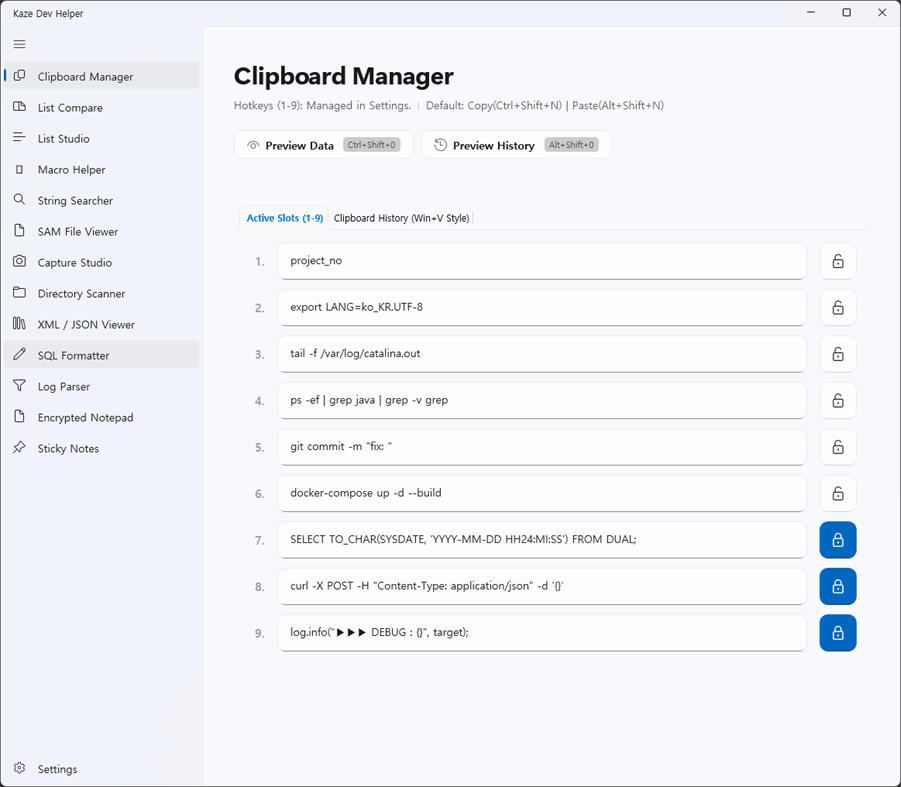
Advanced Clipboard Manager: Supercharge your copy-pasting with 9 independent clipboard slots. Features global hotkeys, On-Screen Display (OSD) previews, and a 'lock' function to prevent accidental overwriting of crucial snippets.
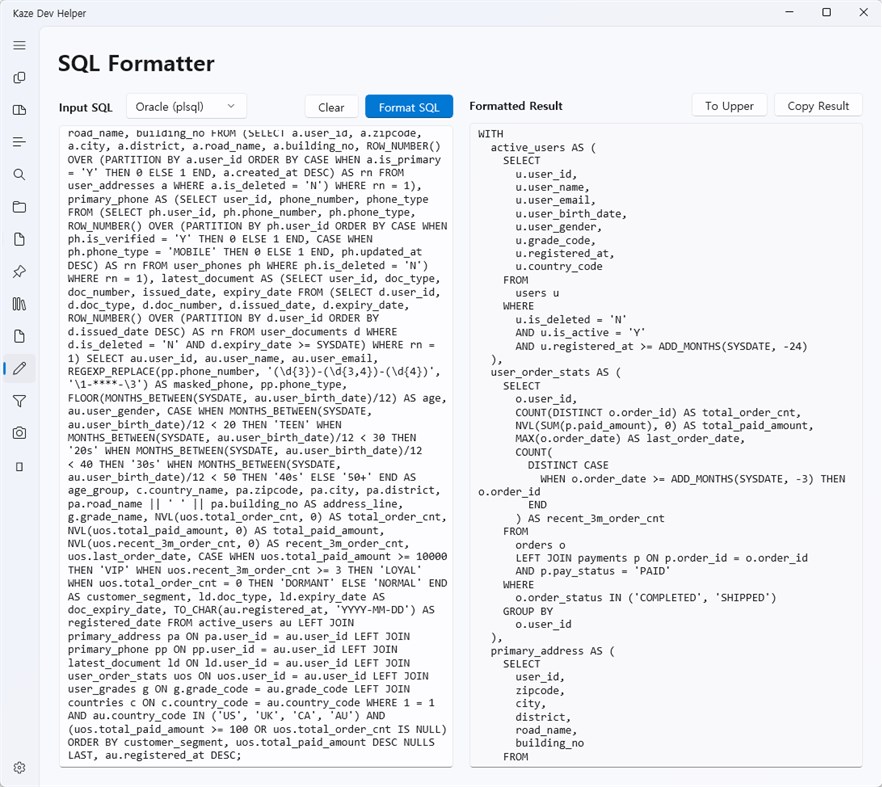
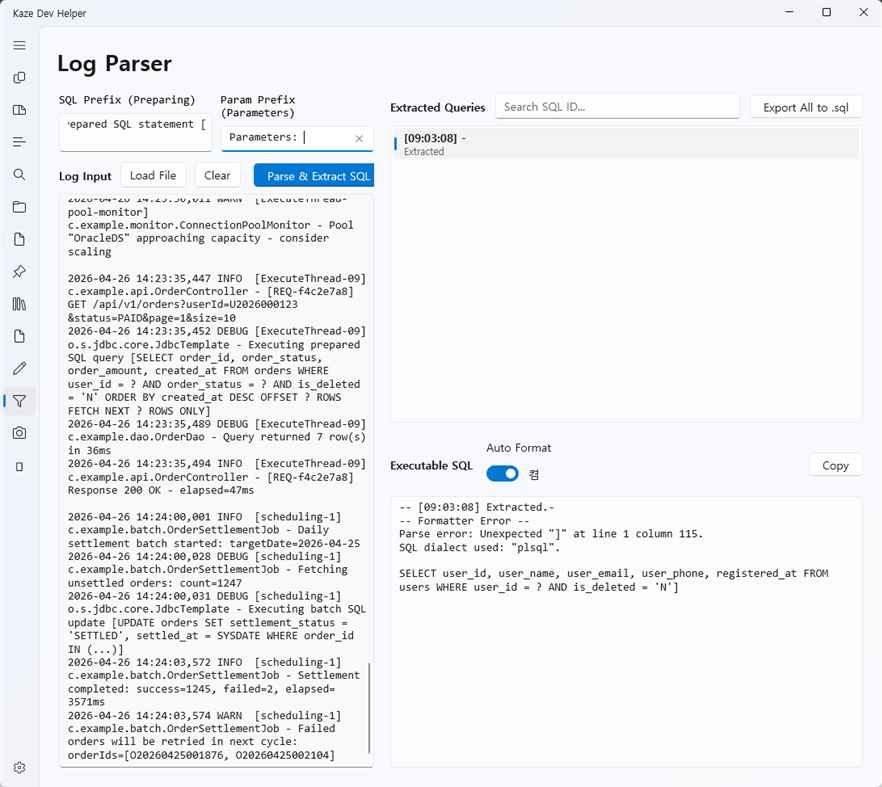
Offline SQL Formatter: Instantly format complex SQL queries without an internet connection. Supports multiple dialects including Oracle (PL/SQL), DB2, MySQL, PostgreSQL, and T-SQL.
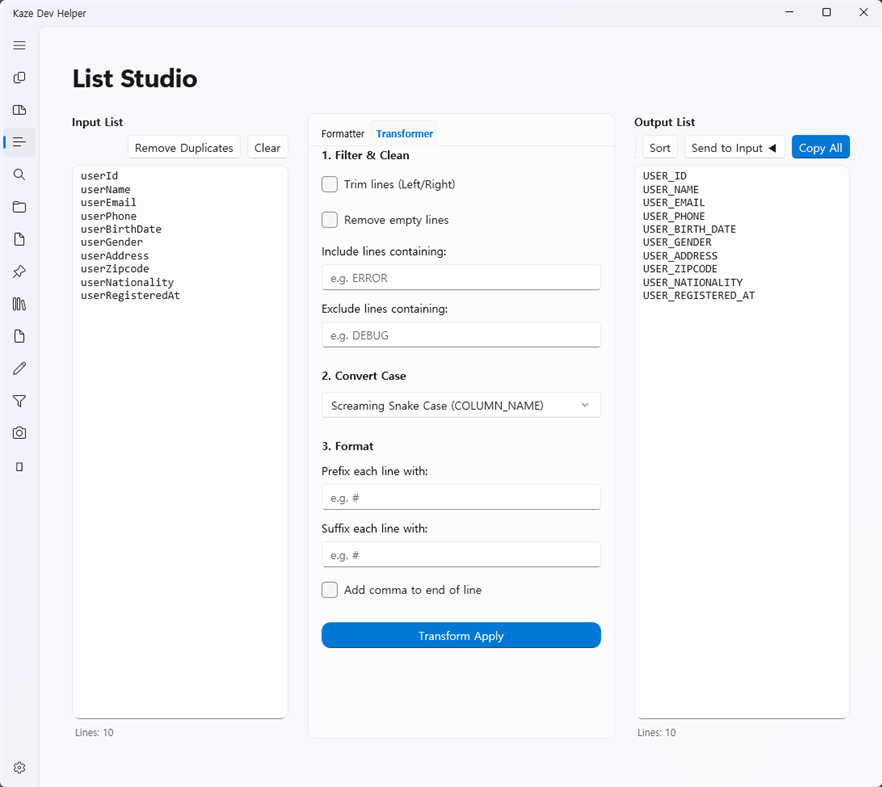
Text & List Studio: Powerful data manipulation at your fingertips. Compare lists to extract intersections or differences, bulk-add prefixes/suffixes, and process real-time text pipelines (Grep filtering, case conversion, and formatting).
🔍 Search & Inspection
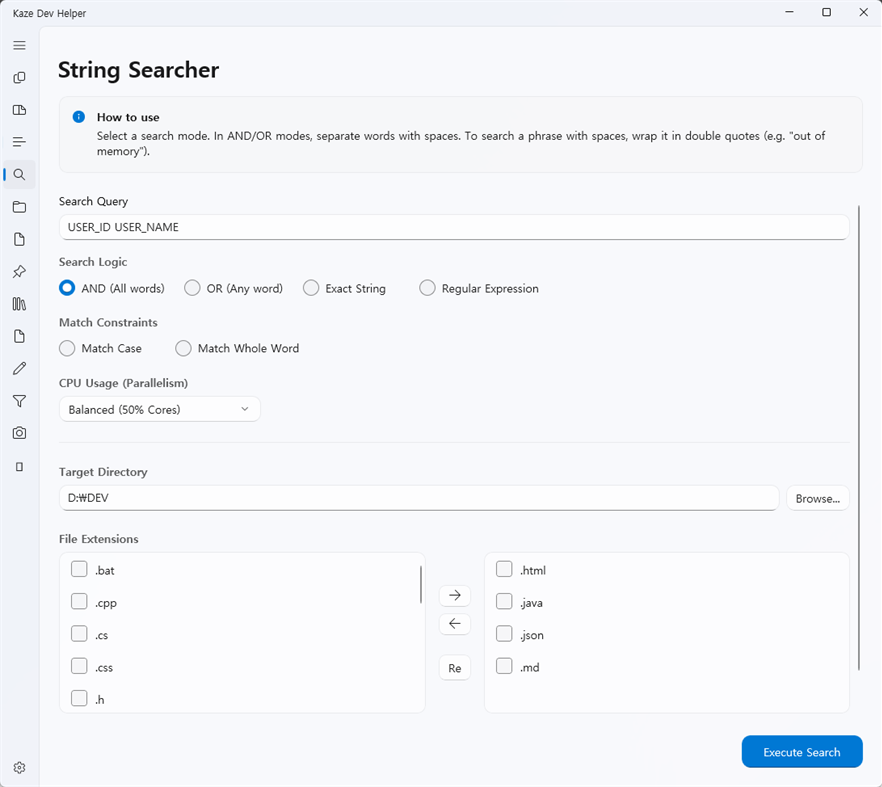
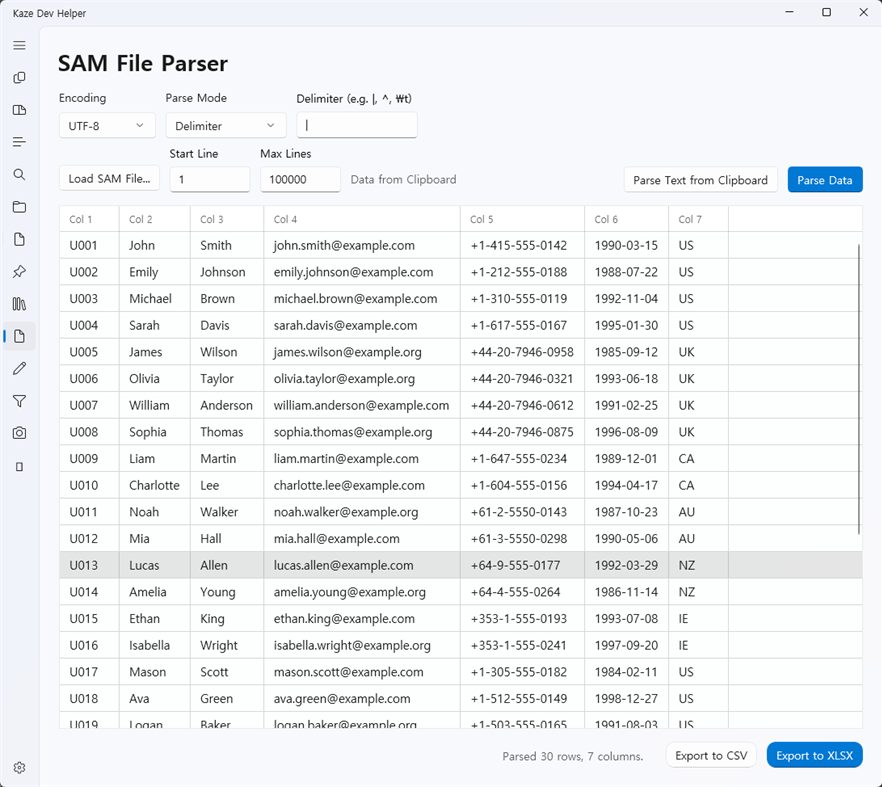
String & Regex Searcher: Perform high-speed string and regular expression searches across multiple files and directories. Export your detailed search results directly to Excel or CSV, complete with automated summary tables.
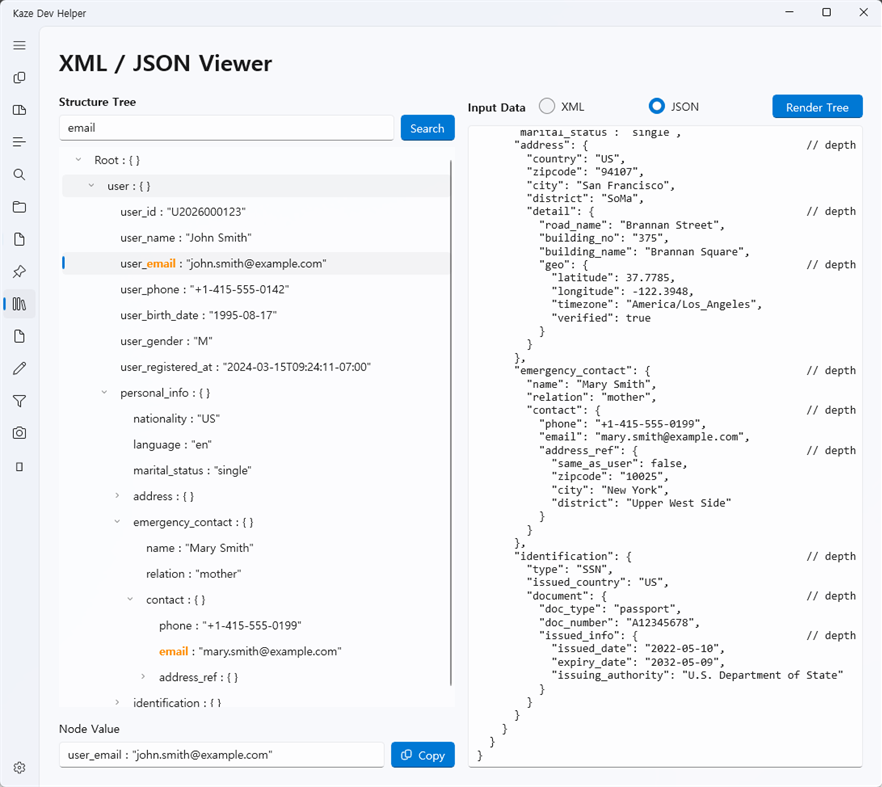
XML / JSON Viewer: Parse, validate, and navigate complex XML and JSON structures effortlessly through a clean, collapsible TreeView interface.
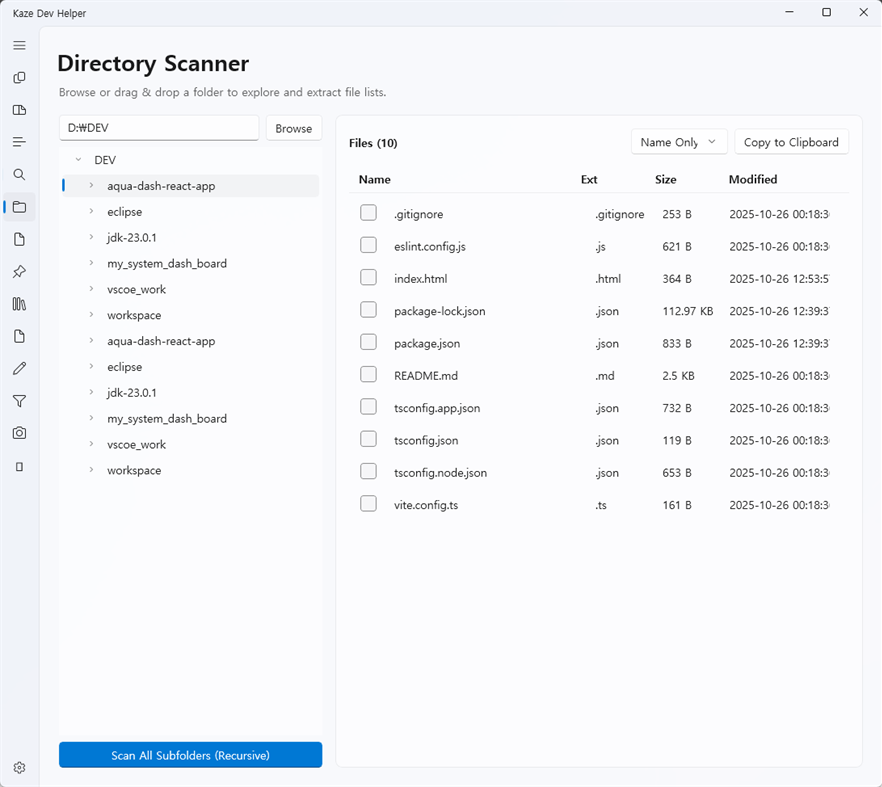
Directory Scanner: Quickly extract file system structures and metadata for comprehensive project overviews.
📝 Smart Workspace Management
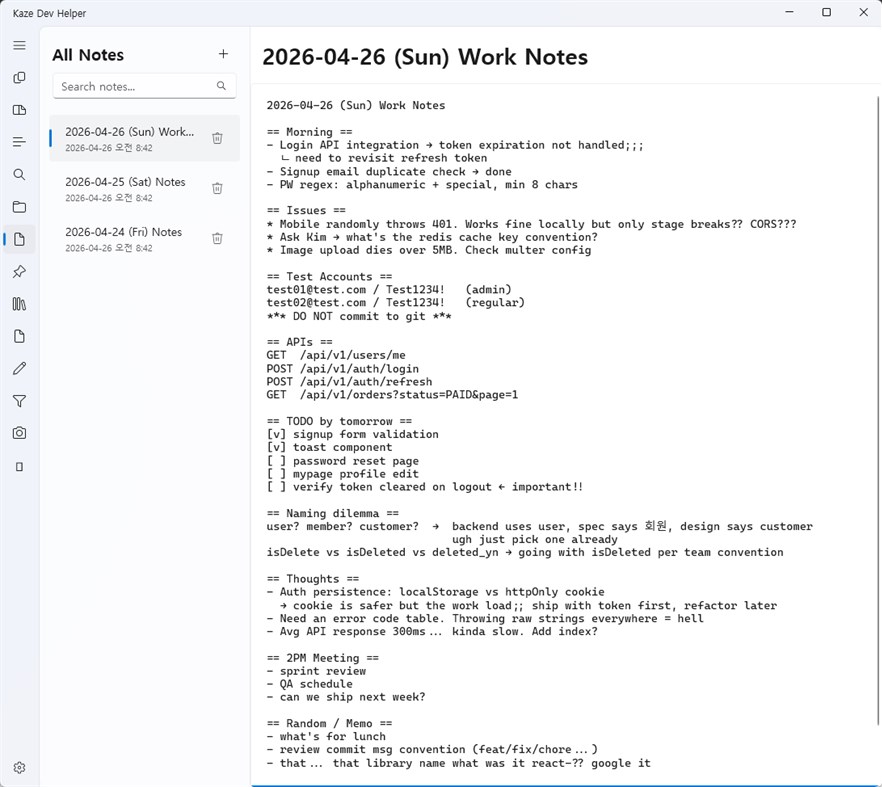
Always-on-top Sticky Notes: Detachable, post-it style notes that stay above other windows. Fully optimized for multi-monitor setups. Manage and search all your scattered notes from a centralized hub.
Secure Data Management: KDH makes backup and migration a breeze. Export your entire encrypted workspace (settings, notes, clipboard data) as a single file and import it seamlessly to any other machine.
Streamline your development workflow with a tool that respects your privacy, guarantees security, and never requires an internet connection.
ภาพหน้าจอ
Ad
ประวัติราคา
- ราคาปัจจุบัน: $3.99
- ต่ำสุด: $3.99
- มากที่สุด: $3.99
ติดตามราคา
การประเมิน AppAgg
500
การประเมิน AppAgg โดยประมาณสำหรับ
kaze dev helper
500 บรอนซ์
การประเมินที่สูงขึ้นมักหมายถึงสัญญาณบน AppAgg ที่แข็งแกร่งขึ้น
อิงจาก: ความนิยม · คะแนนจากผู้ใช้ · ความสดใหม่ · ดีล · ข้อมูลร้านค้า · กิจกรรมชุมชน
คำนวณใหม่ทุกวันจากข้อมูล AppAgg ล่าสุด.
URL แบบสั้น: คัดลอกแล้ว!
มีอะไรใหม่
- เวอร์ชัน: PC
- อัปเดตล่าสุด:
ข้อมูลเพิ่มเติม
- วันที่วางจำหน่าย:
- หมวดหมู่:
Windows แอป›เครื่องมือสำหรับนักพัฒนา - ระบบปฏิบัติการ:
PC - ขนาด:
46 Mb - ภาษาที่สนับสนุน:
Korean - การจัดประเภทเนื้อหา:
EVERYONE - Windows Store คะแนนโดย:
0
ผู้พัฒนา
- kazegamja
- แพลตฟอร์ม: Windows แอป (1)
- รายการ: 0 + 0
- แต้มแล: 0 + 0 ¡
- การจัดอันดับ: 0
- ความเห็น: 0
- ลดราคา: 0
- วิดีโอ: 0
- RSS: ติดตาม
รายการ (0)
0
- kaze dev helper
แต้มแล (0)
0
การจัดอันดับ (0)
0
ความเห็น (0)
เป็นคนแรกที่แสดงความเห็น
สรุป
kaze dev helper URL แบบสั้น: คัดลอกแล้ว!- แชร์
- Windows Store
«kaze dev helper». แพลตฟอร์ม: Windows. หมวดหมู่: เครื่องมือสำหรับนักพัฒนา. ผู้พัฒนา: «kazegamja». การเปิดตัวครั้งแรก: . อัปเดตล่าสุด: . ราคาปัจจุบัน: $3.99. ราคาต่ำสุดที่บันทึกไว้: $3.99. ราคาสูงสุดที่บันทึกไว้: $3.99. ชื่อนี้ยังไม่ได้รับการให้คะแนนหรือบทวิจารณ์บน AppAgg ภาษาที่ใช้ได้: Korean. AppAgg ติดตามประวัติราคา การให้คะแนน และคำติชมของผู้ใช้ «kaze dev helper». AppAgg ไม่ได้โฮสต์แอปพลิเคชันหรือแจกจ่ายซอฟต์แวร์ เครื่องหมายการค้า โลโก้ และภาพหน้าจอทั้งหมดเป็นของเจ้าของที่เกี่ยวข้อง ส่วนลดและอัปเดตในอนาคต: RSS
คล้ายกัน
-
- Dev Center
- Windows แอป: เครื่องมือสำหรับนักพัฒนา โดย: Microsoft Corporation
- ฟรี
- รายการ: 0 0 0
- แต้มแล: 2 + 92 3K เวอร์ชัน: PC The Microsoft Dev Center app allows you to quickly view details about the health and performance of your Windows Store apps on any Windows 10 device. Note: You must have an active ... ⥯
-
- Topcoder Helper
- Windows แอป: เครื่องมือสำหรับนักพัฒนา โดย: i'Mozo Studio
- ฟรี
- รายการ: 0 0 0
- แต้มแล: 0 + 0 500 เวอร์ชัน: PC TopCoder Helper is a helpful tool for generating code template with test cases for TopCoder competition problems. Supported languages include C++, C#, VB. Java and Python will be ... ⥯
-
- C# Resource Helper 10
- Windows แอป: เครื่องมือสำหรับนักพัฒนา โดย: CF Software Consultants Inc.
- $1.99
- รายการ: 0 0 0
- แต้มแล: 0 + 0 500 เวอร์ชัน: PC C# Resource Helper 10 is a Windows 10 application used to generate C# resource files and source code to support multiple languages for a Windows Metro application. The application ... ⥯
-
- Developer Helper
- Windows แอป: เครื่องมือสำหรับนักพัฒนา โดย: Bruno Capuano
- ฟรี
- รายการ: 0 0 0
- แต้มแล: 0 + 0 530 เวอร์ชัน: PC The app displays - The current connection status (connected or disconnected to internet) - The current IP Address - Battery information - Device information - Latest time of ... ⥯
-
- Red David Dev Tools
- Windows แอป: เครื่องมือสำหรับนักพัฒนา โดย: Red David
- $21.49
- รายการ: 0 0 0
- แต้มแล: 0 + 0 500 เวอร์ชัน: PC App personalized with tools for UWP development, styles and code references. ⥯
-
- App Dev Analytics
- Windows แอป: เครื่องมือสำหรับนักพัฒนา โดย: MajinSoft
- * $18.99
- รายการ: 0 0 0
- แต้มแล: 0 + 0 500 เวอร์ชัน: PC Analyze your unexplored Microsoft Store App Sales reports and improve your performance! Discover in no-time what's happening with grouping, filters and charts that provide you every ... ⥯
-
- JavaScript Studio
- Windows แอป: เครื่องมือสำหรับนักพัฒนา โดย: Melvin Dev
- ฟรี
- รายการ: 1 + 2 0 0
- แต้มแล: 1 + 88 2K เวอร์ชัน: PC Use your JavaScript, CSS, html skills to create apps wherever you go. These days many of us we use a smartphone anytime, as a developers sometimes we create code using some text editor ⥯
-
- Interop Tools (Preview)
- Windows แอป: เครื่องมือสำหรับนักพัฒนา โดย: IT Dev Team
- ฟรี
- รายการ: 0 0 0
- แต้มแล: 0 + 13 1K เวอร์ชัน: PC Note: This release requires provider extensions to make Interop Tools fully work, learn more at http://insidewindows.net/category/interop-tools/ Interop Tools is an app that allows you ⥯
-
- Number Generator
- Windows แอป: เครื่องมือสำหรับนักพัฒนา โดย: Aspec Dev
- ฟรี
- รายการ: 0 0 0
- แต้มแล: 0 + 0 530 เวอร์ชัน: PC A simple random number generator. ⥯
-
- UET PWA SDK Sample App
- Windows แอป: เครื่องมือสำหรับนักพัฒนา โดย: antonakos.dev
- ฟรี
- รายการ: 0 0 0
- แต้มแล: 0 + 0 500 เวอร์ชัน: PC A sample app to test UET PWA SDK. ⥯
-
- X410 - X Server for Windows
- Windows แอป: เครื่องมือสำหรับนักพัฒนา โดย: Choung Networks
- * ฟรี
- รายการ: 1 0 0
- แต้มแล: 0 + 24 1K เวอร์ชัน: PC Do you want to seamlessly use Linux GUI apps side by side with Windows apps? Simply start X410 and adjust a few settings; your Linux GUI apps then suddenly appear in Windows and you ... ⥯
-
- MQTTBox
- Windows แอป: เครื่องมือสำหรับนักพัฒนา โดย: workswithweb
- * ฟรี
- รายการ: 0 0 0
- แต้มแล: 0 + 9 730 เวอร์ชัน: PC Developers helper program to create,develop and test MQTT connectivity protocol. MQTTBox enables you to create MQTT clients to publish or subscribe to topics, create MQTT virtual ... ⥯
-
- Commandeer
- Windows แอป: เครื่องมือสำหรับนักพัฒนา โดย: Commandeer, Inc.
- ฟรี
- รายการ: 0 0 0
- แต้มแล: 1 + 1 540 เวอร์ชัน: PC Commandeer is a desktop app built by developers for developers which allows you to manage your infrastructure as code, view your data, and test your plumbing. We are access to 20 of ... ⥯
-
- Port Detective: Network Process Monitor
- Windows แอป: เครื่องมือสำหรับนักพัฒนา โดย: Automata Labs
- * ฟรี
- รายการ: 1 0 0
- แต้มแล: 0 + 0 540 เวอร์ชัน: PC EADDRINUSE: address already in use :::3000. Every developer knows the frustration. You try to spin up a local server, a database container, or an AI gateway, and Windows tells you the ... ⥯