
Marcaje
| Dezvoltator: | Shuhei123 (8) | ||
| Preț: | $3.99 Nou | ||
| Scor: | 600 Argint | ||
| Clasamente: | 0 | ||
| Comentarii: | 0 Postează comentariu | ||
| Liste: | 0 0 | ||
| Puncte: | 0 | ||
| +1 Punct | |||
Pe scurt
Fă cunoștință cu Markdown Vault, o aplicație de la Shuhei123 din categoria „Instrumente pentru dezvoltatori”.
A apărut , deci e mai tânără decât laptele din frigiderul tău.
$3.99 și nicio reducere pe AppAgg până acum. O nucă tare.
Microsoft Store e integrat în Windows, deci se instalează din câteva clicuri.
Scorul AppAgg e 600. „Argint”, și asta nu e deloc rău.
Clasificare de vârstă „EVERYONE”: merge și pentru copii.
Știe 9 limbi, dar româna n-a învățat-o încă.
Liniște totală deocamdată. Nicio notă, niciun comentariu. Rupe tăcerea.
Dezvoltatorul mai are 7 aplicații pe AppAgg. Merită o privire.
Vrei să afli primul de reduceri, actualizări și aplicații noi? Setează o alertă de preț, urmărește dezvoltatorul sau abonează-te la RSS. Notificările push vin prin aplicația AppAgg Alerts pentru Android și iOS.
Capturi de ecran 3
Alte platforme 0
Istoricul prețurilor 0
- Prețul actual: $3.99
- Minim: $3.99
- Maxim: $3.99
Propriul tău flux pe pagina principală
Descriere

Why Choose Markdown Vault?
Unlike cloud-based converters or AI wrappers that upload your files to external servers, Markdown Vault performs every conversion, OCR scan, table reconstruction, and PII redaction completely on your local Windows PC. Pay once and own your privacy workflow forever.
Key Features:
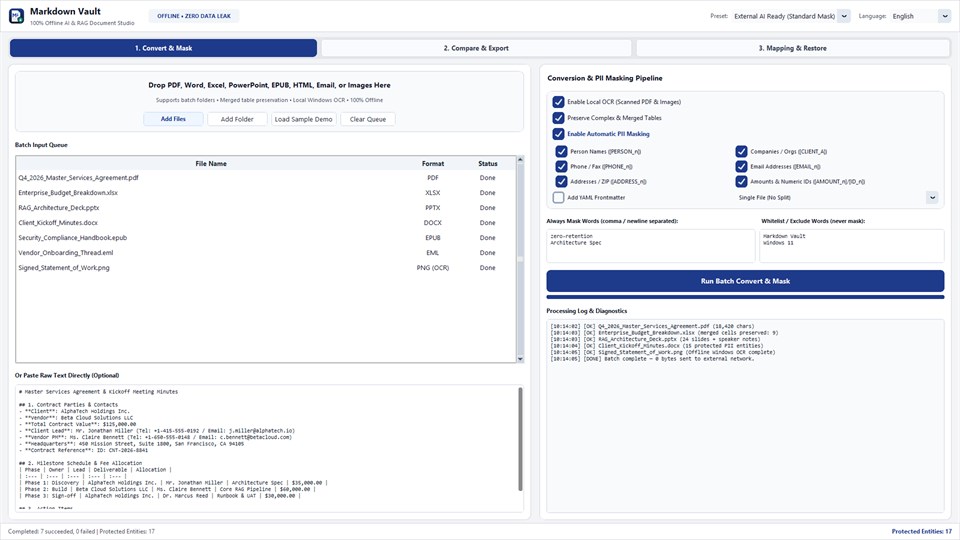
- Multi-Format Faithful Conversion: Batch-convert text and scanned PDFs, Word (.docx), Excel (.xlsx), PowerPoint (.pptx), EPUB (.epub), saved web pages (.html/.htm), emails (.eml/.msg), and images (.png/.jpg) into clean Markdown without AI summarization, rewriting, or hallucination.
- Complex Merged Table Preservation: Accurately parses merged cells in Excel, Word, PDF, and HTML tables so financial breakdowns and specification matrices stay aligned in Markdown.
- Built-In Offline Windows OCR: Extract text from scanned PDFs, embedded Word images, and screenshots locally using Windows native OCR with zero external API calls.
- Smart PII Auto-Detection & Entity Consistency: Automatically detects and masks Person Names, Companies/Clients, Phone Numbers, Email Addresses, Physical Addresses, and Amounts/Numeric IDs. The same entity always maps to the exact same placeholder (such as [CLIENT_A] or [PERSON_1]) across an entire project so ChatGPT, Claude, or Gemini can follow context accurately.
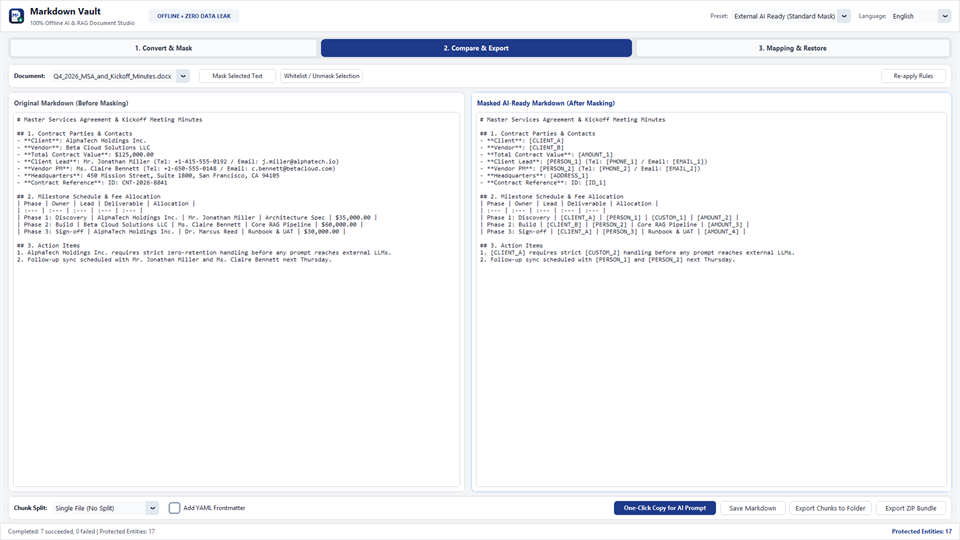
- Side-by-Side Comparison & Manual Control: Inspect original vs. masked Markdown side by side. Right-click any text to cut, copy, paste, manually mask sensitive project names, or whitelist false positives.
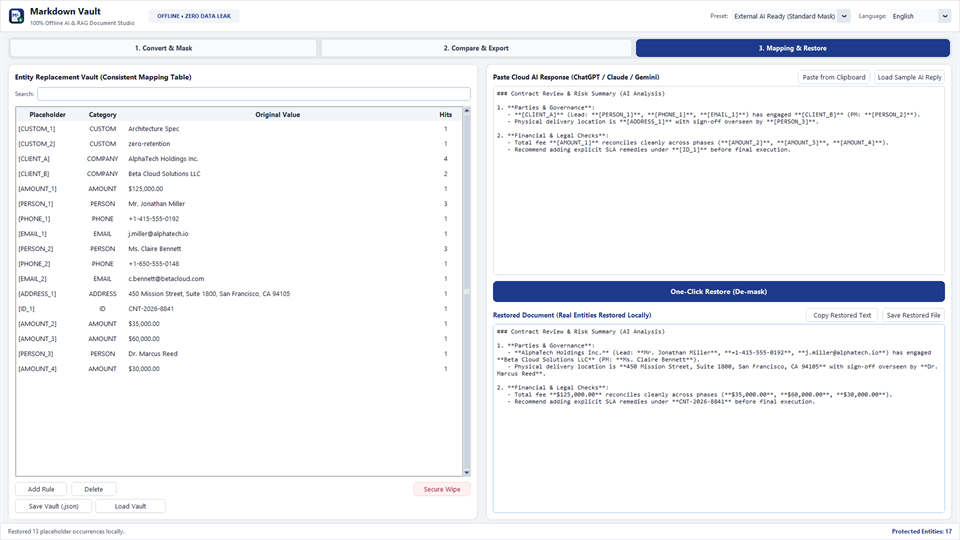
- One-Click AI Response Restoration: Paste any AI response containing placeholders and restore all original names, companies, and numbers locally in a single click. Save and reload mapping vaults per client or project.
- RAG & LLM Chunk Export: Split long documents by headings (# / ## / ###) or character/token limits (2,000 / 4,000 / 8,000), attach YAML frontmatter metadata, copy everything for AI prompts, or export to folders and ZIP archives.
- Multilingual Interface: Fully localized in English, Japanese, Hindi, Spanish, German, French, Portuguese, Korean, and Chinese, with automatic detection of your Windows system language.
How It Works (3-Step Workflow):
1. Convert & Mask:
- Drag and drop files or folders into the drop area, or click "Add Files" / "Add Folder" (or click "Load Sample Demo" to test immediately).
- Select a preset from "Preset:" ("High-Fidelity Convert", "External AI Ready (Standard Mask)", "Strict Anonymization", or "RAG Chunk Export") and customize PII categories, "Always Mask Words (comma / newline separated):", or "Whitelist / Exclude Words (never mask):".
- Click "Run Batch Convert & Mask" to convert and mask locally.
2. Compare & Export:
- Review "Original Markdown (Before Masking)" alongside "Masked AI-Ready Markdown (After Masking)".
- Select any phrase and click "Mask Selected Text" or "Whitelist / Unmask Selection", or right-click to adjust rules interactively.
- Choose "Chunk Split:" and "Add YAML Frontmatter", then click "One-Click Copy for AI Prompt", "Save Markdown", "Export Chunks to Folder", or "Export ZIP Bundle".
3. Mapping & Restore:
- Manage all masked entities in "Entity Replacement Vault (Consistent Mapping Table)" with search, "Add Rule", "Save Vault (.json)", "Load Vault", and "Secure Wipe".
- Paste your AI reply under "Paste Cloud AI Response (ChatGPT / Claude / Gemini)" and click "One-Click Restore (De-mask)" to recover the final document with real names intact, ready for "Copy Restored Text" or "Save Restored File".
Ideal For:
- Business teams, consultants, and legal professionals sharing contracts, specs, or meeting minutes with ChatGPT, Claude, or Gemini safely.
- Developers and knowledge workers building local RAG pipelines, Obsidian vaults, or clean Markdown archives.
Download Markdown Vault today and turn sensitive documents into AI-ready knowledge with complete peace of mind.
De la dezvoltator
Dezvoltator
- Shuhei123
- Urmăritori: 0
- Platforme: Windows Aplicații (8)
- Reduceri: 0
- Liste: 0 0
- Puncte: 0
- Clasamente: 0
- Comentarii: 0
- Videoclipuri: 0
- RSS: Abonează-te
Liste 0
-
 Markdown Vault
Puncte 0
-

- +1 Punct

Clasamente 0
-
- Evaluarea ta
Ce este nou
- Versiune: PC
- Ultima actualizare:
Informații suplimentare
- Data lansării:
- Categorie:
Aplicații pentru Windows›Instrumente pentru dezvoltatori - SO:
PC - Dimensiune:
133 Mb - Limbi disponibile:
Chineză,Coreeană,Engleză,Franceză,Germană,Hindi,Japoneză,Portugheză,Spaniolă - Evaluarea conținutului:
EVERYONE - Windows Store Evaluare: ¡
0
Comentarii 0 ¡
Scor AppAgg
Scor AppAgg estimat pentru
Markdown Vault
Dezvoltator: Shuhei123
Un scor mai mare reflectă de obicei rezultate mai bune pentru indicatorii urmăriți de AppAgg.
Bazat pe: popularitate · evaluări ale utilizatorilor · actualitate · oferte · date din magazine · activitatea comunității
Recalculat zilnic pe baza datelor AppAgg actualizate.
Markdown Vault Adresă URL scurtă: Copiat!- Windows Store

