
| Udvikler: | Whitewater Foundry (5) | ||
| Pris: | $8.99 | ||
| Rangeringer: | 0 | ||
| Anmeldelser: | 0 Skriv en anmeldelse | ||
| Lister: | 0 + 0 | ||
| Point: | 1 + 0 ¡ | ||
| Windows Store | |||
Beskrivelse

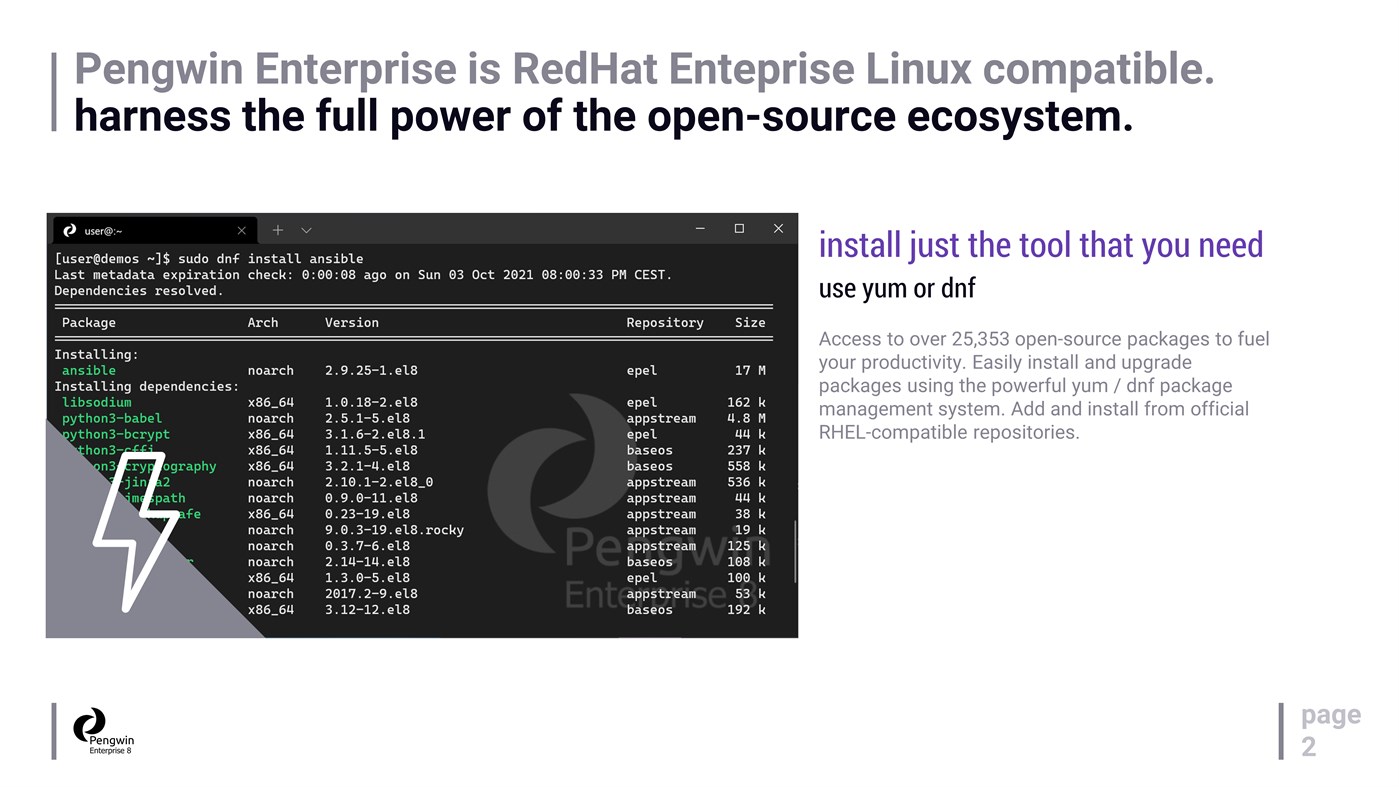
Pengwin Enterprise can be customized to fit the organization's needs and leverage existing Linux infrastructure and subscriptions. Pengwin Enterprise also comes with a rich set of tools and packages to help you work productively with Linux on Windows.
Whether you are a developer, a system administrator, a data scientist, or a power user, Pengwin Enterprise can meet your needs and enhance your workflow.
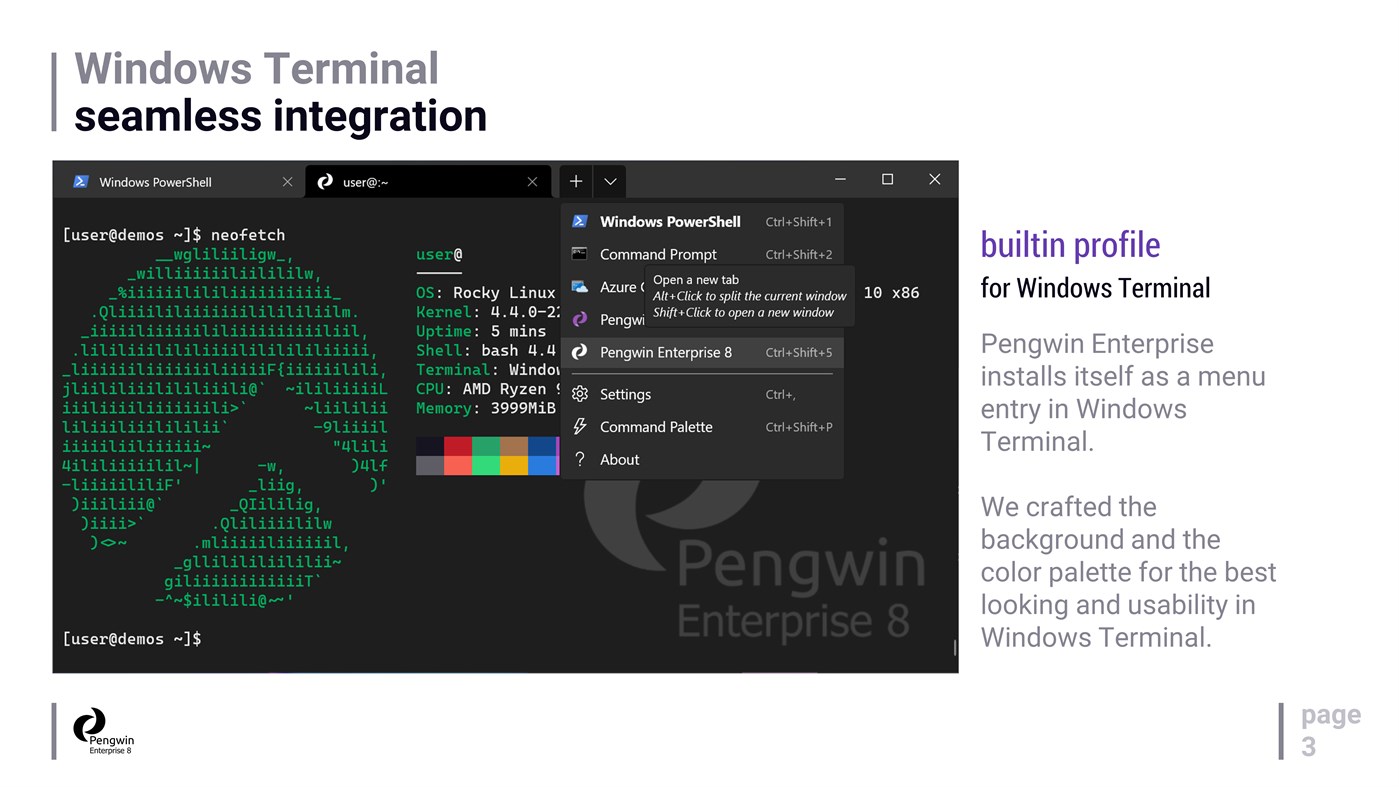
Pengwin Enterprise installs itself as a menu entry in Windows Terminal. We crafted the background and the color palette for the best looking and usability in Windows Terminal. Configuring Pengwin Enterprise as your Default Profile in Windows Terminal allows greater integration with the Windows environment. Specifically, right-click a folder in File Explorer and select Open in Terminal. It will open in the chosen directory, making it easier to access all necessary files and tools from within the terminal.
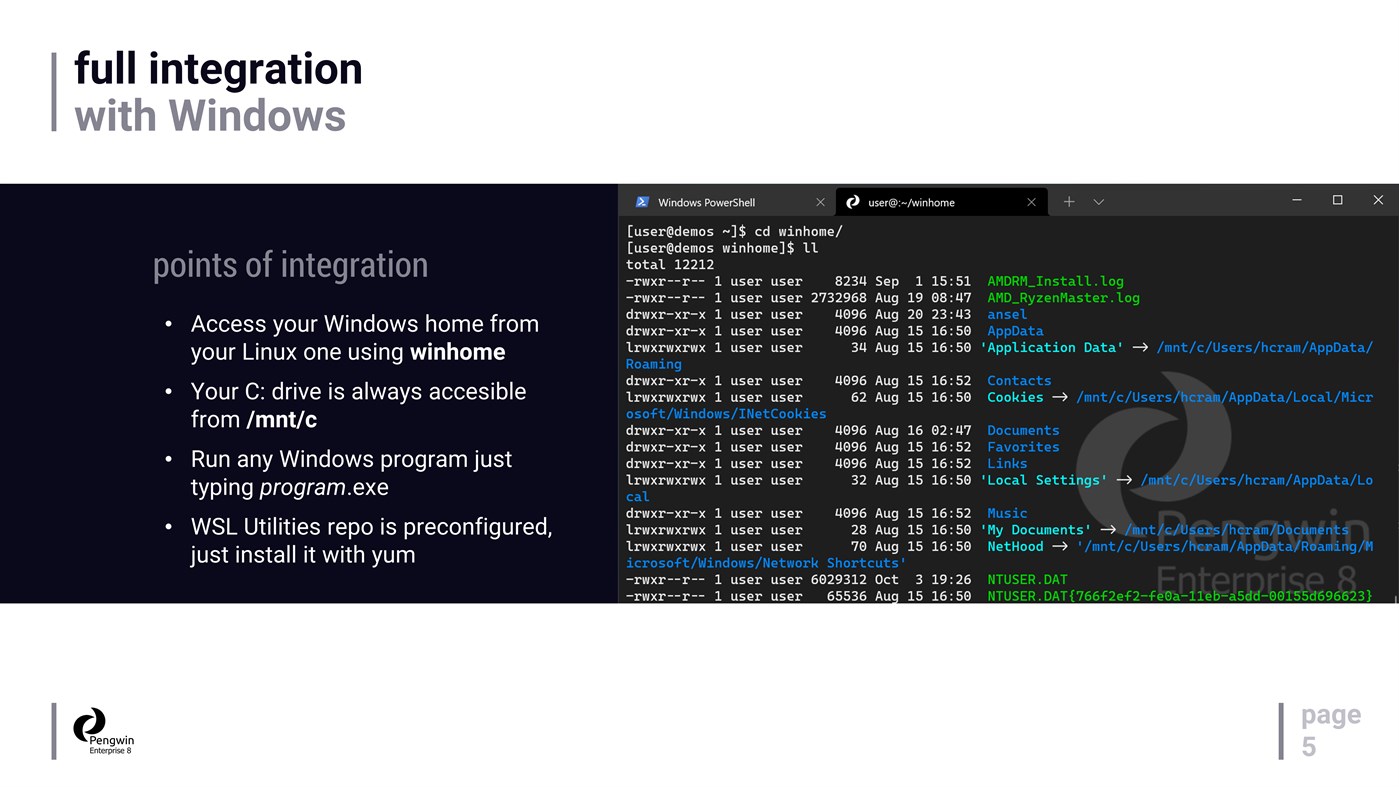
Access your C:\ drive at /mnt/C automatically. Copy and paste from Visual Studio into Emacs. Open Word from zsh. Pipe ifconfig.exe output into a Python script. It is a hybrid world. Pengwin Enterprise bridges the gap between Windows and Linux.
Pengwin Enterprise is designed for custom deployments in consultation with Whitewater Foundry's international team of WSL experts.
This build provided on the Microsoft Store is built from Rocky Linux, for demonstration purposes and personal use only.
Businesses and institutions who wish to license Pengwin Enterprise, use Pengwin Enterprise with Red Hat Enterprise Linux (Red Hat Enterprise Linux subscription required), and obtain a support contract for Pengwin Enterprise should e-mail enterprise@whitewaterfoundry.com or visit https://www.whitewaterfoundry.com/pengwin-enterprise for details.
Individual end-users are very strongly encouraged to obtain Pengwin or Fedora Remix for WSL instead. Pengwin includes end-user support and several usability modifications and tools, such as pengwin-setup, to improve the overall WSL experience for end-users.
The Pengwin Enterprise build provided on the Microsoft Store does NOT include Red Hat Enterprise Linux packages, end-user support, pengwin-setup, or the WSL usability features that accompany Pengwin or are built into Pengwin Enterprise in a custom deployment.
Whitewater Foundry is a Microsoft Partner, Red Hat Business Partner, and licensee in the Open Innovation Network.
Pengwin Enterprise is not endorsed by or affiliated with the CentOS Project, Scientific Linux, Rocky Linux, or Fermi National Accelerator Laboratory.
DISCLAIMER: Windows Insider Preview versions are not production-ready and can contain incompatibilities or bugs that affect the performance of Pengwin. We support insider versions on a best-effort basis.
Skærmbilleder


Nyheder
- Version: PC
- Opdateret:
Pris
- I dag: $8.99
- Minimum: $4.49
- Maksimalt: $99.99
Overvåg priser
Udvikler
- Whitewater Foundry
- Platforme: Windows Apps (5)
- Lister: 2 + 1
- Point: 2 + 101 ¡
- Rangeringer: 0
- Anmeldelser: 0
- Rabatter: 0
- Videoer: 0
- RSS: Abonner
Point
-

- 98 lan an
- +1

Rangeringer
0 ☹️
Lister
0 ☹️
- Pengwin Enterprise 8
Anmeldelser
Vær den første til at gennemgå 🌟
Yderligere oplysninger
- Version: PC
- Kategori:
Windows Apps›Udviklerværktøjer - Operativsystem:
PC - Størrelse:
422 Mb - Understøttet sprog:
English - Indholdsklassificering:
EVERYONE - Windows Store Bedømmelse:
0 - Opdateret:
- Udgivelsesdato:
Kontaktpersoner
 https://www.whitewaterfoundry.com/pengwin-enterprisePengwin Enterprise 8 Kort webadresse: Kopieret!
- 🌟 Del
- Windows Store
Du vil måske også kunne lide
-
- Pengwin Enterprise 9
- Windows Apps: Udviklerværktøjer Ved: Whitewater Foundry
- $9.99
- Lister: 0 + 0 Rangeringer: 0 Anmeldelser: 0
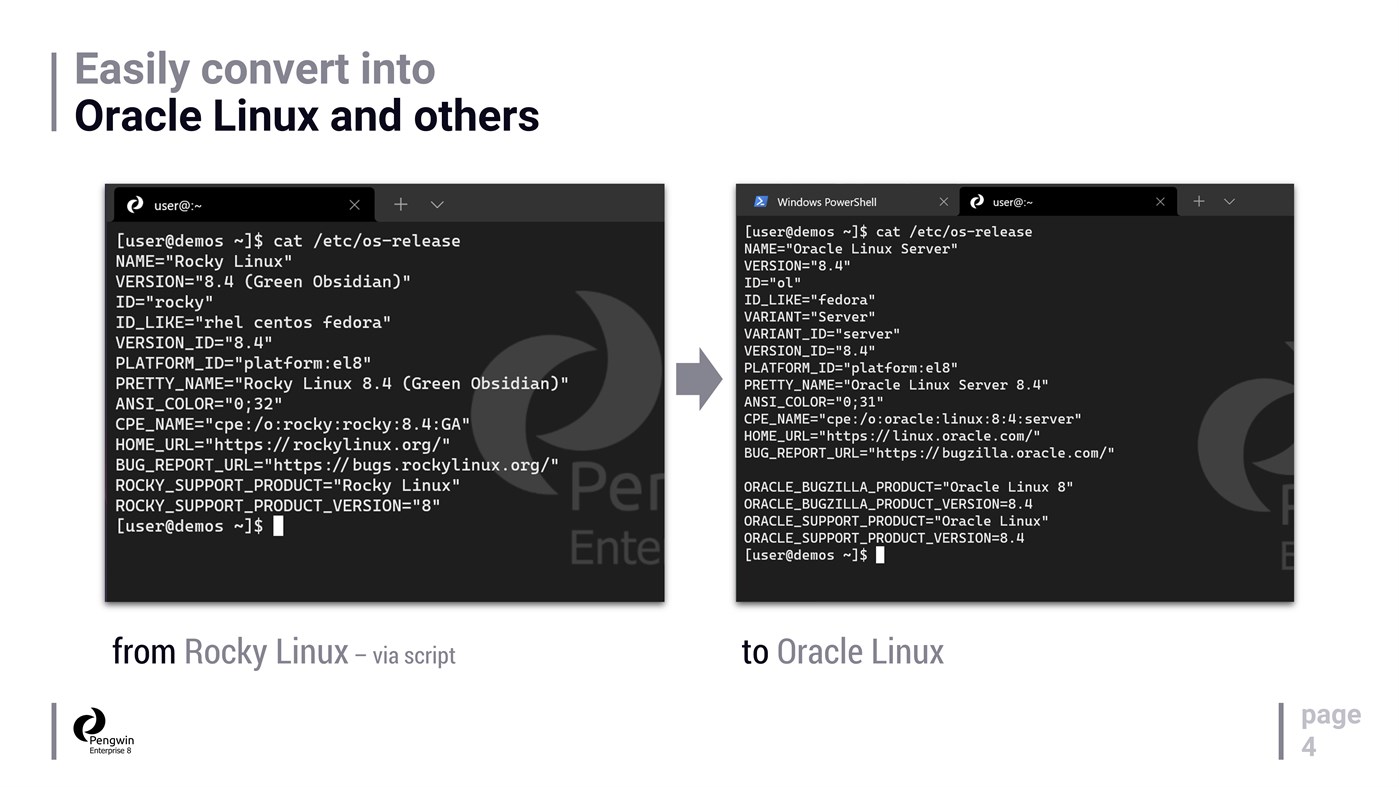
- Point: 0 + 0 Version: PC Pengwin Enterprise is a Windows Subsystem for Linux (WSL) solution compatible with mainstream enterprise Linux distributions such as **Oracle Linux** and **Red Hat Enterprise Linux**. ... ⥯
-
- WIP Setup Developer Assistant
- Windows Apps: Udviklerværktøjer Ved: Microsoft Corporation
- Gratis
- Lister: 0 + 1 Rangeringer: 0 Anmeldelser: 0
- Point: 1 + 4 (4.8) Version: PC The WIP setup developer assistant is an easy to use tool for developers who need to quickly set up a Windows Information Protection (WIP) environment on their local machine. Setting up ⥯
-
- Macaos Rover
- Windows Apps: Udviklerværktøjer Ved: Macaos Software AS
- Gratis
- Lister: 0 + 0 Rangeringer: 0 Anmeldelser: 0
- Point: 0 + 0 Version: PC This app will give some of the same functionality found in the product browser of Macaos Enterprise for Windows. This app is read only and will reflect the data published to Macaos ... ⥯
-
- Oracle Linux 9.1
- Windows Apps: Udviklerværktøjer Ved: Oracle America, Inc.
- Gratis
- Lister: 0 + 0 Rangeringer: 0 Anmeldelser: 0
- Point: 0 + 3 (5.0) Version: PC Oracle Linux combines the fundamental building blocks of modern IT infrastructure: operating system, containers, and virtualization into one integrated offering. Oracle Linux provides ... ⥯
-
- App Dev Analytics
- Windows Apps: Udviklerværktøjer Ved: MajinSoft
- * $18.99
- Lister: 0 + 0 Rangeringer: 0 Anmeldelser: 0
- Point: 0 + 0 Version: PC Analyze your unexplored Microsoft Store App Sales reports and improve your performance! Discover in no-time what's happening with grouping, filters and charts that provide you every ... ⥯
-
- Agile ESA Diagram
- Windows Apps: Udviklerværktøjer Ved: AgileViews
- Gratis
- Lister: 0 + 0 Rangeringer: 0 Anmeldelser: 0
- Point: 0 + 0 Version: PC This is the diagram view version of the Agile Enterprise Solution Architecture (A-ESA) modeling tool. This tool features extremely simple and fast enterprise solution diagramming ... ⥯
-
- SCADAvis.io Synoptic Editor
- Windows Apps: Udviklerværktøjer Ved: DSC_Systems
- $19.99
- Lister: 1 + 0 Rangeringer: 0 Anmeldelser: 0
- Point: 0 + 0 Version: PC SCADAvis.io Synoptic Editor is a powerful tool to create synoptic graphics that can be animated with real-time data on any modern web browser (mobile or desktop). This editor is based ... ⥯
-
- SSH Client - SFTP Terminal and Telnet
- Windows Apps: Udviklerværktøjer Ved: Moon Technolabs Pvt. Ltd.
- * Gratis
- Lister: 0 + 0 Rangeringer: 0 Anmeldelser: 0
- Point: 0 + 0 Version: PC Experience seamless remote access with SSH Client Terminal & Telnet! This terminus & SFTP app offers secure & easy-to-use terminal emulation for your device. Here is one of the most ... ⥯