
ที่บันทึกไว้
เลือกชื่อที่จะแสดงในเมนูที่บันทึกไว้ของคุณ
เสร็จแล้ว
| ผู้พัฒนา: | Ostrong Studios (12) | ||
| ราคา: | ฟรี | ||
| การประเมิน: | 960 เงิน | ||
| การจัดอันดับ: | 0 | ||
| ความเห็น: | 0 โพสต์ความคิดเห็น | ||
| รายการ: | 0 + 0 | ||
| แต้มแล: | 0 + 0 ¡ | ||
| +1 แต้มแล | |||
คำอธิบาย

THE TERMINAL
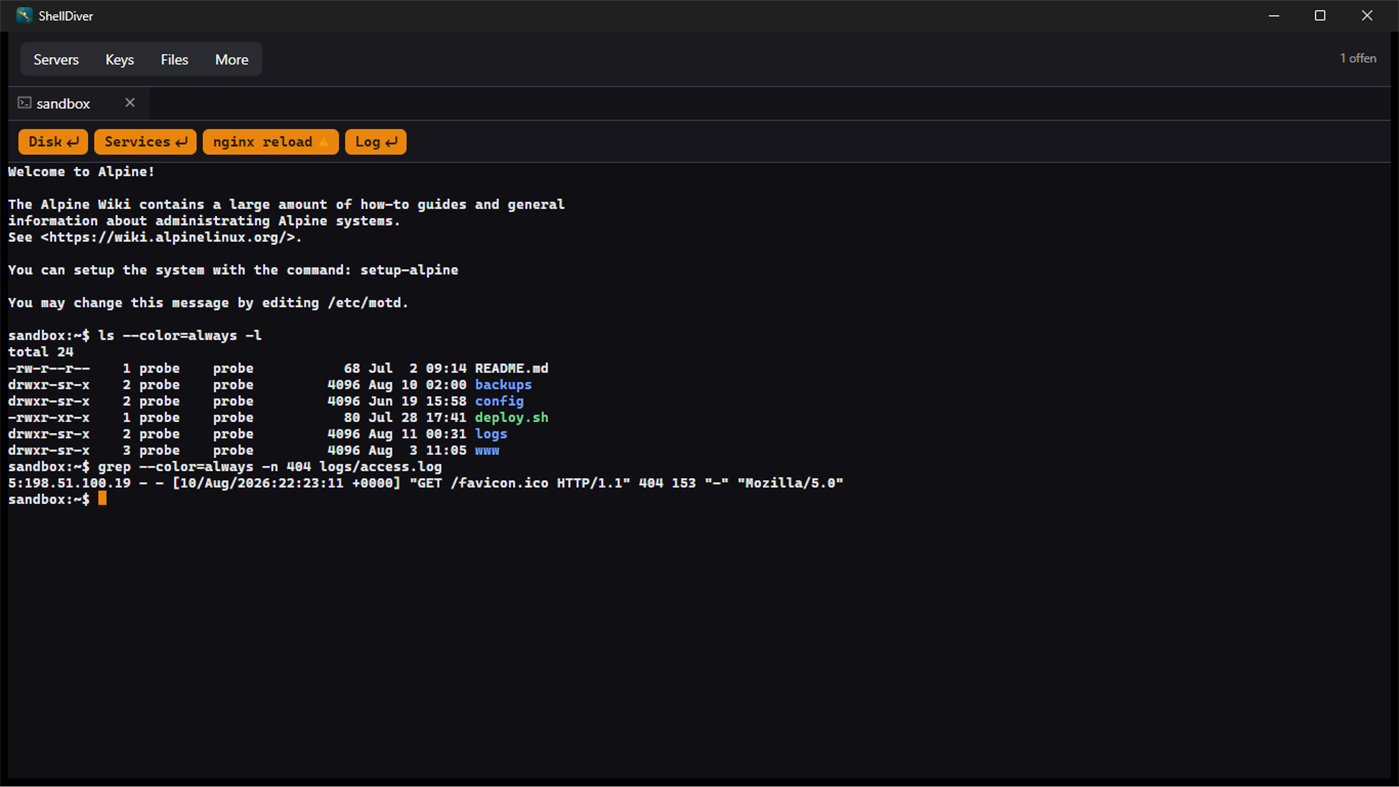
A real terminal, not a text box with a border. 256 colours and true colour,
scrollback, reflow at any window size, search through the history. Accents,
emoji and CJK characters land where they belong, and wide characters take two
columns — the way the server meant them.
Several sessions run side by side as tabs. When the line drops, the tab stays
and reconnects on its own, waiting a little longer between each attempt.
Above the terminal your snippets sit as buttons — one press and the command
is on the line. Pick one to run by itself whenever you connect.
THE FILES
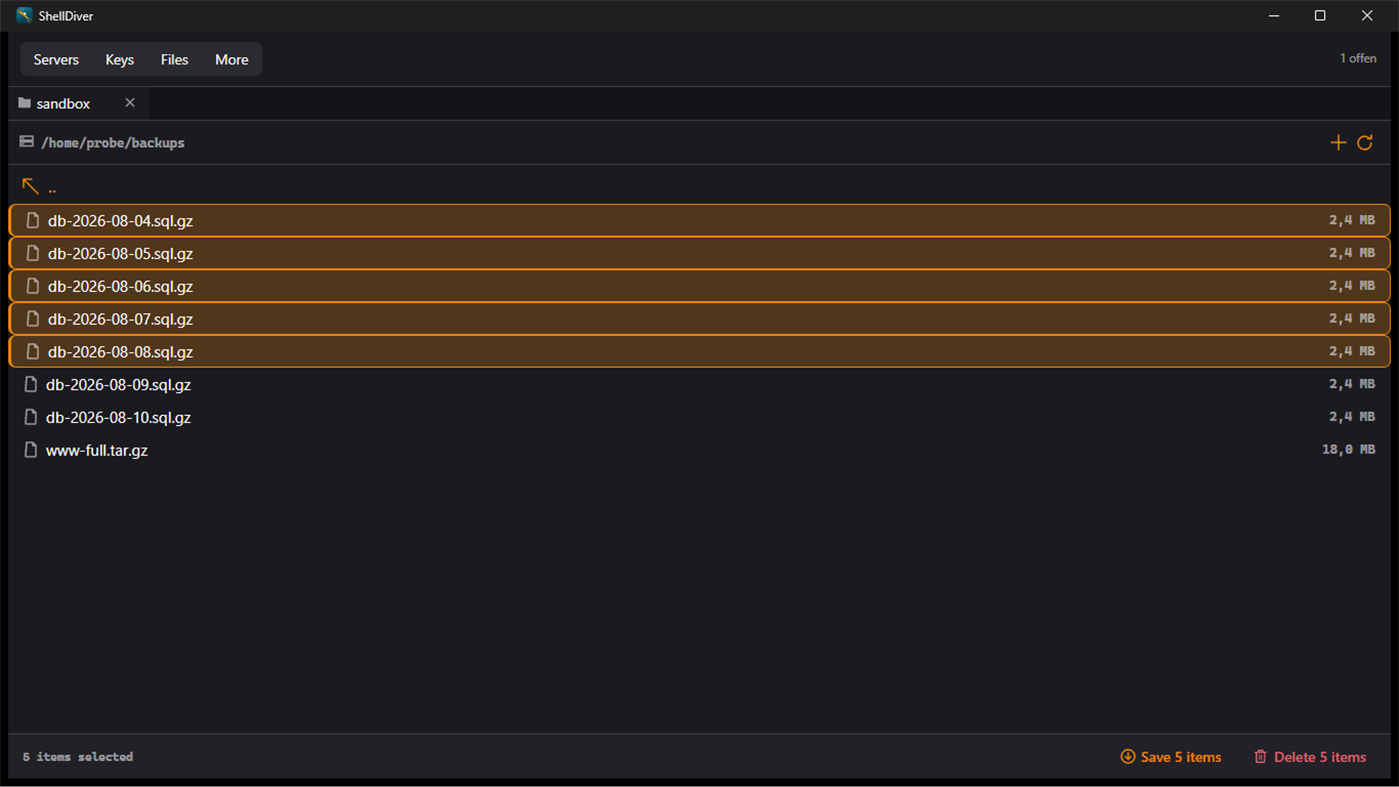
An SFTP browser next to the terminal, in the same window and on the same
connection. Drag files from Explorer into the window to upload them;
downloading goes through the selection — one file, several at once, or whole
directory trees. If a file is already there, ShellDiver asks once and
remembers the answer for the rest of the run.
THE KEYS
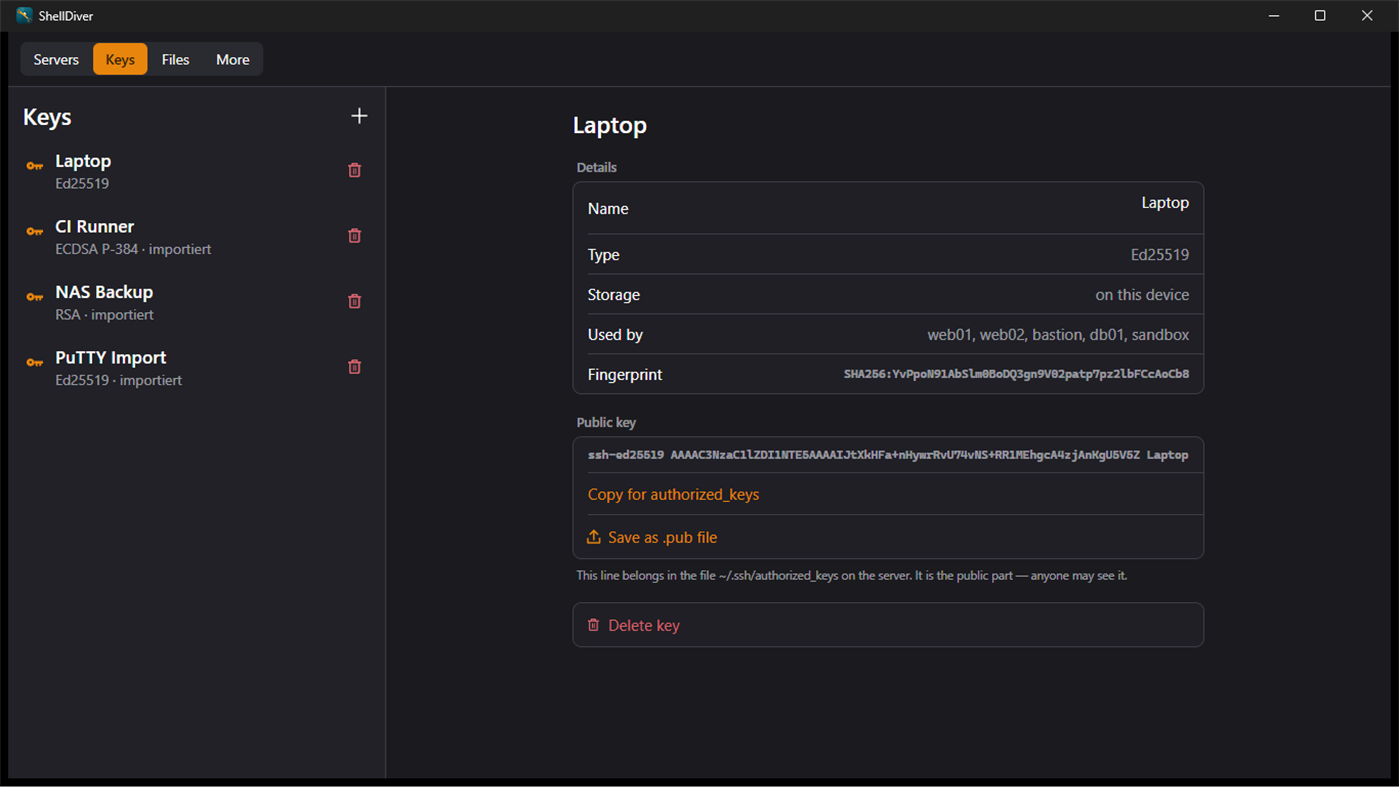
Generate: Ed25519, ECDSA over the three NIST curves, RSA at 2048, 3072 or
4096 bits. While it generates you stir the pointer through the window and
watch the randomness come in.
Import: OpenSSH and PuTTY, encrypted or not, RSA, ECDSA and Ed25519. The
private half then sits under Windows' own protection and leaves the device
only when you say so. The public half you copy out with one press, in the
form that belongs in authorized_keys on the server.
SIGNING IN
Password, keyboard-interactive or key — and when a server asks for more than
one, ShellDiver works through whatever it holds credentials for. Key and then
the one-time code is an ordinary sign-in, not a special case. One-time codes
are never stored.
You confirm the host key once, by fingerprint. After that it is checked on
every connection and a changed one is refused — including during an automatic
reconnect, where nobody is watching. An existing known_hosts file can be
taken over.
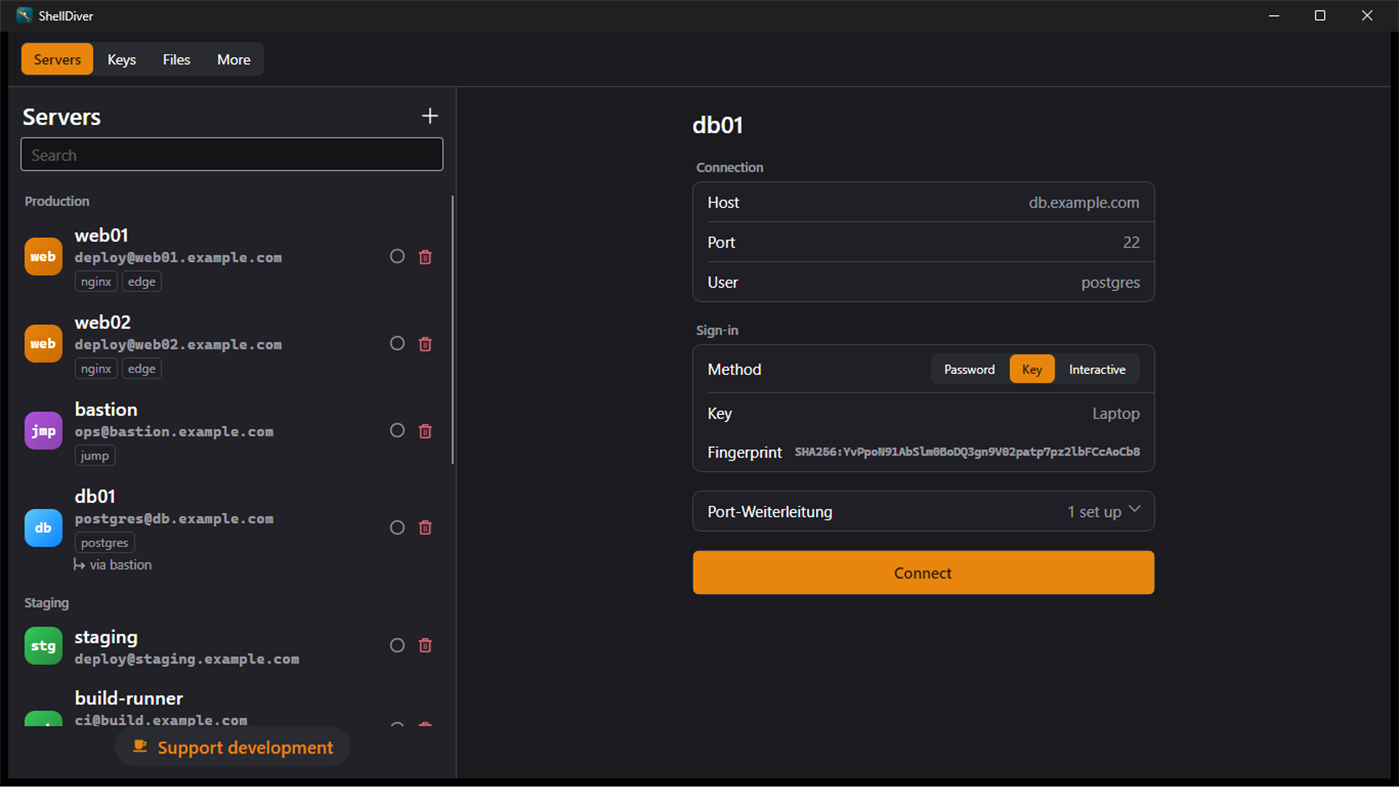
THROUGH A JUMP HOST
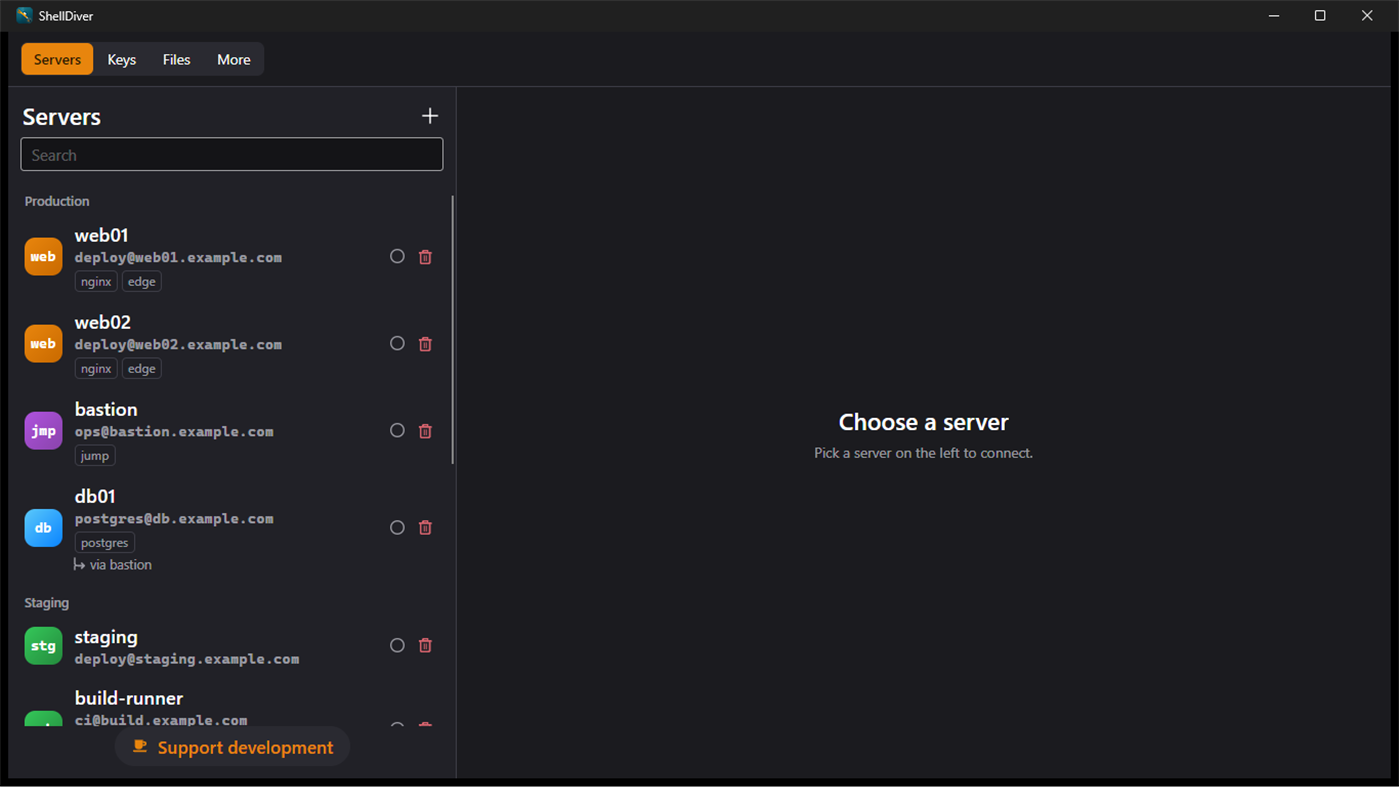
When a server is only open on the inside, you give it a jump host — OpenSSH's
ProxyJump. It forwards encrypted bytes and cannot read along; every link in
the chain is signed in from this device. Chains of up to three are allowed.
PORT FORWARDING
A service that only listens inside the server shows up on your 127.0.0.1. The
listener answers on this device alone; the network next to it never sees it.
YOUR SERVERS, ON EVERY DEVICE
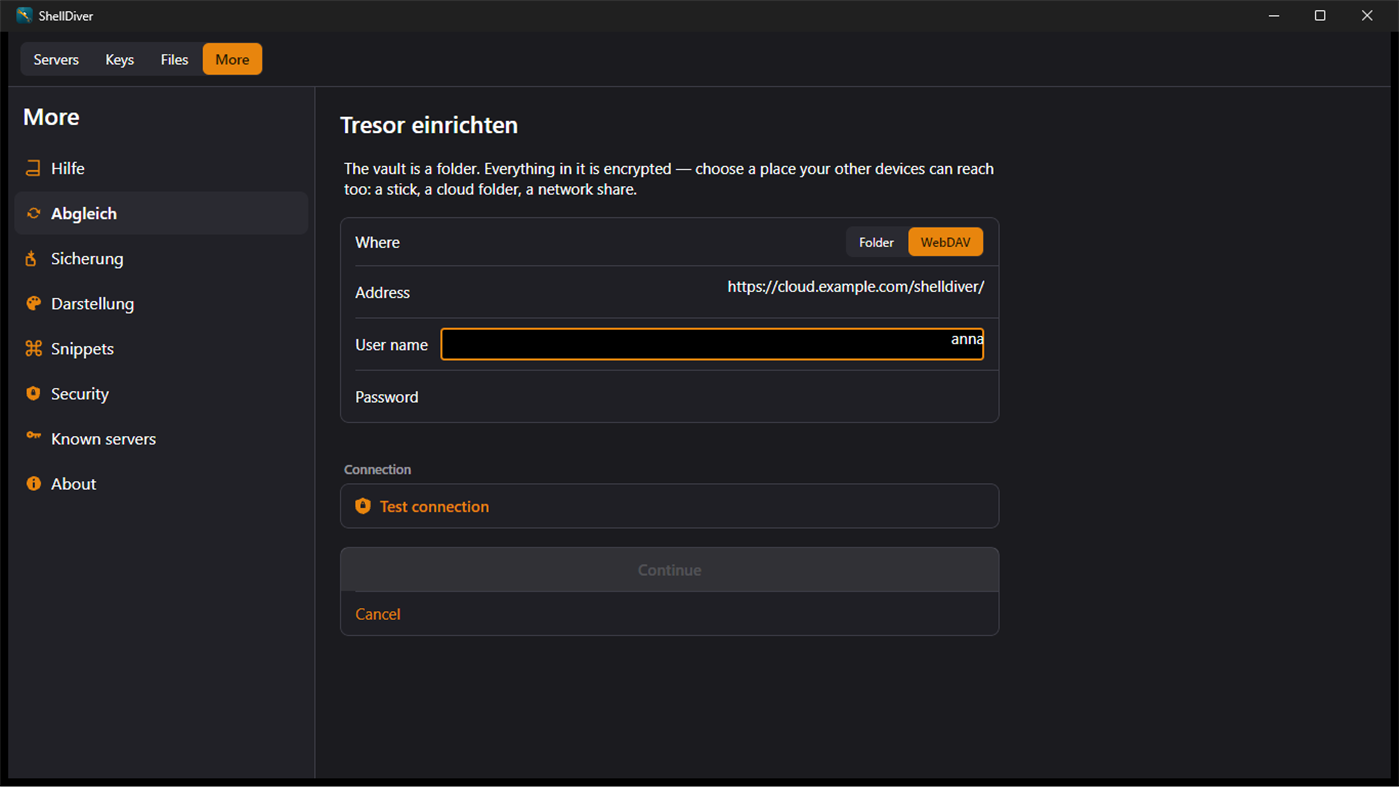
ShellDiver syncs servers, snippets, keys and confirmed host keys across your
devices — through a folder, a stick, or your own WebDAV server. No account,
no sign-in, no service in between.
Encryption happens on the device before anything is written: Argon2id for the
passphrase, AES-GCM for the data. Whoever runs the storage sees files they
cannot open. You add a second device with a QR code, without typing the
passphrase twice, and for the day you forget it there is an emergency sheet.
The Mac, iPhone and iPad versions read and write the same format. A server you
add on your phone is here — and the other way round.
BACKUP AND RESTORE
One file, written once and never touched again. With passwords and private
keys inside if you want, encrypted under a password of its own. When you
restore, ShellDiver first shows what the file holds and what it would change —
before anything happens.
WHAT SHELLDIVER KNOWS ABOUT YOU
Nothing. There is no account, no sign-in, no usage statistics and no call to
any service of ours. ShellDiver connects to the servers you enter, and to
nothing else. Crash reporting is switched off on purpose, so that nothing
leaves the device that way either.
โฆษณา
ภาพหน้าจอ
ประวัติราคา
- ราคาปัจจุบัน: ฟรี
- ต่ำสุด: ฟรี
- มากที่สุด: ฟรี
ติดตามราคา เพิ่มลงในรายการเพื่อรับการแจ้งเตือนส่วนลดทางอีเมลหรือพุช
การประเมิน AppAgg
960
การประเมิน AppAgg โดยประมาณสำหรับ
ShellDiver: SSH Client
ผู้พัฒนา: Ostrong Studios
960 เงิน
การประเมินที่สูงขึ้นมักหมายถึงสัญญาณบน AppAgg ที่แข็งแกร่งขึ้น
อิงจาก: ความนิยม · คะแนนจากผู้ใช้ · ความสดใหม่ · ดีล · ข้อมูลร้านค้า · กิจกรรมชุมชน
คำนวณใหม่ทุกวันจากข้อมูล AppAgg ล่าสุด.
URL แบบสั้น: คัดลอกแล้ว!
มีอะไรใหม่
- เวอร์ชัน: PC
- อัปเดตล่าสุด:
ข้อมูลเพิ่มเติม
- วันที่วางจำหน่าย:
- หมวดหมู่:
Windows แอป›เครื่องมือสำหรับนักพัฒนา - ระบบปฏิบัติการ:
PC - ขนาด:
83 Mb - ภาษาที่สนับสนุน:
English,German - การจัดประเภทเนื้อหา:
EVERYONE - Windows Store คะแนนโดย:
0 - เว็บไซท์:
 https://www.ostrongstudios.de
ผู้พัฒนา
- Ostrong Studios
- ผู้ติดตาม: 0
- แพลตฟอร์ม: Android แอป (2) Android เกม (5) Windows แอป (5)
- ลดราคา: 0
- รายการ: 0 + 0
- แต้มแล: 0 + 0 ¡
- การจัดอันดับ: 0
- ความเห็น: 0
- วิดีโอ: 0
- RSS: ติดตาม
รายการ (0)
0
- ShellDiver: SSH Client
แต้มแล (0)
0
การจัดอันดับ (0)
0
ความเห็น (0)
เป็นคนแรกที่แสดงความเห็น
สรุป
ShellDiver: SSH Client URL แบบสั้น: คัดลอกแล้ว!- แชร์
- Windows Store
«ShellDiver: SSH Client». แพลตฟอร์ม: Windows. หมวดหมู่: เครื่องมือสำหรับนักพัฒนา. ผู้พัฒนา: «Ostrong Studios». การเปิดตัวครั้งแรก: . อัปเดตล่าสุด: . ราคาปัจจุบัน: ฟรี. ชื่อนี้ยังไม่ได้รับการให้คะแนนหรือบทวิจารณ์บน AppAgg ภาษาที่ใช้ได้: English, German. AppAgg ติดตามประวัติราคา การให้คะแนน และคำติชมของผู้ใช้ «ShellDiver: SSH Client». AppAgg ไม่ได้โฮสต์แอปพลิเคชันหรือแจกจ่ายซอฟต์แวร์ เครื่องหมายการค้า โลโก้ และภาพหน้าจอทั้งหมดเป็นของเจ้าของที่เกี่ยวข้อง ส่วนลดและอัปเดตในอนาคต: RSS
คล้ายกัน
-
- SSH Client - SFTP Terminal and Telnet
- Windows แอป: เครื่องมือสำหรับนักพัฒนา โดย: Moon Technolabs Pvt. Ltd.
- * ฟรี
- รายการ: 0 0 0
- แต้มแล: 0 + 5 7K · ทอง เวอร์ชัน: PC Experience seamless remote access with SSH Client Terminal & Telnet! This terminus & SFTP app offers secure & easy-to-use terminal emulation for your device. Here is one of the most ...
-
- Termius - Modern SSH Client
- Windows แอป: เครื่องมือสำหรับนักพัฒนา โดย: Termius Corporation
- * ฟรี
- รายการ: 0 + 4 0 0
- แต้มแล: 8 + 552 39K · ตำนาน เวอร์ชัน: PC Termius is a modern SSH client designed for productivity and collaboration. Connect with one click from desktop and mobile no re-entering IP addresses, ports, and passwords. With a ...
- ใหม่
- Filemade - Dual-Pane SFTP & SSH Client
- Windows แอป: เครื่องมือสำหรับนักพัฒนา โดย: Hades Corporation
- ฟรี
- รายการ: 0 0 0
- แต้มแล: 0 + 0 1K · เงิน เวอร์ชัน: PC Filemade is a modern, lightweight, and blazing-fast dual-pane SFTP & SSH client designed specifically for developers, system administrators, and DevOps engineers. Powered by a ...
-
- SSH Proxy
- Windows แอป: เครื่องมือสำหรับนักพัฒนา โดย: XSoft Studio
- $1.19
- รายการ: 0 0 0
- แต้มแล: 0 + 0 610 · เงิน เวอร์ชัน: PC SSH Proxy is applications help to create proxy or local port forwarding to access blocked websites and servers over an encrypted SSH connection easily. It is able to create socks5 ...
-
- SSH Folders
- Windows แอป: เครื่องมือสำหรับนักพัฒนา โดย: Birdie
- ฟรี
- รายการ: 0 0 0
- แต้มแล: 0 + 0 980 · เงิน เวอร์ชัน: PC SSH Folders turns any SFTP server into an on-demand folder inside Windows File Explorer. Your remote files appear as online-only placeholders that use no disk space. The moment you ...
-
- SSH Tunnel
- Windows แอป: เครื่องมือสำหรับนักพัฒนา โดย: Kostadin Gospodinov
- ฟรี
- รายการ: 0 0 0
- แต้มแล: 0 + 7 750 · เงิน เวอร์ชัน: PC SSH Tunnel allows a network user to access or provide a network service that the underlying network does not support or provide directly. SSH Tunnel Provides a Secure Internet ...
- ใหม่
- QuickTerminal - Multi-Shell
- Windows แอป: เครื่องมือสำหรับนักพัฒนา โดย: kakitiro
- * ฟรี
- รายการ: 0 0 0
- แต้มแล: 0 + 0 580 · บรอนซ์ เวอร์ชัน: PC QuickTerminal is a professional terminal emulator and SSH client designed for Windows. It combines local shell access, remote SSH sessions, SFTP file browsing, command tools, and ...
- -33%
- AI SSH
- Windows แอป: เครื่องมือสำหรับนักพัฒนา โดย: parmata
- ▼ $3.34
$4.99-33% - รายการ: 0 0 0
- แต้มแล: 0 + 0 580 · บรอนซ์ เวอร์ชัน: PC Stop memorizing complex shell commands. AI SSH transforms how you manage remote servers by letting you describe what you want in plain English, then instantly generates the exact ...
-
- Tempest 3 - SSH, RDP & FTP
- Windows แอป: เครื่องมือสำหรับนักพัฒนา โดย: Altas Express LLC
- * ฟรี
- รายการ: 0 0 0
- แต้มแล: 0 + 0 850 · เงิน เวอร์ชัน: PC Tempest is the SSH client built for people who actually manage servers. Connect via SSH, SFTP, or Mosh. Forward ports. Transfer files. Manage Kubernetes clusters. Collaborate in ...
-
- SQLSSH: Database Client/SSH/S3
- Windows แอป: เครื่องมือสำหรับนักพัฒนา โดย: Trendcas
- ฟรี
- รายการ: 0 0 0
- แต้มแล: 0 + 0 910 · เงิน เวอร์ชัน: PC SQLSSH Developer Tools, One Beautiful App. In Your Pocket, On Your Desk. Stop switching between a database IDE, a terminal, and an SFTP/S3 app. SQLSSH unifies PostgreSQL, MySQL, MSSQL,
-
- WSL SSH Launcher
- Windows แอป: เครื่องมือสำหรับนักพัฒนา โดย: V2BV
- $0.99
- รายการ: 0 0 0
- แต้มแล: 0 + 0 550 · บรอนซ์ เวอร์ชัน: PC This is a simple yet naive program that can launch SSH daemon (or if you prefer, service) inside WSL systems. It may be useful when the distribution's RC system is not compatible with ...
- ใหม่
- NATS Client
- Windows แอป: เครื่องมือสำหรับนักพัฒนา โดย: Nathan Ver Beek
- ฟรี
- รายการ: 0 0 0
- แต้มแล: 0 + 0 670 · เงิน เวอร์ชัน: PC NATS Client is a fast, full-featured desktop client for monitoring and managing NATS messaging servers - built for developers and operators who need to see what's actually happening on
-
- HelloUKey - SSH Agent & Key Vault
- Windows แอป: เครื่องมือสำหรับนักพัฒนา โดย: Jack One
- ฟรี
- รายการ: 0 0 0
- แต้มแล: 0 + 0 590 · บรอนซ์ เวอร์ชัน: PC HelloUKey is a modern Windows SSH agent and key vault designed to eliminate cleartext private key risks. By utilizing your device's built-in TPM hardware combined with Windows Hello, ...
-
- WebSocket Debug Tools: Client & Server
- Windows แอป: เครื่องมือสำหรับนักพัฒนา โดย: YH Software
- * ฟรี
- รายการ: 1 + 1 0 0
- แต้มแล: 1 + 0 1K · เงิน เวอร์ชัน: PC This is a testing and debugging UWP app for WebSocket that helps you debug WebSocket connections! Both client and server debugger are included and you can view and copy detail message ...

