
Bokmärken
| Utvecklare: | lucas9801 (1) | ||
| Pris: | Gratis Nytt | ||
| Helhetsbetyg: | 580 Brons | ||
| Rankningar: | 0 | ||
| Kommentarer: | 0 Skriv kommentar | ||
| Listor: | 0 0 | ||
| Poäng: | 0 | ||
| +1 Poäng | |||
Sammanfattning
Möt Solo Code, en app från lucas9801 i kategorin ”Utvecklarverktyg”.
Nyhet: släpptes , så du är bland de första.
Gratis, ingen reklam, inga inbyggda köp. Bara du och appen.
Microsoft Store är inbyggd i Windows, så installationen tar bara ett par klick.
AppAgg-betyget är 580. Brons än så länge, med gott om utrymme att växa.
Åldersgräns ”EVERYONE”, så det passar även barn.
Kan 2 språk, men svenska är inte med än.
Ingen på AppAgg har betygsatt appen än. Chansen att bli först är just nu.
Det är utvecklarens enda app på AppAgg. Än så länge.
Vill du vara först med att höra om uppdateringar och nya appar? Följ utvecklaren eller prenumerera på vårt RSS-flöde. Pushnotiser kommer via appen AppAgg Alerts för Android och iOS.
Skärmbilder 1
Andra plattformar 0
Prishistorik 0
- Aktuellt pris: Gratis
- Minimum: Gratis
- Maximum: Gratis
Ditt eget flöde på startsidan
Beskrivning

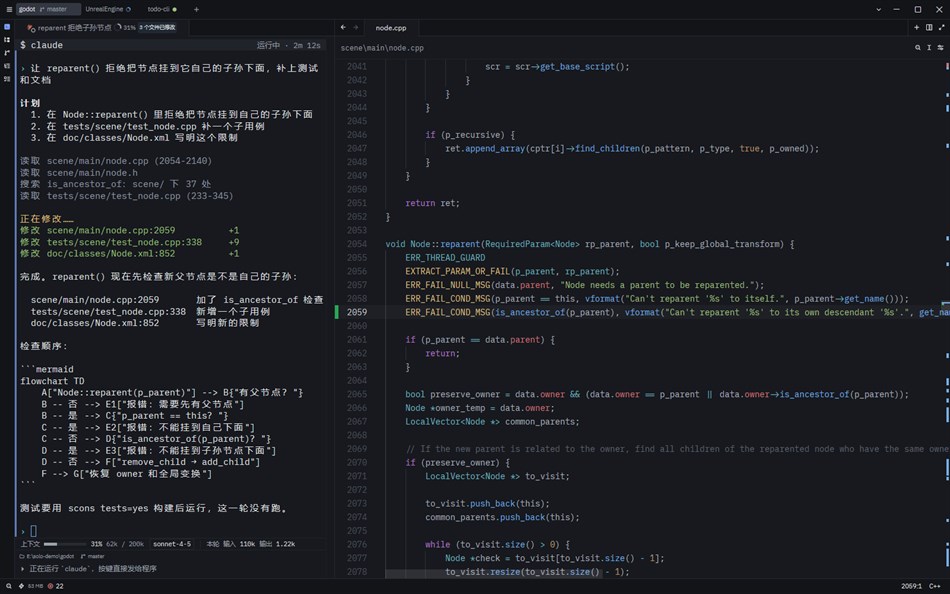
Solo Code is an editor for AI coding agents, built on the open-source Zed editor. The terminal fills the window, and command-line agents such as Claude Code, Codex and Copilot CLI run in a real terminal. When you need to read code, a full code editor opens on the right, so you can see what the agent changed at any time.
• Workspace tabs: one tab per project, each with its own terminals, agents, editor and file tree.
• Agent status: tabs show whether an agent is working, waiting for you, done with a turn or failed, and how much of its context it has used.
• Review and roll back by turn: see what each turn changed and how many new errors it introduced; keep or undo each change.
• A full code editor: language servers, go to definition, find references, project-wide search and Git.
• File paths in the terminal open with a click. Markdown and Mermaid diagrams render in a preview, and you can comment on a document and send the comments back to the agent.
• A better terminal: command blocks, an input editor and completions as you type.
• Parallel tasks: one git worktree per task, so several agents work without getting in each other's way.
You install and sign in to the agents yourself. Solo Code doesn't provide AI models and doesn't need an account.
Från utvecklaren
Utvecklare
- lucas9801
- Följare: 0
- Plattformar: Windows Appar (1)
- Erbjudanden: 0
- Listor: 0 0
- Poäng: 0
- Rankningar: 0
- Kommentarer: 0
- Videor: 0
- RSS: Prenumerera
Listor 0
-
 Solo Code
Poäng 0
-

- +1 Poäng

Rankningar 0
-
- Ditt betyg
Nyheter
- Version: PC
- Senast uppdaterad:
Ytterligare information
- Utgivningsdatum:
- Kategori:
Windows-appar›Utvecklarverktyg - OS:
PC - Storlek:
129 Mb - Språk som stöds:
Engelska,Kinesiska - Innehållsklassificering:
EVERYONE - Windows Store Betyg: ¡
0 - Webbplats:
 https://github.com/lucas9801/solo
Kommentarer 0 ¡
AppAgg-betyg
Uppskattat AppAgg-betyg för
Solo Code
Utvecklare: lucas9801
Ett högre betyg speglar oftast bättre resultat för de faktorer som AppAgg bedömer.
Baserat på: popularitet · användarbetyg · aktualitet · erbjudanden · butiksdata · communityaktivitet
Räknas om dagligen med färska AppAgg-data.
Solo Code Kort webbadress: Kopierad!- Windows Store

