
Marcaje
| Dezvoltator: | Yutaka Hirata (4) | ||
| Preț: | $8.39 | ||
| Scor: | 1.070 Argint | ||
| Clasamente: | 0 | ||
| Comentarii: | 0 Postează comentariu | ||
| Liste: | 0 0 | ||
| Puncte: | 0 | ||
| +1 Punct | |||
Pe scurt
Fă cunoștință cu YuHex, o aplicație de la Yutaka Hirata din categoria „Instrumente pentru dezvoltatori”.
Azi costă $8.39, dar a costat $2.49. Răbdarea se răsplătește.
Lansată , încă destul de proaspătă.
Microsoft Store e integrat în Windows, deci se instalează din câteva clicuri.
Scorul AppAgg e 1.070. „Argint”, și asta nu e deloc rău.
Doar 4 megabyți, încape chiar și pe un disc plin.
Clasificare de vârstă „EVERYONE”: merge și pentru copii.
Vorbește o singură limbă, și nu e româna.
Nimeni de pe AppAgg n-a evaluat-o încă. Șansa ta să fii primul e chiar acum.
Dezvoltatorul mai are 3 aplicații pe AppAgg. Merită o privire.
Vrei să afli primul de reduceri, actualizări și aplicații noi? Setează o alertă de preț, urmărește dezvoltatorul sau abonează-te la RSS. Notificările push vin prin aplicația AppAgg Alerts pentru Android și iOS.
Alte platforme 0
Istoricul prețurilor 4
- Prețul actual: $8.39
- Minim: $2.49
- Maxim: $8.39
Propriul tău flux pe pagina principală
Capturi de ecran 8
Descriere

Inspect huge files or search across folders with YuHex, a Windows 11 hex editor that presents bytes as text, numbers and C structures. Work with 100 language variants, 107 regional choices, 22 encodings and right-to-left layouts.
FIND BYTES WITHOUT OPENING EVERY FILE
Search binary files across multiple folders and subfolders. Choose include/exclude patterns and generate a reusable CMD with embedded search conditions. View results in the console or save TXT, HTML and JSONL output. Open a match directly in YuHex from an HTML report, connecting discovery with inspection.
KEEP DISTANT OFFSETS IN VIEW
Open up to three read-only mirror views to inspect headers and data side by side. Search and navigate independently, synchronize offsets in one step, and arrange or restore your windows.
Use the byte map to visualize each byte as a pixel. Inspect distributions and repeating patterns in the displayed range, then click a pixel to locate its byte in the editor.
COMPARE HUGE FILES AND APPLY THE DIFFERENCES YOU NEED
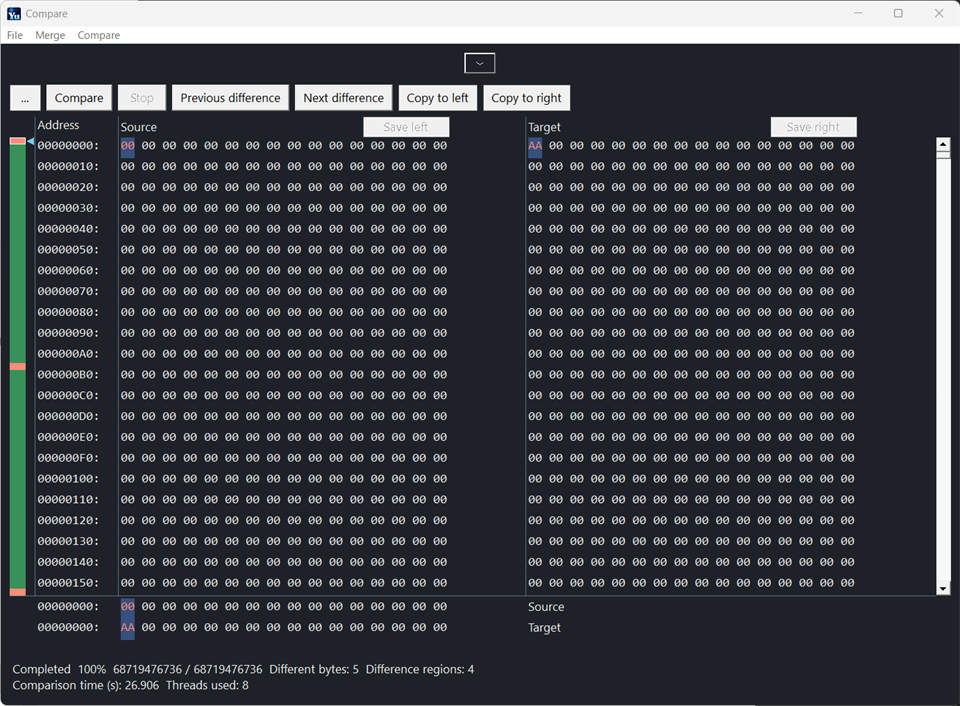
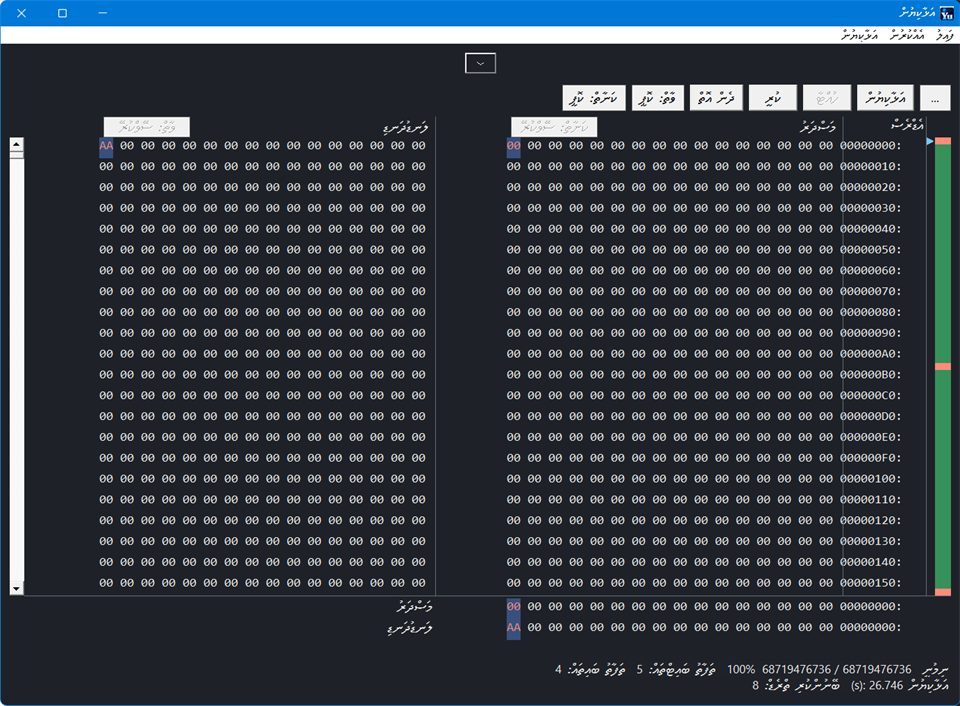
View, edit and compare large files without loading them entirely into memory. Accelerate hexadecimal searches and comparisons with up to 32 workers. Follow highlighted differences and the location pane, then copy difference regions in either direction and save after comparison completes. Browse the full range during comparison, monitor progress and cancel when needed.
REVIEW CHANGES AS YOU REPLACE OR FILL
Replace equal-length hex sequences individually or in bulk, with a change list and highlights showing what changed. Fill a selection with a repeating hex pattern without expanding the entire fill into memory, and undo or redo the whole fill as one operation.
Hex (mismatch) search finds contiguous ranges that differ from a repeating pattern, useful for checking zero-filled regions and other expected data.
READ BYTES AS TEXT, VALUES AND STRUCTURES
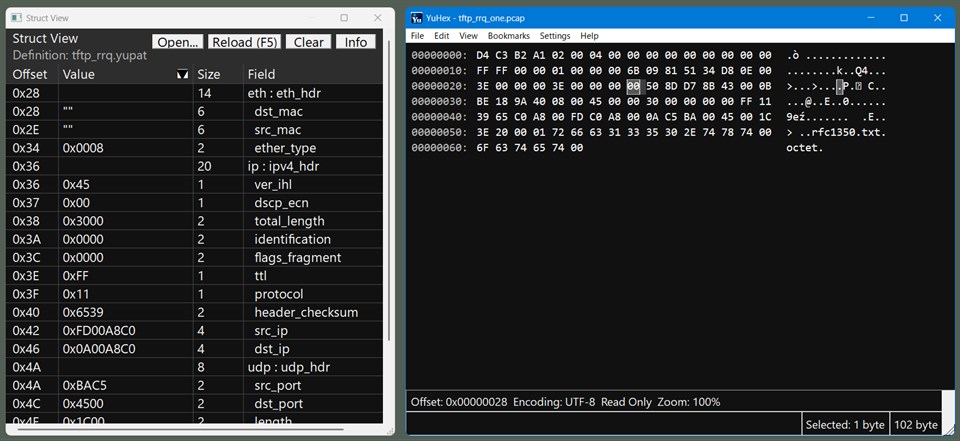
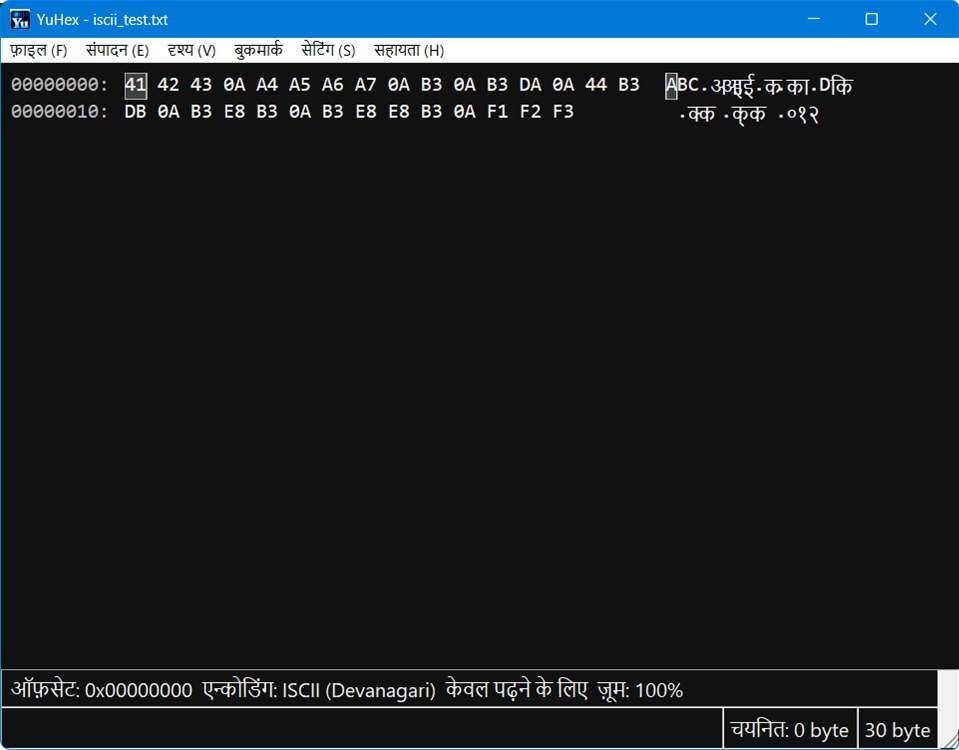
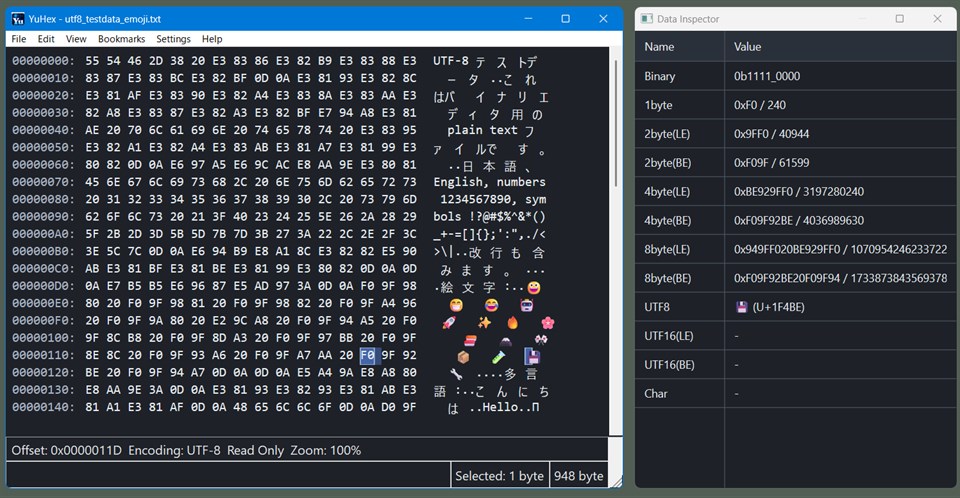
Switch between 22 encodings, including ASCII, UTF-8, UTF-16 and Shift_JIS, with full-color Unicode emoji. Inspect integers, floating-point values and characters in Data Inspector. Load .yupat definitions containing C struct declarations to explore field names, types, values and offsets in Struct View.
FROM SEARCH AND EDITING TO OUTPUT
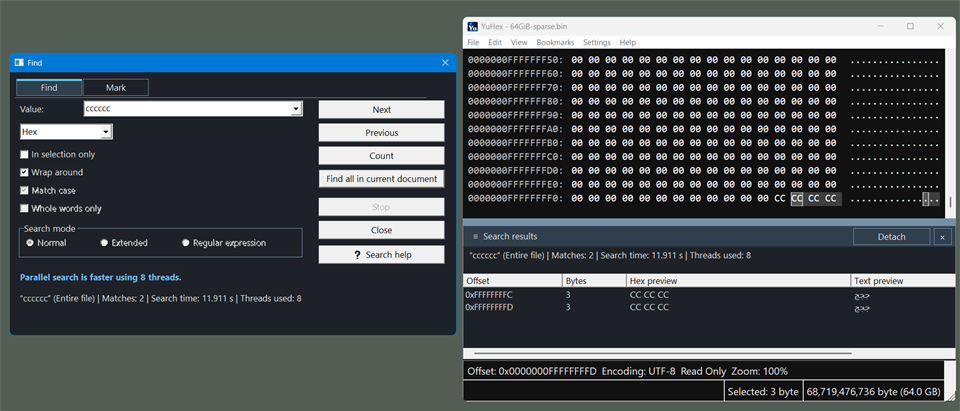
Search hex, text and regular expressions, count matches and browse up to 100,000 results. Jump using arithmetic expressions and add named, colored bookmarks without a count limit. Overwrite, insert or delete data with Undo/Redo and Edit History.
Export whole files or selections as text dumps or C arrays. Print addresses, hex bytes and ASCII with print preview. The printed character column always uses ASCII.
YOUR LANGUAGE, YOUR COLORS
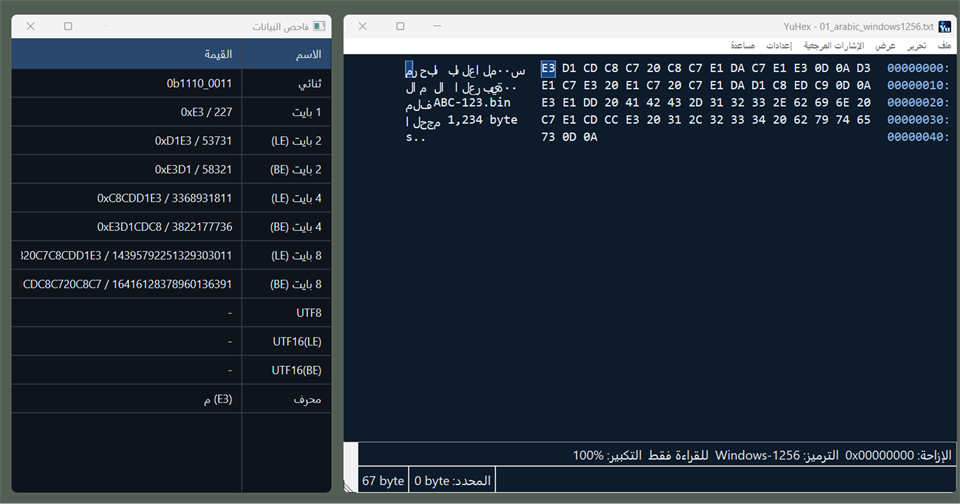
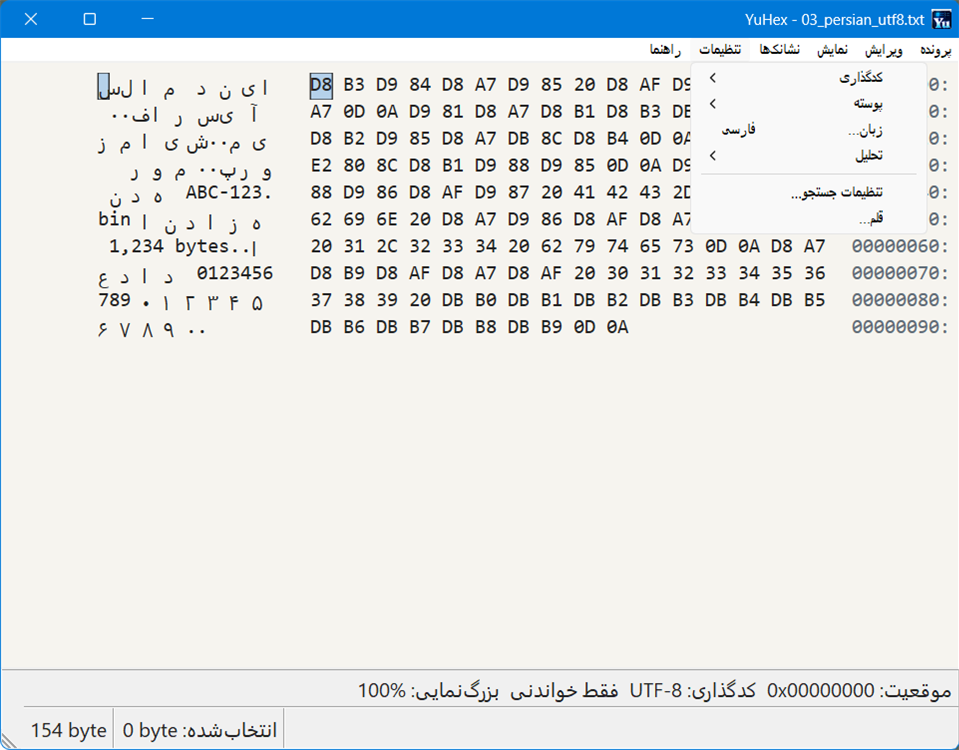
Use Japanese, English and many other languages, including Arabic and Persian with RTL layouts. Follow the system light/dark setting or choose from five dark palettes, including Mystical Forest and Juicy Plum. Adjust zoom and fonts with high-DPI and long-path support.
USAGE NOTES
• Windows 11 on Intel/AMD 64-bit systems.
• File viewing, searching and editing run on your PC. No account is required. Automatic update checks can be disabled.
• Dedicated links in HTML results require the installed Store edition.
• Comparison merging overwrites the same offsets; merge Undo/Redo and Save As are not supported.
• Normal-edit history retains up to 16 MiB. Pattern fill supports whole-operation Undo/Redo.
Features, supported languages and guides:
https://yutakasan.11ya.net/winapps/YuHex/store/index.html
De la dezvoltator
Liste 0
-
 YuHex
Puncte 0
-

- +1 Punct

Clasamente 0
-
- Evaluarea ta
Dezvoltator 4
- Yutaka Hirata
- Urmăritori: 0
- Platforme: Windows Aplicații (4)
- Reduceri: 0
- Liste: 0 0
- Puncte: 0
- Clasamente: 0
- Comentarii: 0
- Videoclipuri: 0
- RSS: Abonează-te
Ce este nou
- Versiune: PC
- Ultima actualizare:
- Please see the release history at the following URL:
https://yutakasan.11ya.net/winapps/YuHex/store/history.html
- Version 3.11
NEW FEATURES
• Added Help → Feedback… to open a draft in your default email app, with a subject identifying your edition and version and an English template for bug reports and feature requests. Review the message before sending; no email is sent automatically.
• Added automatic update checks in Settings → Update settings…. Enabled by default, checks run once a day and notify you when an update is available. You can disable automatic checking, check manually, and open the download page from the notification.
BUG FIXES
[Memory management]
• Fixed an application crash when memory allocation failed during data inspector analysis.
• Fixed an application crash when memory allocation failed while caching character boundaries for Shift_JIS and other double-byte encodings.
• Fixed a duplicated thread handle leak when memory allocation failed while registering file comparison I/O. - Version 3.09
NEW FEATURES
• Compare and merge huge files with no app-imposed size cap and up to 32 workers. Full scans tested at 64 GiB; interaction with 1 TiB sparse files. Browse and select anywhere during comparison, monitor progress or stop.
• After comparison, copy the current contiguous difference region in either direction and save each side separately. Resolved differences disappear from highlights, counts and the location pane. Copies overwrite ranges present in both files; resizing and merge Undo/Redo are not supported. Saving supports progress, cancellation and unsaved-change checks. Comparison alone leaves originals unchanged; merged changes apply when saved.
• File location: view or copy the open file's full path, or show it in Explorer. Title bars retain file names only.
IMPROVEMENTS
• Red "*Modified" indicators identify unsaved changes in the editor and on each modified comparison side, with RTL and theme support.
BUG FIXES
File saving
• Restored keyboard focus after Save, Save As, failure or cancellation without interrupting other active windows.
• Fixed long-path saving, misleading external-change errors and Save As to a hard-link alias.
Export
• Corrected RTL progress direction and keyboard focus handling.
• Prevented mixed-content output if another program changes or replaces the source; existing output is preserved.
Localization
• Fixed untranslated Filipino language names, RTL descriptions and restart/settings-save messages. - Version 3.08
NEW FEATURES
• Export text dumps (optional addresses) and C arrays, with selection support, unsaved edits, background processing, progress and cancellation.
• Added ISO 8859-6, OEM 720, Windows-1255, ISO 8859-8 and OEM 862: 22 encodings in total.
• Go To: arithmetic and parentheses, decimal/0x input, start/current/end origins, destination preview and shared history.
• Per-file encoding recall and a recent files list with full-path copying.
IMPROVEMENTS
• Shared file/search histories, compact lists and screen-fitting path tooltips, including RTL layouts.
BUG FIXES
File I/O
• Fixed opening long local/WSL paths via Open, Explorer drop, startup and history; improved folder/quoted-path input, reloading and change detection.
Display
• Fixed RTL address order and punctuation, language-dialog title bars, translated structure-view buttons and dialog icons.
Informații suplimentare
- Data lansării:
- Categorie:
Aplicații pentru Windows›Instrumente pentru dezvoltatori - SO:
PC - Dimensiune:
4 Mb - Limbi disponibile:
Engleză - Evaluarea conținutului:
EVERYONE - Windows Store Evaluare: ¡
0 - Website:
 https://yutakasan.11ya.net/
Scor AppAgg
Scor AppAgg estimat pentru
YuHex
Dezvoltator: Yutaka Hirata
Un scor mai mare reflectă de obicei rezultate mai bune pentru indicatorii urmăriți de AppAgg.
Bazat pe: popularitate · evaluări ale utilizatorilor · actualitate · oferte · date din magazine · activitatea comunității
Recalculat zilnic pe baza datelor AppAgg actualizate.
Comentarii 0 ¡
Distribuie
YuHex Adresă URL scurtă: Copiat!- Windows Store

