
Marcaje
| Dezvoltator: | Antony Corbett (2) | ||
| Preț: | Gratuit | ||
| Scor: | 590 Bronz | ||
| Clasamente: | 0 | ||
| Comentarii: | 0 Postează comentariu | ||
| Liste: | 0 0 | ||
| Puncte: | 0 | ||
| +1 Punct | |||
Pe scurt
Zoomara este o aplicație creată de Antony Corbett, din categoria „Instrumente pentru dezvoltatori”.
Merge chiar și pe HoloLens: Windows în realitate mixtă.
Există chiar și o versiune pentru Windows Mobile. Salutări din trecut.
Gratuită, fără reclame, fără cumpărături în aplicație. Doar tu și aplicația.
Lansată , încă destul de proaspătă.
Merge chiar și pe Surface Hub, pentru sălile mari de ședințe.
Scorul AppAgg e 590. Deocamdată „Bronz”, dar are mult loc de creștere.
Clasificare de vârstă „EVERYONE”: merge și pentru copii.
Vorbește o singură limbă, și nu e româna.
Nimeni de pe AppAgg n-a evaluat-o încă. Șansa ta să fii primul e chiar acum.
Dezvoltatorul mai are 1 aplicație pe AppAgg. Merită o privire.
Vrei să afli primul de actualizări și aplicații noi? Urmărește dezvoltatorul sau abonează-te la RSS. Notificările push vin prin aplicația AppAgg Alerts pentru Android și iOS.
Capturi de ecran 2
Alte platforme 0
Istoricul prețurilor 0
- Prețul actual: Gratuit
- Minim: Gratuit
- Maxim: Gratuit
Propriul tău flux pe pagina principală
Descriere

Zoomara is a modern, high-performance Windows application designed to make Deep Zoom image creation fast, intuitive, and accessible to everyone. Whether you’re a photographer, artist, archivist, educator, or web developer, Zoomara empowers you to convert ultra-high-resolution images into interactive, zoomable experiences suitable for online viewing and sharing.
What is Deep Zoom?
Deep Zoom technology allows users to explore massive images smoothly, without long load times or excessive memory usage. Instead of loading the entire image at once, Deep Zoom splits your image into a pyramid of tiles at multiple resolutions. As viewers pan and zoom, only the necessary tiles are loaded, ensuring a seamless and responsive experience—even on devices with limited resources or slower connections. This approach is ideal for detailed maps, artwork, blueprints, historical documents, and any scenario where clarity at every zoom level is essential.
Why Choose Zoomara?
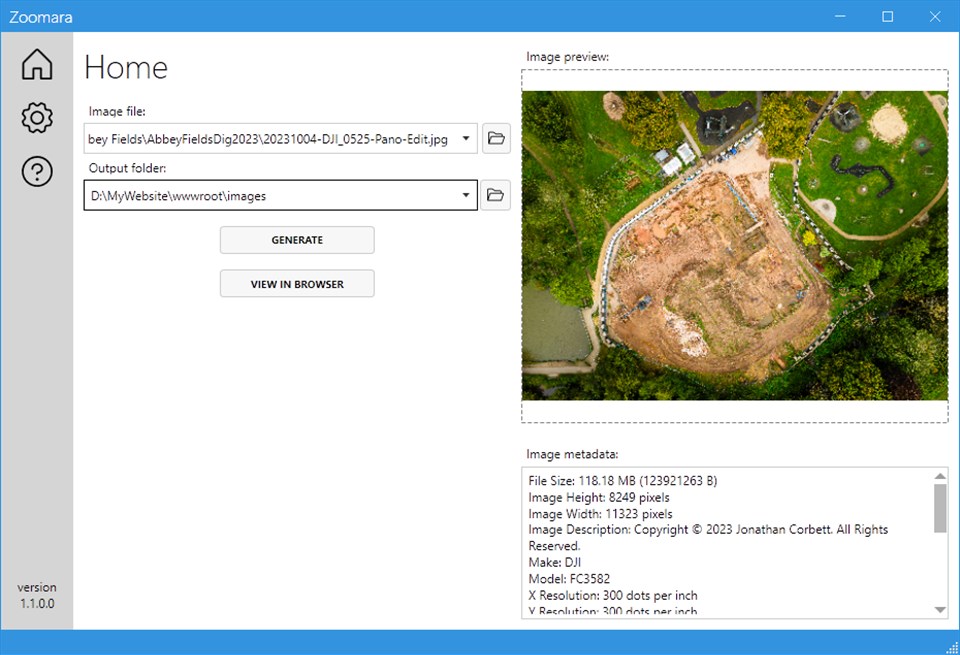
• User-Friendly Interface: Zoomara’s clean, modern interface makes it easy to load your high-resolution images, preview them, and generate Deep Zoom tiles in just a few clicks.
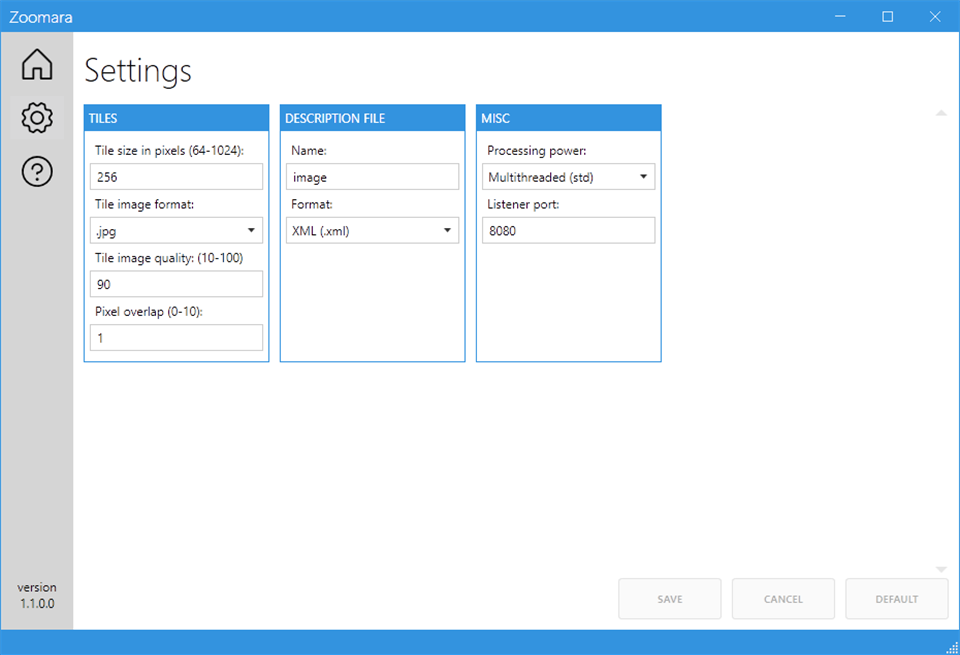
• Fast Processing: Leveraging multi-threaded processing and efficient algorithms, Zoomara can process even very large images quickly. You can adjust processing power to suit your workflow, from background-friendly single-threaded mode to full-speed multithreaded operation.
• Flexible Output: Choose your preferred tile size, image format (JPG, PNG, WebP, BMP), and quality settings. Zoomara supports the industry-standard DZI (Deep Zoom Image) format, as well as XML, JSON, and JSONP description files for maximum compatibility.
• Instant Preview: Use the built-in “View in Browser” feature to instantly preview your Deep Zoom image in your default web browser, powered by an integrated local web server. No need to upload files to a website just to check your results.
• Comprehensive Settings: Fine-tune tile overlap, output folder structure, and listener port for browser previews. All settings are clearly explained, making it easy to optimize for your specific needs.
• Seamless Deployment: Once your image is processed, simply upload the generated tiles and description file to your website. Zoomara provides clear instructions and sample HTML for integrating with popular viewers like OpenSeadragon.
How It Works:
1. Install Zoomara on your Windows PC from the Microsoft Store.
2. Load your high-resolution image.
3. Select an output folder and click “Generate” to create Deep Zoom tiles.
4. Preview your results in your browser, or upload the output to your website for public viewing.
Ideal For:
• Museums and galleries digitizing artwork or artifacts
• Educators sharing detailed diagrams or maps
• Photographers and artists showcasing high-res portfolios
• Archivists preserving historical documents
• Anyone needing to present large images online with clarity and speed
Support and Documentation:
Zoomara includes built-in help and links to online resources about Deep Zoom technology. For additional support, contact the developer directly via the support email provided in the app.
Trademarks:
Microsoft, Deep Zoom, and Seadragon are trademarks of the Microsoft group of companies.
De la dezvoltator
Dezvoltator
- Antony Corbett
- Urmăritori: 0
- Platforme: Windows Aplicații (2)
- Reduceri: 0
- Liste: 0 0
- Puncte: 0
- Clasamente: 0
- Comentarii: 0
- Videoclipuri: 0
- RSS: Abonează-te
Liste 0
-
 Zoomara
Puncte 0
-

- +1 Punct

Clasamente 0
-
- Evaluarea ta
Ce este nou
- Versiune: PC
- Ultima actualizare:
Informații suplimentare
- Data lansării:
- Categorie:
Aplicații pentru Windows›Instrumente pentru dezvoltatori - SO:
HoloLensMobilePCSurface Hub - Dimensiune:
243 Mb - Limbi disponibile:
Engleză - Evaluarea conținutului:
EVERYONE - Windows Store Evaluare: ¡
0 - Website:
 https://cv8.org.uk/zoomara
Comentarii 0 ¡
Scor AppAgg
Scor AppAgg estimat pentru
Zoomara
Dezvoltator: Antony Corbett
Un scor mai mare reflectă de obicei rezultate mai bune pentru indicatorii urmăriți de AppAgg.
Bazat pe: popularitate · evaluări ale utilizatorilor · actualitate · oferte · date din magazine · activitatea comunității
Recalculat zilnic pe baza datelor AppAgg actualizate.
Zoomara Adresă URL scurtă: Copiat!- Windows Store

