
| Developer: | Mind Alive Inc. (3) | ||
| Price: | $79.99 | ||
| Rankings: | 0 | ||
| Reviews: | 0 Write a Review | ||
| Lists: | 0 + 0 | ||
| Points: | 0 + 0 ¡ | ||
| Windows Store | |||
Description

It provides programmability for all functions such as: rates, volume, intensity, tones, number of replays, etc. It includes a complete library of factory sessions to use as templates to help you design your own sessions. Any session may be written as a prescription in that the number of times a session can be played can also be set.
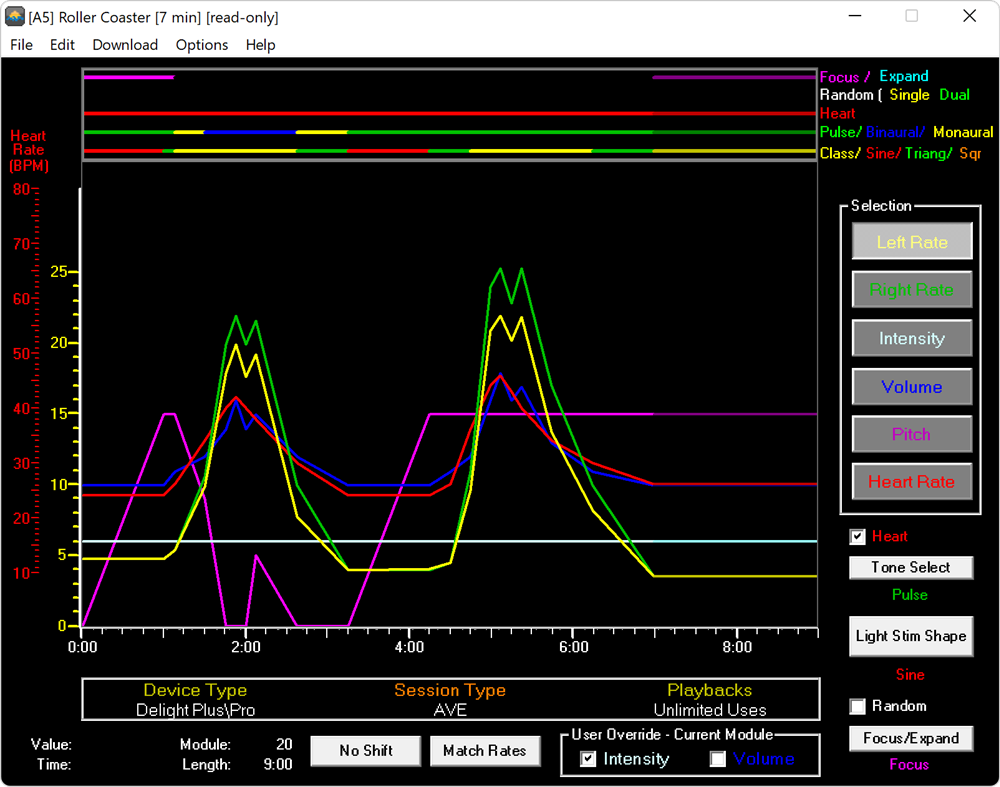
The colour coded lines in the graph area describe the changes in session parameters (such as Left and Right Rates) over the course of the session.
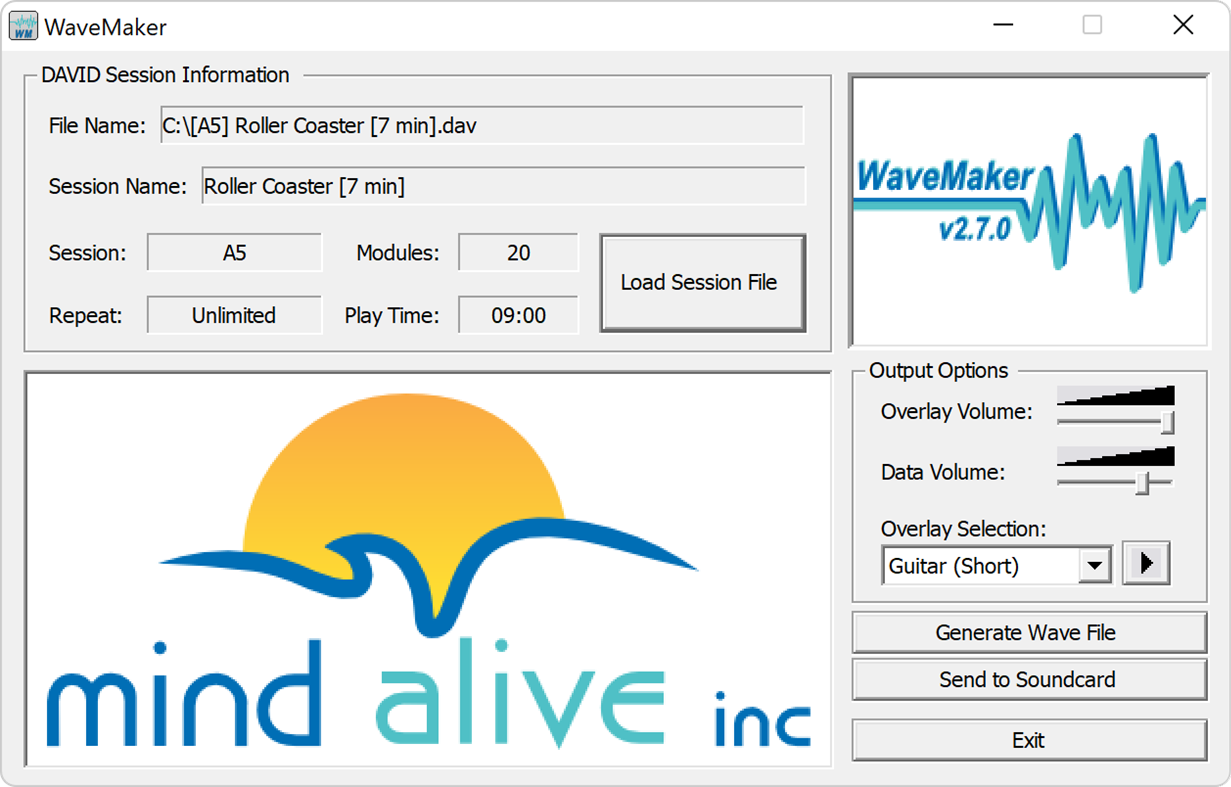
WaveMaker converts the DAVID session information into a series of audio tones that program the DAVID units. It mixes this audio data with an overlay sound, to hide the data tones and provide a distinct introduction to a DAVID session. The program can be used to directly program a DAVID unit, or can create a wave file suitable for adding to an audio CD.
The status bar area displays the settings of various module options over the visible session time. Each bar represents a different module option. The presence of a colour indicates the setting. The various colours in the bars indicate the settings of the Surf Tone, Heart Beat, Tone Selection, Focus/Expand selection, Light Stim Format, and Eyeset Colours. The position of the coloured bars above the Time Axis on the bottom of the graph indicate when that selection will begin, change, or end when the session is played. Modules with no line displayed for an option indicate that the option is shut off.
The Module Options control different features available to the sessions. The status of these is displayed in the Status Bar area. Each Module Option is described in its own section. Toggling the Surf or Heart check boxes enables or disables these options. Clicking the Tone Select (Pulse, Binaural, Chime, Off), Focus/Expand, or Light Stim Format (Classic, Sine, Triangle, Square) buttons will cycle through each of the possible settings (with the current setting displayed to the right). Clicking the Eyeset Color button will bring up a Colour Select Dialog, allowing you to select a custom colour which will be displayed in the area to the right.
The editor graph displays the primary session settings. The horizontal axis is session time, displayed in minutes and seconds. The vertical axis is the value of the currently selected setting. Because the Heart Rate scale is different than that of the other settings, it utilizes a separate scale (displayed in red). The scroll bar allows you to scroll left or right to view and access parts of the session that you wish to view within the editor graph.
Each setting is represented by a coloured line. The vertical scale on the left will be coloured to match the currently selected setting. Module points appear along the selected setting as square handles. If a module is selected, a vertical cursor will appear through it. When you move or add a module, both a vertical and horizontal cursor will indicate the current position selected on the graph.
Screenshots
What's new
- Version: PC
- Updated:
Price History
- Today: $79.99
- Minimum: $79.99
- Maximum: $79.99
Track prices
Developer
- Mind Alive Inc.
- Platforms: Windows Apps (3)
- Lists: 1 + 0
- Points: 1 + 0 ¡
- Rankings: 0
- Reviews: 0
- Discounts: 0
- Videos: 0
- RSS: Subscribe
Points
0 ☹️
Rankings
0 ☹️
Lists
0 ☹️
Reviews
Be the first to review 🌟
Additional Information
- Version: PC
- Category:
Windows Apps›Productivity - OS:
PC - Size:
82 Mb - Supported Languages:
English - Content Rating:
EVERYONE - Windows Store Rating:
0 - Updated:
- Release Date:
Contacts
- Website:
 https://mindalive.com/
«DAVID Session Editor» is a Productivity app for Windows, developed by «Mind Alive Inc.». It was first released on and last updated on . The lowest historical price was $79.99, and the highest was $79.99. This app has not yet received any ratings or reviews on AppAgg. Available languages: English. AppAgg continuously tracks the price history, ratings, and user feedback for «DAVID Session Editor». Subscribe to this app or follow its RSS feed to get notified about future discounts or updates.
DAVID Session Editor Short URL: Copied!- 🌟 Share
- Windows Store
You may also like
-
- Trio Office: DOCX & XLSX Editor
- Windows Apps: Productivity By: GT Office PDF Studio
- * Free
- Lists: 4 + 3 Rankings: 0 Reviews: 1 (1)
- Points: 6 + 56,916 (4.5) Version: PC Trio Office is an all-in-one office suite. It's compatible with MS Office (Word, Excel & PowerPoint), Txt, Google Docs, Sheets & Slides, PDF and OpenOffice format for Windows. Edit ... ⥯
-
- AutoCAD - DWG Viewer & Editor
- Windows Apps: Productivity By: Autodesk Inc.
- * Free
- Lists: 2 + 0 Rankings: 1 (1) Reviews: 0
- Points: 4 + 2,347 (3.8) Version: PC Essential drafting and design capabilities for your everyday needs: Autodesk®️ AutoCAD® Web️ on mobile is a trusted solution that gives you access to the core AutoCAD commands that you ⥯
-
- XPS Editor Pro: for PDF & MS Office Converter
- Windows Apps: Productivity By: Canyua Software Technology Co., Ltd.
- $14.99
- Lists: 0 + 0 Rankings: 0 Reviews: 0
- Points: 0 + 3 (4.0) Version: PC View, Edit, Create, Convert Microsoft XML Paper Specification(.xps) Document. XPS Editor Pro is a must-have app for anyone who reads, edits, creates, or converts MS XPS document on ... ⥯
-
- DOCX Editor Express
- Windows Apps: Productivity By: LISAppStudio.com
- * Free
- Lists: 0 + 0 Rankings: 0 Reviews: 0
- Points: 0 + 32 (4.3) Version: PC View, edit, and create Microsoft Word documents with ease. DOCX Editor Express simplifies document creation with its intuitive interface and comprehensive editing tools. Effortlessly ... ⥯
-
- DOCX Editor for Windows
- Windows Apps: Productivity By: HUXSoft.com
- * Free
- Lists: 0 + 0 Rankings: 0 Reviews: 0
- Points: 0 + 252 (4.2) Version: PC Fully compatible with Microsoft Word, DOCX Editor for Windows is a powerful yet user-friendly word processing application, designed to cater to both beginners and experienced users. It ⥯
-
- ID Passport Size Photo Editor
- Windows Apps: Productivity By: PicsCanvas
- * Free
- Lists: 0 + 0 Rankings: 0 Reviews: 0
- Points: 1 + 1 (1.0) Version: PC Download the ID Passport Size Photo Editor for free and effortlessly create photographs for all your document needs. This passport-size photo maker app enables you to instantly create ... ⥯
-
- Foxit PDF Editor
- Windows Apps: Productivity By: Foxit Software Inc.
- * Free
- Lists: 1 + 1 Rankings: 0 Reviews: 0
- Points: 4 + 27 (3.0) Version: PC The Foxit PDF Editor is a PAID application, but we offer a free evaluation before purchase. Utilize the full capabilities of this award winning PDF Editor for 14 days to see how it ... ⥯
-
- Sonic PDF - Fast PDF Editor & Converter
- Windows Apps: Productivity By: RoxyApps
- * Free
- Lists: 0 + 0 Rankings: 5 (1) Reviews: 0
- Points: 1 + 6 (5.0) Version: PC Sonic PDF is a reliable PDF reader, editor, and converter for Windows. Perfect for students, professionals, and anyone who needs efficient document management. Say goodbye to complex ... ⥯
-
- PDF Editor: PDF Reader
- Windows Apps: Productivity By: finetuneapps
- * $3.99
- Lists: 0 + 1 Rankings: 0 Reviews: 0
- Points: 1 + 345 (4.3) Version: PC Discover PDF Master Editor & Reader, the all-in-one, comprehensive PDF management application available on the Windows Store. This powerful app offers a smooth and user-friendly ... ⥯
-
- PDF Extra - PDF Reader, PDF Editor, Fill & Sign
- Windows Apps: Productivity By: MobiSystems
- * Free
- Lists: 0 + 1 Rankings: 0 Reviews: 0
- Points: 1 + 945 (4.6) Version: PC PDF Extra is the only professional PDF editor, reader, and converter you need. Create, edit, OCR, fill, sign, convert, annotate, and organize any PDF. Аdd pages, images, stamps, attach ⥯
-
- Real PDF Editor PLUS
- Windows Apps: Productivity By: Xiaoya Lab.
- * Free
- Lists: 0 + 0 Rankings: 0 Reviews: 0
- Points: 0 + 1,521 (4.5) Version: PC Compatible with Adobe Acrobat PDF, Foxit PDF, Xodo PDF, Polaris PDF, Google PDF and Drawboard PDF, Real PDF Editor PLUS is a useful tool that has almost all features you need to work ... ⥯
-
- Word Files Editor
- Windows Apps: Productivity By: Virtual Pulse
- * $5.09
- Lists: 0 + 1 Rankings: 0 Reviews: 0
- Points: 0 + 222 (3.7) Version: PC Word Files Editor is an important tool for working with Word documents much easier and faster! The application provides a comfortable work with text in many popular text formats: .doc, ⥯
- -30%
- PDF Reader Pro - Expert PDF Editor
- Windows Apps: Productivity By: Kdan Mobile Software Ltd.
- * $83.99
$119.99-30% - Lists: 0 + 0 Rankings: 0 Reviews: 0
- Points: 3 + 164 (4.7) Version: PC Are you in search of versatile and user-friendly PDF software? KDAN PDF, formerly KDAN PDF Reader, is robust software that makes it simple to view, edit, and share PDF files. Its ... ⥯
-
- MDE Editor
- Windows Apps: Productivity By: DZ Chan
- Free
- Lists: 0 + 1 Rankings: 0 Reviews: 0
- Points: 1 + 3 (3.7) Version: PC A open-source markdown editor, it's simple and easy to use. ⥯