
| ผู้พัฒนา: | Garry Patchett (2) | ||
| ราคา: | ฟรี | ||
| การจัดอันดับ: | 0 | ||
| ความเห็น: | 0 เขียนความเห็น | ||
| ความเห็น: | 0 โพสต์ความคิดเห็น | ||
| รายการ: | 0 + 0 | ||
| แต้มแล: | 0 + 0 ¡ | ||
| Windows Store | |||
คำอธิบาย

Don't make it easy for hackers to get into your private stuff; use a password generator instead.
PiPaGen - PIn and PAssword GENerator - is a small and easy-to-use App which gives you simple tools to generate random passwords and PIN codes via a simple user interface.
Usage is very simple:
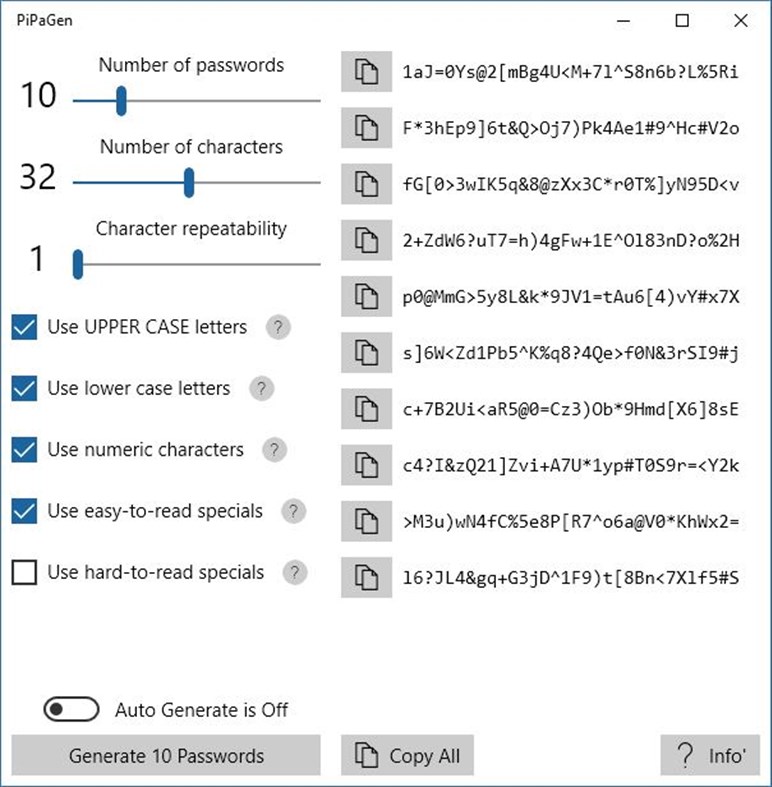
* Use a slider to choose how many passwords you want to generate (generate a few and pick one you like the look of);
* Use a slider to choose the number of characters in each password (more characters means better security);
* Use a slider to set how much characters can be repeated (higher number = more often);
* Use check boxes to specify which types of character you want to use in your passwords;
* Press the "Generate" button to generate some passwords (press again if you don't like what you see);
* Press the "Copy" button next to a password that you like and paste from the clipboard into wherever you want to use it.
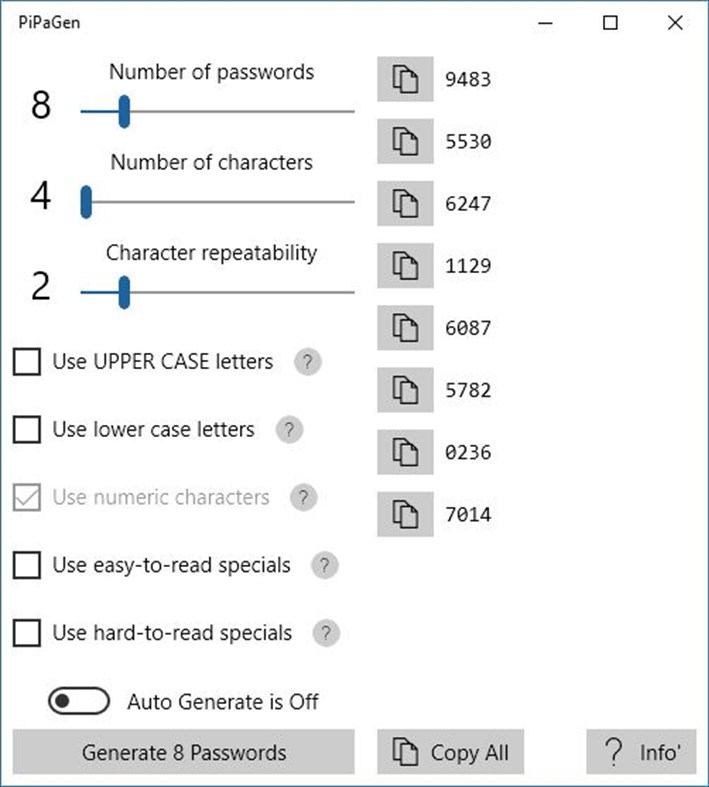
If you want to create PIN codes then set the number of characters to 4 - or whatever length of code you want - and use only numeric characters.
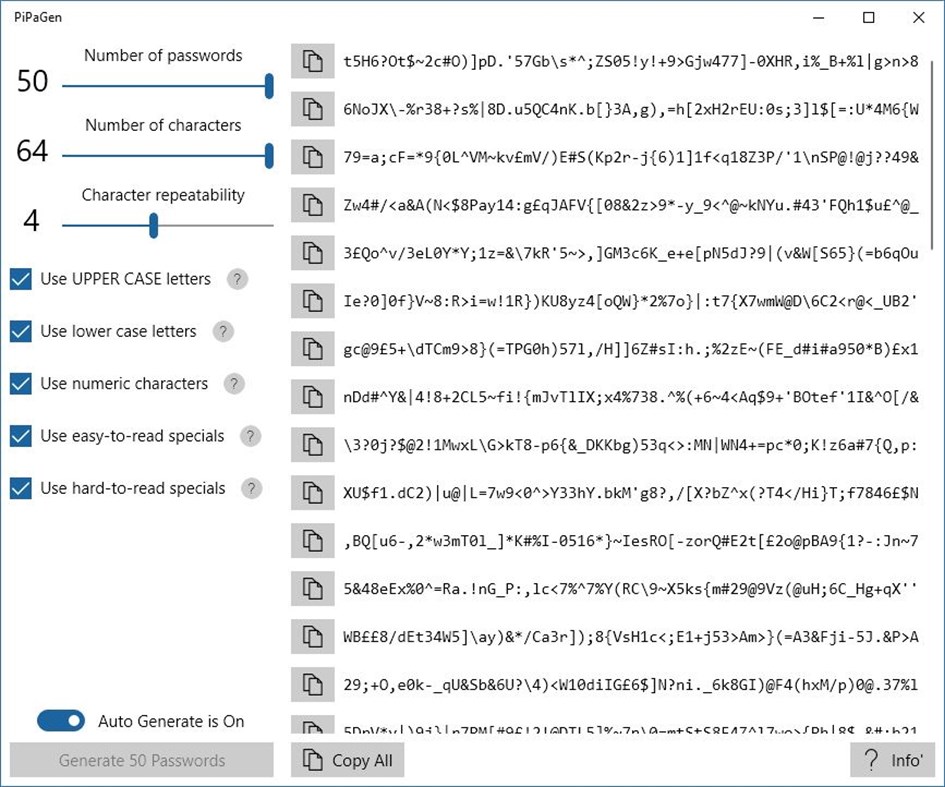
Switch "Auto Generate" to "ON" if you want the App to automatically generate the passwords when your generation criteria change.
Press the "Copy All" button to copy all of the generated passwords to the clipboard (useful for system administrators).
(When you change your generation criteria, the App will automatically clear the previously generated passwords. This is so that you can be sure that, if there are passwords shown, they have been created by the criteria you can see.)
PiPaGen is totally free for everyone to use - either for personal use or in any organisation - with no ads, no trials period, no in-app purchases, no internet connection needed and no weird permissions. It doesn't store any information, retrieve any information from your system, or send any information anywhere. It generates passwords and PINs, and that's all it does. It was designed this way for your peace of mind.
Even though it's totally free to use, PiPaGen takes time and effort to maintain so, if you find yourself using it regularly, it would be really nice if you could make a donation to the developer. Just donate whatever you think is appropriate for what you get from using the App.
You can make a donation via the App itself, just press the "Info'" button and follow the "Donate" link.
Important Note: The Passwords and PINs generated by PiPaGen are simply randomly-generated strings of characters and, as such and in themselves, can be no guarantee of security. Using a long and complicated password is usually much safer than just using something that came off the top of your head but it's not a guarantee of total security. Good security is way more than just having good passwords but by using a good password you're making a start. The developer takes no responsibility for any problems you have after securing anything with a password or PIN generated by the App. They're just random strings; use them wherever you want but your security is your own responsibility and any risk is your own.
Ad
ภาพหน้าจอ
มีอะไรใหม่
- เวอร์ชัน: PC
- อัปเดต:
ประวัติราคา
- วันนี้: ฟรี
- ต่ำสุด: ฟรี
- มากที่สุด: ฟรี
ติดตามราคา
Ad
ผู้พัฒนา
- Garry Patchett
- แพลตฟอร์ม: Windows แอป (2)
- รายการ: 0 + 0
- แต้มแล: 0 + 0 ¡
- การจัดอันดับ: 0
- ความเห็น: 0
- ความเห็น: 0
- ลดราคา: 0
- วิดีโอ: 0
- RSS: ติดตาม
แต้มแล (0)
0 ☹️
การจัดอันดับ (0)
0 ☹️
รายการ (0)
0 ☹️
- PiPaGen
ความเห็น (0)
แสดงรีวิวเป็นคนแรกเลย 🌟
ความเห็น (0)
เป็นคนแรกที่แสดงความเห็น 🌟
ข้อมูลเพิ่มเติม
- เวอร์ชัน: PC
- หมวดหมู่:
Windows แอป›ความปลอดภัย - ระบบปฏิบัติการ:
HoloLens,PC,Surface Hub - ขนาด:
1 Mb - ภาษาที่สนับสนุน:
English - การจัดประเภทเนื้อหา:
EVERYONE - Windows Store คะแนนโดย:
0 - อัปเดต:
- วันที่วางจำหน่าย:
«PiPaGen». แพลตฟอร์ม: Windows. หมวดหมู่: ความปลอดภัย. ผู้พัฒนา: «Garry Patchett». การเปิดตัวครั้งแรก: . อัปเดตล่าสุด: . ราคาปัจจุบัน: ฟรี. ชื่อนี้ยังไม่ได้รับการให้คะแนนหรือบทวิจารณ์บน AppAgg ภาษาที่ใช้ได้: English. AppAgg ติดตามประวัติราคา การให้คะแนน และคำติชมของผู้ใช้ «PiPaGen». ส่วนลดและอัปเดตในอนาคต: RSS. AppAgg ไม่ได้โฮสต์แอปพลิเคชันหรือแจกจ่ายซอฟต์แวร์ เครื่องหมายการค้า โลโก้ และภาพหน้าจอทั้งหมดเป็นของเจ้าของที่เกี่ยวข้อง
PiPaGen URL แบบสั้น: คัดลอกแล้ว!- 🌟 แชร์
- Windows Store
คุณอาจชอบ
-
- Pi Power Estimator
- Windows แอป: เครื่องมือและอรรถประโยชน์ โดย: Matt Hawkins
- $0.99
- รายการ: 0 + 0 การจัดอันดับ: 0 ความเห็น: 0
- แต้มแล: 0 + 0 ความเห็น: 0 เวอร์ชัน: PC Pi Power Estimator allows you to calculate the run-time of a Raspberry Pi running from a USB power bank or a set of AA batteries. It has the following features : - Select Model A, B, ... ⥯
-
- Pi Day
- Windows แอป: การตั้งค่าส่วนบุคคล โดย: Microsoft Corporation
- ฟรี
- รายการ: 0 + 0 การจัดอันดับ: 0 ความเห็น: 0
- แต้มแล: 0 + 9 (5.0) ความเห็น: 0 เวอร์ชัน: PC How will you celebrate the elegance of the mathematical constant p (pi)? It's approximate, irrational, and circular... or you could just eat some pie on March 14 instead. Do the math: ... ⥯
-
- 3.14 - Memorize Pi Digits
- Windows แอป: การศึกษา โดย: UnknownProjectX
- $1.99
- รายการ: 0 + 1 การจัดอันดับ: 0 ความเห็น: 0
- แต้มแล: 2 + 0 ความเห็น: 0 เวอร์ชัน: PC Pi is constant, it is represented by the Greek letter π. The numerical value of π is 3.1415926....... Pi is infinite series irrational number. From wikipedia: Piphilology is the ... ⥯
-
- Connect My Pi To WiFi
- Windows แอป: เครื่องมือและอรรถประโยชน์ โดย: Same Day Rules
- ฟรี
- รายการ: 1 + 0 การจัดอันดับ: 0 ความเห็น: 0
- แต้มแล: 0 + 2 (3.0) ความเห็น: 0 เวอร์ชัน: PC Connect your Raspberry Pi (or other compatible Linux-based computer) to your home WiFi network using Bluetooth. Configuring the wireless interface on a newly deployed Raspberry Pi ... ⥯
-
- Memory Pi
- Windows แอป: การศึกษา โดย: Nuclear Pixel
- ฟรี
- รายการ: 0 + 0 การจัดอันดับ: 0 ความเห็น: 0
- แต้มแล: 0 + 1 (1.0) ความเห็น: 0 เวอร์ชัน: PC An app that aids in memorising the first 30000 digits of pi ⥯
-
- Barcode Gen
- Windows แอป: เครื่องมือและอรรถประโยชน์ โดย: Roast247
- ฟรี
- รายการ: 0 + 1 การจัดอันดับ: 0 ความเห็น: 0
- แต้มแล: 0 + 5 (5.0) ความเห็น: 0 เวอร์ชัน: PC Create barcodes for anything! ⥯
-
- Random Name Gen
- Windows แอป: เครื่องมือและอรรถประโยชน์ โดย: Mana Worlds
- ฟรี
- รายการ: 0 + 0 การจัดอันดับ: 0 ความเห็น: 0
- แต้มแล: 0 + 2 (1.0) ความเห็น: 0 เวอร์ชัน: PC Allows you to generate over 2,500 random names with different options like fantasy and Japanese. With more options and names coming soon. ⥯
-
- CityVago
- Windows แอป: ไลฟ์สไตล์ โดย: PA Arabia FZE
- ฟรี
- รายการ: 0 + 0 การจัดอันดับ: 0 ความเห็น: 0
- แต้มแล: 0 + 0 ความเห็น: 0 เวอร์ชัน: PC City Vago: Indispensable For City Living Provides lifestyle services, and covers all aspects of life in the city. We provide fast solutions to help you find what you are looking for. ... ⥯
-
- Intel® Graphics Command Center (Beta)
- Windows แอป: ธุรกิจ โดย: INTEL CORP
- ฟรี
- รายการ: 4 + 2 การจัดอันดับ: 0 ความเห็น: 0
- แต้มแล: 25 + 111 (3.9) ความเห็น: 0 เวอร์ชัน: PC This application is a beta release which is considered As-Is , with no future updates to features or functionality planned in the future. Requirements: Windows 10 version 1709 or ... ⥯
-
- MSI Center
- Windows แอป: เครื่องมือและอรรถประโยชน์ โดย: MICRO-STAR INTERNATIONAL CO., LTD
- ฟรี
- รายการ: 0 + 1 การจัดอันดับ: 0 ความเห็น: 0
- แต้มแล: 3 + 8,024 (2.7) ความเห็น: 0 เวอร์ชัน: PC MSI Center is a brand new platform which will combine all MSI s exclusive features. Now you can find all your favorite features like Gaming Mode or Smart Priority in the Feature Sets ... ⥯
-
- Luminar Neo - AI Photo Editor
- Windows แอป: ภาพถ่ายและวิดีโอ โดย: Skylum Software USA, Inc.
- * ฟรี
- รายการ: 2 + 1 การจัดอันดับ: 0 ความเห็น: 0
- แต้มแล: 3 + 1,086 (4.8) ความเห็น: 0 เวอร์ชัน: PC Luminar Neo is a powerful RAW photo editor with cutting-edge AI tools and other incredible features. Achieve professional-quality results effortlessly with this next-gen picture ... ⥯
-
- Sticky Calculator
- Windows แอป: ผลผลิต โดย: Life Code
- * ฟรี
- รายการ: 2 + 0 การจัดอันดับ: 0 ความเห็น: 0
- แต้มแล: 5 + 20 (4.0) ความเห็น: 0 เวอร์ชัน: PC Is that really need the number pad to the calculator? You know, the keyboard! Really small! Memo + Calculator! Characteristic Because there is no number pad, the window size is very ... ⥯
-
- PIPay
- Windows แอป: ธุรกิจ โดย: Payment Innovators
- ฟรี
- รายการ: 1 + 0 การจัดอันดับ: 0 ความเห็น: 0
- แต้มแล: 0 + 1 (2.0) ความเห็น: 0 เวอร์ชัน: PC Accept and process EMV chip cards, Apple Pay, Google Pay, Samsung Pay and other contactless methods, by using PI Pay. Masterfully designed to provide simple tools for processing credit ⥯
-
- Lunacy - Graphic Design Tool for UI/UX and Web
- Windows แอป: การออกแบบมัลติมีเดีย โดย: Icons8 LLC
- * ฟรี
- รายการ: 2 + 0 การจัดอันดับ: 0 ความเห็น: 0
- แต้มแล: 2 + 649 (4.5) ความเห็น: 0 เวอร์ชัน: PC Meet Lunacy, your ultimate design tool! Key features include: real-time worldwide collaboration 1 500 000 icons, photos, and illustrations powerful AI tools Figma & Sketch support ... ⥯