
ที่บันทึกไว้
เลือกชื่อที่จะแสดงในเมนูที่บันทึกไว้ของคุณ
เสร็จแล้ว
| ผู้พัฒนา: | digitalMoksha LLC (1) | ||
| ราคา: | $4.99 | ||
| การประเมิน: | 3,770 | ||
| การจัดอันดับ: | 0 | ||
| ความเห็น: | 0 โพสต์ความคิดเห็น | ||
| รายการ: | 1 + 1 | ||
| แต้มแล: | 0 + 0 ¡ | ||
| +1 แต้มแล | |||
คำอธิบาย

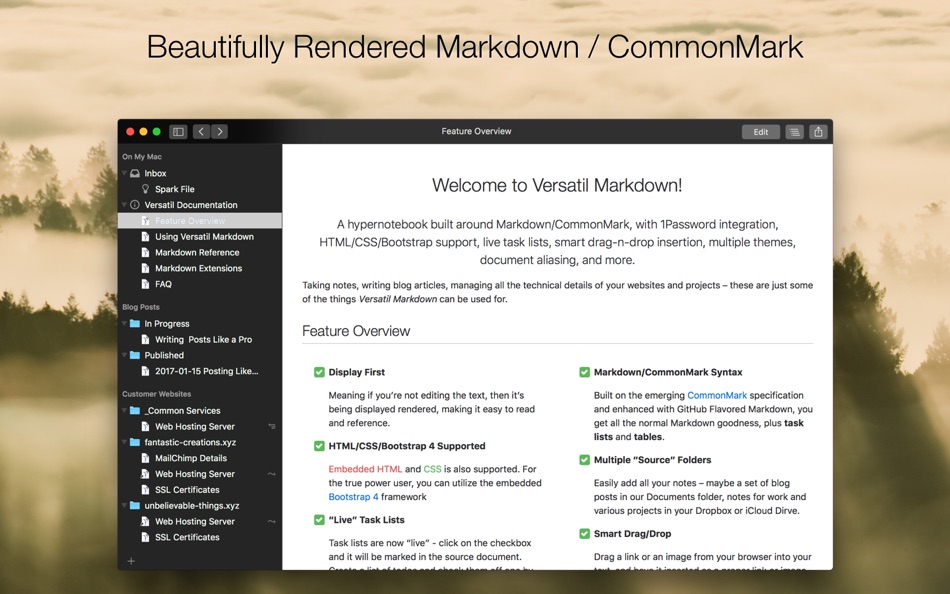
Taking notes, writing blog articles, managing all the technical details of your websites and projects -- these are just some of the things _Versatil Markdown_ can be used for.
## Feature Overview
### Display First
Meaning if you're not editing the text, then it's being displayed rendered, making it easy to read and reference.
### Markdown/CommonMark Syntax
Built on the emerging _CommonMark_ specification and enhanced with GitHub Flavored Markdown, you get all the normal Markdown goodness, plus **task lists** and **tables**.
### Multiple "Source" Folders
Easily add all your notes -- maybe a set of blog posts in our Documents folder, notes for work and various projects in your Dropbox or iCloud Drive.
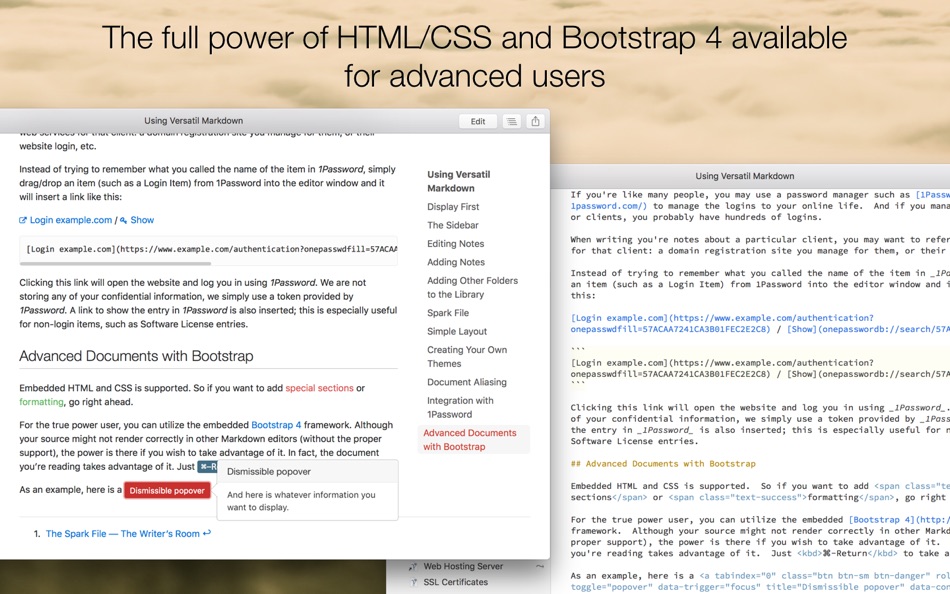
### HTML/CSS/Bootstrap 4 Supported
Embedded HTML and CSS is also supported. For the true power user, you can utilize the embedded Bootstrap 4 framework
### "Live" Task Lists
Task lists are "live" - click on the checkbox and it will be marked in the source document. Create a list of todos and check them off one by one as they get done, without having to directly edit the document.
### 1Password Integration
If you use _1Password_ to store your logins to various websites, you can easily create a link to one of these sites, by simply dragging an item from 1Password into the editor window.
### Integrated Spark File
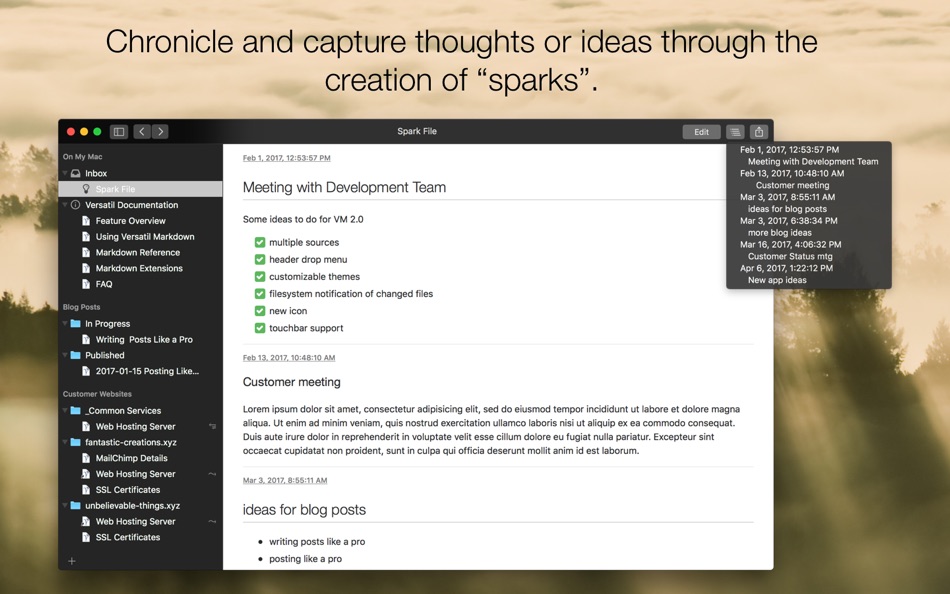
An easy way to chronicle and capture thoughts or ideas through the creation of _sparks_. Each spark is stamped with a date and time and kept in chronological order, so you can quickly browse through them.
### Syntax Highlighting
Embedded source code can be syntax highlighted for many languages, including HTML, CSS, JavaScript, Ruby, and many more.
### Smart Drag/Drop
Drag a link or an image from your browser into your text, and have it inserted as a proper link or image, including the title for the link.
### Document Aliasing
Sometimes information belongs in more than one place; create an alias to virtually place a note in any section/folder where it needs to be.
### Dark Mode and Multiple Themes
_Normal_, _Solarized Dark_, and _Solarized Light_ themes for display and editing are provided, or create your own customized themes, whether it's making a small tweak to an existing theme or creating something entirely new. A "Dark Mode" is also provided.
### Multiple Columns
Sometimes, it makes sense to have multiple columns for your notes/data. With a simple syntax, easily create new rows and columns. Simple and unobtrusive.
## Additional Features
- Markdown
- Fully CommonMark compliant
- Supports GitHub Flavored Markdown (GFM) extensions
- Tables
- Task lists
- Footnotes
- Supports GitLab Flavored Markdown (GFLM) extensions
- Multiline blockquotes
- Color chips
- Inline diagrams with Kroki
- Other Markdown extensions
- Description lists
- MathJax for TeX and LaTeX Support
- Abbreviations
- Syntax highlighting
- Defining multiple columns
- Data stored as text
- Frictionless keyboard flow
- Click to edit at specific location
- Sharing menu integration
- Export (HTML, PDF and Web Archives)
- Touchbar support
- Back/Forward history navigation
- QuickLook integration
ภาพหน้าจอ


Ad
ประวัติราคา
- ราคาปัจจุบัน: $4.99
- ต่ำสุด: $4.99
- มากที่สุด: $14.99
ติดตามราคา
การประเมิน AppAgg
3,770
การประเมิน AppAgg โดยประมาณสำหรับ
Versatil Markdown
3,770
การประเมินที่สูงขึ้นมักหมายถึงสัญญาณบน AppAgg ที่แข็งแกร่งขึ้น
อิงจาก: 🔥 ความนิยม · ⭐ คะแนนจากผู้ใช้ · 🕒 ความสดใหม่ · 🏷️ ดีล · 🏬 ข้อมูลร้านค้า · 👥 กิจกรรมชุมชน
คำนวณใหม่ทุกวันจากข้อมูล AppAgg ล่าสุด.
URL แบบสั้น: คัดลอกแล้ว!
ข้อมูลเพิ่มเติม
- วันที่วางจำหน่าย:
- หมวดหมู่:
macOS แอป›ประสิทธิภาพการผลิต - ระบบปฏิบัติการ:
macOS,macOS 11.0 และสูงกว่า - ขนาด:
23 Mb - ภาษาที่สนับสนุน:
English - การจัดประเภทเนื้อหา:
4+ - Mac App Store คะแนนโดย:
0 - เว็บไซท์:
 https://versatilapp.com
ผู้พัฒนา
- digitalMoksha LLC
- แพลตฟอร์ม: macOS แอป (1)
- รายการ: 1 + 1
- แต้มแล: 0 + 0 ¡
- การจัดอันดับ: 0
- ความเห็น: 0
- ลดราคา: 0
- วิดีโอ: 0
- RSS: ติดตาม
รายการ (1)
- Versatil Markdown

แต้มแล (0)
0 ☹️
การจัดอันดับ (0)
0 ☹️
ความเห็น (0)
เป็นคนแรกที่แสดงความเห็น 🌟
«Versatil Markdown». แพลตฟอร์ม: macOS. หมวดหมู่: ประสิทธิภาพการผลิต. ผู้พัฒนา: «digitalMoksha LLC». การเปิดตัวครั้งแรก: . อัปเดตล่าสุด: . ราคาปัจจุบัน: $4.99. ราคาต่ำสุดที่บันทึกไว้: $4.99 (). ราคาสูงสุดที่บันทึกไว้: $14.99 (). ชื่อนี้ยังไม่ได้รับการให้คะแนนหรือบทวิจารณ์บน AppAgg รายการ: สาธารณะ 1, ส่วนตัว 1. ภาษาที่ใช้ได้: English. AppAgg ติดตามประวัติราคา การให้คะแนน และคำติชมของผู้ใช้ «Versatil Markdown». ส่วนลดและอัปเดตในอนาคต: RSS. AppAgg ไม่ได้โฮสต์แอปพลิเคชันหรือแจกจ่ายซอฟต์แวร์ เครื่องหมายการค้า โลโก้ และภาพหน้าจอทั้งหมดเป็นของเจ้าของที่เกี่ยวข้อง
Versatil Markdown URL แบบสั้น: คัดลอกแล้ว!- 🌟 แชร์
- Mac App Store
คล้ายกัน
-
- Markdown - Enjoy writing
- macOS แอป: ประสิทธิภาพการผลิต โดย: 潇 罗
- $7.99
- รายการ: 1 0 0
- แต้มแล: 0 + 0 3K เวอร์ชัน: 1.3.3 I'm Markdown, the Markdown editor for OS X. This is a powerful Markdown editor, very design, UI simple and user-friendly interactive experience, let us focus more on writing. Markdown ... ⥯
-
- Markdown Pro
- macOS แอป: ประสิทธิภาพการผลิต โดย: RADSense Software
- $5.99
- รายการ: 1 0 0
- แต้มแล: 0 + 0 3K เวอร์ชัน: 1.0.9 Best Markdown Syntax Editor With Markdown PRO you can write beautiful documentation, notes, essays, term papers all by using plain text to tag your formatting such as bold, italic, ... ⥯
-
- Markdown Peek
- macOS แอป: ประสิทธิภาพการผลิต โดย: Michael Thingmand
- ฟรี
- รายการ: 0 0 0
- แต้มแล: 1 + 0 3K เวอร์ชัน: 1.0 Description: Markdown Peek is a simple, elegant markdown viewer for macOS. Set it as your default app for .md files and enjoy instant, beautiful rendering. Features: Instant Preview ... ⥯
- ใหม่
- Markdown to PDF - Pro Editor
- macOS แอป: ประสิทธิภาพการผลิต โดย: Zain Aaban
- $9.99
- รายการ: 0 0 0
- แต้มแล: 0 + 0 3K เวอร์ชัน: 2.3 Turn your Markdown files into polished, print-ready PDFs, all without your files leaving your desktop. This is app provides a powerful markdown editor with live-rendered preview, and ... ⥯
-
- Markdown Web Writer
- macOS แอป: ประสิทธิภาพการผลิต โดย: Eric Kampman
- ฟรี
- รายการ: 0 + 1 0 0
- แต้มแล: 9 + 0 6K เวอร์ชัน: 1.1.0 Markdown Web Writer is a macOS application for converting Markdown into clean HTML and PDF output. It s designed as a single-purpose tool, without plugins, build steps, or ... ⥯
-
- Markdown Inbox
- macOS แอป: ประสิทธิภาพการผลิต โดย: Solutions Cay LLC
- $14.99
- รายการ: 0 0 0
- แต้มแล: 0 + 0 4K เวอร์ชัน: 1.2 Markdown Inbox is a clean, focused markdown reader designed for people who work with lots of markdown files. Whether you re managing AI-generated documentation, personal notes, or ... ⥯
-
- Markdown Book Compiler
- macOS แอป: ประสิทธิภาพการผลิต โดย: Lotus Core
- $34.99
- รายการ: 0 0 0
- แต้มแล: 0 + 0 4K เวอร์ชัน: 1.1.2 Markdown Book Compiler makes it easy for self-publishers, authors, bloggers, and educators to turn plain-text .md files into fully formatted, beautifully styled eBooks without using ... ⥯
-
- Markdown Editor
- macOS แอป: ประสิทธิภาพการผลิต โดย: Satoshi Iwaki
- ฟรี
- รายการ: 0 0 0
- แต้มแล: 1 + 0 2K เวอร์ชัน: 1.5.0 Markdown Editor is a lightweight markdown editor. MAIN FEATURES - Syntax highlighting - Display line numbers - Auto preview - Export to HTML ⥯
-
- Markdown Viewer Offline
- macOS แอป: ประสิทธิภาพการผลิต โดย: Hopebest Inc Limited
- ฟรี
- รายการ: 0 0 0
- แต้มแล: 1 + 0 4K เวอร์ชัน: 1.0 In today s fast-paced digital landscape, clear and structured documentation is essential. Whether you are a developer writing technical guides, a student organizing lecture notes, or a ⥯
-
- Markdown-Mermaid Viewer
- macOS แอป: ประสิทธิภาพการผลิต โดย: CHING FENG HSU
- $0.99
- รายการ: 0 0 0
- แต้มแล: 0 + 0 3K เวอร์ชัน: 1.6 Looking for a clean, easy-to-use Mac app that lets you write and preview Mermaid diagrams and Markdown fully offline, completely private, with built-in history? Need zoom, pan, and ... ⥯
-
- Markdown Clip
- macOS แอป: ประสิทธิภาพการผลิต โดย: Tomoaki Yagishita
- * ฟรี
- รายการ: 0 0 0
- แต้มแล: 2 + 0 5K เวอร์ชัน: 6.2.7 simple MarkdownEditor - new-style Markdown WYSIWYG editor Simple markdown editor without preview mode. apply markdown decoration on the spot. - TODO management (simple TODO and Dated ... ⥯
-
- Markdown Email
- macOS แอป: ประสิทธิภาพการผลิต โดย: Roger Oba
- $14.99
- รายการ: 0 0 0
- แต้มแล: 0 + 0 3K เวอร์ชัน: 3.2.1 Write in Markdown and send beautiful emails with one click! Tired of messy email formatting? Markdown Email lets you write in Markdown and instantly transform your emails into clean, ... ⥯
- -100%
- FlowMD — Markdown Editor
- macOS แอป: ประสิทธิภาพการผลิต โดย: Phanith Ny
- ▼ ฟรี
$2.99-100% - รายการ: 0 + 1 0 0
- แต้มแล: 4 + 0 6K เวอร์ชัน: 1.1.0 FlowMD Markdown Editor FlowMD is a fast, focused Markdown editor for macOS with live preview built for clarity and flow. Write Markdown on one side and instantly preview the result on ... ⥯
คุณอาจชอบ
ดูล่าสุด
อัปเดตล่าสุด:
โอเปอเรเตอร์การค้นหาที่คุณสามารถใช้กับ AppAgg