
| ผู้พัฒนา: | RADSense Software (2) | ||
| ราคา: | $5.99 | ||
| การจัดอันดับ: | 0 | ||
| ความเห็น: | 0 เขียนความเห็น | ||
| ความเห็น: | 0 โพสต์ความคิดเห็น | ||
| รายการ: | 1 + 0 | ||
| แต้มแล: | 0 + 0 ¡ | ||
| Mac App Store | |||
คำอธิบาย

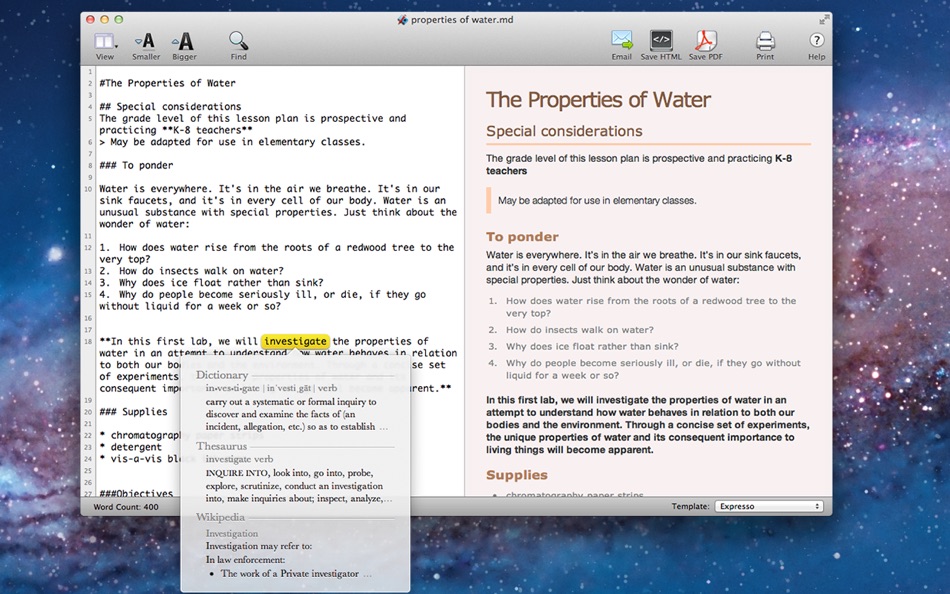
With Markdown PRO you can write beautiful documentation, notes, essays, term papers all by using plain text to tag your formatting such as bold, italic, lists and others. Need a heading? add # before your text; need to make a text italic? add * around your *text*.
Using the plain text formatting, it is really easy and fast to type. You will never have to take your hands off the keyboard, so you can focus on writing. Markdown PRO provides live preview of beautifully formatted text using one of the provided templates. See the results as you type.
It takes less than a minute to learn it!
Your formatting stays where it should, with your text. You can apply a different template at any time to change the colors and size of the text you write.
FEATURES
• Full screen support
- Markdown Pro can run in full-screen mode, allowing you to focus on your work and remove distractions from your screen. We utilize the native OS X Lion full-screen support and you can open more than one document in full-screen.
• Auto save
- It's time to stop worrying about saving your documents all the time. We save your work automatically. You don't need to remember to press Command-S to save anything.
• Version history
- You know when you are working on your document and you regret the changes you made, but is too late because you have already saved it? Well, don't pull your hair anymore. Everything is saved.
• Resume
- We always open your documents where you left off
• Export Markdown PRO documents to PDF, HTML and plain text
• UTF8 support. Write in any language!
Ad
ภาพหน้าจอ


มีอะไรใหม่
- เวอร์ชัน: 1.0.9
- อัปเดต:
- • New support to iCloud documents
• Fixed issue exporting to PDF under Mac OS X 10.9
• Fixed Unicode encoding bug inside code blocks
• Other small fixes and improvements
ประวัติราคา
- วันนี้: $5.99
- ต่ำสุด: $5.99
- มากที่สุด: $5.99
ติดตามราคา
ผู้พัฒนา
- RADSense Software
- แพลตฟอร์ม: iOS แอป (1) macOS แอป (1)
- รายการ: 1 + 0
- แต้มแล: 0 + 16 ¡
- การจัดอันดับ: 0
- ความเห็น: 0
- ความเห็น: 0
- ลดราคา: 0
- วิดีโอ: 0
- RSS: ติดตาม
แต้มแล (0)
0 ☹️
การจัดอันดับ (0)
0 ☹️
รายการ (1)
- Markdown Pro

ความเห็น (0)
แสดงรีวิวเป็นคนแรกเลย 🌟
ข้อมูลเพิ่มเติม
- เวอร์ชัน: 1.0.9
- หมวดหมู่:
macOS แอป›ประสิทธิภาพการผลิต - ระบบปฏิบัติการ:
macOS,macOS 10.7 และสูงกว่า - ขนาด:
3 Mb - ภาษาที่สนับสนุน:
English - การจัดประเภทเนื้อหา:
4+ - Mac App Store คะแนนโดย:
0 - อัปเดต:
- วันที่วางจำหน่าย:
รายชื่อติดต่อ
- เว็บไซท์:
 http://www.markdownpro.com
«Markdown Pro». แพลตฟอร์ม: macOS. หมวดหมู่: ประสิทธิภาพการผลิต. ผู้พัฒนา: «RADSense Software». การเปิดตัวครั้งแรก: . อัปเดตล่าสุด: . ราคาปัจจุบัน: $5.99. ราคาต่ำสุดที่บันทึกไว้: $5.99. ราคาสูงสุดที่บันทึกไว้: $5.99. ชื่อนี้ยังไม่ได้รับการให้คะแนนหรือบทวิจารณ์บน AppAgg รายการ: สาธารณะ 1, ส่วนตัว 0. ภาษาที่ใช้ได้: English. AppAgg ติดตามประวัติราคา การให้คะแนน และคำติชมของผู้ใช้ «Markdown Pro». ส่วนลดและอัปเดตในอนาคต: RSS. AppAgg ไม่ได้โฮสต์แอปพลิเคชันหรือแจกจ่ายซอฟต์แวร์ เครื่องหมายการค้า โลโก้ และภาพหน้าจอทั้งหมดเป็นของเจ้าของที่เกี่ยวข้อง
ความเห็น (0)
เป็นคนแรกที่แสดงความเห็น 🌟
Markdown Pro URL แบบสั้น: คัดลอกแล้ว!- 🌟 แชร์
- Mac App Store
Ad
คุณอาจชอบ
-
- Markdown+
- macOS แอป: ประสิทธิภาพการผลิต โดย: InSili.co
- $14.99
- รายการ: 0 + 0 การจัดอันดับ: 0 ความเห็น: 0
- แต้มแล: 0 + 0 ความเห็น: 0 เวอร์ชัน: 3.3 Edit, style, preview and export your Markdown in macOS. With style. Like a breeze. Easy-to-use Getting started is really easy. Just open the editor and start writing. Your text will be ⥯
-
- Markdown - Enjoy writing
- macOS แอป: ประสิทธิภาพการผลิต โดย: xiao luo
- $7.99
- รายการ: 1 + 0 การจัดอันดับ: 0 ความเห็น: 0
- แต้มแล: 0 + 0 ความเห็น: 0 เวอร์ชัน: 1.3.3 I'm Markdown, the Markdown editor for OS X. This is a powerful Markdown editor, very design, UI simple and user-friendly interactive experience, let us focus more on writing. Markdown ... ⥯
-
- Markdown Peek
- macOS แอป: ประสิทธิภาพการผลิต โดย: Michael Thingmand
- ฟรี
- รายการ: 0 + 0 การจัดอันดับ: 0 ความเห็น: 0
- แต้มแล: 1 + 0 ความเห็น: 0 เวอร์ชัน: 1.0 Description: Markdown Peek is a simple, elegant markdown viewer for macOS. Set it as your default app for .md files and enjoy instant, beautiful rendering. Features: Instant Preview ... ⥯
- -100%
- Markdown Web Writer
- macOS แอป: ประสิทธิภาพการผลิต โดย: Eric Kampman
- ▼ ฟรี
$19.99-100% - รายการ: 0 + 1 การจัดอันดับ: 0 ความเห็น: 0
- แต้มแล: 6 + 0 ความเห็น: 0 เวอร์ชัน: 1.0 Markdown Web Writer is a focused macOS application for turning Markdown into clean, dependable HTML and PDF output. It s designed as a professional, single-purpose tool that emphasizes ⥯
-
- Markdown Inbox
- macOS แอป: ประสิทธิภาพการผลิต โดย: Solutions Cay LLC
- $14.99
- รายการ: 0 + 0 การจัดอันดับ: 0 ความเห็น: 0
- แต้มแล: 0 + 0 ความเห็น: 0 เวอร์ชัน: 1.2 Markdown Inbox is a clean, focused markdown reader designed for people who work with lots of markdown files. Whether you re managing AI-generated documentation, personal notes, or ... ⥯
-
- Markdown Book Compiler
- macOS แอป: ประสิทธิภาพการผลิต โดย: Lotus Core
- $34.99
- รายการ: 0 + 0 การจัดอันดับ: 0 ความเห็น: 0
- แต้มแล: 0 + 0 ความเห็น: 0 เวอร์ชัน: 1.1.2 Markdown Book Compiler makes it easy for self-publishers, authors, bloggers, and educators to turn plain-text .md files into fully formatted, beautifully styled eBooks without using ... ⥯
-
- Markdown Editor
- macOS แอป: ประสิทธิภาพการผลิต โดย: Satoshi Iwaki
- ฟรี
- รายการ: 0 + 0 การจัดอันดับ: 0 ความเห็น: 0
- แต้มแล: 1 + 0 ความเห็น: 0 เวอร์ชัน: 1.5.0 Markdown Editor is a lightweight markdown editor. MAIN FEATURES - Syntax highlighting - Display line numbers - Auto preview - Export to HTML ⥯
-
- Markdown Viewer Offline
- macOS แอป: ประสิทธิภาพการผลิต โดย: Hopebest Inc Limited
- ฟรี
- รายการ: 0 + 0 การจัดอันดับ: 0 ความเห็น: 0
- แต้มแล: 1 + 0 ความเห็น: 0 เวอร์ชัน: 1.0 In today s fast-paced digital landscape, clear and structured documentation is essential. Whether you are a developer writing technical guides, a student organizing lecture notes, or a ⥯
-
- Markdown Email
- macOS แอป: ประสิทธิภาพการผลิต โดย: Roger Oba
- $14.99
- รายการ: 0 + 0 การจัดอันดับ: 0 ความเห็น: 0
- แต้มแล: 0 + 0 ความเห็น: 0 เวอร์ชัน: 3.2.1 Write in Markdown and send beautiful emails with one click! Tired of messy email formatting? Markdown Email lets you write in Markdown and instantly transform your emails into clean, ... ⥯
-
- Markdown Clip
- macOS แอป: ประสิทธิภาพการผลิต โดย: Tomoaki Yagishita
- * ฟรี
- รายการ: 0 + 0 การจัดอันดับ: 0 ความเห็น: 0
- แต้มแล: 2 + 0 ความเห็น: 0 เวอร์ชัน: 6.2.3 simple MarkdownEditor - new-style Markdown WYSIWYG editor Simple markdown editor without preview mode. apply markdown decoration on the spot. - TODO management (simple TODO and Dated ... ⥯
- ใหม่
- Open Markdown
- macOS แอป: ประสิทธิภาพการผลิต โดย: Aralu Single Member P.C.
- ฟรี
- รายการ: 0 + 0 การจัดอันดับ: 0 ความเห็น: 0
- แต้มแล: 0 + 0 ความเห็น: 0 เวอร์ชัน: 1.3.1 Working with LLMs and the markdown files they generate can be tedious. This app is will help you easily visual what your LLM is telling you. You can now effortlessly visualize the ... ⥯
- ใหม่
- FlowMD — Markdown Editor
- macOS แอป: ประสิทธิภาพการผลิต โดย: Phanith Ny
- ฟรี
- รายการ: 0 + 0 การจัดอันดับ: 0 ความเห็น: 0
- แต้มแล: 0 + 0 ความเห็น: 0 เวอร์ชัน: 1.1.0 FlowMD Markdown Editor FlowMD is a fast, focused Markdown editor for macOS with live preview built for clarity and flow. Write Markdown on one side and instantly preview the result on ... ⥯
-
- Marked 2 - Markdown Preview
- macOS แอป: ประสิทธิภาพการผลิต โดย: Brett Terpstra
- * $13.99
- รายการ: 1 + 5 การจัดอันดับ: 0 ความเห็น: 0
- แต้มแล: 4 + 0 ความเห็น: 0 เวอร์ชัน: 2.6.46 Marked 2 is a previewer (*not an editor*) for Markdown, MultiMarkdown and other text markup languages. It updates live every time you save your document in your favorite text editor, ... ⥯
-
- Versatil Markdown
- macOS แอป: ประสิทธิภาพการผลิต โดย: digitalMoksha LLC
- $4.99
- รายการ: 1 + 1 การจัดอันดับ: 0 ความเห็น: 0
- แต้มแล: 0 + 0 ความเห็น: 0 เวอร์ชัน: 2.5.13 A hypernotebook built around Markdown/CommonMark, with 1Password integration, HTML/CSS/Bootstrap support, live task lists, smart drag-n-drop insertion, multiple themes, document ... ⥯