
| 개발자: | Blackmagic Design Inc (11) | ||
| 가격: | $299.99 | ||
| 순위: | 0 | ||
| 리뷰: | 0 리뷰 작성 | ||
| 댓글: | 0 댓글 게시 | ||
| 목록: | 3 + 2 | ||
| 포인트: | 9 + 0 ¡ | ||
| Mac App Store | |||
기술
Hollywood’s most powerful tools for professional editing, color correction, audio post and visual effects!
DaVinci Resolve Studio is the world’s only solution that combines professional editing, color correction, visual effects and audio post production all in one software tool! You can instantly move between editing, color, effects, and audio with a single click. Whether you’re an individual artist, or part of a large team, it’s easy to see why DaVinci Resolve is the standard for high end post production and finishing on more Hollywood feature films, television shows and commercials than any other software.
Blackmagic Cloud
DaVinci Resolve supports Blackmagic Cloud for remote collaboration using cloud based workflows! You can host project libraries using Blackmagic Cloud and collaborate on the same timeline, in real time with multiple users all over the world.
Cut Page Editing
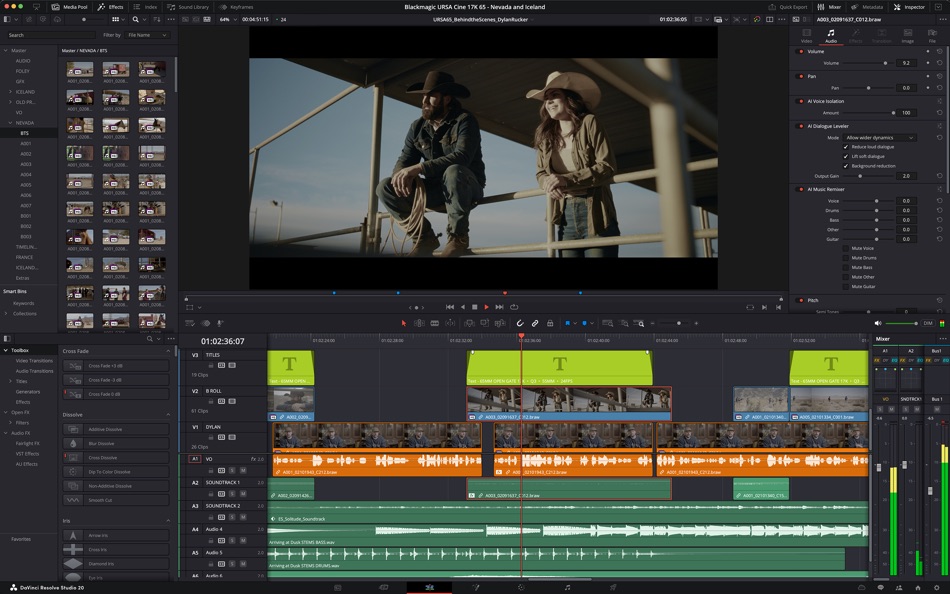
Designed for projects with tight deadlines that need to be turned around quickly, the cut page is designed for editing speed. The sync bin and source overwrite tools are the fastest way to edit multi cam programs. You can work faster than ever with dual timelines, source tape and smart editing tools. The cut page has a new layout for vertical timelines, voice over palette, dedicated keyframe editor, MultiText tool, new live overwrite controls and more!
Professional Editing
Perfect for both offline editorial and online finishing. You get every editing and trimming tool imaginable, stacked and tabbed timelines, multi cam, closed caption and subtitling tools, on screen annotations, faster project loading, 2D and 3D title templates, and dozens of other new features!
Advanced Color Correction
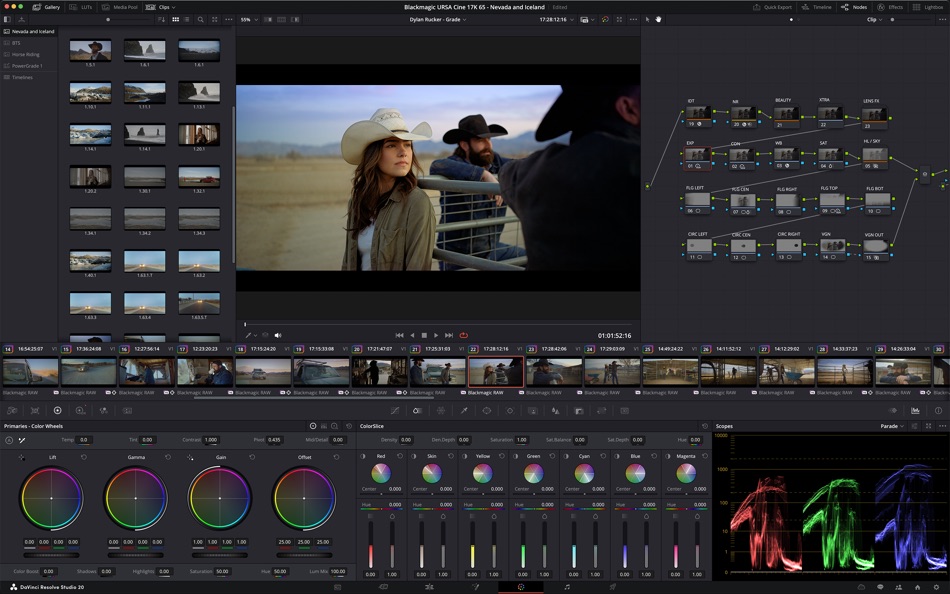
Hollywood’s favorite color corrector keeps getting better! You get advanced HDR primary color grading tools with unlimited secondary corrections, power windows and tracking. The new AI Magic Mask gives you even more refined tracking and AI depth map 2 enables faster scene analysis and mattes, plus there’s new chroma warp grading and more.
Fusion Visual Effects
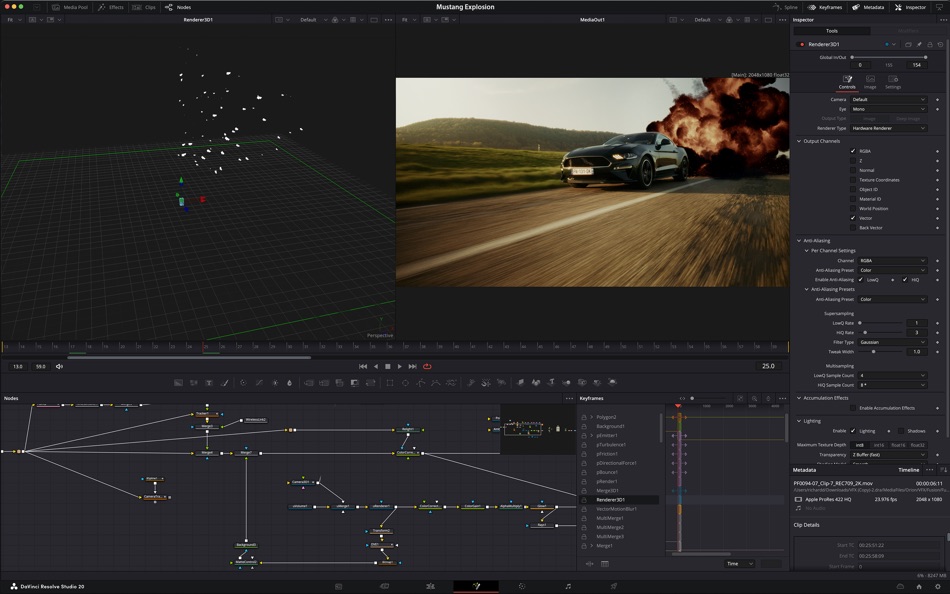
Fusion gives you a true 3D workspace with over 250 tools for creating feature film quality visual effects and stunning motion graphics! DaVinci Resolve 20 has a new deep image compositing toolset as well as a multi-layer pipeline for OpenXR, and psd files. There’s a new vector warp toolset, support for 180 VR, 3D scene dome light and support for native Cryptomatte workflows.
Fairlight Audio Post
Fairlight is a full blown digital audio workstation with high performance multi track sample level editing and mixing! You get ADR tools, support for sound libraries, audio and video scrollers for quickly syncing sound, a scrolling timeline, normalization and Fairlight FX plugins including a hum remover, de-esser, reverb and more. DaVinci Resolve 20 features AI Audio Assistant which automatically creates a final mix.
Upgrade to the paid version of DaVinci Resolve Studio 20 and you also get IntelliScript to create a timeline from script text, dialogue matcher, music editor to adjust track length automatically, animated subtitles, beat detector and MultiCam SmartSwitch for automatic camera angle switching. New Fusion toolsets include deep image compositing, multi layer pipelining and vector warping plus there’s support for VR 180. Studio v20 also includes major updates to Magic Mask and depth map. IntelliCut to remove silence and checkerboard speakers and audio assistant for a mastered final mix.
DaVinci Resolve 20 App Store Limitations
The Mac App store version of DaVinci Resolve Studio 20 does not support some external control panels, and may not be compatible with all 3rd party OpenFX or VST plugins. If you need these features, please download DaVinci Resolve Studio 20 from the Blackmagic Design support website.
System Requirements
Current model Mac with Apple silicon. 8GB of system memory, 16GB when using Fusion, Mac OS X 14 or higher, at least a 1440 x 900 resolution display.
Ad
스크린샷


가격 내역
- 오늘: $299.99
- 최소: $149.99
- 최대: $299.99
가격 추적
새로운 기능
- 버전: 20.3.2
- 업데이트:
- • Preferences option to enable dynamic trim for trim editor in edit.
• More consistent kerning for subtitles.
• Magic mask cache is now retained when pasting node attributes.
• Improved render speeds for side-by-side stereoscopic 3D renders.
• Up to 2.5x faster SuperScale Enhanced with Apple Neural Engine.
• Progressive renders for interlaced timelines with same frame rate.
• Addressed issue with lens correction of vertical clips.
• Addressed incorrect ILPD used with disabled clip on higher tracks.
• Addressed incorrect aivu when rendering marked timeline ranges.
• Addressed incorrect ImmersivePatcher behavior with proxy media.
• Addressed timecode issue for proxies from stereoscopic 3D EXRs.
• Addressed issue localizing media pool column headers.
• Addressed slow media management start up for larger projects.
• Addressed ProRes RAW decode issue when using ACES.
• Addressed issue with editing effects on a locked node stack layer.
• Analog Damage disabling CRT scan no longer disables restless foot.
• Addressed potential flicker in face refinement eyebag removal.
• Addressed retention of MaxCLL from XML when exporting IMF.
• Addressed issues with Dolby Atmos external renderers.
• Addressed ADC reverb delay compensation issue in some projects.
• Addressed incorrect pass through behavior for Sony XAVC renders.
• Addressed issue decoding some Sony ARW clips.
• Addressed incorrect render size estimates for some MXF clips.
• Support for Fujifilm F-Gamut C colorspace and F-Log2 C gamma.
• Support for Dolby headphone personalization of binaural monitoring.
• General performance and stability improvements.
개발자
포인트 (9)
-

- 214 Attila Szucs
- +1
-
- 320 pantype
- +1
-
- 29 Ильяс
- +1
-
- 2 Rush Riders Gaming
- +1
-
- 251 john papa
- +1
-
- 1 Bassam essabri
- +1


순위 (0)
0 ☹️
목록 (3)
- DaVinci Resolve Studio


리뷰 (0)
첫 번째 리뷰를 남겨보세요 🌟
추가 정보
주소록
 http://www.blackmagicdesign.com
 «DaVinci Resolve Studio». 플랫폼: macOS. 카테고리: 사진 및 비디오. 개발자: «Blackmagic Design Inc». 첫 번째 릴리스: . 마지막 업데이트: . 현재 가격: $299.99. 최저 기록 가격: $149.99 (). 최고 기록 가격: $299.99 (). 이 타이틀은 아직 AppAgg에서 평가나 리뷰를 받지 못했습니다. 목록: 공개: 3, 비공개: 2. 추적된 포인트: 확인됨: 9, 간접: 0. AppAgg는 «DaVinci Resolve Studio»의 가격 기록, 평점 및 사용자 피드백을 추적합니다. 향후 할인 및 업데이트 받기: RSS에서 확인할 수 있습니다. AppAgg는 애플리케이션을 호스팅하거나 소프트웨어를 배포하지 않습니다. 모든 상표, 로고 및 스크린샷은 해당 소유자의 자산입니다.
댓글 (0)
가장 먼저 댓글을 남겨주세요 🌟
DaVinci Resolve Studio 단축 URL: 복사됨!- 🌟 공유하기
- Mac App Store
Ad
유사 항목
-
- Studio Live:TV HD Broadcast
- macOS 앱: 사진 및 비디오 게시자: Charlie Pryor
- 무료
- 목록: 0 + 0 순위: 0 리뷰: 0
- 포인트: 1 + 0 0 버전: 1.0.0 During the last few months live TV found itself not being able to deliver live video quality that it was used to. With most people staying at home in lock downs. Studio Live tends to ... ⥯
-
- DaVinci Resolve
- macOS 앱: 사진 및 비디오 게시자: Blackmagic Design Inc
- 무료
- 목록: 0 + 1 순위: 0 리뷰: 0
- 포인트: 8 + 0 0 버전: 20.3.2 DaVinci Resolve Studio 20 Hollywood s most powerful tools for professional editing, color correction, audio post and visual effects! DaVinci Resolve Studio is the world s only solution ⥯
-
- Templates for DaVinci Resolve
- macOS 앱: 사진 및 비디오 게시자: Syed Sahib Sultan
- $19.99
- 목록: 0 + 0 순위: 0 리뷰: 0
- 포인트: 0 + 0 0 버전: 1.0.1 Unlock Your Creativity with Professional Templates for DaVinci Resolve Studio Looking to enhance your video editing projects with stunning, ready-to-use templates? Templates for ... ⥯
-
- Black & White Studio
- macOS 앱: 사진 및 비디오 게시자: Valentino Frati
- $4.99
- 목록: 0 + 1 순위: 0 리뷰: 0
- 포인트: 10 + 0 0 버전: 1.3 With Black & White Studio you can create black & white photography like a professional. You can emphasize every detail of your photo using a complete set of controls: channel ... ⥯
-
- ACDSee Photo Studio
- macOS 앱: 사진 및 비디오 게시자: ACD Systems International Inc.
- * 무료
- 목록: 1 + 0 순위: 0 리뷰: 0
- 포인트: 0 + 0 0 버전: 26.0.0 A qualifying ACDSee Photo Studio subscription is required. Get access to the full product FREE for 7 DAYS before incurring the annual subscription fee. ACDSee Photo Studio is designed ... ⥯
-
- Photo Flipbook Studio
- macOS 앱: 사진 및 비디오 게시자: Solaz Dazen srl
- $14.99
- 목록: 0 + 0 순위: 0 리뷰: 0
- 포인트: 0 + 0 0 버전: 1.7.2 Create your own flipbooks with ease! This software takes your chosen photos of pdfs and generates a beautiful HTML flipbook that you can publish online or view on your computer or ... ⥯
-
- Afterglow Timelapse Studio
- macOS 앱: 사진 및 비디오 게시자: YINGHAO WANG
- $9.99
- 목록: 0 + 0 순위: 0 리뷰: 0
- 포인트: 0 + 0 0 버전: 1.0 Detailed Feature Summary The app is a macOS SwiftUI timelapse studio that converts frame sequences into a video-only MP4 (H.264). It uses a single-window interface with adaptive ... ⥯
-
- MatchColors AI - Studio
- macOS 앱: 사진 및 비디오 게시자: talonsodev
- $9.99
- 목록: 0 + 1 순위: 0 리뷰: 0
- 포인트: 9 + 0 0 버전: 1.2 Transform your images with ease using our app, powered by cutting-edge artificial intelligence (AI). Effortlessly colorize any photo by transferring colors from another image in just a ⥯
-
- Image View Studio: Gallery
- macOS 앱: 사진 및 비디오 게시자: Everyday Tools, LLC
- * 무료
- 목록: 0 + 1 순위: 0 리뷰: 0
- 포인트: 7 + 0 0 버전: 3.7.9 Image View Studio is an ergonomic, fast and convenient image viewer. It provides the best experience to browse and view images in a large number of formats. Its lightweight and ... ⥯
-
- Stop Motion Studio Pro 2
- macOS 앱: 사진 및 비디오 게시자: CATEATER, LLC
- $9.99
- 목록: 2 + 0 순위: 0 리뷰: 0
- 포인트: 3 + 0 0 버전: 25.12 Join 25 million creators making stop motion animation with ease. Stop Motion Studio is the Apple-featured app for creating stunning stop motion films. Enjoy powerful creative tools ... ⥯
-
- ProRes Studio
- macOS 앱: 사진 및 비디오 게시자: Makayama.com
- $11.99
- 목록: 0 + 0 순위: 0 리뷰: 0
- 포인트: 0 + 0 0 버전: 1.1 All you need to create a ProRes video file with one click. Convert common video formats to high quality HD or 4K ProRes-videos for professional applications such as video editing. Or ... ⥯
-
- Camera Lens Studio Pro - Best Photo Editor and Stylish Camera Filters Effects
- macOS 앱: 사진 및 비디오 게시자: PSDC Creative Inc.
- $29.99
- 목록: 0 + 1 순위: 0 리뷰: 0
- 포인트: 1 + 0 0 버전: 1.0 Amazing 50% discount from the original app price! Eligible Australian, China, New Zealand Mac App Store bestseller list first photography class software, Norway, Mexico, Japan, Hong ... ⥯
-
- Watercolor Studio
- macOS 앱: 사진 및 비디오 게시자: JixiPix Software
- $49.99
- 목록: 0 + 1 순위: 0 리뷰: 0
- 포인트: 0 + 0 0 버전: 1.4.16 Watercolor Studio is an Automated Photo to Watercolor Software with Realistic and Natural Style Watercolor Studio creates fluid, liquidy, translucent watercolors with paint that flows ... ⥯
-
- Hyper: VTuber Avatar Studio
- macOS 앱: 사진 및 비디오 게시자: Hyper Online, Inc.
- * 무료
- 목록: 0 + 0 순위: 0 리뷰: 0
- 포인트: 3 + 0 0 버전: 1.0.2 Professional avatar content creation tools for beginners or seasoned VTubers alike. Supports Hyper Avatars and VRM files. - Create your Hyper Avatar. Customize a stunning 3D Hyper ... ⥯