
저장됨
저장됨 메뉴에 표시할 이름을 선택하세요.
완료!
기술

Advanced Encoding for Final Cut Pro
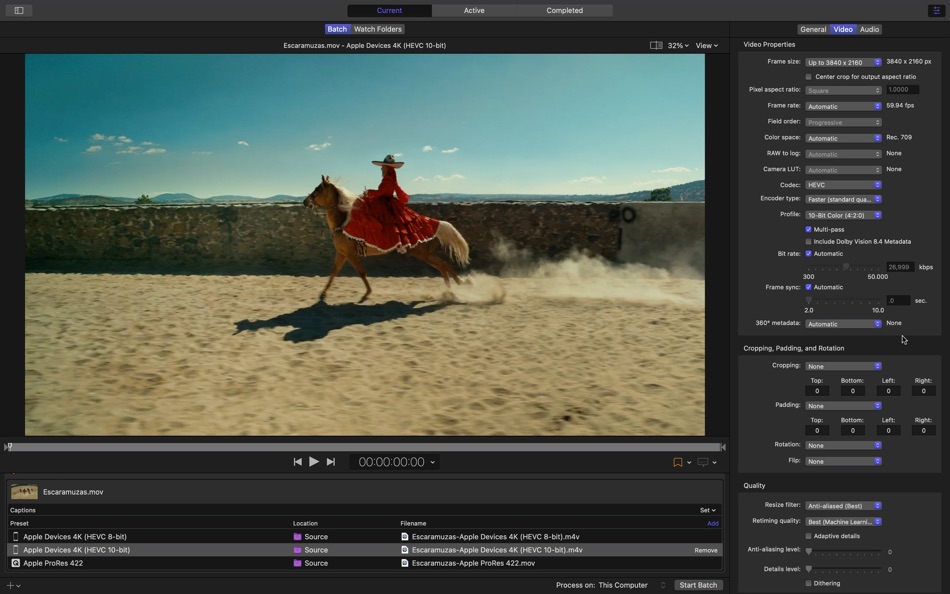
• Use Compressor to customize encoding settings for use in Final Cut Pro and Motion
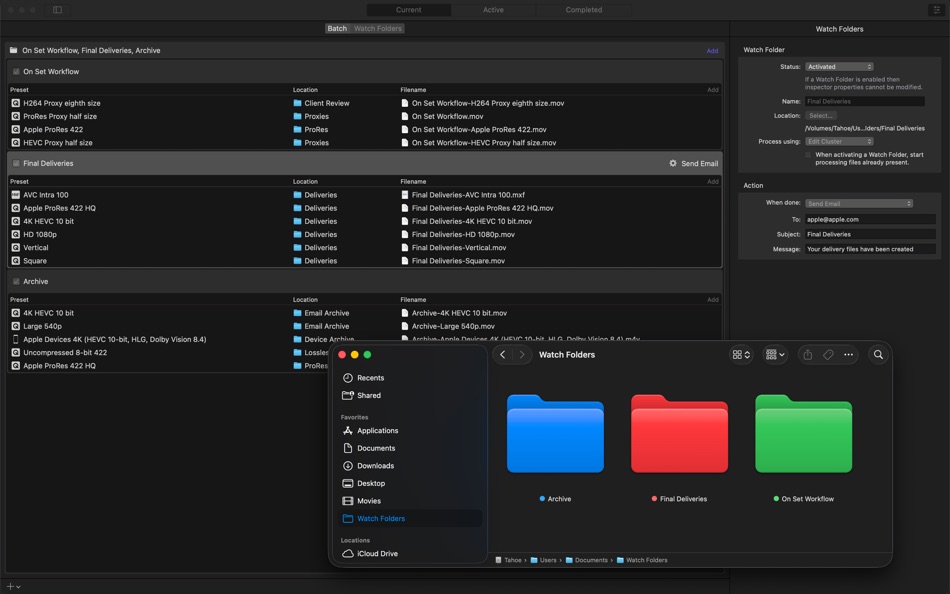
• Set up batch processes to streamline the encoding of large numbers of files
• Create self-contained Droplets to encode on the desktop with drag-and-drop ease
• Automatically encode videos that are added to selected folders in the file system
• Encode stereoscopic spatial video and deliver directly to Apple Vision Pro
• Encode videos recorded with iPhone in Cinematic mode
• Unrivaled performance with optimizations for the latest generation of Apple silicon
iTunes Store Package Creation
• Import and organize your movie, trailer, closed captions, audio descriptions, and subtitles into an iTunes Store-compliant package for submission to an Apple-certified iTunes delivery partner
• Audition video with any audio, caption, or subtitle to verify sync
• Built-in error detection helps you identify issues with your iTunes Store Package
• Deliver HDR video as P3 D65 PQ, Rec. 2020 HLG, and Rec. 2020 PQ for HDR10
• Support in the iTunes Store Package to link a Dolby Vision graded video file to a Dolby Vision XML
Support for Industry Standards
• Encode to a broad range of industry standard formats including HEVC, MV-HEVC, H.264, MXF and ProRes
• Import Targa, DPX, TIFF, PSD, PNG or OpenEXR image sequences and encode them using any setting
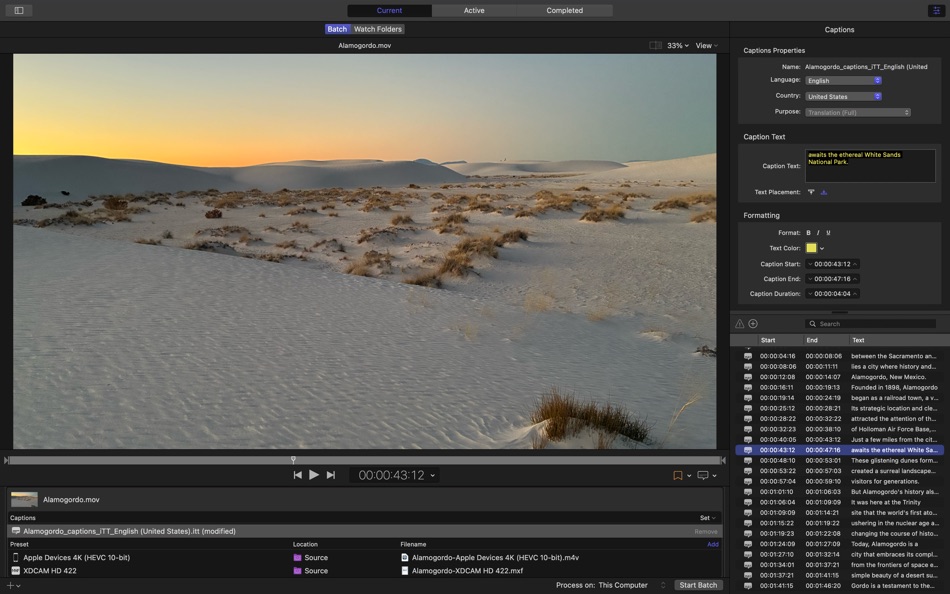
• Create, view, adjust, and deliver closed captions in CEA-608, SRT, and iTT formats
Pristine Format Conversions
• Convert any file between formats — such as NTSC to PAL, SD to HD or progressive to interlaced video
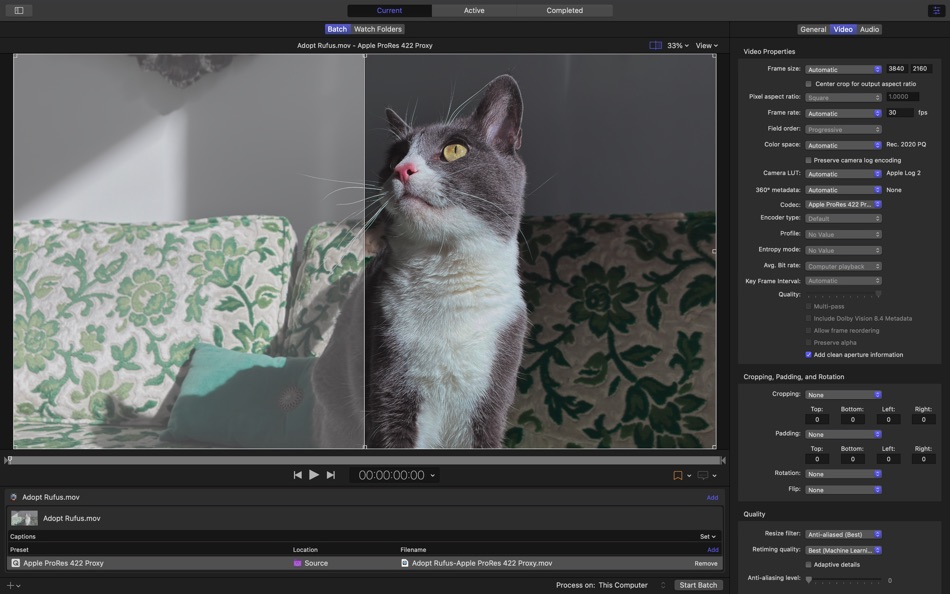
• Import and manipulate wide color video, then deliver in standard Rec. 601 and Rec. 709 color spaces or in wide Rec. 2020 color space
• Deliver High Dynamic Range (HDR) video with controls for color space conversions and HDR metadata
• Deliver HDR video as P3 D65 PQ, Rec. 2020 HLG, and Rec. 2020 PQ
• Add effects to your content like custom LUTs, a timecode overlay, and watermarks
• Speed up video, slow it down, or adjust the frame rate to make the duration match a runtime
• Convert log-encoded video to SDR and HDR color spaces using built in camera LUTs for Panasonic, Sony, Canon, Blackmagic, Nikon and ARRI or add a custom camera LUT
• Convert ProRes RAW and ProRes RAW HQ media to other professional file formats
• Play and transcode Canon Cinema RAW Light to other video codecs and formats
Distributed Encoding
• Save time by distributing encoding work among multiple workstations
• Install Compressor on any Mac to activate it as a node for distributed encoding
System Requirements: macOS 15.6 or later, 8 GB of memory, 1.2 GB of available disk space. Apple Immersive Video processing requires 32 GB memory (64 GB recommended). Storage read speed of 2 GB/s or faster is recommended. Some features require a Mac with Apple silicon.
Ad
스크린샷
가격 내역
- 오늘: $49.99
- 최소: $49.99
- 최대: $49.99
가격 추적
새로운 기능
- 버전: 5.2
- 업데이트:
- • This update includes stability improvements and bug fixes
Also Recently Added:
• Create files for an Apple Immersive Video package for playback, and HTTP live streaming on Apple Vision Pro
추가 정보
 http://www.apple.com/finalcutpro/compressor/
개발자
목록 (5)
- Compressor


포인트 (0)
0 ☹️
순위 (0)
0 ☹️
댓글 (0)
가장 먼저 댓글을 남겨주세요 🌟
«Compressor». 플랫폼: macOS. 카테고리: 사진 및 비디오. 개발자: «Apple». 첫 번째 릴리스: . 마지막 업데이트: . 현재 가격: $49.99. 최저 기록 가격: $49.99. 최고 기록 가격: $49.99. 이 타이틀은 아직 AppAgg에서 평가나 리뷰를 받지 못했습니다. 목록: 공개: 5, 비공개: 5. 사용 가능한 언어: Chinese, English, French, German, Japanese, Korean, Spanish. AppAgg는 «Compressor»의 가격 기록, 평점 및 사용자 피드백을 추적합니다. 향후 할인 및 업데이트 받기: RSS에서 확인할 수 있습니다. AppAgg는 애플리케이션을 호스팅하거나 소프트웨어를 배포하지 않습니다. 모든 상표, 로고 및 스크린샷은 해당 소유자의 자산입니다.
Compressor 단축 URL: 복사됨!- 🌟 공유하기
- Mac App Store
유사 항목
-
- Compressor: Encode Media
- macOS 앱: 사진 및 비디오 게시자: Apple
- * 무료
- 목록: 0 + 0 0 0
- 포인트: 0 + 0 버전: 5.2 Compressor is now part of Apple Creator Studio, an amazing collection of Apple s most powerful creative apps designed to help you bring your ideas to life. The suite includes Final Cut ⥯
-
- Video Size Compressor
- macOS 앱: 사진 및 비디오 게시자: Ruchira Ramesh
- $4.99
- 목록: 0 + 0 0 0
- 포인트: 0 + 0 버전: 6.3 Video Size Compressor reduces the file size of a video to an exact size without clipping any part of it.For example, if there is a Video of size 250 MB . The application could reduce ... ⥯
-
- iLove Video Compressor
- macOS 앱: 사진 및 비디오 게시자: 平 吕
- * 무료
- 목록: 0 + 1 0 0
- 포인트: 2 + 0 버전: 3.0.0 Large videos often take quite a lot of storage space on your Mac. Do not worry, iLove Video Compressor can help you to reduce the size of your videos. After shrinking using this ... ⥯
-
- Mass Image Compressor
- macOS 앱: 사진 및 비디오 게시자: Cognirush Labs LLP
- * 무료
- 목록: 0 + 0 0 0
- 포인트: 1 + 0 버전: 2.4 1. Drag & Drop Images/Videos/Folders - Mass Image Compressor can recursively scan input folders. 2. Adjust simple settings like quality, size, output format, EXIF copy options. 3. ... ⥯
-
- Photo Compressor: JPG PNG HEIC
- macOS 앱: 사진 및 비디오 게시자: Nikita Marchenko
- 무료
- 목록: 0 + 0 0 0
- 포인트: 1 + 0 버전: 1.0 Completely free Photo Compressor helps you compress photos and reduce photo size on Mac in seconds. Drag and drop images, choose the quality level, and export smaller files that still ... ⥯
-
- Image Size Compressor
- macOS 앱: 사진 및 비디오 게시자: Nikhil Anshuman
- $2.99
- 목록: 0 + 0 0 0
- 포인트: 1 + 0 버전: 1.2 Compress the JPEG, PNG and HEIC images easily using the application. The applications supports adding multiple files and folders at the same time. After adding the images, just specify ⥯
-
- Video Compress Pro - Compressor Smaller Movie
- macOS 앱: 사진 및 비디오 게시자: 小磊 张
- $3.99
- 목록: 0 + 0 0 0
- 포인트: 0 + 0 버전: 3.2.3 If you want to reduce your video size and the app will be your best choose . You can input the video size and the app will auto adjust the video's parameters to meet your need . Source ⥯
-
- Tyniy Image Compressor
- macOS 앱: 사진 및 비디오 게시자: MILIVON
- 무료
- 목록: 0 + 0 0 0
- 포인트: 0 + 0 버전: 1.0 Running out of storage? Tyniy delivers professional-grade photo compression that's completely free. Reduce JPEG and HEIC file sizes by up to 90% without compromising visual quality - ... ⥯
-
- Lossless Photo Squeezer - Reduce Image Size
- macOS 앱: 사진 및 비디오 게시자: effectmatrix
- $4.99
- 목록: 0 + 1 0 0
- 포인트: 19 + 0 버전: 1.70 On Sale for for a limited time. Original $ 14.99. Don't forget to download "Super PhotoCut" - A great photo backgroud eraser. 50% OFF! Lossless Photo Squeezer reduces image size No ... ⥯
-
- mini Video Creator
- macOS 앱: 사진 및 비디오 게시자: Max Schlee
- $2.99
- 목록: 0 + 1 0 0
- 포인트: 1 + 0 버전: 1.25 SHRINK YOUR VIDEOS! 100% PRIVATE & SECURE! Tired of dealing with large video files that slow you down? Mini Video Compressor is your go-to solution for seamless uploads, faster email ... ⥯
-
- Format Transcode Factory
- macOS 앱: 사진 및 비디오 게시자: 代莉 陈
- $7.99
- 목록: 0 + 0 0 0
- 포인트: 0 + 0 버전: 4.2 The Worlds No 1 Video Converter that support all video formats including 4k/8k video. Fastest Video Converter and Compressor in the market that supports almost all video formats: MP4, ... ⥯
-
- Simplified! Final Cut Pro X Edition
- macOS 앱: 사진 및 비디오 게시자: ANTHONY PETER WALSH
- $6.99
- 목록: 0 + 0 0 0
- 포인트: 0 + 0 버전: 1.0 Final Cut Pro X is the Industry Standard Video Editing Software used by designers and computer users all over the World. Create professional video / dvd with amazing effects and ... ⥯
-
- Enhance-O-Tron for Plex
- macOS 앱: 사진 및 비디오 게시자: Tyler Milford
- 무료
- 목록: 0 + 0 0 0
- 포인트: 0 + 0 버전: 1.5.7 Enhance-O-Tron adds the following features to Plex*: Trailers: - Open a movie library item and a link to the trailer will appear beneath the title Random library sorting: - Click the ... ⥯
-
- UniConverter-Video Converter
- macOS 앱: 사진 및 비디오 게시자: Shenzhen Wondershare Software Co., Ltd
- $69.99
- 목록: 1 + 0 0 0
- 포인트: 0 + 0 버전: 12.0.10 **Simple-Click to Convert, Compress and Capture Your Video & Audio** Wondershare UniConverter is a complete video conversion toolset (conversion, editing, screen recording) with a ... ⥯