| 개발자: | Complete Magic Apps (7) | ||
| 가격: | 무료 | ||
| 순위: | 0 | ||
| 리뷰: | 0 리뷰 작성 | ||
| 목록: | 1 + 0 | ||
| 포인트: | 4 + 0 ¡ | ||
| Mac App Store | |||
기술
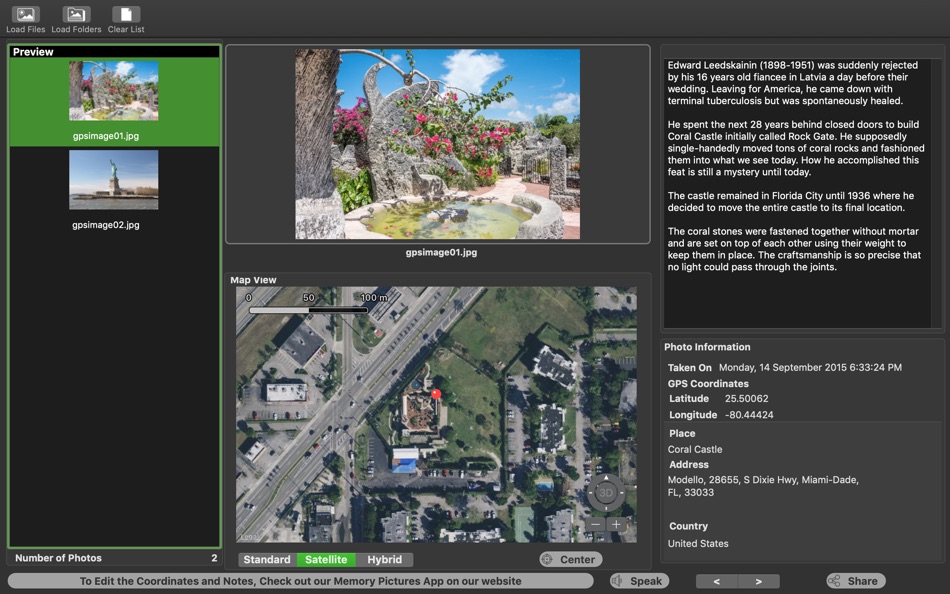
Memory Pictures Viewer will work with any JPEG, JXL (macOS 14 Sonoma and above), HEIC , AVIF, TIFF and PNG, as well as supports RAW photos formats which includes Adobe RAW (DNG), Canon RAW (CR2 & CR3), Fujifilm RAW (RAF), Hasselblad RAW (3FR), Mamiya RAW (MEF), Minolta RAW (MRW), Nikon RAW (NEF & NRW), Olympus RAW (ORF), Panasonic RAW (RW2), Pentax RAW (PEF) and Sony RAW (SR2 & ARW) which comes embedded with the GPS Coordinates and/or the User Comments (which is used by Memory Pictures app to allow you to embed notes or diary entries about the photo you have taken).
A Picture may paint a thousand words which is certainly true but most times it helps to also include a story and location information so that you will get context about the photo. This will enrich your experiences even further.
You can look back at your photos taken years ago with Memory Pictures Viewer and know where you been and something about the place. Now Memory Pictures Viewer can read the Notes for you using the built-in text to speech support.
Use Memory Pictures app to include the story and GPS Coordinates and share the photos with your loved ones. Have them download Memory Pictures Viewer to get a more enriched experience with your story.
* Note : This is a Read-Only Viewer and details cannot be modified. To change or include the notes or GPS Coordinates, search for our Memory Pictures app.
스크린샷
가격
- 오늘: 무료
- 최소: 무료
- 최대: 무료
가격 추적
개발자
- Complete Magic Apps
- 플랫폼: macOS 앱 (7)
- 목록: 1 + 0
- 포인트: 7 + 0 ¡
- 순위: 0
- 리뷰: 0
- 할인: 0
- 동영상: 0
- RSS: 구독
포인트
-
- 1,075 眰恦(眰恦)
- +1
-
- 10,631 Simon Chan
- +1
-
- 3,144 Dragon
- +1
-
- 48 Czak
- +1
순위
0 ☹️
목록
리뷰
첫 번째 리뷰를 남겨보세요 🌟
추가 정보
- 🌟 공유하기
- Mac App Store
당신은 또한 같은 수 있습니다
-
- Memory Pictures
- macOS 앱: 사진 및 비디오 게시자: Complete Magic Apps
- $5.99
- 목록: 0 + 0 순위: 0 리뷰: 0
- 포인트: 0 + 0 버전: 4.7.2 The core goal of Memory Pictures is to allow to keep your memories alive by assisting you in embedding the location and journal entries within the photo header. We all take photos with ⥯
-
- Simple Camera Viewer
- macOS 앱: 사진 및 비디오 게시자: Zachary Tirrell
- $0.99
- 목록: 0 + 0 순위: 0 리뷰: 0
- 포인트: 0 + 0 버전: 1.0 Simple Camera Viewer lets you check and preview any camera connected to your Mac with a clean, distraction-free interface. * Select from available cameras with a single click * Mirror ... ⥯
-
- StillView - Image Viewer
- macOS 앱: 사진 및 비디오 게시자: Vinny Carpenter
- 무료
- 목록: 0 + 0 순위: 0 리뷰: 0
- 포인트: 0 + 0 버전: 3.0.0 A minimalist, elegant image viewer designed specifically for macOS users who want a clean, distraction-free way to browse through image collections. Built with SwiftUI and optimized ... ⥯
-
- ImageViewer: Video Player and Photo Image Viewer
- macOS 앱: 사진 및 비디오 게시자: 志强 吴
- $4.99
- 목록: 1 + 2 순위: 0 리뷰: 0
- 포인트: 37 + 0 버전: 1.71 On sale. Original $14.99. Download it Now. Don't forget to download "Super PhotoCut" - A great photo background eraser. 50% OFF! ImageViewer is a powerful photo viewer and video player ⥯
-
- WidsMob Viewer Pro
- macOS 앱: 사진 및 비디오 게시자: WidsMob Technology Co., Limited
- $44.99
- 목록: 0 + 2 순위: 0 리뷰: 0
- 포인트: 11 + 0 버전: 2.20.1412 WidsMob Viewer Pro is a one-step media viewer to browse most photos and videos at a fast speed. Whether you need to browse the photos and videos taken with camcorders/smartphones or ... ⥯
-
- Hot Viewer
- macOS 앱: 사진 및 비디오 게시자: Jupiter Valley LLC
- 무료
- 목록: 1 + 2 순위: 0 리뷰: 0
- 포인트: 16 + 0 버전: 1.6.1 Hot Viewer is keyboard and mouse controlled viewer intended to make viewing of files easy. Inspired by good ol' Irfan view it uses simply shortcuts: - space to move to next file in ... ⥯
- -100%
- ImageButler - Fast IMG Viewer
- macOS 앱: 사진 및 비디오 게시자: Devhoon
- ▼ 무료
$4.99-100% - 목록: 0 + 1 순위: 0 리뷰: 0
- 포인트: 8 + 0 버전: 1.2 ImageButler - Professional Photo Culling & Selection Tool Quickly browse, rate, and select the best images from thousands of photos. Perfect for professional photographers and ... ⥯
- -100%
- XGallery Viewer
- macOS 앱: 사진 및 비디오 게시자: Grzegorz Rakoca
- ▼ 무료
$0.99-100% - 목록: 0 + 1 순위: 0 리뷰: 0
- 포인트: 10 + 0 버전: 1.0 Features: - Image Browsing: Navigate through folders with a tree view, view thumbnails in an adjustable grid, and open images in a detailed viewer - Image Editing: Apply ... ⥯
-
- Spherical Viewer
- macOS 앱: 사진 및 비디오 게시자: Olga Kacher
- 무료
- 목록: 0 + 0 순위: 0 리뷰: 0
- 포인트: 1 + 0 버전: 1.1 Spherical Viewer is a simple viewer for panoramic images. - Image content fills the entire window. Controls are at hand but shown only when required. - Rotate and zoom with intuitive ... ⥯
-
- ApolloOne - Photo Video Viewer
- macOS 앱: 사진 및 비디오 게시자: Anogeissus Limited
- * 무료
- 목록: 1 + 1 순위: 0 리뷰: 0
- 포인트: 5 + 0 버전: 4.1.1 WIRED s Best Image Viewer Two Years Running ApolloOne Reborn: The Fastest Image Viewer Built for photographers, ApolloOne offers fast, intuitive tools without database imports. Enjoy a ⥯
-
- Image Exif Viewer
- macOS 앱: 사진 및 비디오 게시자: 扬超 张
- $3.99
- 목록: 0 + 0 순위: 0 리뷰: 0
- 포인트: 0 + 0 버전: 3.4.2 Time-Limited Special Offer Image Exif View is a useful tool to view the metadata (Exif, IPTC) stored in image files. With dragging file(s) to Image Exif Viewer or icon on the Dock, You ⥯
-
- PIP Viewer
- macOS 앱: 사진 및 비디오 게시자: Harshad Jadav
- $0.99
- 목록: 0 + 0 순위: 5 (1) 리뷰: 0
- 포인트: 2 + 0 버전: 1.3 [Introduction] PIP Viewer is a Safari extension that lets you use all HTML5 video in Picture in Picture mode. [Features] Zoom In/Out Play/Pause [How to user this extension] 1. Open app ⥯
-
- AnyEXIF: VIewer/Cleaner/Editor
- macOS 앱: 사진 및 비디오 게시자: 通 张
- * 무료
- 목록: 0 + 1 순위: 0 리뷰: 0
- 포인트: 4 + 0 버전: 2.0.1 A brand new all-in-one EXIF Viewer/Cleaner/Editor has been released. Support M1/M2/M3/M4, fully tested in the latest macOS AnyEXIF is a professional yet easy-to-use toolkit for ... ⥯
-
- Matte Viewer
- macOS 앱: 사진 및 비디오 게시자: Héliographe, Inc
- * 무료
- 목록: 0 + 0 순위: 0 리뷰: 0
- 포인트: 4 + 2 (3.0) 버전: 2.0 Matte Viewer lets you quickly preview the mattes in photos taken with your iPhone, including the depth map and semantic maps. You can export them and use them in 3rd party software ... ⥯