
북마크
이 북마크의 제목을 입력하세요.
북마크가 저장되었습니다
설명

Turn on the widgets you want, put the panel where it suits you, and leave it there.
• Always on top
The panel stays above every other window, so the numbers are there while you game, render or build. Click-through mode lets the mouse pass straight to whatever sits underneath.
• Seventeen widgets, your choice
Switch on only what matters to you. Each one has its own options, and the panel resizes itself around what is left.
• Processor
Total load, every core on its own, load over time, and the processes using the most CPU right now.
• Memory
Used and free memory, memory over time, and the processes holding the most of it.
• Network
Live upload and download, both directions over time, speed against your adapter's maximum, a separate graph per direction, and the processes generating the traffic - including the system daemons that other tools leave out.
• Graphics and storage
Graphics card load, free space on every volume, and read and write speed per drive.
• Sensors
Temperature, power draw and fan speed, through a small helper app that is free to download.
• Real time, or easy on the battery
Choose how often the panel samples: four times a second when you want to catch every spike, or once every two seconds when you would rather it stayed quiet. The graphs cover the same stretch of time either way.
• Put it where you want it
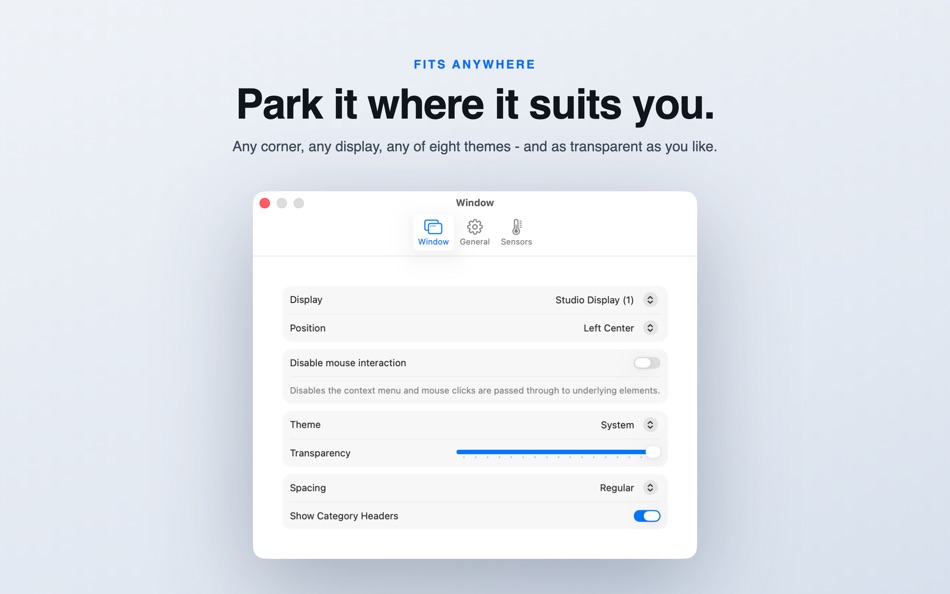
Anchor it to a corner or an edge, or drop it anywhere you like, on whichever display you prefer. Set the spacing between widgets and how transparent the panel should be.
• Eight themes
System, Light, GitHub, Dracula, Noctis, One Dark Pro, Palenight and Ayu.
• In your language
English, German, French, Spanish, Italian, Dutch, Polish, Portuguese, Russian, Japanese, Korean and Simplified Chinese.
The app icon was designed by Hugo Santos. You can check out his portfolio here:
https://sites.google.com/view/guerreirodosantos/início?authuser=0
Find other great apps on my homepage:
https://www.sascha-simon.com
https://sascha-simon.com/contact
If you like this app, please leave a positive rating. Positive ratings help others find the app and also is a great motivator for me to further develop the app.
광고
스크린샷




가격 내역
- 현재 가격: 무료
- 최소: 무료
- 최대: 무료
AppAgg 점수
2,330
AppAgg 예상 점수:
System Monitor Panel
개발자: Sascha Simon
2,330 골드
점수가 높을수록 대체로 AppAgg의 여러 지표에서 좋은 결과를 보인다는 뜻입니다.
기준: 인기 · 사용자 평점 · 최신성 · 할인 · 스토어 데이터 · 커뮤니티 활동
최신 AppAgg 데이터를 바탕으로 매일 다시 계산됩니다.
웹사이트용 배지:  복사됨!
복사됨!
새로운 기능
- 버전: 7.0.0
- 마지막 업데이트:
- • The Sensors plugin update can now stop the running plugin first, so the update installs.
• Now requires a Mac with Apple silicon. Macs with an Intel processor can keep using the previous version.
추가 정보
개발자
목록 (3)
- System Monitor Panel


포인트 (5)
-

- 3,600 Dragon
- +1
-
- 13,678 Simon Chan
- +1
-
- 480 J-Unit
- +1
-
- 2,791 바람처어럼
- +1
-
- 536 m374
- +1




순위 (0)
0
댓글 (0)
가장 먼저 댓글을 남겨주세요
요약
System Monitor Panel 단축 URL: 복사됨!- Mac App Store
AppAgg에서 앱 ‘System Monitor Panel’의 정보를 확인할 수 있습니다. 개발자: Sascha Simon. 플랫폼: macOS. 카테고리: 유틸리티. AppAgg 점수: 2,330 (골드). 이 앱의 AppAgg 포인트: 확인된 포인트 5, 간접 포인트 0. 이 앱이 포함된 공개 목록: 3개. 비공개 목록에 저장한 사용자: 1명. AppAgg 사용자가 아직 이 앱에 별점을 남기지 않았습니다. 확인된 포인트는 로그인한 AppAgg 사용자가 스토어로 이동한 기록을 반영합니다. 간접 포인트는 스토어 데이터를 바탕으로 합니다. 두 숫자는 공개 목록 수와 비공개 목록에 저장한 사용자 수를 나타냅니다. 이 앱의 최초 출시일은 입니다. 이 앱의 마지막 업데이트 날짜는 입니다. 이 앱은 현재 무료로 이용할 수 있습니다. 이 앱은 다음 언어를 지원합니다: Chinese, Dutch, English, French, German, Italian, Japanese, Korean, Polish, Portuguese, Russian, Spanish. 가격 기록을 확인하거나 앱을 목록에 추가하고 개발자를 팔로우할 수 있습니다. 이 앱의 향후 할인과 업데이트는 RSS 피드에서 확인할 수 있습니다. AppAgg는 이 앱을 호스팅하거나 배포하지 않습니다. 이 앱과 관련된 모든 상표, 로고 및 스크린샷은 각 소유자에게 귀속됩니다.

